You've recorded five talking-head clips, your microphone is still off, and the latest one is sitting at 412 views. The problem may not be your expertise or your camera. You may be building videos around the part of content creation that slows everything down.
Faceless video removes the on-camera performance from the production line. It replaces it with a stronger requirement: a clear promise, purposeful visuals, and editing that earns the next second. That makes the format useful for creators who want to publish consistently without turning every upload into a filming session.
Why Faceless Short Form Is Worth Your Time Right Now
Short-form video fits an automation-first workflow because the finished asset is compact, vertical, and easy to adapt across platforms. Marketers commonly define short-form as content under 60 seconds, while YouTube Shorts now allows videos up to 3 minutes, according to Kapwing's 2026 short-form video statistics. That gives you room to build either a sharp single-idea clip or a slightly deeper miniature explainer.
The distribution opportunity is substantial. YouTube Shorts reportedly exceeded 200 billion daily views in early 2026, compared with 70 billion in March 2024, as reported in Kapwing's creator video marketing statistics. Short-form also generates roughly 2.5 times more engagement than long-form content on social platforms, and one 2026 summary reports that it accounts for 58% of social media time. Those figures don't guarantee results, but they explain why an efficient vertical workflow deserves serious attention.
A faceless format creates four practical advantages:
- Shipping speed: You can move from a script to a finished clip without arranging lighting, wardrobe, camera framing, or multiple takes.
- Niche flexibility: Screen recordings suit software tutorials, maps suit history explainers, and generated scenes suit fictional storytelling.
- Lower burnout: You can batch research, scripting, voiceover, and editing instead of performing every video from scratch.
- Platform-neutral output: One 9:16 master can be adapted for TikTok, YouTube Shorts, and Reels, with platform-specific captions and titles.
| Dimension | Talking Head | Faceless Short |
|---|---|---|
| Main production dependency | The creator's availability and performance | Script, voiceover, visuals, and edit |
| Visual identity | Face, setting, gestures, wardrobe | Motion system, typography, color, and recurring imagery |
| Useful formats | Commentary, personal story, live reaction | Explainers, listicles, tutorials, stories, rankings |
| Common bottleneck | Recording and retakes | Weak hooks or generic visual selection |
| Scaling path | More filming or additional presenters | Batch production and repeatable templates |
The trade-off is real. A face can create immediate familiarity, while a faceless channel must earn recognition through voice, pacing, visual consistency, and point of view. Faceless isn't a loophole. It's a workflow, and that workflow only works when the creative decisions are deliberate.
Pick a Template or Prompt That Sets the Hook
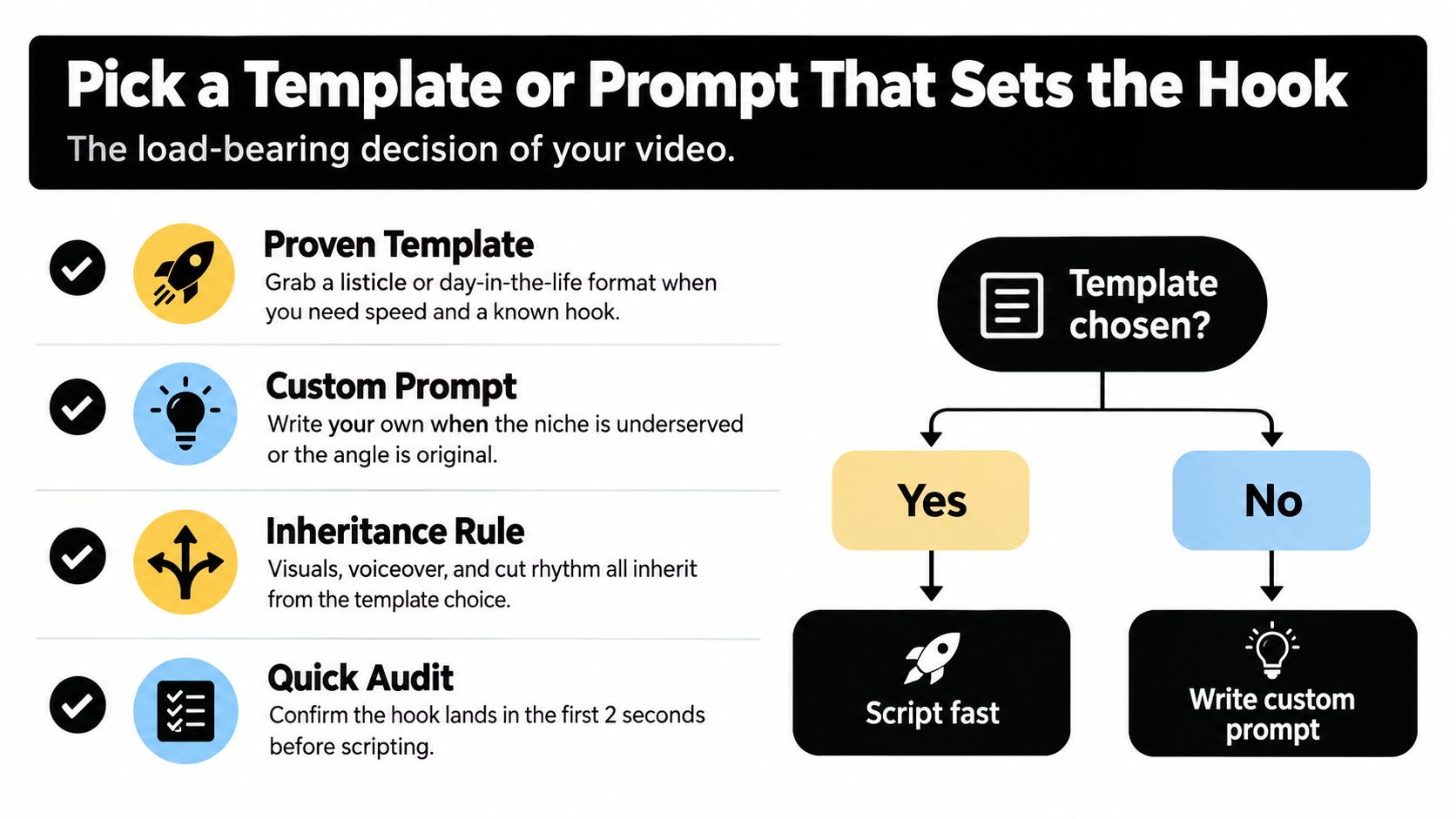
A viewer decides quickly whether the opening deserves attention. Choose the format before generating assets, because it sets the script's rhythm, visual requirements, voiceover energy, and rate of frame changes. A weak structure leaves subtitles and transitions doing work they cannot fix.
Use a proven format when the subject fits naturally:
- Listicle: Present useful ideas in a clear order.
- Myth-bust: Name the common belief, then replace it with a more useful explanation.
- Ranking: Compare options against one defined criterion.
- Day-in-the-life: Show a process through sequential moments, even when the subject is a tool, routine, or fictional character.
Choose a custom prompt when the niche has limited template coverage or the strongest angle needs a different structure. “Make a video about productivity” gives an AI tool too little direction. Ask instead for a 45-second explanation of why a specific calendar habit fails, one concrete example, and a visual change at every beat. The prompt should define the audience, promise, tone, evidence, and ending.
The opening makes one promise. State the payoff in the first few seconds, then show a visual cue that confirms the video is already delivering it. A sharply defined promise, a self-contained payoff, and several hook variations give you a better test than producing one polished opening and assuming it works. Keep the underlying idea fixed while changing the first line, first image, or question.
Run a template audit before writing
Ask:
- Does the viewer understand the subject immediately?
- Does the first visual show the promised outcome or create a specific curiosity gap?
- Can each beat stand on its own without relying on earlier context?
- Does the format match the niche's evidence, such as screens, diagrams, objects, maps, or generated scenes?
- Can you write several distinct hooks without changing the central idea?
A template should speed up scripting without making every upload look copied. It also needs enough visual variation to hold attention while preserving a recognizable editing system. Review AI video templates for short-form production for reusable structures, then reject any format that cannot support an immediate promise before generating assets.
Generate the Script, Voiceover, and Visuals
Start production only after the hook is locked. Give your script tool the topic, audience, promise, tone, platform, and desired structure. A useful first pass can target 130 to 160 words, then you should cut filler manually, remove repeated explanations, and sharpen the final line.
Don't ask the script to “make it engaging” and accept the first draft. Ask for a sequence of beats, with each beat containing one spoken idea and one visual instruction. A 45-second clip might use a hook, three evidence beats, a complication, and a complete payoff. The exact count matters less than the rule that every visual must advance the narration.
Build around 3-to-5-second beats
For each beat, define:
- Narration: The words the viewer hears.
- Visual evidence: The image, screen recording, animation, or stock clip that supports those words.
- Motion: A crop, zoom, pan, reveal, or text change.
- On-screen text: Only the phrase the viewer needs to remember.
Story-aligned visuals beat random B-roll. If the narration explains a browser setting, show the interface. If it describes a historical event, use a map, document, timeline, or generated reconstruction. Stock footage is useful when it illustrates action, but a person staring at a laptop rarely proves anything.
The voiceover has to carry personality because the creator isn't on screen. Select a lifelike voice that matches the subject, then add pacing cues to the prompt, such as “pause after the hook” or “speed up during the list.” Reject a take when its first syllable sounds flat. A polished voice with no conviction still loses the opening.
For a practical workflow on combining narration and visuals, use a video audio overlay with Vocuno. You can also compare voice options and text-to-speech techniques in this AI text-to-speech voice guide.
Make subtitles support, not compete
Generate subtitles in SRT or burn them into the video, depending on your publishing workflow. Break lines at natural breath points, keep each caption visually readable, and avoid placing a long sentence over a busy image. The voiceover should deliver the explanation, while captions highlight the key phrase.
Music should sit underneath the narration rather than fight it. Use a consistent sound profile across the channel, but vary the visual treatment enough that the viewer doesn't feel trapped in a slideshow. Subtle color grading, purposeful B-roll swaps, and movement on still images can create continuity without adding decorative noise.
Engineer for Outlier Hits, Not Just Average Views
A faceless channel can look healthy in its average view count while producing very few genuine winners. The 2026 study of 7,431 short-form videos shows why the median matters: faceless videos reached a median of 6,630 views, compared with 12,503 for face-on-camera videos. Their mean was higher, however, at 248,789 views versus 193,091, because a small group of breakout videos pulled the average upward, according to the Content Labs comparison study.
TikTok showed the same tension, with a reported median of 4,051 faceless views versus 9,856 face-on-camera views. Faceless production can compete, but the workflow must create repeated chances for an unusually strong result instead of settling for respectable average performance.
Four production choices improve the odds
Make the first frame legible without sound. Show a specific claim, number, object, or visual problem immediately. “Three signs your landing page leaks leads” gives viewers a clear reason to continue, especially when the frame already shows the relevant page element. “Let's talk about websites” leaves too much work to the viewer.
Add motion before attention fades. Use a zoom, parallax shift, text pop, or object reveal near the opening. Movement should direct attention toward evidence or the promised payoff. Decorative motion adds activity without improving the hook.
Match cadence to the platform and topic. A technical explanation needs room for comprehension, while a ranking or reveal can move faster. Keep the core script, then test different pauses, cuts, and delivery speeds for each channel. This turns one production batch into a useful experiment rather than a single guess.
Re-hook in the middle. Once the initial question has been answered, introduce a consequence, exception, or second reveal. “That works for most accounts, but not this one” creates a reason to continue while keeping the same subject.
| Production Choice | Median Performers | Outlier Performers |
|---|---|---|
| Opening frame | Broad topic label | Specific promise paired with visible payoff |
| Early movement | Decorative transition | Motion that directs attention to evidence |
| Script structure | Several loosely related points | One idea with progression and resolution |
| Mid-video rhythm | Continuous explanation | Re-hook, contrast, or escalating reveal |
| Visual selection | Generic stock footage | Assets that demonstrate the spoken claim |
Run an originality check before publishing. An enterprise guide from AI Image Detector can help larger teams establish synthetic-media review and quality-control processes. Aim for a finished video that is coherent, useful, and recognizably yours, with AI serving as the production engine rather than the visible identity.
Schedule and Auto-Post Across TikTok, Shorts, and Reels
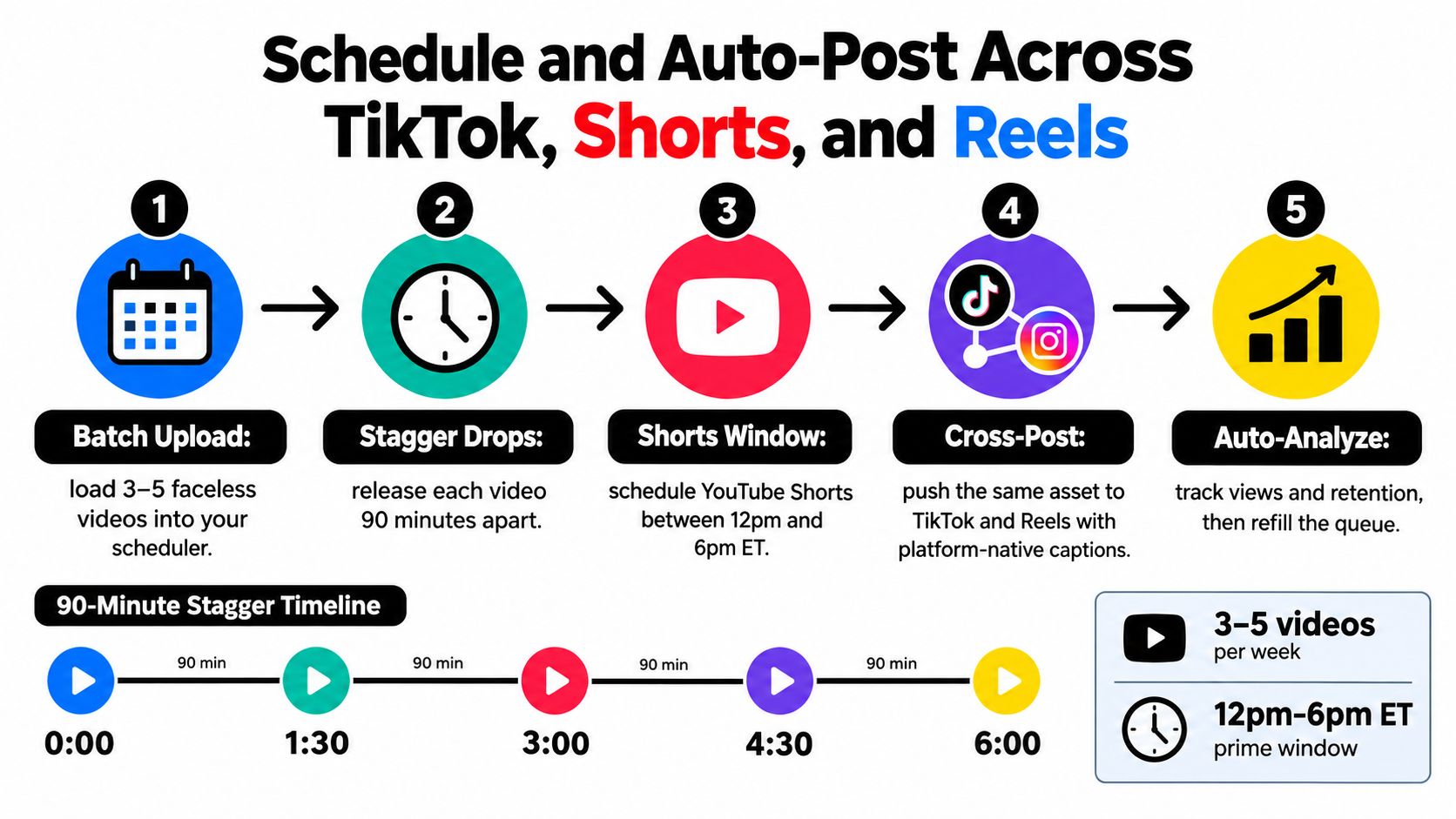
A batch recorded on Monday should still be working by Friday. Upload clean masters to a scheduler, queue releases in advance, and customize each platform's title, caption, and opening metadata. The core video can remain substantially the same, while its packaging matches how viewers find content on TikTok, Shorts, and Reels.
A practical rollout uses three to five videos per week, staggered by 90 minutes, with a YouTube Shorts window between 12pm and 6pm ET, based on this Shorts length and performance analysis. Use those times as a testing baseline. Replace generic timing guidance with audience data once your account has enough results to compare.
Prepare platform-specific exports
Keep a clean vertical master without another platform's watermark. Add native captions where supported, write a distinct YouTube Shorts title, and rotate a small group of relevant hashtags instead of pasting one large block into every description.
Track topic, hook, template, publish time, platform, first-hour views, retention, comments, and next action in one sheet. Use those fields to identify whether the topic, hook, or packaging produced early outperformance, rather than obsessing over one upload. Adapt a strong result into a related clip while the subject remains fresh.
One topic can support a short series. The first video introduces the problem, the second demonstrates the fix, and the third addresses a common exception. A 2026 YouTube analysis of 799,718 videos from 71,177 accounts found that more than six in ten organic views came from the Shorts feed. It also reported that channels posting around five Shorts per month averaged about 46% more long-form views than channels posting none, according to the reported YouTube study. Use that finding to build a repeatable publishing system, then validate the format against your own analytics.

For the operational setup, follow a social media scheduling workflow that queues assets, supports caption review, and makes it easy to refill the calendar after analytics reveal a strong format. Build the queue around proven hooks, not production volume alone.
Build a Defensible Faceless Brand Beyond Virality
A durable faceless channel gives viewers a reason to return beyond one successful upload. Choose a repeatable visual system, such as consistent typography, color treatment, framing, or transition rhythm. Match it with a recognizable script cadence and point of view, so viewers can identify the work before they see the channel name.
That consistency should support a clear editorial promise. A finance channel might explain one practical decision per video. A history channel might build each episode around an overlooked detail. The production workflow can stay efficient, but every script needs a distinct angle, useful evidence, and an original takeaway.
Platforms are paying closer attention to repetitive, mass-produced, and reposted material. Coverage of these predictions about the future of faceless content points to greater emphasis on original content and AI disclosure in 2026, with possible suppression of low-value faceless output. Use AI for research, drafting, asset creation, and editing, then make the final decisions yourself.
Treat disclosure as a production step. Check each platform's current rules and label altered or synthetic elements when required. Keep records of tools, source assets, licenses, and approvals for sponsored videos, especially when a client must review the production process.
A channel also needs a path from attention to revenue. Coverage from eMarketer's creator format analysis reports that short videos are the preferred creator format for 63% of global social media users and that 71% of surveyed marketers consider videos from 30 seconds to 2 minutes most effective. Use those findings to test whether the format can explain, demonstrate, or recommend something useful.
Build a relevant link-in-bio path, collect email subscribers where appropriate, and connect every offer to the channel's niche. A defensible brand can withstand trend changes because its value rests on editorial judgment and viewer trust, rather than a temporary visual gimmick.
Your 30-Day Faceless Video Launch Plan and FAQ
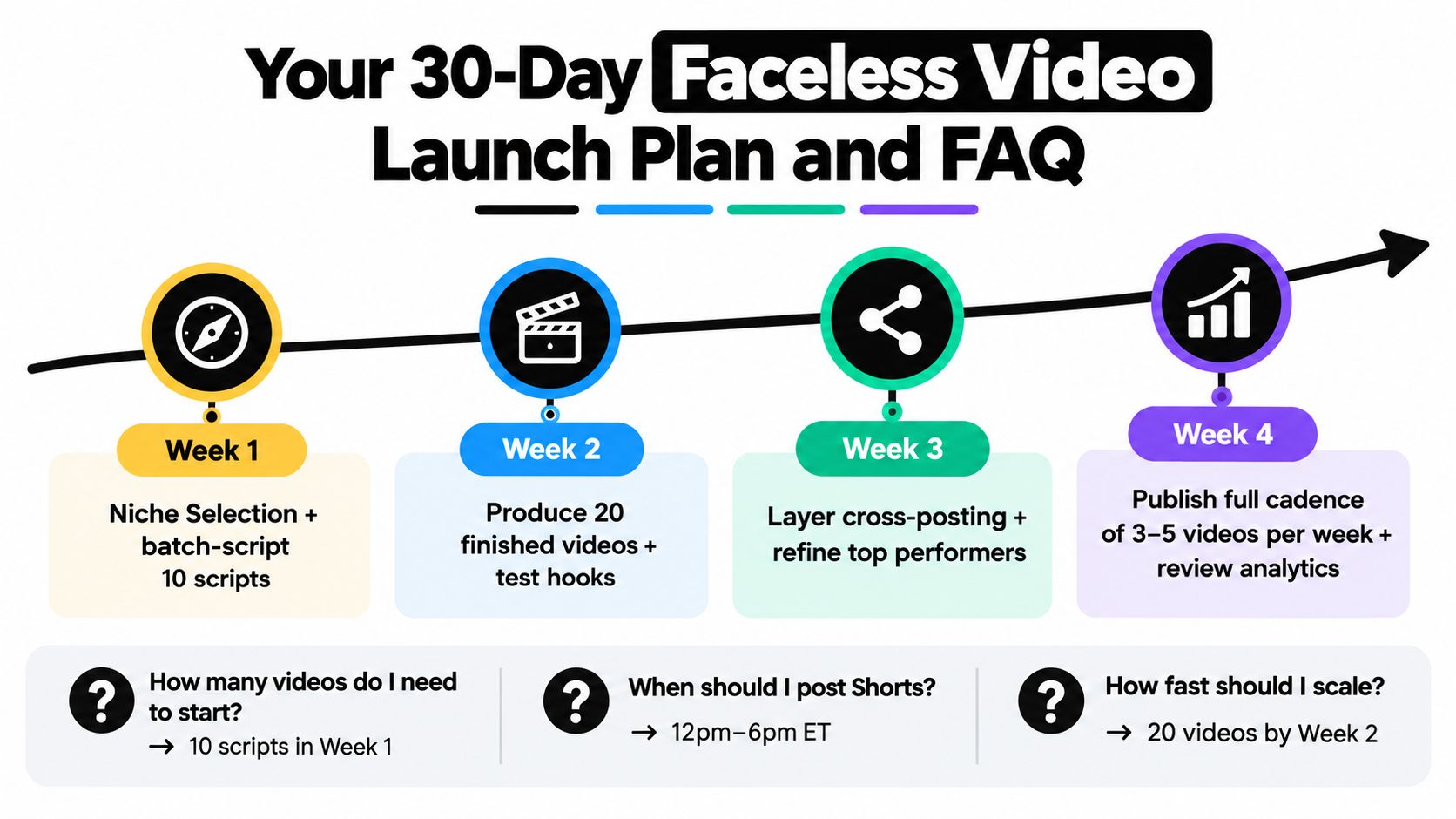
Start with a narrow promise and use the first month to test it. Your goal is enough variation to identify which topics, hooks, visuals, and formats deserve more production time.
Follow a four-week ramp
- Week 1, choose and script: Select the niche, define a repeatable format, and batch-script 10 scripts. Write several opening lines for the strongest concepts.
- Week 2, produce and test: Create 20 finished videos. Compare the first frame, hook wording, voiceover pace, visual changes, and payoff.
- Week 3, distribute and study: Cross-post consistently, review retention graphs, and record where viewers leave, pause, or re-engage.
- Week 4, focus and monetize: Commit more production time to the two strongest formats. Add a relevant affiliate path, product, service, or email capture.
Operational FAQ
Can I monetize TikTok without showing my face?Yes, faceless production does not block monetization by itself. Eligibility depends on current program rules, account location, originality, and policy compliance. Check TikTok's official requirements before forecasting revenue.
Do AI voices violate platform rules?Not automatically. Problems include misleading use, impersonation, unauthorized voice cloning, and missing disclosures. Use a voice with commercial permission, then review each platform's current rules before publishing.
Who owns stock footage and synthetic voices?Read the license for every asset and tool. Confirm commercial rights, redistribution limits, voice-cloning terms, and whether client projects receive the same usage rights as personal content.
What should I do when a video underperforms after 24 hours?Do not delete it immediately. Record the hook, topic, retention pattern, and packaging. Rework the idea with a different first frame or promise, since a weak upload can still show what needs changing.
How should I handle paid AI tools and refunds?Check billing frequency, cancellation timing, trial terms, usage limits, and refund conditions before subscribing. Keep receipts and test the first workflow early instead of waiting until the billing period ends.
How do I disclose AI involvement without damaging watch time?Use the required label or disclosure field, keep the wording accurate, and avoid making the disclosure the hook unless the synthetic process is the subject. Clear disclosure helps viewers understand what they are watching.
ClipCreator.ai turns a prompt or proven template into a faceless short with an AI-written script, story-aligned visuals, lifelike voiceover, and subtitles, then supports scheduling across TikTok and YouTube. Visit ClipCreator.ai to test the workflow without assembling every production step manually.

Create your first video in under 2 minutes
Pick a niche, and ClipCreator.ai generates and auto-posts faceless videos to your channels every day.
Join ClipCreator.ai

