Facebook does not pay a fixed rate per Reel view; payouts are performance-based on qualified plays, and Meta paid creators nearly $3 billion across its monetization programs in 2025, up 35% year over year. That total shows the scale of creator payments, but it doesn't tell you what your next Reel will earn.
The useful answer isn't an internet-wide rate. It's a forecast built from your account's qualified views, Earnings Rate, and monetization status, with enough room for those inputs to change.
What You Need to Know About Facebook Reels Pay
Meta's nearly $3 billion in creator payments during 2025, a 35% annual increase, covered its monetization programs collectively. It did not establish a guaranteed payment schedule for individual Reels, as reported in Tubefilter's coverage of Meta's creator payout announcement. Dividing that total by an assumed number of Facebook views would not produce a meaningful creator rate.
Someone searching “how much do Facebook pay for Reels” is usually making a practical decision: whether to spend more time on production, hire an editor, or set a publishing schedule around expected income. Those choices depend on account-level evidence, not platform-wide spending.
The key is to distinguish reach from activity that can earn.
Separate reach from earning activity
- Total views measure the reach recorded for your content. They help assess distribution, but do not by themselves forecast monetization.
- Qualified views are views that meet the program's conditions for earnings. A recorded view does not necessarily qualify.
- Earnings Rate estimates earnings per thousand qualified views. It connects eligible viewing activity to revenue, rather than treating every view as equally valuable.
Review these measures together. The dashboard image illustrates the performance and earnings information creators can examine.

Ask a question your dashboard can answer
Open Facebook Professional Dashboard and review the monetization information available to your account. Compare qualified views, earnings, and Earnings Rate for the same content type and reporting period.
Ask: How much eligible viewing activity can this account generate at its observed earnings rate? That question is narrower than what Facebook pays everyone, but it gives you a usable basis for planning.
A Reel can reach a large audience and still earn less than expected. Use total views to gauge attention; use qualified views and the observed Earnings Rate to judge whether that attention can support production costs.
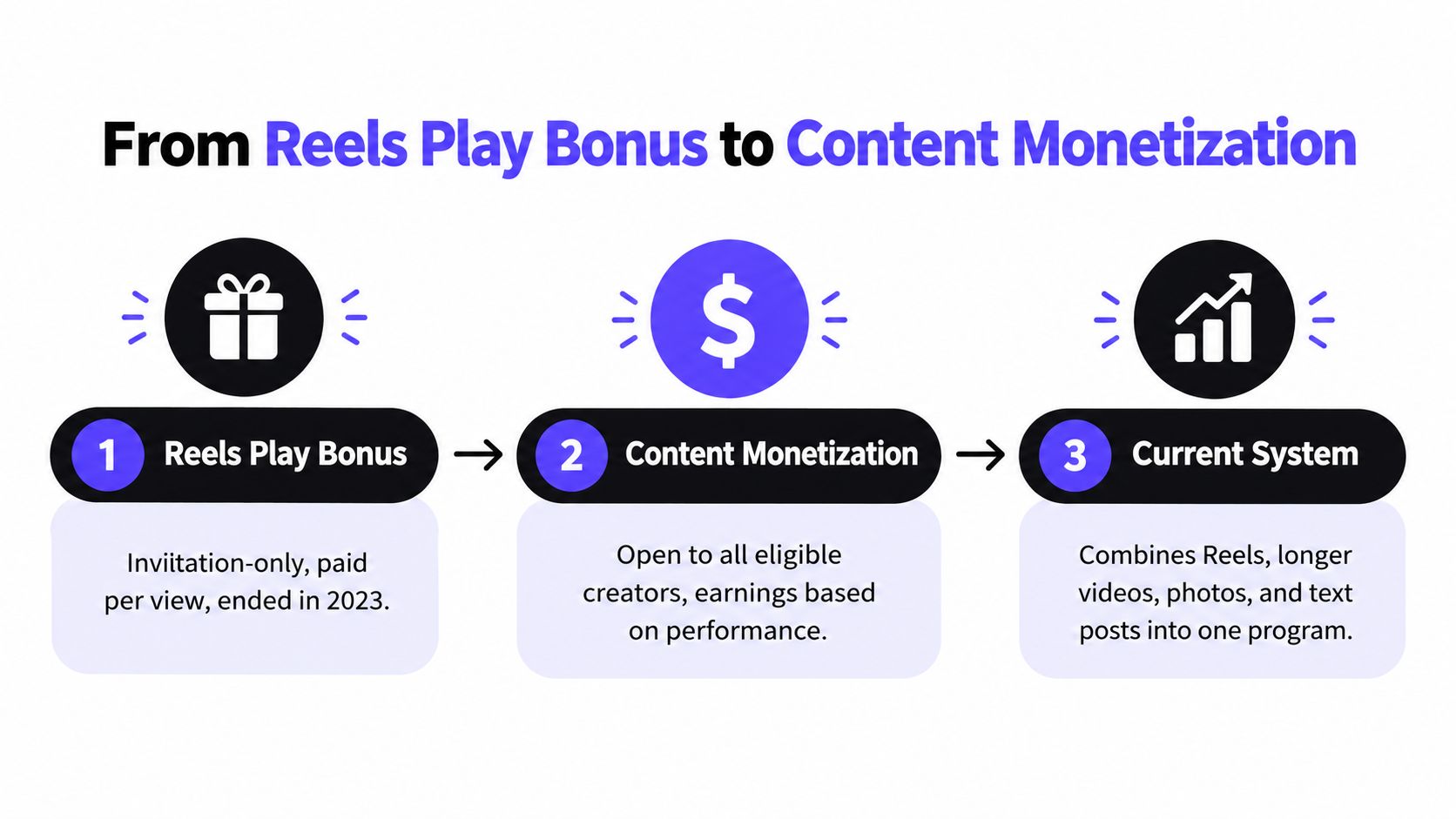
From Reels Play Bonus to Content Monetization
Old payout screenshots often describe a different economic arrangement from the one creators are trying to enter today. Reels Play Bonus, Ads on Reels, and Facebook Content Monetization shouldn't be treated as interchangeable names for a permanent payment formula.
The timeline provides a visual overview, but its shorthand shouldn't be interpreted as a universal per-view rate or a guarantee of access.
Different programs, different promises
The original bonus program offered invited creators individualized monthly incentives. The contract mattered: qualifying plays, the offer's conditions, and its maximum bonus determined the opportunity. It wasn't a salary attached to every uploaded video.
Ads on Reels shifted the emphasis toward performance-based payments determined by plays. Meta described payments in terms of eligible content performance rather than allocating the advertising revenue generated by each individual Reel.
Meta then announced its consolidated framework in 2024, bringing Reels, longer videos, photos, and text posts into Facebook Content Monetization, with invitation-based onboarding during the initial rollout, according to Meta's announcement of the streamlined monetization program.
Historical comparison rule: Before using a creator's payout screenshot, identify the program, reporting period, and payment conditions it represents.
Why the timeline changes your decision
The continuity is performance, but the contract has changed. A bonus-era creator could be pursuing an individualized target; a creator using Content Monetization needs to evaluate eligible content within the current framework.
By the current system, access and performance are separate questions. Broader program scope doesn't prove that every account has access, and an old invitation doesn't establish today's terms. Your dashboard remains the practical authority for your account.
The video below offers additional context for the monetization discussion.

Keep platform comparisons equally disciplined. An Instagram Reels monetization guide can help you assess another publishing channel, but Instagram's opportunities shouldn't be substituted for Facebook's payment terms.
What Actually Drives Facebook Reels Payouts
Qualified views determine the relevant volume; Earnings Rate describes its observed value. Audience geography, advertiser demand, watch behavior, and eligibility can change the result. Meta doesn't publish enough detail to reconstruct the full payout formula independently.
That uncertainty matters. You can diagnose changes in your account's results, but you can't credibly assign a fixed monetary value to every comment, extra second watched, or viewer location.
Distinguish inputs from outcomes
Qualified views are the starting point. If total reach grows while qualified viewing activity doesn't, your revenue forecast shouldn't grow automatically. Investigate the content's monetization status before concluding that Facebook has reduced your rate.
Earnings Rate is an outcome metric, not a promise about your next upload. It summarizes what eligible viewing activity earned under the conditions of the reporting period. Its usefulness comes from being specific to your actual results.
Audience geography and advertiser demand can affect earnings, but neither supports a universal country-by-country price list. Compare your own audience composition with changes in earnings rather than importing another creator's geographic assumptions.
Watch behavior adds another diagnostic layer. Retention and engagement can help you understand differences between content groups, but a correlation in your dashboard doesn't establish Meta's precise weighting.
Measure without inventing the formula
Build a working record with:
- Content topic and format, so you can distinguish a storytelling series from tutorials or commentary.
- Audience composition, where available, to identify shifts in who watched.
- Watch behavior, using the retention information your account exposes.
- Eligibility and earnings, so distribution success isn't mistaken for financial success.
Avoid combining all these observations into an invented scoring system. Your objective is to identify repeatable patterns, then test whether they persist.
Meta's explanation of its expanded Ads on Reels model describes payouts based on plays and the performance of eligible public Reels, rather than the advertising revenue generated on each particular Reel. That distinction rules out a tempting shortcut: estimating your payout by guessing how much an advertiser paid for an ad near your video.
Observed account earnings are stronger forecasting evidence than reconstructed ad economics.
Eligibility and Onboarding for Facebook Reels Payouts
A successful upload and a monetized upload aren't the same event. Before planning income, confirm that your account has access to the relevant program and that you've completed the onboarding it requires.
The consolidated program's initial invitation process, described earlier, required creators to complete onboarding and provide payout details. Don't assume a public profile, professional mode, or strong view count automatically completes those steps.
Confirm what your account actually requires
Use Professional Dashboard to check the account-specific requirements and status you can see. If professional mode needs enabling for your account, follow the displayed setup flow before assessing monetization access.
- Program access: Confirm that Content Monetization is available and that enrollment is complete, rather than relying on an expression of interest.
- Account requirements: Read the follower, viewing, geographic, and policy conditions shown to you. Don't borrow numerical thresholds from another program.
- Content status: Check whether the public content you intend to monetize is eligible and whether restrictions require action.
- Payout setup: Complete the requested payment details and any tax-information fields in your onboarding flow.
No universal follower or watch-time threshold should be asserted without a current, applicable requirement. A requirement copied from an older monetization product can send you toward the wrong target.
Treat status checks as part of publishing
Before budgeting revenue: Verify access, content eligibility, and payout setup separately. Progress on one doesn't prove the others are complete.
Save a record of the conditions your dashboard displays. That makes it easier to distinguish an access problem from a performance problem when results change.
Also inspect policy notices before increasing production. Meta's originality guidance, discussed below, makes clear that mainly unoriginal publishing can put monetization at risk. If an account already has content restrictions, producing more of the same material isn't a sound response.
The practical priority is eligible participation first, revenue optimization second. Until you've confirmed access and setup, any payout estimate remains conditional.
Real Reported Bonus Offers and What They Imply
The historical bonus program provides useful evidence of variability, not a benchmark for today's account. Its offers differed substantially, which is precisely why a single Facebook rate is the wrong conclusion to draw from them.
When Meta expanded Facebook Reels globally in February 2022, it said eligible creators could earn up to 35,000 per month**; the program belonged to its broader **1 billion creator investment announced for 2022, as described in Meta's global Facebook Reels launch announcement.
Reported Reels Play Bonus Offers and Implied Per-1,000-View Rates
| Reported Bonus | Monthly Views | Implied Rate per 1,000 Views |
|---|---|---|
| $500 cap | 200,000 | Depends on actual qualifying plays and bonus earned |
| $8,500 offer | 9.28 million | Approximately $0.92 |
| $35,000 offer | 50 million | Approximately $0.70 |
These are historical offer illustrations, not independently verified dashboard payouts or current Content Monetization rates. The implied rates divide the stated bonus by the associated view target; they don't prove a creator received that amount or that every play qualified.
Consider the middle offer. Its implied rate describes the relationship between a particular bonus and its target, not a standing entitlement for anyone who reaches a similar audience. Changing the offer terms changes the calculation even before audience behavior enters the discussion.
Read the contract before reading the rate
- A cap is a ceiling, not a payment promised for every possible result below it.
- A target is conditional, because qualifying plays and other offer requirements matter.
- An implied rate is retrospective arithmetic, not evidence that the program applied a flat rate throughout the earning period.
The largest headline also doesn't imply the highest effective rate. In the examples, the larger bonus corresponds to a lower implied amount per thousand views than the smaller offer.
That's the useful conclusion: a payment total can rise while the implied rate falls. For planning, use a range grounded in your own applicable terms and observed earnings. Don't turn a historical maximum into an expected monthly income.
Why Original Content Matters More Than Volume
Posting more Reels only helps a revenue plan if the additional content can earn. A production system that repeatedly generates derivative videos may increase uploads without creating a stronger monetizable account.
Meta says original content can receive greater distribution and monetization, while accounts that mainly publish unoriginal material may be deprioritized, made non-recommendable, or demonetized, according to its guidance on rewarding original Facebook creators. That makes originality an economic constraint, not just an editorial preference.
Faceless doesn't settle the originality question
A creator doesn't need an on-camera personality to develop an original story or explanation. Conversely, adding a voiceover, captions, or a different aspect ratio doesn't by itself establish meaningful original value.
Meta's public guidance doesn't supply a simple transformation percentage or a guaranteed checklist for AI-assisted eligibility. Treat any promise that a particular edit will automatically qualify as unsupported.
For a faceless storytelling channel, the editorial questions are more useful:
- Script ownership: Did you develop a distinctive narrative, explanation, or argument rather than paraphrase a circulating clip?
- Visual purpose: Do the images advance the story, or are they interchangeable decoration?
- Narration and commentary: Does the spoken material add substance beyond describing what's already visible?
- Variation: Does each upload offer a fresh idea, rather than repeat a template with superficial substitutions?
Automate execution, retain editorial judgment
An AI-assisted workflow can draft scripts, assemble generated visuals, and produce narration. The creator still needs to review the premise, factual accuracy, rights, and final sequence before publishing.
Increasing output is useful only after you've established what makes each upload worth watching and eligible to earn.
My analytical view is that originality deserves priority over volume because an originality problem can threaten both distribution and monetization. An inefficient production process costs time; a derivative-content strategy can undermine the earning opportunity itself.
Scale a concept you can defend as your own. Don't scale merely because the software can produce another video.
Reels vs Longer Videos vs Photos and Text Posts
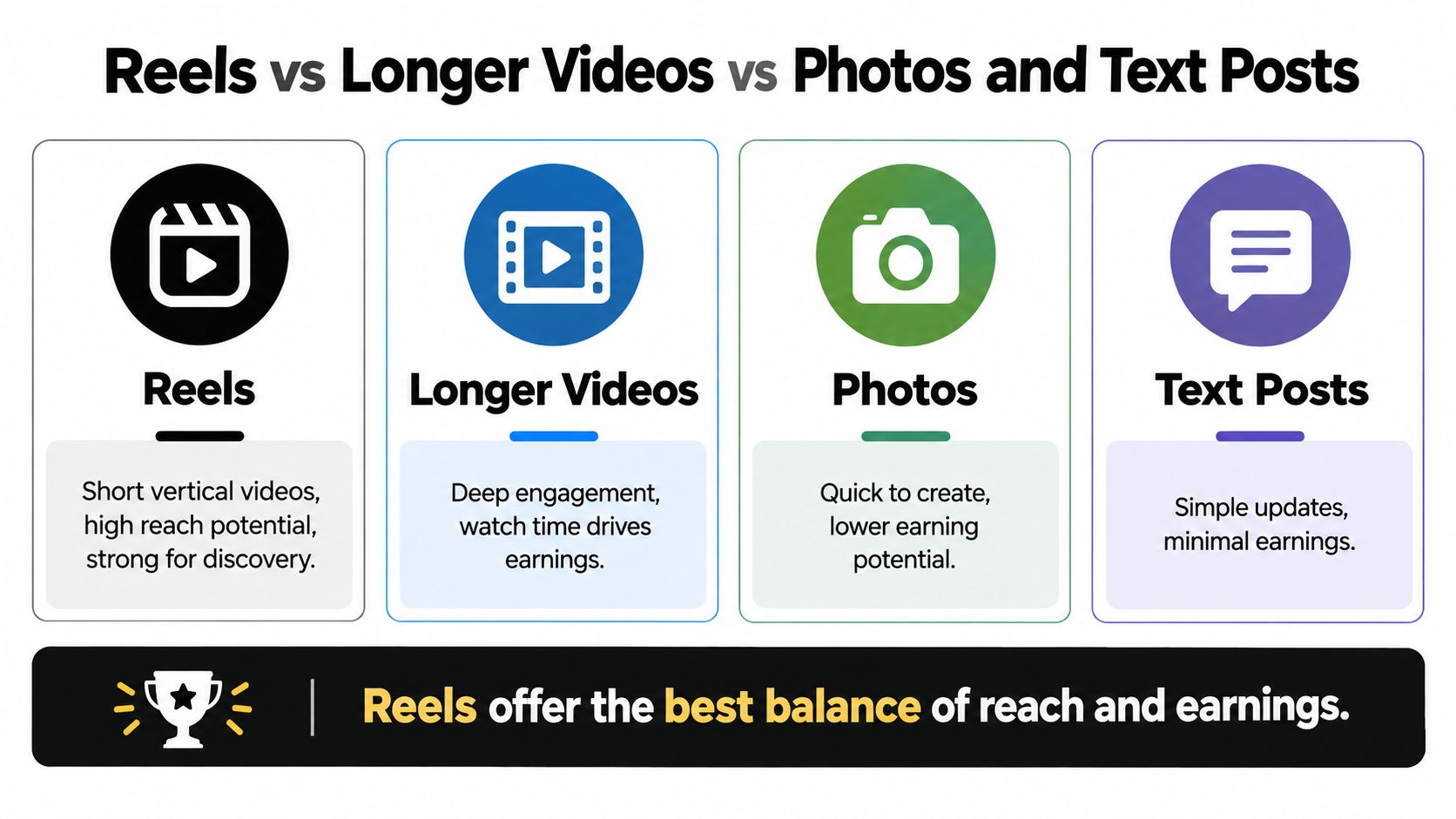
Facebook Content Monetization gives creators a reason to assess more than short-form video. Its consolidated structure includes Reels, longer videos, photos, and text posts; Meta's newer guidance also includes Stories.
That scope supports testing a publishing mix, but it doesn't establish a universal earnings hierarchy. The comparison graphic is a planning aid, not a verified ranking of payouts by format.
Choose formats by editorial purpose
Reels suit ideas that can deliver their central value quickly. Use them for compact explanations, narrative hooks, or self-contained stories, then evaluate the eligible earnings they produce.
Longer videos give you room to develop an argument, demonstrate a process, or expand a story. I'd test them as a deeper-content companion to Reels, but I wouldn't call them a higher-rate anchor until the account's results support that description.
Photos and text posts let you test whether an audience responds to visual explanations, written observations, or discussion prompts. They still require original value; lower production complexity isn't a reason to publish generic material.
Diversify the test, not the assumption
- Match the idea to the format rather than stretching every topic into a Reel.
- Record production effort alongside eligible earnings so a demanding format has to justify its workload.
- Compare within your account before deciding that any format deserves most of your schedule.
A mixed-format system may reduce dependence on a single type of content performance. That's a portfolio argument, not proof that diversification will raise every creator's income.
The same discipline applies across platforms. Use a YouTube Shorts revenue guide to understand that channel on its own terms, rather than assuming Facebook results transfer directly.
Your strongest format is the one that combines audience fit, defensible originality, and acceptable returns for the effort required. Let recorded results determine the allocation.
Forecasting Your Own Reels Earnings and Next Steps
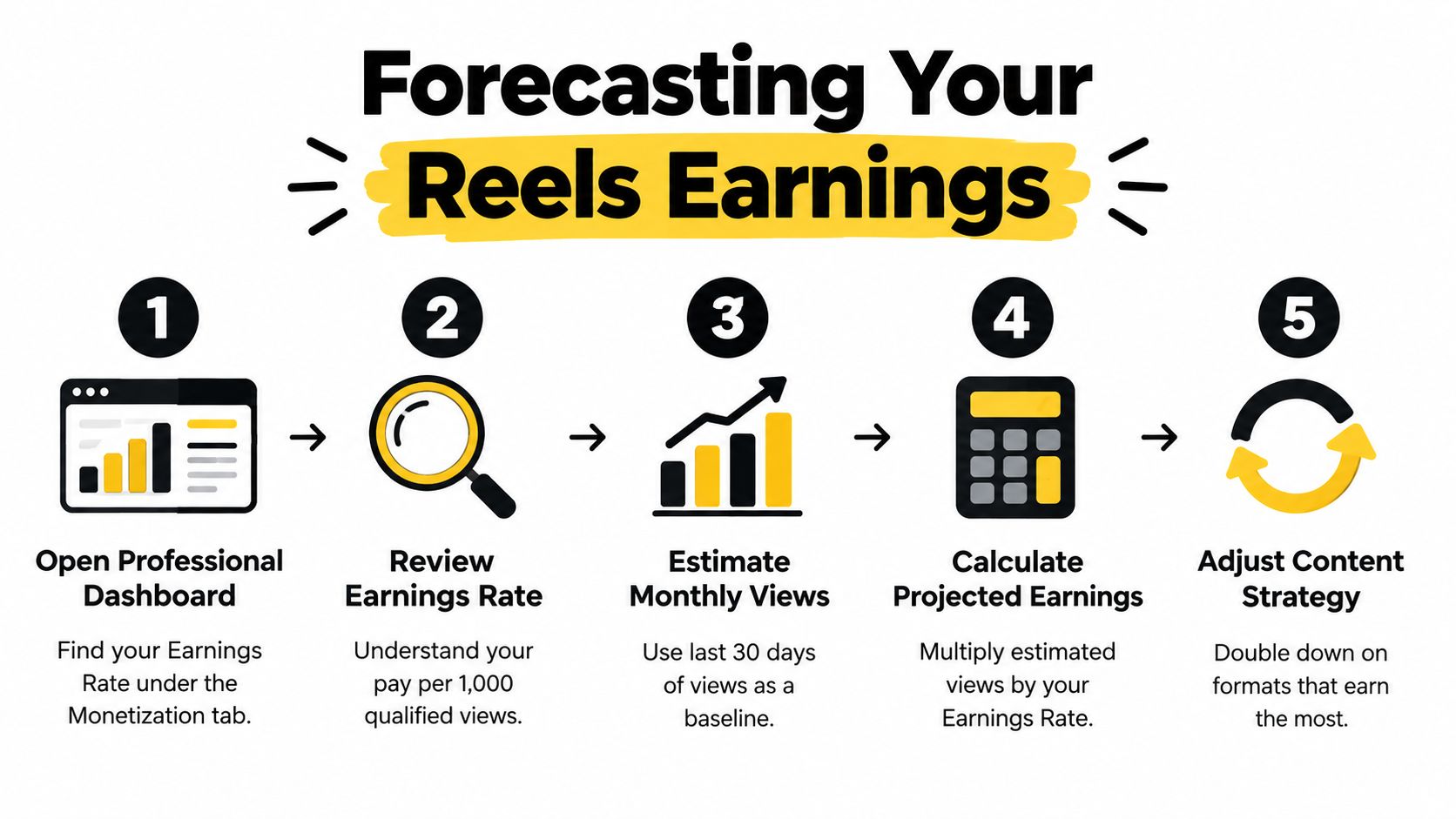
Start your forecast with a consistent reporting period in Professional Dashboard. Use the Earnings Rate available to your account and the corresponding qualified views, not a total-view figure taken from a different screen or date range.
The correct unit conversion is:
Projected earnings = projected qualified views ÷ 1,000 × Earnings Rate.
That denominator matters because Earnings Rate is expressed per thousand qualified views. The workflow graphic should be read with this correction in mind: estimated views must mean qualified views, and the calculation must account for the rate's unit.
Build a range from comparable periods
Use recent, comparable reporting periods to establish a cautious case, a central case, and an optimistic case. Derive those cases from your own observed variation rather than inserting a rate found in a viral-view calculator.
Where the reporting permits, compare content by topic, audience country, retention, and originality status. If qualified views rise but earnings disappoint, inspect the observed rate; if distribution rises without comparable qualified activity, inspect eligibility.
Don't multiply unrelated extremes and call the result a forecast. A period with your highest rate may not resemble the period with your highest qualified-view volume.
Put the forecast into your publishing routine
- Confirm eligibility and resolve outstanding account or content notices.
- Complete payouts before treating estimated earnings as usable income.
- Track qualified views separately from total reach.
- Audit originality before increasing production frequency.
- Test a non-Reels format and record both earnings and production effort.
Reforecast monthly and after meaningful changes in content strategy. If your account doesn't yet expose enough earnings information, keep the estimate provisional rather than inventing a rate.
A broader creator monetization framework can help you place these payments within your publishing business. For Facebook-specific planning, however, your own Earnings Rate is the most honest forecasting tool available, not a guarantee and not a substitute for eligibility.
Plan around qualified activity and its observed value. That gives you a stronger basis for production decisions than planning around the next viral view count.
ClipCreator.ai is one option for producing faceless short videos with custom-prompt scripts, story-aligned generated images, voiceovers, and subtitles. Visit ClipCreator.ai to explore that production workflow, then review each video for originality and use Facebook's qualified-view reporting to judge its earning potential.

Create your first video in under 2 minutes
Pick a niche, and ClipCreator.ai generates and auto-posts faceless videos to your channels every day.
Join ClipCreator.ai