The video is eleven seconds old and your seven year old has already watched it four times. A man in a red suit looks into the camera, says her name, mentions the reading challenge she finished in October, and tells her to keep an eye on the sky. She turns to you and asks how Santa knew.
That clip is a Hey Santa video. The label covers any short personalized Santa message built on a fixed template, where the greeting, the tone and the sign-off stay the same across every version and only a few details change. Think of a greeting card that talks. The layout and the printed verse are decided in advance, and the blanks take one family's facts.
What a Hey Santa Video Is and Where It Began
Three Parts Every Clip Shares
A recognizable Santa greeting. Red suit, white beard, a warm "ho ho ho" in the first second or two, so a child knows instantly what they're watching and doesn't need the sound on.
One or two personal details. The first name is the minimum. A specific achievement, a gift they've asked for, or the name of a pet does the rest. Two details land better than five, because a short list stays believable and a long one starts sounding like a database read out loud.
A seasonal sign-off. Merry Christmas, be good, sleep well, see you on the twenty-fifth. This is the line that ends the clip and gives the parent a clean stopping point instead of an abrupt cut.
Where the Name Comes From
"Hey Santa!" was a Christmas song and music video by sisters Carnie Wilson and Wendy Wilson, released in 1993 through Capitol Records and tied to a 10-song holiday album of the same name running approximately 38 minutes, as the Spotify catalog record documents. Carnie Wilson, Wendy Wilson and Jack Kugell wrote the song, and the album reportedly entered the Billboard Top Pop Albums chart on Christmas Day in 1993.
Catalog dates for the song, the video and the album don't line up across platforms, so check the source before you quote a specific release day. What matters here is that the phrase carried holiday meaning decades before personalized clips existed.
The substitution step is the whole craft, and it's the same idea behind video personalization in any format. A simple test: if the clip names the viewer and mentions something specific about them, it's a Hey Santa video in the sense this guide uses. If Santa only reads a generic message, it's a holiday greeting with a beard on it.
Why Hey Santa Videos Peak Every December
Timing here is a production decision, not a marketing one. You're not choosing when to promote a finished product. You're choosing how much room you leave yourself to fix a name, re-render a scene or reshoot a sentence.
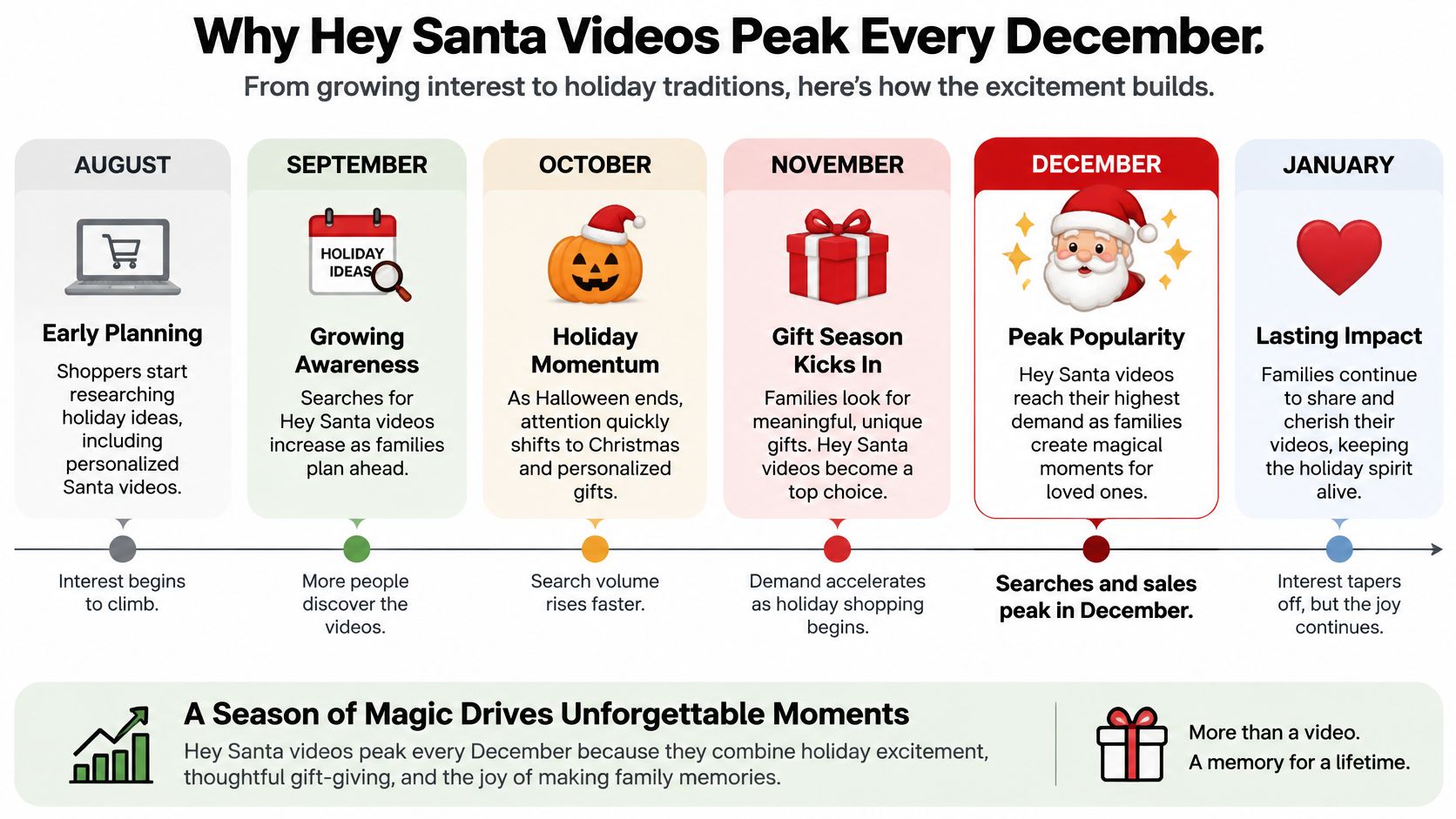
The seasonal pattern is sharp. Jump on the Trend's seasonal search tracking recorded searches for "AI Santa video" rising from 3 in December 2024 to 41 in December 2025 on a five-year Google Trends comparison, with the peak around December 24 and 25, 2025. The same source's TikTok trend guidance shows Christmas video searches beginning in early November, accelerating during the week of November 30, and reaching their highest level between December 21 and 27, 2025.
Hey Santa video demand and publishing timeline
| Phase | Window | What Searchers Do | What to Publish |
|---|---|---|---|
| Early discovery | Early November | Christmas video searches begin | Teaser or Santa-received-your-message clip |
| Acceleration | Week of November 30 | Searches climb toward the holiday | Prepared personalized story variants |
| Peak demand | December 21 to 27 | Searches reach their highest level | Private personalized videos delivered on time |
| After the holiday | After December 27 | Search interest falls back to everyday levels | Repurposed New Year or bedtime-story variants |
The trade-off is real. Publishing on Christmas Eve catches peak intent, and it also means a mispronounced name at 10pm with nobody awake to fix it. Split the work instead: teaser clips in early December for public discovery, private personalized videos scheduled a few days before the holiday, with the script locked earlier than feels necessary.
If you're planning an early-December post built around a brand-new baby, baby's first Christmas photo session ideas can supply the visual concept while a short Santa clip carries the message.
Work backward from the delivery date: one day for script review, one day for a phone preview, one day of slack for a render that fails.
Pick the window from the purpose. A public clip needs time to be discovered. A private clip needs time to be correct.
Choose Inputs That Keep Your Child Private
Start with one principle and most of the hard calls make themselves: treat the child as the viewer, not the source of the likeness. The AI Santa template guidance from MakeViral lands in the same place, recommending minimal details such as a first name, avoiding child photos, and getting consent before cloning an identifiable person's voice or face.
Privacy risk by input type
| Input Option | What Gets Shared | Risk Level | Safer Alternative |
|---|---|---|---|
| First name only | First name | Low | Use a nickname or fictional name |
| Age range and one accomplishment | General age band and general achievement | Low | Keep it generic, such as a great reader |
| Room or home photo | Home layout and personal space | Medium | Use a generic bedroom illustration |
| Child's photo or face | Identifiable likeness of the child | High | Use an illustrated or fictional character |
| Cloned voice of a familiar adult | Identifiable voice of a real person | High | Use a stock AI voice with no consent issues |
Why the Most Magical Version Is the Least Private
A Santa who appears in your child's actual bedroom, standing beside the bookshelf, speaking in a voice your child knows, looks astonishing. It also runs on the most sensitive material you own: the inside of your home, your child's face, and a person's voice.
The less realistic version delivers nearly the same emotional hit. A child who hears her name and one true detail about her year does not audit the background. She's busy being seen.
The comfort test: if you wouldn't hand the same file to a stranger in a queue, don't upload it to a generator.
Three checks before you type anything into a form. Read the provider's retention policy and find out how long inputs are stored and whether they train models. Decide whether the clip is private or public before you generate, because that answer changes what's safe to include. And if you're already collecting pictures of guests for a family gathering, the event photo consent questions are the same ones that apply here.
A public TikTok or YouTube post exposes identifying details to strangers, and platform disclosure expectations for synthetic media increasingly apply to it. Use the lowest-risk input that still gives the child a clear, personal moment. For most families that's a name and one accomplishment.
How AI Builds a Hey Santa Video, Step by Step
Every tool in this space runs the same pipeline, whether you start with a seasonal template or a general text-to-video generation workflow and build the Santa framing yourself. The pipeline is proven at scale: the Bouygues Telecom Allô Papa Noël case study describes speech-to-text, language generation, voice synthesis and image generation working together to produce more than 1.4 million personalized videos. You're running the same logic for one child.
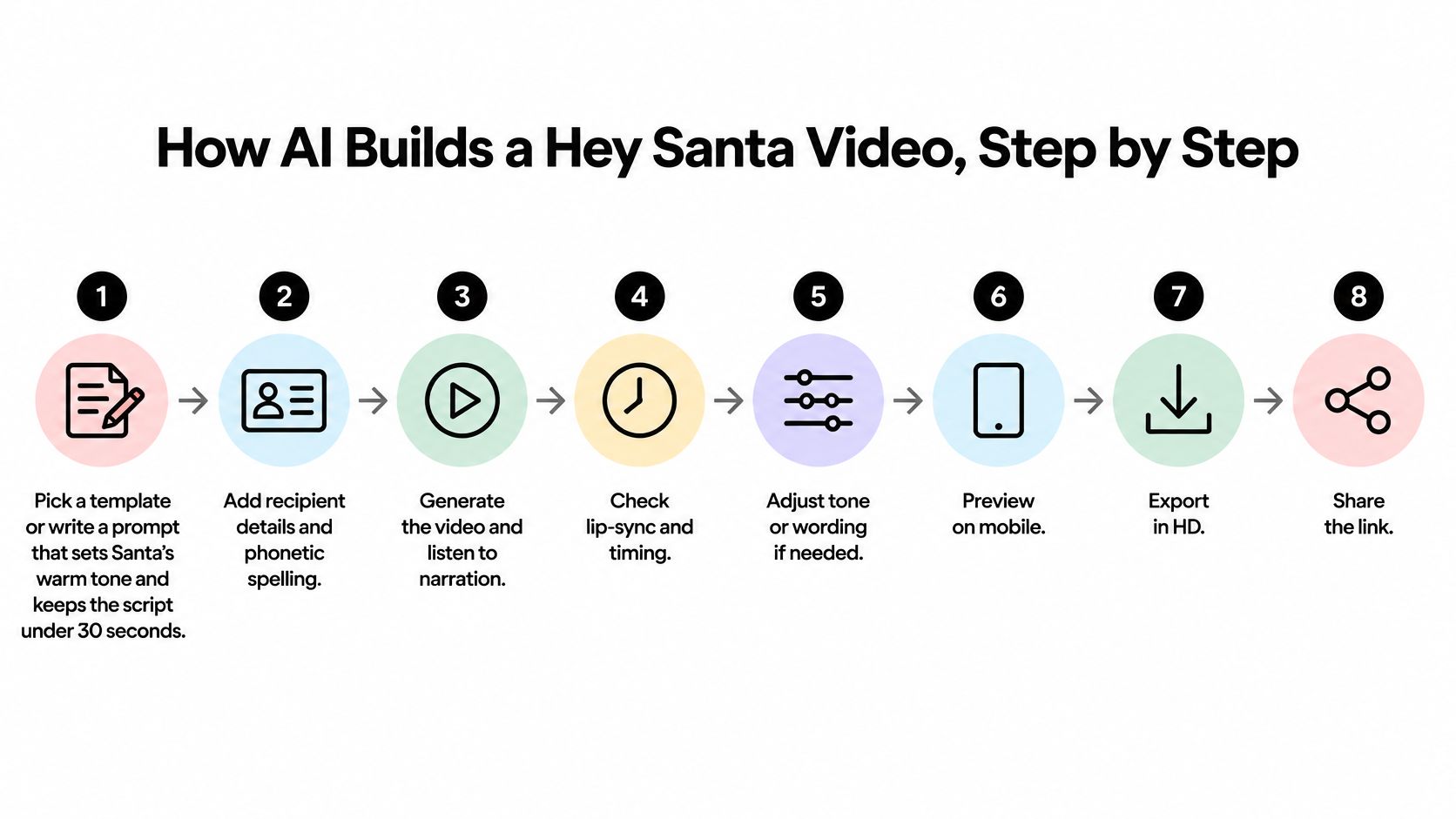
- Pick a template or write a prompt that sets Santa's tone and keeps the script under 30 seconds. Short scripts render faster, cost less and give the model fewer chances to invent something.
- Enter structured fields only: first name, age range, one accomplishment, one gift preference. No address, no school name, no photos. A workable entry looks like this: Maya, 7, finished a reading challenge, wants a telescope.
- Generate the script from those fields alone. Constrained inputs are your best defense against invented family details. Sample output: "Ho ho ho, Maya! I heard you finished your whole reading challenge this year, and I am so proud of you. Keep looking up at the stars, because a telescope might be waiting for you. Merry Christmas, Maya!"
- Review the script for name pronunciation and child-safe wording, and delete any sentence that mentions a fact you didn't type in.
- Synthesize the narration with a chosen AI voice, then match your subtitles to the actual timing rather than the written script, since voiceovers stretch and compress sentences.
- Generate scene images that follow the script, opening on a recognizable Santa shot so the first frame reads correctly even before the sound starts.
- Render in vertical 9:16 and watch the whole clip on a phone, not on your laptop, before you export anything.
- Deliver or publish. For a private family message, download the file and send it directly. You can download any generated video and publish it manually to any social network, which is exactly the route you want when the clip contains a child's name.
One checkpoint before you move on: the name, the personal detail and the sign-off all land inside the first 30 seconds, and the child is addressed directly rather than talked about.
Export Settings That Look Right on a Phone
Holiday advertising research identifies videos under 30 seconds as the format consumers are most likely to engage with during the holiday rush, according to Adobe's holiday marketing analysis. That single constraint shapes everything else: the opening seconds go to a recognizable Santa visual and the child's name, one or two concrete details follow, and a seasonal call to action closes it out. A compact script also cuts text-to-speech latency, rendering cost and subtitle density.
Settings That Survive a Phone Screen
Framing: vertical 9:16, with the subject kept inside a safe center crop so platform buttons and captions don't sit on Santa's face.
Captions: large, high-contrast, two lines maximum, and positioned above the bottom interface bar rather than across it.
Audio: mixed for a phone speaker, with narration clearly above the music bed. Check it at low volume in a quiet room, because that's how a child will hear it.
Template consistency: when you need variants by language, age group or personalization depth, change only the fields and keep one visual template, so every version renders from the same settings.
Mobile-first delivery isn't a preference at this point. Mobile video ad spending has overtaken desktop video spending in the cited analysis, so the phone preview is the test, and a laptop screen flatters audio and caption sizes that fail in the hand. If you're unsure which container and bitrate to use for a vertical render, this guide to the best quality video formats covers the trade-offs.
Before export, confirm five things: length under 30 seconds, 9:16 framing, caption size readable at arm's length, narration audible at low volume, and every variant built from the same template.
Common Mistakes and How to Fix Them
Most failed clips don't fail at the idea stage. They fail at the two minutes before delivery, when a pronunciation slips through or a sentence contains a detail nobody typed in.
Here's the check people often skip, and the one that fixes the most videos:
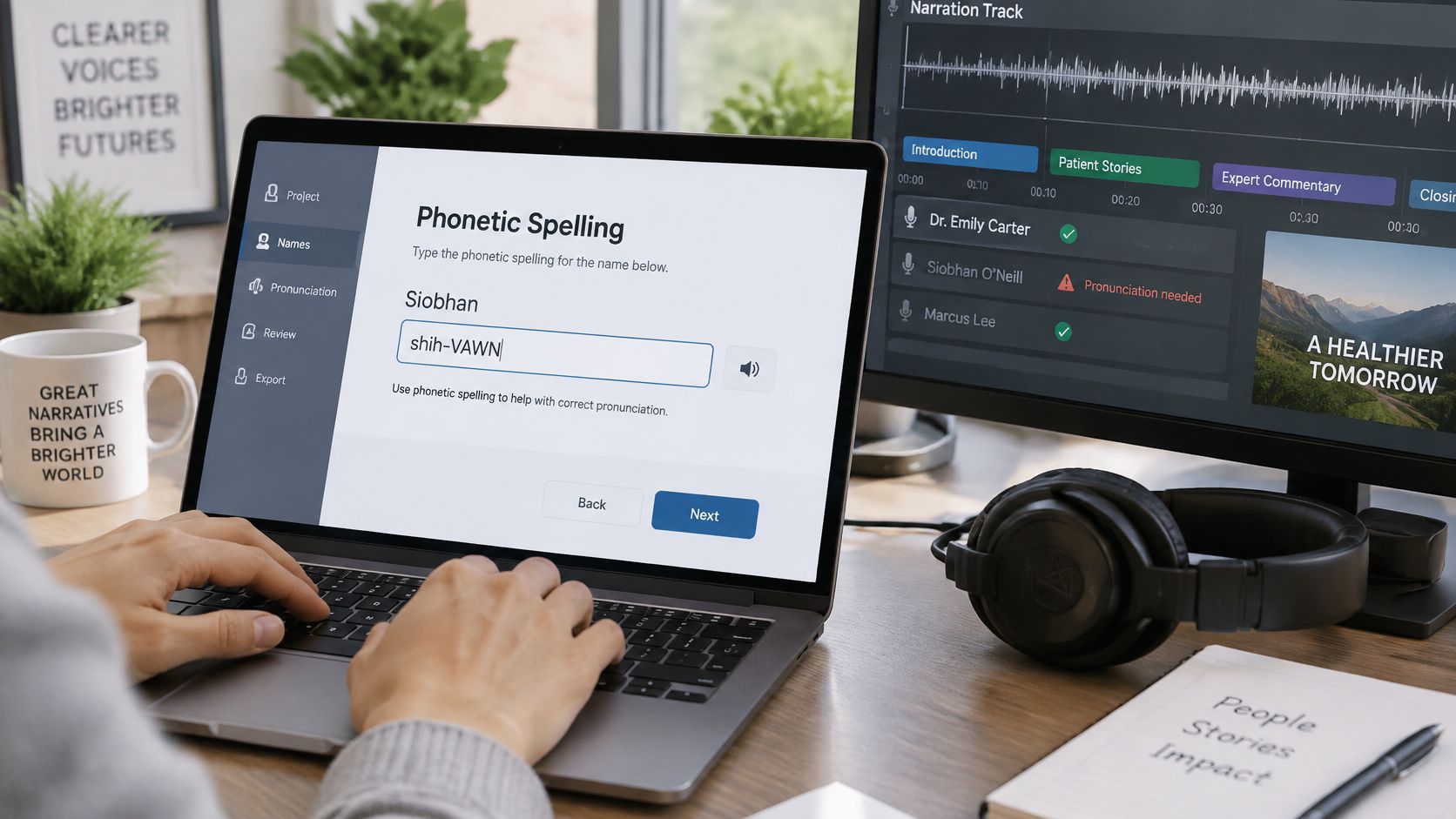
- Mispronounced names. Add a phonetic spelling field (Siobhan as "shiv-awn") and listen to the narration all the way through before export. A name is the one detail the whole clip exists to deliver.
- Invented details. Limit the script to the fields you entered, then delete any sentence that mentions a fact you didn't provide. If Santa mentions a dog you never described, you've found a hallucination, not a bonus.
- Late delivery. Set the delivery date first and build a buffer backward from it. A clip that arrives on December 26 is a clip nobody opens.
- The cost trap. Each video generated incurs non-refundable GPU costs from AI providers, and a failed full render is money you don't get back. Test with a short draft and a single scene before committing to the finished length.
- Unsafe reuse. A clip made for a private message shouldn't be posted publicly without deciding, deliberately, that its privacy tier allows it.
The fix worked when three things are true: the name is pronounced the way the family says it, every detail in the script matches a field you filled in, and the clip plays cleanly at phone volume with the captions clear of the interface.
Cheapest test: render the first five seconds. If the name and tone are wrong there, they'll be wrong at second thirty too.
Plan Your Hey Santa Video Before the Deadline
Four decisions, made in this order, turn everything above into a finished clip.
- Privacy tier. Name-only is the default. Any photo or voice use needs a stated reason and written consent from the person whose face or voice it is.
- Purpose and window. Early-December teaser for public discovery, or a private personalized video delivered a few days before the holiday. Work backward from the delivery date and protect the buffer.
- Script and test draft. Write the 30-second version from your structured fields, then run the eight-step workflow once with a short test before you render the full piece.
- Delivery path. A private family message gets downloaded and shared directly. A public discovery post gets scheduled so it lands in the right window without you remembering on the day.
The one commitment that matters: choose the private path or the public path and put a date on it. Everything else is adjustable.
If you want a single tool for the production step, ClipCreator.ai starts from viral templates or a custom prompt, writes the script, generates story-matched images, adds AI voiceovers and subtitles, and produces HD videos up to 90 seconds, with the exact length depending on the script and voiceover. You can create a first video in under two minutes, and publishing can run automatically to TikTok and YouTube. Use it, or use whatever you already have. The workflow is the part that decides whether the clip works.
If you'd rather spend your December evenings with your family than in a render queue, ClipCreator.ai handles the production end of a Hey Santa video: pick a template or write your own prompt, and it writes the script, generates story-matched images, adds an AI voiceover with subtitles, and exports an HD clip you can download or schedule straight to TikTok and YouTube. Start with a name-only version, keep the details to one accomplishment and one gift, and you'll have something a child will replay five times in a row. Visit ClipCreator.ai to make the first one.

Create your first video in under 2 minutes
Pick a niche, and ClipCreator.ai generates and auto-posts faceless videos to your channels every day.
Join ClipCreator.ai