You finish scripting a 60-second short on Tuesday night, open your voice generator, scroll through forty presets, and click one that sounds decent. By Thursday's upload, you forget which preset you picked, grab a similar one, and publish anyway. Four episodes later, your channel has no recognizable narrator, your viewers can't tell your videos apart in their feed, and retention slips before the third second.
Synthetic narration has moved past novelty into standard production. In 2023, 45% of companies surveyed reported using an AI voice, and 64% said they planned to use one in the future, according to the Voices 2024 Client Trends Report. Yet most video creators still treat synthetic speech like a quick export setting instead of a recurring role on their channel.
Animators don't redraw a lead character from memory before every scene. They work from a model sheet that locks proportions, colors, and expressions. Treating AI voice characters the same way shifts your focus from chasing raw realism to building fit, consistency, and listener trust across an entire series.
What AI Voice Characters Actually Are
Say a solo creator publishes three faceless shorts a week on historical oddities. Viewers never see a face on screen, so the narrator has to carry the channel's identity from Monday's clip to Friday's. If the narrator sounds warm and unhurried in one video, then rushed and brassy in the next, returning viewers lose the sense that they're watching the same show.
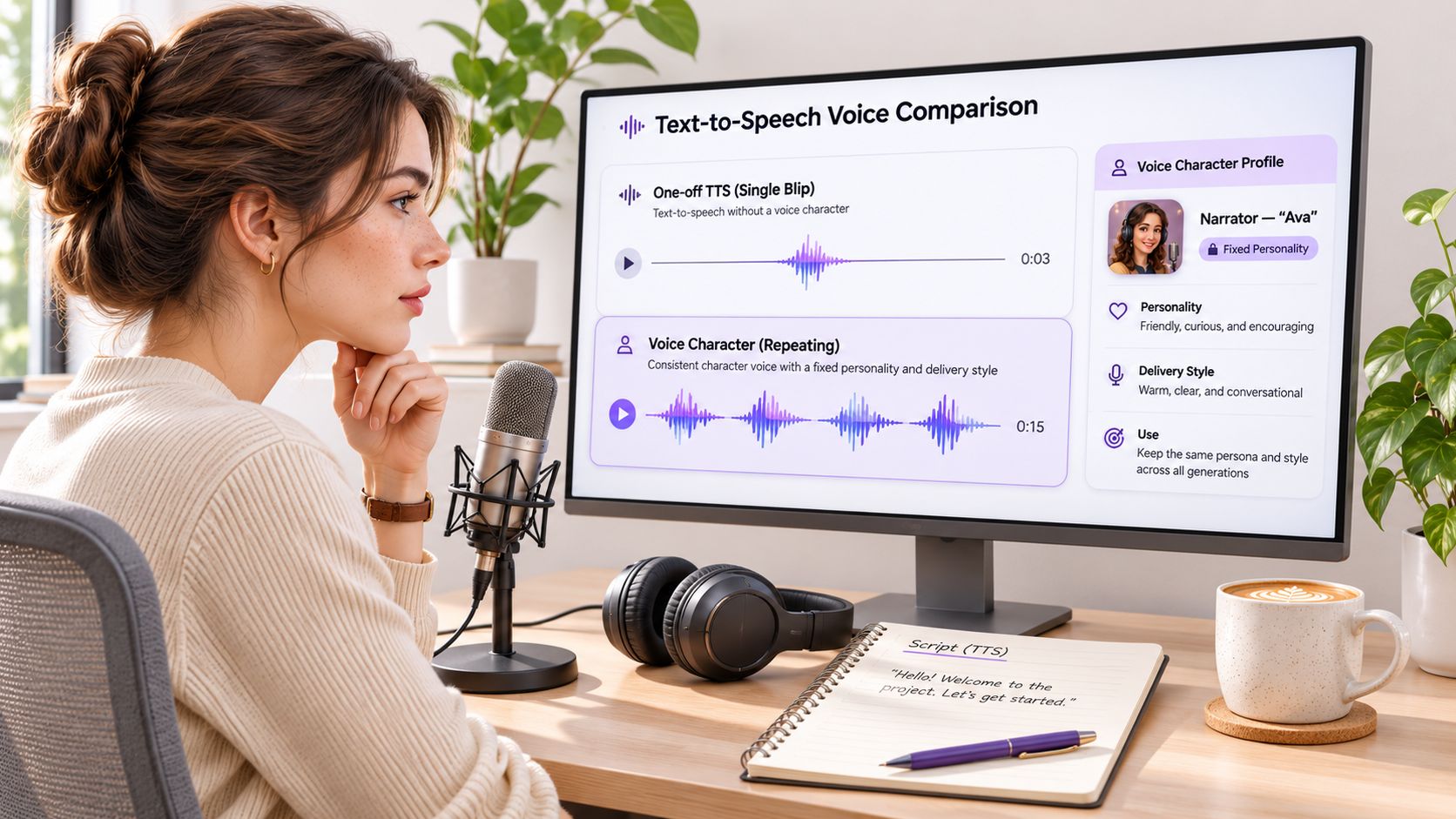
An AI voice character is a reusable synthetic vocal identity backed by a fixed personality, prosody profile, and delivery style. Think of a working voice actor stepping into a booth with a character bible taped to the music stand. That bible defines how fast the character talks, where the pitch settles, how long pauses linger before a punchline, and how much emotion enters the read. A stored character spec plays that exact role for synthetic narration.
Three Synthetic Voice Types Creators Confuse
Many beginners lump every generated voice into one bucket, which leads to poor casting choices and avoidable legal headaches. Separating the three categories makes your production decisions much clearer:
- Generic text-to-speech voices read any script cleanly, but they stay flat and interchangeable across channels. They work for utility prompts, not memorable storytelling.
- Cloned voices replicate a specific real person's vocal identity from reference audio. Because they mirror an actual human, they carry strict consent, licensing, and impersonation obligations.
- AI voice characters establish an original persona with locked delivery traits, including consistent pitch range, speaking rate, pause habits, emotional range, and a signature cadence.
What separates a character from a plain reader isn't cleaner audio fidelity. It's repeatable vocal behavior. When a narrator consistently drops half a beat before revealing a twist or clips the end of every dry joke, listeners start recognizing that rhythm before the logo even appears.
That level of control is relatively new. Speech synthesis evolved over more than two centuries before neural models like DeepMind's WaveNet in 2016 and Google's Tacotron in 2017 replaced stitched audio fragments with controllable, expressive vocal identities, as documented in AIWiki's text-to-speech history.
Viewers don't need convincing to listen to synthetic speech anymore. Industry estimates counted roughly 8.4 billion active voice-assistant devices worldwide by the end of 2024, according to Dazzle's voice assistant usage statistics. Audiences already take directions, timers, and answers from software voices every day.
One recognizable narrator across thirty shorts does the same brand-building work that an on-camera host does for a long-form YouTube channel.
How a Script Becomes a Character Voice
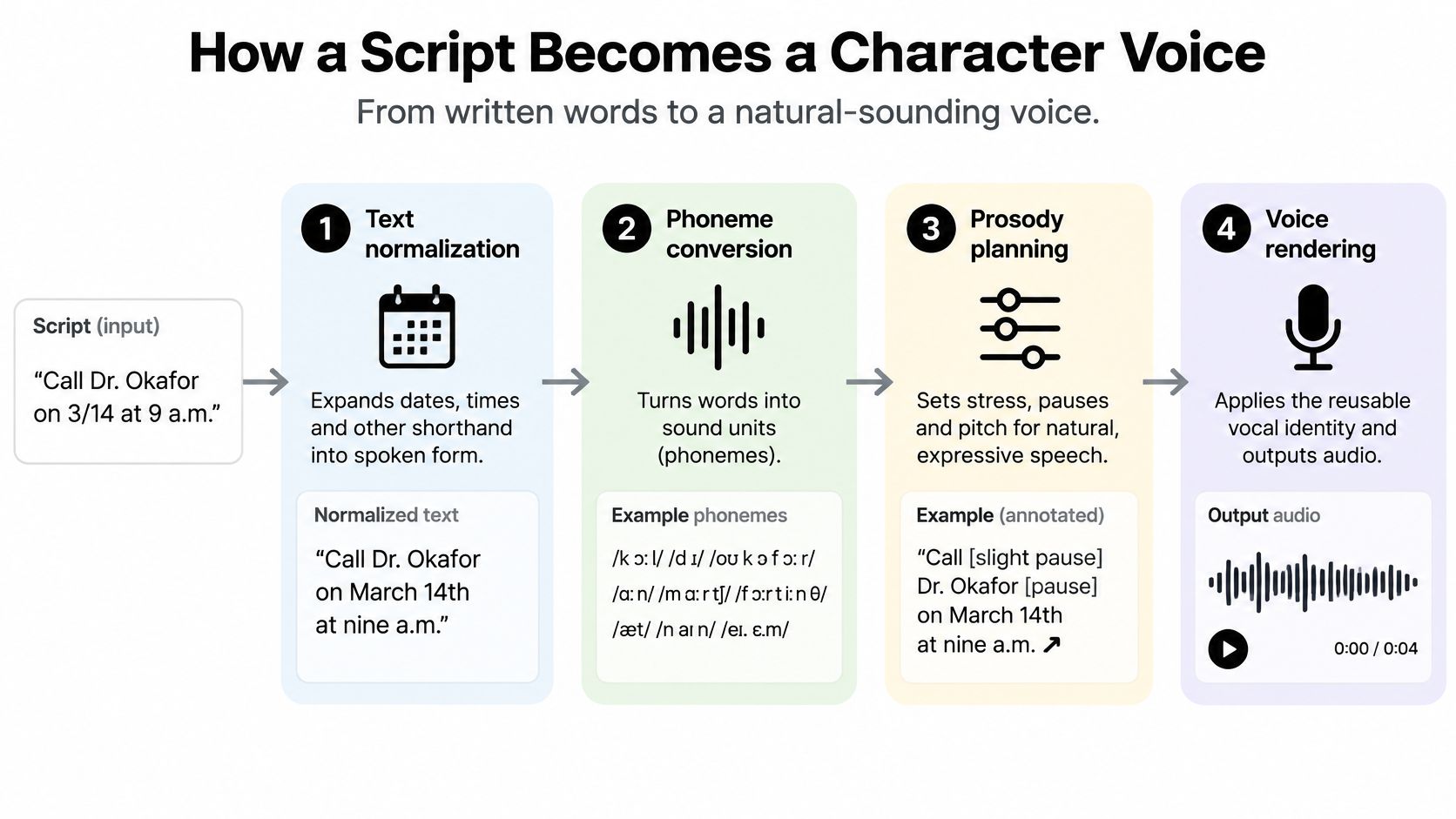
A creator types Call Dr. Okafor on 3/14 at 9 a.m. and needs the same narrator to deliver it on episode one and episode thirty. Treat that line as one pose in a character turnaround. The voice is the model sheet: a locked personality spec that decides pace, pitch, pauses, and emphasis before a single waveform exists.
The rendering chain runs in a fixed order. A slip at any stage changes how the finished character sounds, the way a wrong in-between frame makes a walk cycle stumble.
- Text normalization rewrites abbreviations, dates, and numbers into spoken words. The sample expands so the model reads Doctor Okafor, March fourteenth, and nine a.m. instead of stumbling over slashes or literal letters.
- Acoustic mapping translates those normalized words into sound units (phonemes) paired with target pitch, timing, and energy contours.
- Vocoder rendering converts those acoustic features into an actual audio waveform you can hear.
- The character layer applies your stored prosody spec, locking speaking rate, pitch range, pause policy, word emphasis, and emotional intensity. The voice stays in character rather than drifting toward a neutral default.
- Post-processing balances overall loudness to match platform standards and exports word-boundary timestamps so animated subtitles snap tightly to every spoken syllable.
Prompted Personas Versus Cloned References
Creators enter that pipeline through one of two doors. You can prompt and configure a pre-built character voice, adjusting its prosody parameters until the personality fits the show. You can also upload reference audio to clone a performer's read.
A clone duplicates a real person's vocal likeness, which ties the show to that individual's rights and availability. A prompted character spec holds a stable personality across episodes without borrowing anyone's identity. For most faceless short-form channels, a configured character voice is faster to maintain and cleaner to scale, because the spec, not a one-off take, is what viewers learn to trust.
Two Metrics That Beat Raw Realism
Asking whether a voice sounds human is too vague for reliable production. A streaming-speech benchmark published on arXiv shows that strong signal clarity alone does not guarantee natural delivery, noting model response latencies of roughly 959 to 2,724 ms compared with 742 ms for human replies in its dataset. Even in pre-rendered shorts with no live conversation, sluggish starts and erratic gaps make a narrator feel robotic and knock captions out of sync.
Replace guesswork with two concrete checks on every test export:
- Time-to-first-audio measures how long the viewer waits in silence before the first spoken syllable hits. Dead air at the start of a vertical video invites an immediate swipe.
- Pause distribution tracks where silence lands across the script. Healthy pacing clusters brief breaths at commas and periods and avoids awkward mid-phrase stalls.
Voice quality is the combined result of clean normalization, a locked prosody spec, tight timestamps, and balanced timing across the whole pipeline. Fit and consistency matter more than chasing a waveform that merely sounds lifelike.
Voice Character Archetypes and Where They Fit
A whispering horror narrator walking someone through a five-step tax tip is a bad hire, even when the waveform looks studio-clean. Casting a voice character works the same way an animator locks a character sheet: personality, pace, and emotional range stay consistent, while the script supplies the scene.
Audience connection depends heavily on that fit. In a 2025 International Journal of Human-Computer Interaction study of 26 participants interacting with an autonomous voice system using three personality-inspired voices, listeners engaged more with the voice linked to a character they already liked than with a neutral or disliked voice. Familiarity with the character did more work than a generic "sounds like me" guess.
Before choosing a preset, match your topic and audience expectations against six proven archetypes. Treat each row as a personality spec, not a one-off effect.
| Archetype | Prosody traits | Best-fit content | Risk to watch | Reference feel |
|---|---|---|---|---|
| Warm teacher | Slower rate, narrow pitch range, gentle pauses | Bedtime tales, micro-lessons, explainers | Can feel sleepy in high-energy feeds | Friendly preschool or documentary narrator |
| Deadpan narrator | Steady rate, flat contour, dry emphasis | Facts, true crime, dry-humor commentary | Can read as bored if pacing is too even | Late-night radio host |
| Ominous storyteller | Low pitch, slow drops, long dramatic pauses | Horror, mystery, suspense shorts | Too intense for non-fiction claims | Campfire ghost-story voice |
| Energetic explainer | Faster rate, wide pitch range, punchy emphasis | Product demos, tips, fast tutorials | Can exhaust over a 90-second video | YouTube tech reviewer |
| Friendly peer | Conversational rate, mid pitch, casual fillers | Day-in-the-life, social commentary, brand voice | Can sound generic without a signature opener | Podcast co-host |
| Authoritative expert | Measured rate, controlled emphasis, clipped ends | News, finance, health, corporate | Can feel cold for entertainment | Clinical news anchor |
If you are building a channel around a business or a recurring show, line the archetype up with your messaging rules by reviewing how brand voice differs from tone. The archetype is the constant personality. Emotional intensity in the script shifts tone from clip to clip, the way one character can whisper a bedtime line and snap a punchline without becoming a different person.
Running a Fast Voice Fit Test
Headphones alone will not settle the cast. Put two versions of the same script in front of viewers and let watch time decide.
Pair contrasting archetypes on one test script. A deadpan narrator against an energetic explainer on a surprising science fact is a clean split: same facts, different personality.
Check early retention at two checkpoints, such as the 3-second hook and the 15-second turn. Then read signals past the view count: rewatch rates, and comments that mention the narrator's style or credibility. If people describe the voice ("the dry one," "the teacher"), the character is landing. If they only praise the facts, the voice is still a setting.
Casting rule: In practice, a distinctive, characterful voice often holds attention better than a polished but generic one, as long as its personality fits the story and the viewer's expectations.
How to Build a Voice Character Step by Step
Once you pick an archetype, write its rules down before generating a full season of videos. Skipping documentation is the fastest way to lose vocal identity once you start publishing on a tight schedule.
Seven Steps to a Reusable Character Spec
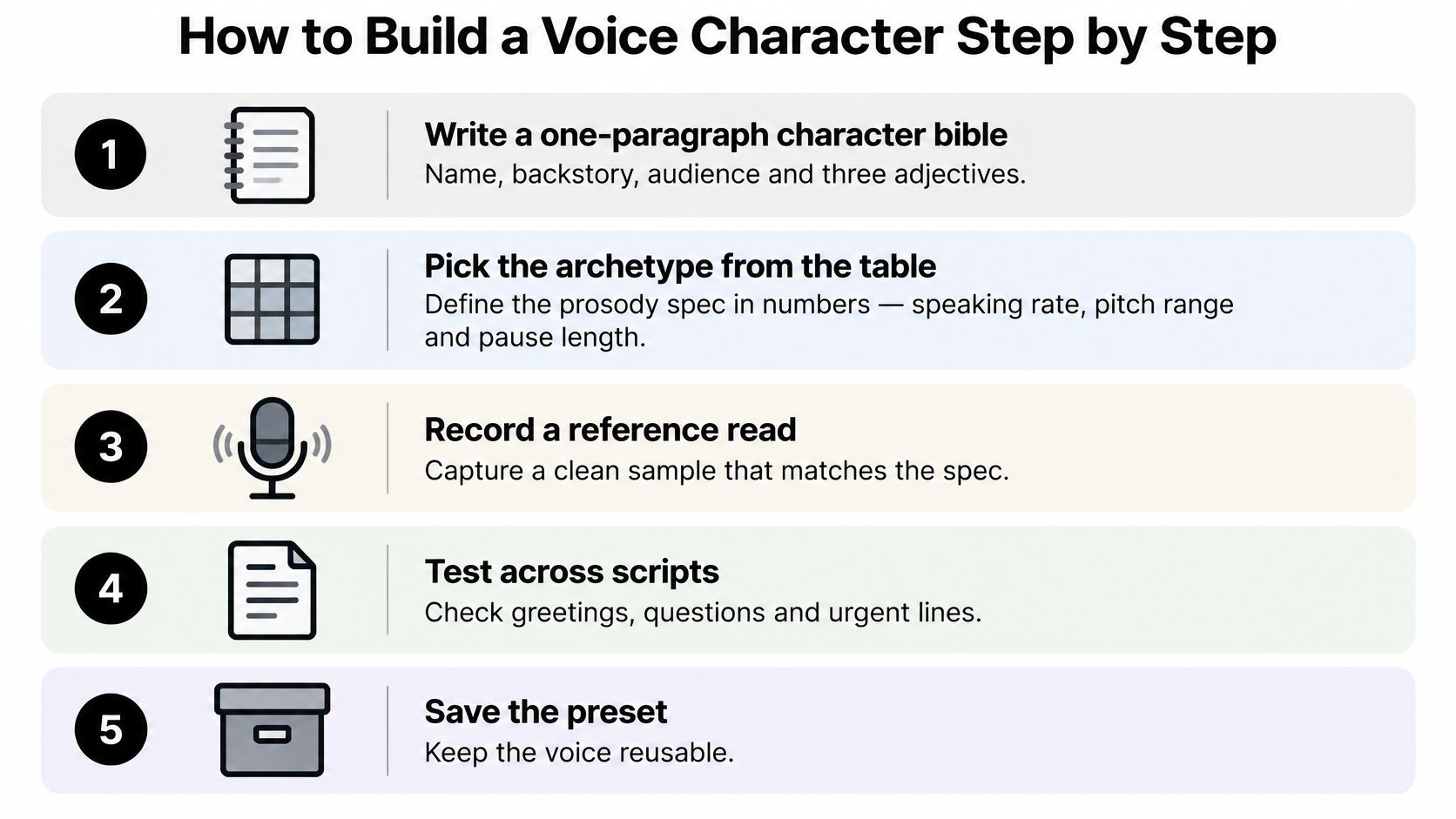
- Draft a one-paragraph character bible. Give your narrator a name, a brief backstory, a target viewer, and three defining adjectives (for example, curious, dry, unhurried). Most creators skip this step and end up writing scripts that clash with the voice's natural cadence.
- Translate your archetype into a numeric prosody spec. Vague labels like "upbeat" invite drift. Define concrete targets: speaking rate in words per minute, pitch range, pause policy, emphasis habits, and emotional intensity on a 1-to-5 scale.
- Select your voice source. Decide whether you're using a pre-built voice character, licensing a real performer's voice for cloning, or crafting a custom prompted persona. Modern video workflows let users choose from a variety of AI-generated voices to narrate their videos, and if you want a deeper look at setup options, walk through how to make an AI voice before locking your primary pick.
- Render a short calibration script. Write a test paragraph that runs roughly 30 to 60 seconds and intentionally packs in a tricky proper name, a multi-digit number, a calendar date, and one emotionally charged sentence. Testing only easy conversational lines hides pronunciation flaws until publication day.
- Audit the calibration file for four failure signs. Listen with your eyes closed for mispronounced terms, pacing that speeds up mid-paragraph, flat emotional delivery on the stressed line, and unnatural mid-sentence pauses.
- Lock and archive the spec alongside the calibration audio. Save the exact parameter values, voice ID, and test audio file in your production folder so every future episode begins from the same baseline.
- Benchmark against the original every ten episodes. Ears adapt gradually to small shifts. Playing episode ten side by side with your original calibration clip immediately exposes subtle pacing or pitch drift.
Sample Prosody Spec Template
Store a compact card like this right above your script template so any writer or editor on your team stays aligned:
- Archetype and adjectives: Deadpan narrator (sharp, skeptical, concise)
- Target speaking rate: Steady conversational pace (dial slightly slower for bedtime tales, or nudge faster for snappy tutorial hooks)
- Pitch and intensity: Mid-low range, emotional intensity set to 2 out of 5
- Pause policy: Brief breath at commas, longer deliberate hold before reveal lines
- Emphasis habit: Stress two to three contrast words per paragraph, never two words back-to-back
Remember that short-form vertical videos run up to 90 seconds long, and the exact length varies based on your script and voiceover pace. A slightly slower warm teacher spec needs fewer words than a brisk energetic explainer to land cleanly inside that cap. Across a multi-episode series, steady consistency beats chasing a mythical "perfect" read on a single clip.
Using Voice Characters in Shorts and Storytelling
Great vocal casting still falls flat if your script ignores how viewers watch mobile feeds. In short-form video, the first two to three seconds decide whether someone stays or scrolls. Script a cold open that your narrator delivers at full hook energy, then let the voice settle into its standard register once you have the viewer's attention.
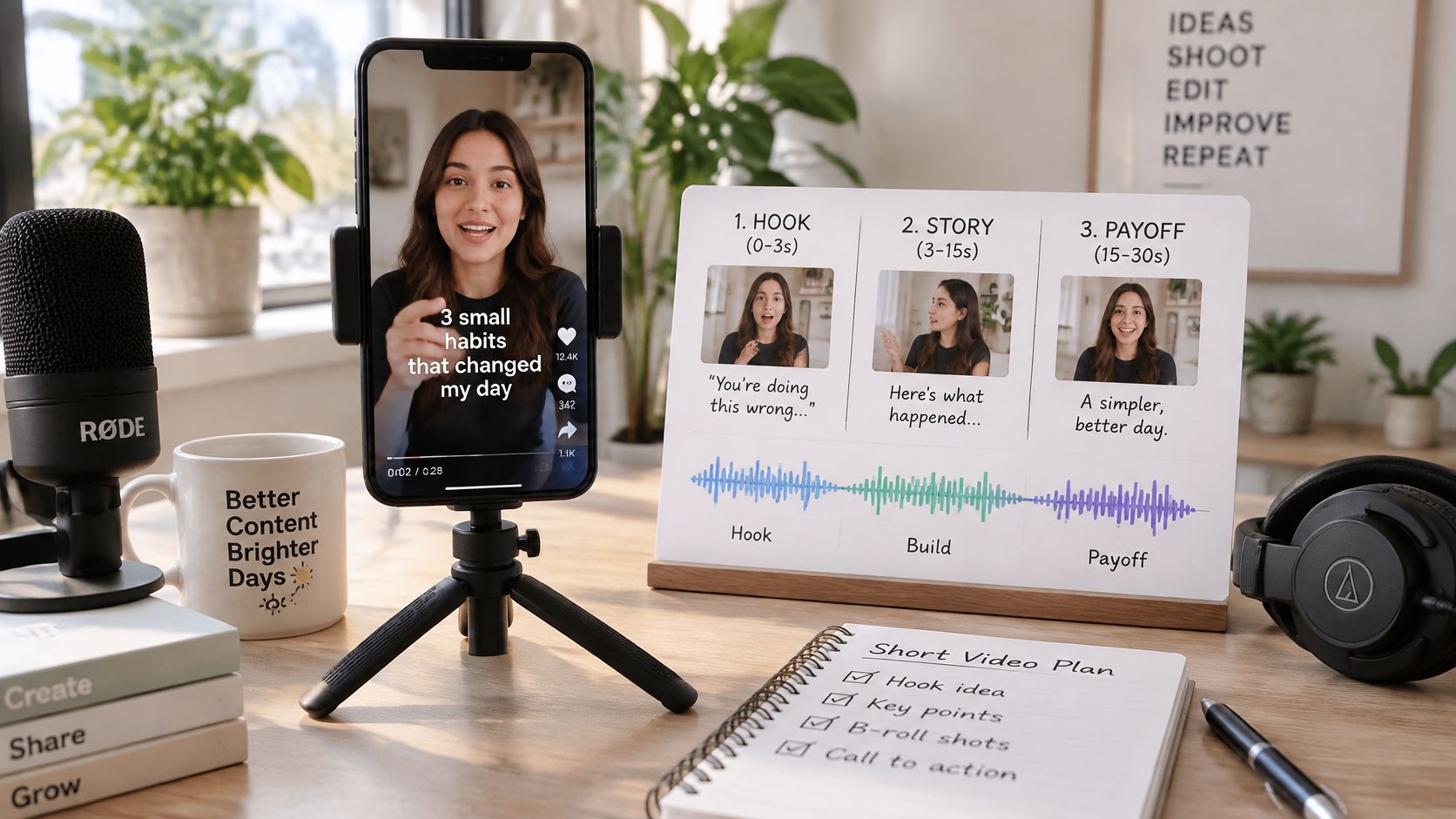
Word count controls pacing more reliably than any speed slider. At a comfortable conversational pace of roughly 140 to 160 spoken words per minute, a 60-second short holds around 140 to 160 words, while a 90-second video tops out near 220 to 240 words. Stuffing extra sentences into the script forces you to speed up the voice, which strips away character cadence and cramps your subtitles.
Keep your captions tied tightly to audio timing. Generating subtitles from word-boundary timestamps keeps on-screen text within a frame or two of the spoken syllable, which helps silent scrollers latch onto the rhythm immediately. In faceless channels where no human host appears on camera, that synchronized voice-and-caption pair carries the entire brand personality.
Mapping Story Beats and Multi-Voice Scenes
Narrative shorts work best on a three-beat arc: setup, turn, and payoff. Put the pause policy from your character spec to work here by placing your longest intentional pauses right before the turn and right before the final payoff line. That tiny pocket of silence signals listeners that something important is coming next.
When you script episodes from scratch or use AI-Powered Story Generation to build narratives from a pre-made viral story type or a custom prompt, keep the same core narrator attached to the series. Custom stories let you direct the AI with your own topics and style to reflect your brand identity, and pairing that narrative style with a locked voice character turns casual viewers into repeat subscribers.
Adding a second character for dialogue scenes brings stories to life, provided listeners can tell the two voices apart without staring at the screen. Pair a main narrator with one dialogue character whose pitch range sits clearly higher or lower, and give them contrasting speaking rates so rapid back-and-forth lines never blur together.
Watch how pacing, emotional delivery, and vocal contrast shape audience attention in this breakdown of expressive voice production:

Planning Your Script Word Budget
Use these sample runtime targets, built around a conversational 140 to 160 word-per-minute pace, to keep your hooks punchy and your stories comfortably under the 90-second ceiling.
| Runtime | Structure |
|---|---|
| 15 seconds | Hook in first 2 to 3 seconds plus payoff line (roughly 35 to 40 words) |
| 30 seconds | Hook, single setup beat, and punchy payoff (roughly 70 to 80 words) |
| 60 seconds | Hook, setup, mid-video turn, and payoff (roughly 140 to 160 words) |
| 90 seconds | Hook, two body beats, and payoff (roughly 220 to 240 words) |
Common Voice Character Problems and Fixes
The most common flaw in faceless channels isn't metallic audio. It's episode-to-episode voice drift, where a narrator sounds slightly younger, faster, or stiffer in episode five than in episode one because nobody locked a prosody spec.
When a finished render feels off, diagnose it backward from the symptom you hear or see rather than randomly swapping voices.
| Symptom | Likely cause | Fix |
|---|---|---|
| Character sounds different in episode 5 than episode 1 | No locked prosody spec | Re-apply the character bible settings and re-test against the calibration file |
| Subtitles drift one to two seconds late | Captions timed to a draft render | Regenerate captions from the final audio |
| Delivery sounds flat | Uniform emphasis across the script | Mark two to three emphasis words per paragraph |
| Long pause in the middle of a sentence | Punctuation or pause tag placed incorrectly | Rewrite into shorter sentences and move pauses to commas |
| Brand name mispronounced | Text normalization reads it literally | Add a phonetic respelling in the script |
| Video runs past 90 seconds | Script over the word budget | Trim filler lines to stay inside the 90-second word budget or split the story into two parts |
| Two characters sound alike in dialogue | Overlapping pitch ranges | Separate the characters by at least a third in pitch range |
Whenever you apply a fix, regenerate the audio and test it against your calibration clip instead of patching only a single bar on the final video timeline. Keeping visual and vocal traits aligned over dozens of uploads follows the same discipline outlined in Dunia's guide to character consistency, where clear reference anchors prevent subtle drift across long-running creative series.
The Six-Point Pre-Publish Check
Run every finished short through these six fast checks before scheduling it to go live:
- Compare against your baseline. Play the finished audio next to your calibration file to confirm speaking rate and pitch still match.
- Audit every proper noun and number. Verify brand names, dates, and technical terms against your phonetic respellings.
- Check the runtime cap. Confirm the full clip lands comfortably inside the word budget for your chosen format.
- Hunt down mid-sentence stumbles. Scan for awkward pauses inside clauses and tighten the punctuation so breaths land cleanly.
- Confirm final caption sync. Make sure subtitles were generated from the last exported voice track, not an earlier script draft.
- Verify vocal dynamics. Listen for two to three natural emphasis hits per paragraph, plus unmistakable pitch separation in any multi-voice dialogue.
Never patch a broken audio read with background music; fixing the script punctuation and regenerating takes two minutes and saves your retention curve.
Consent Disclosure and Audience Trust
A bedtime channel runs the same warm narrator for months. Viewers start treating that voice like a person they know. Then a health short uses the same calm delivery, and comments ask whether the "doctor" is a licensed clinician. The script never claimed a degree. The caption never said the narrator was synthetic. Trust unravels in a single thread.
A voice that sounds original is not automatically low risk. A fictional character can still land too close to a recognizable performer. Even a labeled synthetic narrator misleads people if you present that persona as a real medical, legal, or financial expert.
A voice character works like an animator's model sheet: one personality spec, reused so the performance stays recognizable. Fit, consistency, and honesty with the audience matter more than how "real" the audio sounds. That spec does not replace permission when the voice copies a living person, and it does not excuse role-play that implies professional credentials.
As outlined in Spirelight's guide to voice cloning laws, legal and industry frameworks increasingly separate original fictional characters from voices imitating identifiable people. Even with a speaker's permission, consent alone may not settle recording rights, publicity rights, union contracts, or regional data-protection obligations.
Use this matrix to match each voice source with the permission and documentation it requires before publishing at scale.
| Voice source | Written permission needed | Record to keep |
|---|---|---|
| Original fictional archetype voice | Usually no, but check for resemblance to a real performer | Design spec and creation log |
| Licensed performer voice | Yes, written license | License contract and consent scope |
| Celebrity imitation | Yes, and publicity rights likely apply | Written permission covering uses and channels |
| Deceased-person imitation | Yes, from estate or rightsholder where applicable | Permission record and jurisdiction check |
| User-uploaded voice clone | Yes, from the speaker before any use | Signed consent and revocation process |
Technical Controls and Audience Disclosure
Modern zero-shot cloning can reproduce a person's vocal identity from a very short audio clip. That creates brand-safety risk if reference audio leaks or gets reused without oversight. In VoiceMark anti-cloning research on arXiv, a speaker-specific watermark survived zero-shot voice conversion with more than 95% accuracy, compared with roughly 50% for earlier methods tested. Separate work noted in that same research shows neural vocoders can degrade embedded watermarks while speaker similarity stays high.
Treat watermarking as one layer, not a total shield. Pair a purpose-built or properly licensed voice with strict access controls on reference recordings, provenance logs, identity-similarity checks, and detection tests after compression or re-encoding. Teams taking narrated characters into new languages can review whether AI dubbing is safe before a localized voice ships under the same character name.
Whenever you use a real performer's voice, write the consent scope in plain terms: exact uses, languages, emotional range, duration, and distribution channels. Spell out revocation too. Document how a performer requests a takedown or model deletion, and how quickly those assets come down.
Listener trust sits beside that paperwork. Many people remain wary of AI voice cloning and of what cloned voices might be used for later. A short, plain disclosure in the caption, the description, or the opening beat tells viewers who is speaking. Guessing, then feeling tricked in the comments, costs more goodwill than the label ever will.
Five-Item Pre-Publish Compliance Check
- Verify voice provenance: Confirm your voice file traces back to an original character preset or an active written license.
- Screen for accidental likeness: Listen objectively so a custom persona does not closely mimic a living celebrity or protected performer.
- Check role honesty: Confirm your synthetic narrator is not framed as a credentialed human specialist giving regulated advice.
- Add clean disclosure: Include a concise synthetic narration label where platform rules and viewer expectations call for it.
- Audit revocation readiness: Confirm your team knows exactly where reference audio and active projects live if a takedown request arrives.
Choose Your First Voice Character and Ship It
You don't need an audio engineering background to put a memorable narrator behind your next ten uploads. Pick your starting lane based on where your channel sits today.
If you already publish faceless shorts each week, pick one archetype from the casting table, write your one-paragraph character bible, and lock your numeric prosody spec today. Generate one calibration clip and keep it pinned at the top of your project folder.
If you're launching a brand-new channel, run the voice fit test on a single 30-second script using two contrasting archetypes. Compare the first three seconds of viewer retention, keep the winner, and commit to that voice for your next ten posts. Recognizability compounds across episodes, so sticking with a well-cast character beats endlessly auditioning new voices.
Creators who want to skip stitching separate scripting, voice, image, and caption tools together can run this workflow inside ClipCreator.ai. Users can choose from a variety of AI-generated voices to narrate their videos, generate scripts from a pre-made viral story type or a custom prompt, and export HD videos up to 90 seconds long with matched visuals and subtitles. Your routine stays lean: cast your voice character, generate the clip, run the six-point pre-publish check, and hit publish.
An AI voice character isn't a throwaway text-to-speech toggle. It's a casting decision paired with a stored spec, and creators who treat it that way build an audience that recognizes their narrator before the channel name ever hits the screen.
Ready to turn a locked voice character into a consistent short-form channel without juggling five separate editing apps? Pair AI-generated voiceovers, custom or viral story prompts, matched visuals, and synced subtitles in HD videos up to 90 seconds long, then schedule them straight to TikTok or YouTube. Start building your channel's signature narrator at ClipCreator.ai.

Create your first video in under 2 minutes
Pick a niche, and ClipCreator.ai generates and auto-posts faceless videos to your channels every day.
Join ClipCreator.ai