
You sit down on Sunday evening determined to post three short videos next week. By the time you pick a topic, write a tight script, hunt for footage, sync captions, and export the right aspect ratio, two hours have vanished and you have only one finished clip. Monday gets busy, Wednesday's upload slips to Friday, and by the end of the month your channel has six unrelated videos that teach you nothing about what your audience wants.
That bottleneck is common because video has become standard across nearly every industry. According to Wyzowl's longitudinal video marketing survey, 91% of businesses used video as a marketing tool in 2025, while 67% measured performance through video views and 63% tracked engagement indicators such as likes, shares, and reposts. Almost everyone is publishing, yet most small teams still treat every clip like a one-off craft project.
Video marketing automation fixes that breakdown, but not in the way many expect. Software isn't just a faster timeline editor that churns out clips while you walk away. Done right, it acts as a repeatable measurement and trust system, running the mechanical steps on a fixed cadence so you can focus human judgment on storytelling, accuracy, and audience trust.
What Video Marketing Automation Actually Means
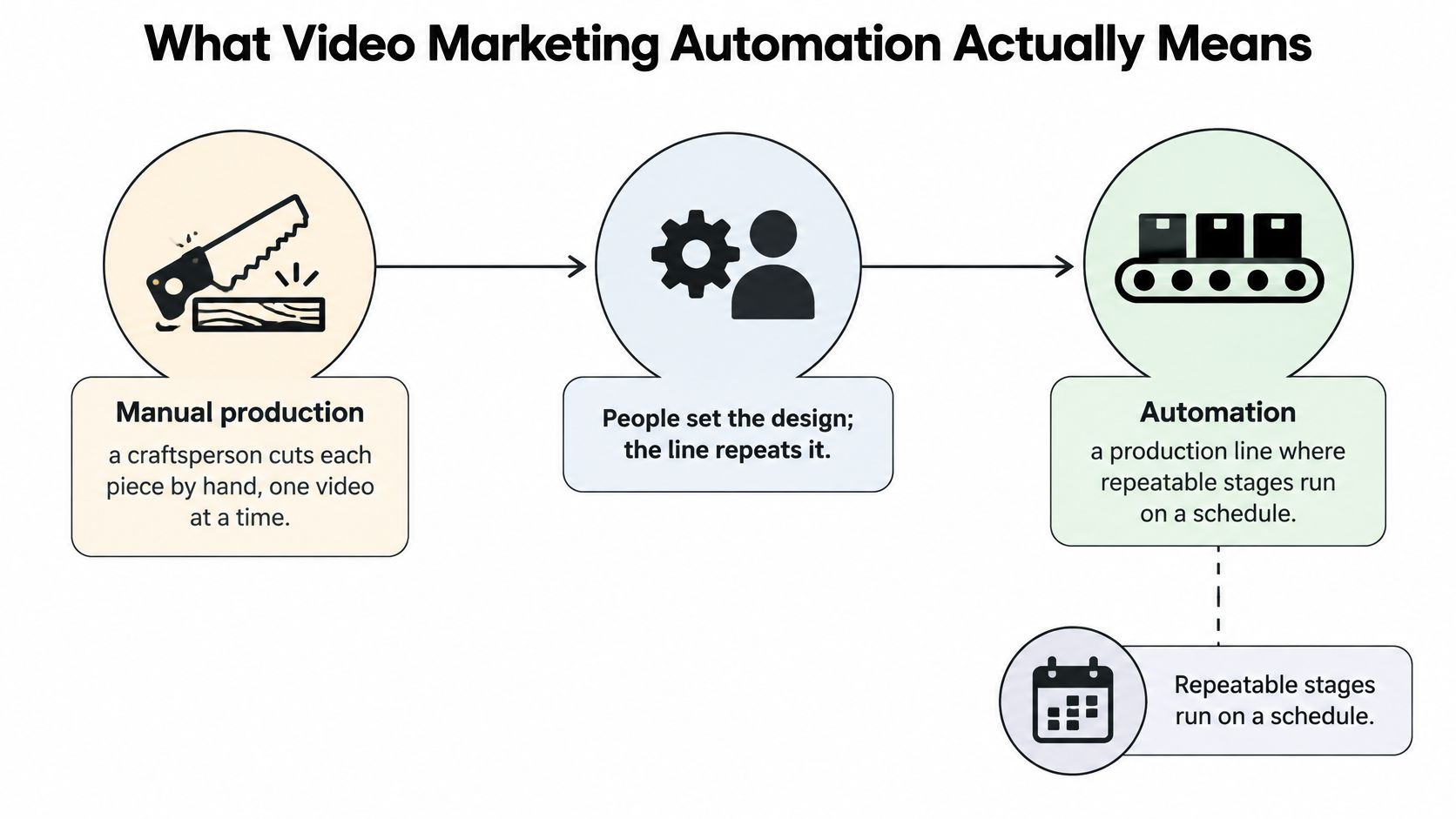
Think of a furniture workshop versus a modern factory floor. In manual video production, you work like a craftsperson cutting every board by hand, measuring one video at a time from a blank screen. In an automated workflow, you run a production line where repeatable stages operate on a set schedule, while people design the blueprint, pick the materials, and inspect finished pieces before they ship.
In plain terms, video marketing automation is the use of software to plan, generate, caption, schedule, and publish video content with minimal manual handling so output stays consistent.
Most confusion happens when teams lump every AI tool into one bucket. An automated pipeline has three distinct layers, and knowing where one stops and the next starts prevents messy setups:
- The creative input layer: Humans set the brief, pick a proven template, or write a structured prompt that defines the topic, tone, and audience.
- The production engine: Software turns that input into a full asset by drafting the script, assembling matching visuals, generating voiceover narration, and timing on-screen subtitles.
- The distribution layer: Scheduling software publishes finished clips to TikTok, YouTube, and Instagram at preselected times without someone logging in to upload each file manually.
Teams building the creative input layer often start with text-based prompts before touching video software. If you want to see how structured prompting connects planning to campaign execution, the FindClout guide to Claude automation breaks down practical prompt-driven marketing workflows.
Why Predictable Cadence Beats Faster Editing
A common misconception is that automation's main benefit is shaving minutes off an edit. Faster rendering helps, sure, but the primary payoff is predictable publishing cadence and comparable data. When every clip follows a consistent template, length, and posting slot, you can isolate why one hook outperformed another instead of guessing across ten completely different formats.
That structure matters most for brief, frequent social clips rather than quarterly brand films. In HubSpot's 2024 State of Marketing survey of more than 1,400 global B2B and B2C marketers, short-form video delivered the highest ROI of any content format, one quarter of marketers planned to invest more in it than in any other format, and 62% considered AI and automation important to their marketing activities. Long-form documentaries still benefit from manual craft, whereas three-times-weekly vertical clips quickly stall without a production line.
Practical test: Ask yourself one question about your current channel. If a video publishes on a fixed schedule without anyone rebuilding the edit from scratch each time, you have automation; if every upload requires a fresh timeline session, you're still cutting by hand.
The Automated Video Workflow Stage by Stage
Moving from manual editing to a production line doesn't mean removing people from the room. Adoption has accelerated quickly: in 2025, 41% of marketers used AI for video creation, up from 18% in 2024, according to Wistia's State of Video Report summarized by MartechEdge, which analyzed 14 million videos, 100,000 businesses, and a survey of 1,300 professionals. The teams getting durable results split the labor clearly across six sequential stages.
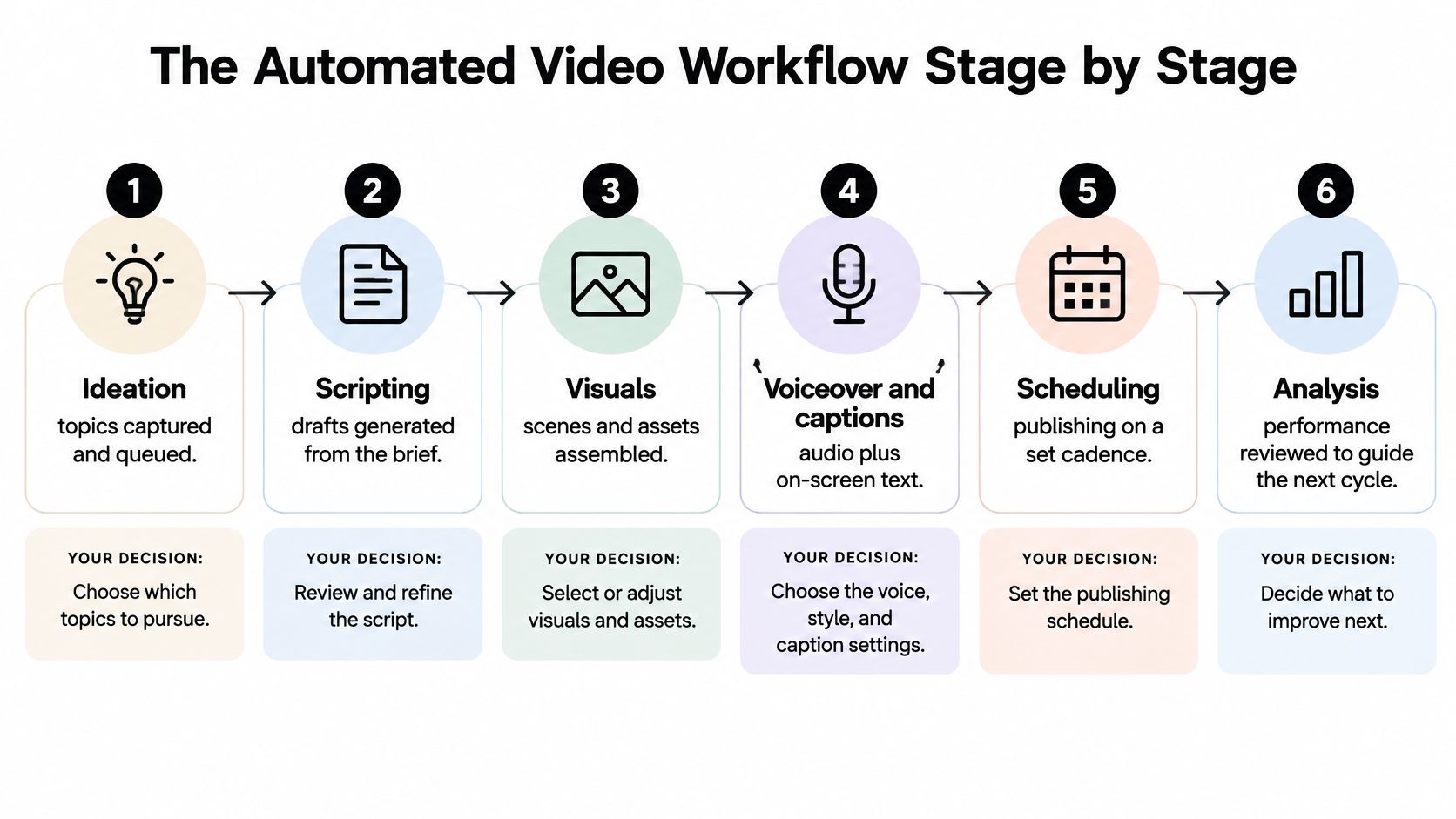
Every stage pairs a repeatable software task with a specific human decision. Skipping the human column is where automated channels start sounding robotic or publishing embarrassing errors.
| Stage | Automated Task | Human Decision |
|---|---|---|
| Ideation | Generates topic and hook options from a template or brief | Chooses the angle that fits the brand |
| Scripting | Drafts narration from a prompt or story type | Checks facts, tone and claims |
| Visuals | Generates images matched to each part of the story | Rejects off-brand or misleading images |
| Voiceover and captions | Narrates the script and times subtitles | Verifies names, terms and reading speed |
| Scheduling | Publishes on set days and times | Sets the calendar and pacing of the series |
| Analysis | Collects platform metrics for each post | Decides which variable to test next |
Walking One Faceless Story Video Through All Six Stages
Concrete examples make the split between software and human judgment much easier to see. Say an online personal finance educator wants to run a faceless twice-weekly series explaining common money mistakes in short story format.
At ideation, the tool generates ten hook ideas from a brief about everyday credit traps. The educator discards seven clickbait angles and picks one grounded scenario about store credit card deferred interest, keeping the series aligned with a calm, trustworthy brand.
At scripting, software expands that angle into a tight narrative built from a story template. The educator reads the draft closely, trims an exaggerated claim about credit scores, and tightens the opening sentence so the core conflict lands in the first few seconds.
At visuals, the production engine generates a sequence of stylized illustrations matched beat by beat to the script. The educator scans the storyboard and swaps out one scene showing an unrealistic bank statement and another with garbled background text.
At voiceover and captions, the system pairs the approved script with a selected narrator voice and syncs animated subtitles to the audio track. Here, the educator listens at normal speed, confirms that financial acronyms are pronounced correctly, and checks that no subtitle line flashes by too fast to read on a phone screen.
At scheduling, the educator assigns finished videos to Tuesday and Thursday mornings so the channel builds a steady rhythm, and the software queues both uploads automatically. At analysis, the platform gathers view, completion, and share counts across the month, and the educator reviews the numbers every Friday to decide whether next week's batch should test shorter openings or a different visual style.
Quality isn't created by the generation button. It's protected at the six checkpoints where a person approves what actually reaches the audience.
When you launch your own series, those exact human decisions become a structured pre-publish gate that every batch passes before going live.
Benefits Worth Tracking and the Metrics That Prove Them
Views feel great on a dashboard, yet they're the easiest number to misread once you automate publishing. If software helps you double your weekly output, total views might climb even while individual clips lose viewers after three seconds. That's why automated channels need a scorecard tied directly to business decisions rather than vanity counts.
The commercial upside of getting video right is well established. In 2025, 93% of marketers said video produced good return on investment, according to Wyzowl's Video Marketing Statistics 2025 reported in Dash's video marketing statistics roundup. (Different surveys report different figures depending on methodology, so always check the specific survey year and publisher before benchmarking your own numbers.)
Automation provides four operational advantages that directly support that return: consistent posting frequency, lower cost per published video, faster creative testing, and comparable campaign data. Still, volume never guarantees distribution on modern feeds. A 2025 analysis of 5,696,685 short-form videos from 582,456 worldwide accounts in Metricool's 2025 State of Short-Form Video Report via Marketing Tech News found that TikTok reach declined 47.19% while average engagement increased 35.61% to 8.24%.
Because reach and interaction can move in opposite directions, you need six core metrics working together.
| Metric | What It Signals | Why Automation Changes It |
|---|---|---|
| Reach | How many accounts see the video | Can fall while engagement rises, so it cannot stand alone |
| Engagement rate | Likes, comments and shares relative to views | Shows whether generated content earns interaction |
| Completion rate | Share of viewers who watch to the end | Tests whether automated pacing holds attention |
| Click-through rate | Clicks on a link or call to action | Core measure for comparing personalized and generic variants |
| Follows and saves | Intent to return to the channel | Indicates long-term value beyond a single spike |
| Cost per published video | Production and tooling cost divided by videos published | Shows whether volume gains are cheaper per unit |
Tying Each Metric to a Concrete Channel Decision
Reading the table becomes simple once each metric maps to an action. Low completion rate usually points to slow pacing, a weak opening visual, or narration that drags before getting to the payoff. If completion stays high while engagement rate lags, your story holds attention but gives viewers no reason to comment or share.
Click-through rate matters most when your clip includes a clear next step, such as visiting a landing page or claiming a guide. If you plan to put paid budget behind your top-performing organic clips, it helps to compare Facebook, TikTok and LinkedIn ads using Wojo Media's breakdown so your call to action matches how buyers behave on each network. For broader context on aligning organic clips with revenue goals, explore our overview of video marketing for businesses.
Don't judge an automated channel on a single breakout clip or one quiet Tuesday. Publish your first ten videos under the same format to establish a clean baseline, then review all six metrics against your monthly software and review time costs every thirty days.
Using Personalization and Testing to Lift Results
When marketers first hear about automated personalization, many jump straight to a gimmick: dropping a viewer's first name into the opening line and calling it customized. Viewers spot that trick immediately, and it rarely changes whether they care about the offer. Real personalization changes meaningful message variables based on who is watching, such as audience segment, product category, geography, intent signals, or funnel stage.
The performance lift shows up clearly when message substance changes. A study of more than 21,000 consumers published by the MIT Initiative on the Digital Economy found that AI-generated personalized video advertisements produced click-through rates 9.4% higher than personalized image ads and 6.5% higher than generic video ads. Swapping a relevant example, opening problem, voiceover emphasis, and call to action gives viewers a reason to keep watching.
Building a Four-Part Architecture That Keeps Tests Traceable
Running personalized variations gets chaotic fast if files live in random folders named "final_v3.mp4." Scalable teams separate their setup into four reusable layers:
- Brand-safe script template: A locked structure with approved claims, tone rules, and clearly marked slots where hooks, examples, or calls to action can swap in.
- Structured audience-data layer: Clean segment fields such as industry, buyer role, region, or lifecycle stage that feed those script slots.
- Media-generation layer: The production engine that turns each filled template into visuals, voiceover, and captions automatically.
- Publishing and measurement layer: The scheduler and analytics tracker that pushes assets live and records performance by segment.
Every generated asset needs metadata attached before it leaves the line: audience segment, prompt version, voice option, visual template, publication time, and destination platform. Without metadata, you'll know a video won, but you won't know which ingredient caused the lift. To dive deeper into structuring dynamic scripts and audience segments, read our practical guide to video personalization.
Running a Controlled Short-Form Experiment
Say a B2B software brand serves both solo accountants and multi-partner firms. Instead of guessing which pain point resonates, the team builds three distinct opening hooks for each audience segment while keeping the middle explanation and visual template identical. They also publish one generic version as a control group.
Keeping a generic control group protects you from two hidden traps: novelty effects fade once viewers get used to customized hooks, and hyper-narrow targeting can shrink your creative range until ads burn out. If you want to refine pacing and opening frames before scaling variants across platforms, the Exerta short form video guide outlines practical creative benchmarks for brief vertical clips.
Follow this four-step test sequence whenever you introduce a new variation:
- Pick one variable to isolate. Change only the opening hook, the call to action, or the visual style in a single batch so results stay legible.
- Create two or three variants plus a generic control. Limit the batch size so each clip gathers enough views for a fair comparison.
- Publish every variant at identical times. Posting one version on Monday morning and another on Saturday night contaminates your data with audience schedule shifts.
- Compare variants on platform-native metrics. Judge winners by click-through rate, completion rate, and conversions rather than raw view counts, then fold the winning variable into your next batch.
Keeping Automated Captions and Formats Accurate
Fast production means nothing if viewers can't read your captions or understand your point with the sound turned off. Viewers often scroll social feeds in muted environments, and accessibility is no longer an afterthought. According to Wistia's 2025 State of Video Report announced via PR Newswire, which analyzed more than 14 million videos and 100,000 businesses, caption adoption increased 572% since 2021, and more than 60% of surveyed respondents had used or planned to use AI captions.
The same report highlights why runtime discipline matters just as much as subtitles. Videos under one minute achieved the highest average engagement rate at 50%, compared with 46% for videos lasting one to three minutes. Generating a sprawling ninety-second clip might feel efficient, yet tightening the cut often lifts completion immediately.
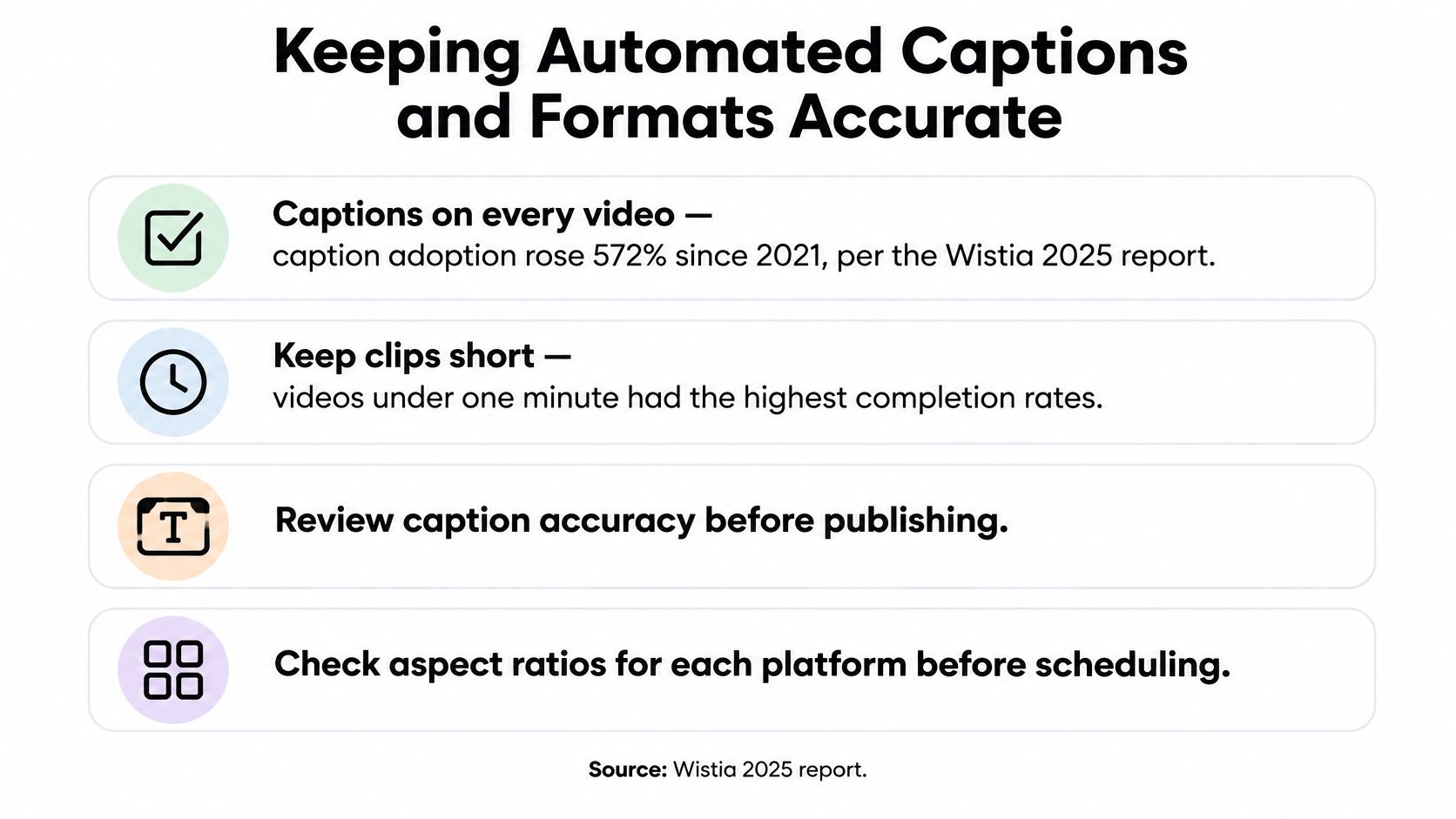
Treat captioning and formatting like factory quality assurance rather than a final checkbox. Set clear pass-or-fail thresholds before any clip hits your publishing calendar.
| Check | Target | Action If It Fails |
|---|---|---|
| Caption confidence | Flag any line below a confidence threshold you set | Re-edit or retype the line before publishing |
| Reading speed | Readable at speaking pace on two lines or fewer | Split the line or shorten the wording |
| On-screen text | Short phrases that stay visible long enough to read | Remove words or move detail into the voiceover |
| Names and terms | Matches the brand and product spelling list | Correct the term and add it to a custom dictionary |
| Length | Test under one minute against the full cut | Produce a shorter cut for the series |
Three Failure Cases That Break Viewer Trust Fast
Even strong speech-to-text models trip over predictable edge cases, and each failure erodes channel authority.
Mispronounced or misspelled brand names destroy credibility instantly. If your automated voiceover mangles a founder's surname or subtitles turn a technical acronym into gibberish, viewers assume nobody cared enough to watch the finished video before posting.
Dense blocks of on-screen text force viewers to choose between reading and watching the visuals. When four lines of captions cover the bottom third of a phone screen and collide with platform buttons on TikTok or Instagram Reels, people swipe past before the hook lands. For detailed technical steps on styling and timing readable overlays, check our walkthrough on automatic subtitles on video.
Weak opening context leaves muted viewers confused in the first two seconds. Pairing a clear headline visual with clean opening captions tells people exactly why they should stay, while preserving speaker labels and sound-effect cues keeps the story accessible for deaf and hard-of-hearing audiences.
Adapting Cuts and Search Wording Across Platforms
Cross-platform publishing works best as adaptation rather than blind duplication. Test a tight sub-minute cut against a fuller narrative version on the same network to see where viewers drop off.
Write platform-specific titles and descriptions rather than pasting identical copy everywhere. YouTube Shorts rewards direct search phrasing that mirrors how people query tutorials, TikTok discovery leans on conversational topic keywords spoken in the script and echoed in captions, and Instagram Reels relies on concise hook lines above the fold.
Review queue rule: Any automated video containing a low-confidence caption flag or an unverified proper noun routes straight to a human reviewer before it enters the publishing schedule.
Disclosing AI Use Without Losing Viewers
Many marketing teams treat AI disclosure like fine print at the bottom of a legal form, hoping nobody notices. That approach misses a widening trust gap between audiences and publishers. According to Typeform's 2026 AI data report, 59% of consumers believe brands should disclose AI-generated content, yet nearly half of marketers report publishing AI-generated work without disclosure and say they would do so again.
Governance inside companies lags even further behind adoption. The same report found that 42% of marketers say their company has no formal AI policy, and 20% of companies that do have a policy describe it as vague or still evolving. Without written rules, individual team members guess differently from week to week.
At the same time, transparency carries a real short-term trade-off that you should plan for instead of ignoring. A separate analysis cited in that report examined 87,362 AI-tagged posts from more than 20,000 creators and found that AI-labeled TikTok posts received less engagement than comparable non-AI posts, while the gap on Instagram was about 1%.
A Clear Decision Rule for Labeling Synthetic Media
Hiding synthetic production invites backlash the moment a sharp viewer spots an artifact, whereas slapping heavy warnings onto harmless minor edits creates unnecessary friction. Draw a clean line between two categories:
- Synthetic narration and generated imagery: Disclose clearly whenever a reasonable viewer could mistake generated scenes, illustrations, or voices for real-world documentary footage or a real human presenter.
- Materially altered footage of real people: Treat realistic digital likenesses, altered interviews, or synthetic scenes involving real individuals as a stricter category requiring explicit native platform labels and senior sign-off every time.
Each network enforces its own disclosure controls. Use TikTok's built-in AI-generated content toggle for realistic synthetic media, apply YouTube's altered or synthetic content label when scenes depict realistic people or events that didn't happen, and check Instagram's AI info tagging rules before scheduling.
Test concise disclosure phrasing on a small batch of clips rather than guessing how your specific audience reacts. Judge those tests by completion rate, shares, and follows rather than raw impressions. A slight dip in immediate clicks matters far less if transparent storytelling earns loyal subscribers who stick around.
Your One-Page AI Disclosure Policy
You don't need a legal committee to bring order to your channel. Draft a one-page internal policy this week covering three essentials:
- What gets labeled: List the exact asset types (synthetic voices, generated visuals, altered footage) that require native platform tags or description notes.
- What requires human editorial review: Specify that every script containing health, financial, legal, or product-performance claims gets human fact-checking before generation.
- Who signs off on wording: Name one person responsible for updating disclosure templates whenever TikTok, YouTube, or Instagram revises its labeling rules.
Transparency paired with sharp storytelling beats stealth automation over the long haul. Audiences forgive synthetic visuals far faster than they forgive feeling tricked.
Set Up Your First Automated Video Series
Putting everything together doesn't require an enterprise tech stack or months of onboarding. Start small with a single repeatable series so you can verify your workflow, calibrate your quality checks, and collect clean baseline metrics before scaling up.

For example, in a dedicated short-form platform like ClipCreator.ai, you can create your first video in under 2 minutes, pick your publishing days and times, and let the system handle creation through publishing once you connect a TikTok or YouTube account. Generation is the fast step; human review is where quality stays protected, so never skip inspection just because rendering finished quickly.
Seven Steps From Blank Slate to Scheduled Series
- Choose one repeatable format. Pick a single structure you can sustain for at least ten episodes, such as sixty-second customer myth-busters, historical micro-lessons, or themed narrative stories.
- Write a short brand brief. Document your narrator tone, visual aesthetic, target audience, approved terminology list, and banned claims on one page before generating a single prompt.
- Generate your first test video and run quality checks. Produce one clip from your brief, then audit caption confidence, reading pace, pronunciation of names, and aspect-ratio framing on a phone screen.
- Pass the pre-publish gate. Confirm four conditions before anything enters the queue: your brand voice is locked into the template, the visual style is approved, a human has verified captions and proper nouns, and your posting calendar is fixed.
- Connect your publishing channels. Link your TikTok or YouTube account if your software supports direct auto-posting, or export the finished HD file to upload manually where custom platform edits are needed.
- Lock in your publishing schedule. Pick specific days and times that match your audience's active hours, whether that means three clips per week or a daily slot, so the series builds viewer habit.
- Review the first batch and adjust one variable. After ten published videos, compare completion rate, engagement, follows, and cost per video against your starting baseline, then tweak one element for the next cycle.
If you'd like to watch how a complete automated setup moves from brief to scheduled posts in practice, the walkthrough below illustrates the workflow step by step.

Make one concrete decision today before opening any software: choose the single video format and weekly cadence you will commit to for the next ten uploads, and pick the one primary metric (completion rate, engagement rate, or click-through rate) that will judge your first batch. Once those two choices are written down, building the line becomes straightforward.
Ready to turn that first ten-video plan into a reliable weekly series without spending Sunday nights in an editing timeline? We built ClipCreator.ai to handle script generation, story-aligned visuals, natural voiceovers, timed subtitles, and scheduled publishing to TikTok and YouTube while keeping your brand voice and review checkpoints firmly in your hands. Visit the site today to build your first automated series and put a measurable video workflow in motion.

Create your first video in under 2 minutes
Pick a niche, and ClipCreator.ai generates and auto-posts faceless videos to your channels every day.
Join ClipCreator.ai