Video is no longer one content option among many. A 2025 industry roundup projects that video will account for 82% of all internet traffic, while 78% of people watch videos online weekly, 55% watch daily, and social videos are shared 1,200% more than text-and-image posts combined (video statistics roundup). That changes how brands teach, sell, entertain, and stay visible.
If you're training a new marketer, this is the first mindset shift to make. Social media video isn't just a format. It's the default language of modern platforms. People don't only read updates anymore. They watch explanations, product demos, reactions, tutorials, proof, and stories in-feed.
The second shift is just as important. A lot of that video no longer has to be filmed the old way. Faceless workflows, templated editing, AI voiceovers, auto-captioning, and scheduled publishing have turned video creation from a studio task into an operational system. For creators, agencies, educators, and small businesses, that means consistency is no longer reserved for teams with cameras, editors, and on-screen talent.
Why Social Media Video Is Non-Negotiable in 2026
HubSpot's 2025 State of Marketing report found that short-form video delivers the highest ROI of any social media format for marketers, which explains why video now shapes how brands earn attention, explain value, and stay remembered (HubSpot video marketing data).
For a new marketer, the key idea is simple. Social video is no longer a campaign add-on. It works more like the front door to the brand. People meet a company through a quick clip, learn from a tutorial, compare options through a demo, and decide whether the business feels credible from what shows up in-feed.
That is why video matters across the full customer journey. One format can introduce the brand, answer objections, reduce purchase anxiety, and keep existing customers engaged after the sale. Few content types can do all four jobs this efficiently.
Social video is now the platform default
TikTok, Instagram, YouTube, and Facebook all train users to expect movement, fast clarity, and mobile-first viewing. Static posts still matter, but they often play a supporting role. Video gets the first audition.
A useful way to understand this shift is to compare social feeds to storefronts. On a quiet street, a sign might be enough. In a crowded market, motion helps people notice you, understand you, and remember you before they scroll past. That changes planning. Teams are no longer asking for a few polished assets per quarter. They need a publishing system that can produce useful video repeatedly.
If your team is deciding where each format belongs, this overview of social media video platforms helps connect channel choice to content style. If you're comparing broader media formats, the guide on 2026 podcast operating model choice is a helpful example of how even podcast strategy now has to account for visual distribution.
Practical rule: If your team can explain something clearly in a meeting, you can probably turn it into a short social video.
Why this changes how businesses operate
The old bottleneck was production. Recording needed people, equipment, time, and editing support. That model still works for flagship campaigns, but it is too slow for brands that need steady weekly output.
The bigger shift in 2026 is operational. Faceless video workflows, templated editing, AI voiceovers, auto-captioning, stock footage libraries, screen recordings, and scheduled publishing let a business treat video like a repeatable process instead of a special event. That is a strategic change, not a creative shortcut.
For creators and companies, this opens a more scalable path to growth. A small team can turn one script into several assets, publish across multiple channels, and maintain consistency without depending on a founder, host, or on-camera specialist every time. In practice, that means video production starts to look less like filmmaking and more like content operations.
The profitable takeaway is straightforward. Regular, useful video usually beats occasional high-polish production in algorithmic feeds, especially when the workflow is built to run every week.
The Four Main Types of Social Media Video
Not all social video does the same job. New marketers get confused when they treat every clip like a mini commercial. A better approach is to sort videos by the conversation they're designed to create.
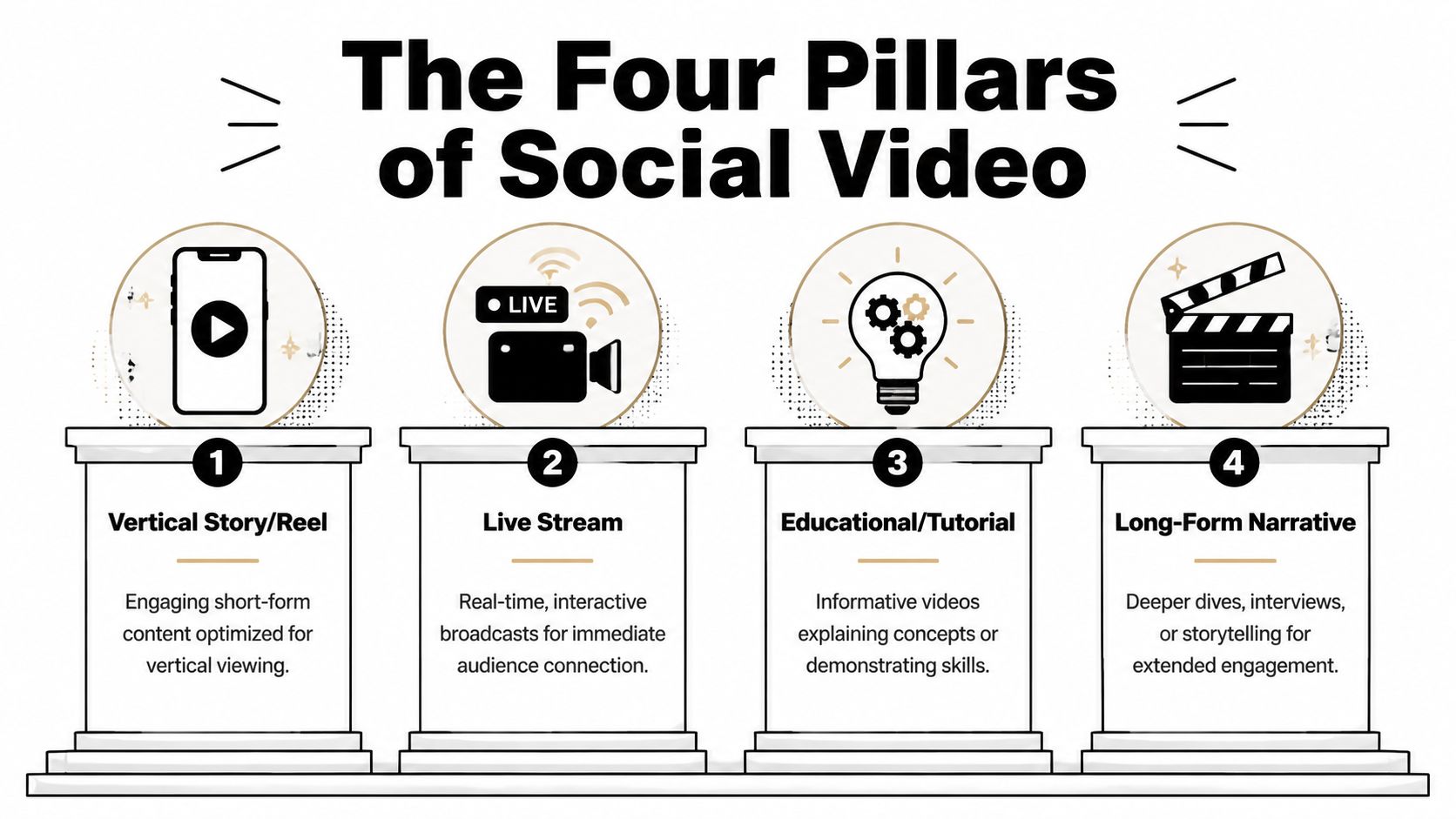
A useful starting point is this. Short-form digital video spending is projected to reach 111 billion** in 2025, up **12% year over year**, and average global digital video ad spend is projected to be nearly **35 per internet user in 2025 (2025 video marketing projections). Money follows attention, and that attention is split across a few core video formats.
Stories and disappearing updates
Stories are the casual check-in. They feel less polished, more immediate, and more personal. Use them when you want to stay top of mind without producing a centerpiece asset.
Good uses include:
- Behind-the-scenes moments that make a business feel active and human
- Quick reminders about launches, events, or limited-time updates
- Light interaction prompts like questions, polls, and reaction requests
Stories usually work best when the goal is familiarity, not deep explanation.
Short-form discovery clips
Reels, TikToks, and Shorts are your audition with strangers. They need a fast premise, a visual hook, and one clear takeaway. Through these, most brands win new reach.
If you need inspiration, this list of short video ideas is a practical way to turn broad topics into specific repeatable concepts.
Here are the jobs short-form clips handle well:
- Pattern interruption by opening with a sharp claim, visual contrast, or surprising statement
- Problem framing by naming a pain point the viewer immediately recognizes
- Proof and payoff by showing a result, lesson, or transformation quickly
Long-form educational or narrative video
Longer videos do a different kind of work. They hold attention after discovery has already happened. In this scenario, tutorials, interviews, explainers, and narrative breakdowns build authority.
A software company might use long-form video for onboarding walkthroughs. A coach might use it to teach a full framework. A founder might use it to explain industry shifts in more depth than a short clip can handle.
The strongest social strategy usually mixes fast discovery formats with slower trust-building formats.
Live video and real-time connection
Live streams create immediacy. They let viewers ask questions, react in real time, and feel present with the creator or brand.
Live works best when you need responsiveness. Think Q&A sessions, launch events, office hours, product walkthroughs, or community discussions. It's less controlled than edited video, but that's part of the value. The audience sees how you think, not just what you polished.
Mastering Platform-Specific Video Specifications
A strong idea can still fail if the upload looks cramped, blurry, cropped badly, or awkward in-feed. That's why social media video strategy needs a technical layer. Specs don't just satisfy platform requirements. They shape viewer experience.
Experts recommend filming in vertical format, keeping clips brief, and using 60 fps capture so final exports hold up better under Instagram and TikTok compression (social video filming recommendations). That one sentence explains a lot of what goes wrong in amateur uploads. People often film horizontally, export at the wrong frame rate, or treat every platform as if it's a regular video player instead of a mobile-first feed.
A quick platform comparison
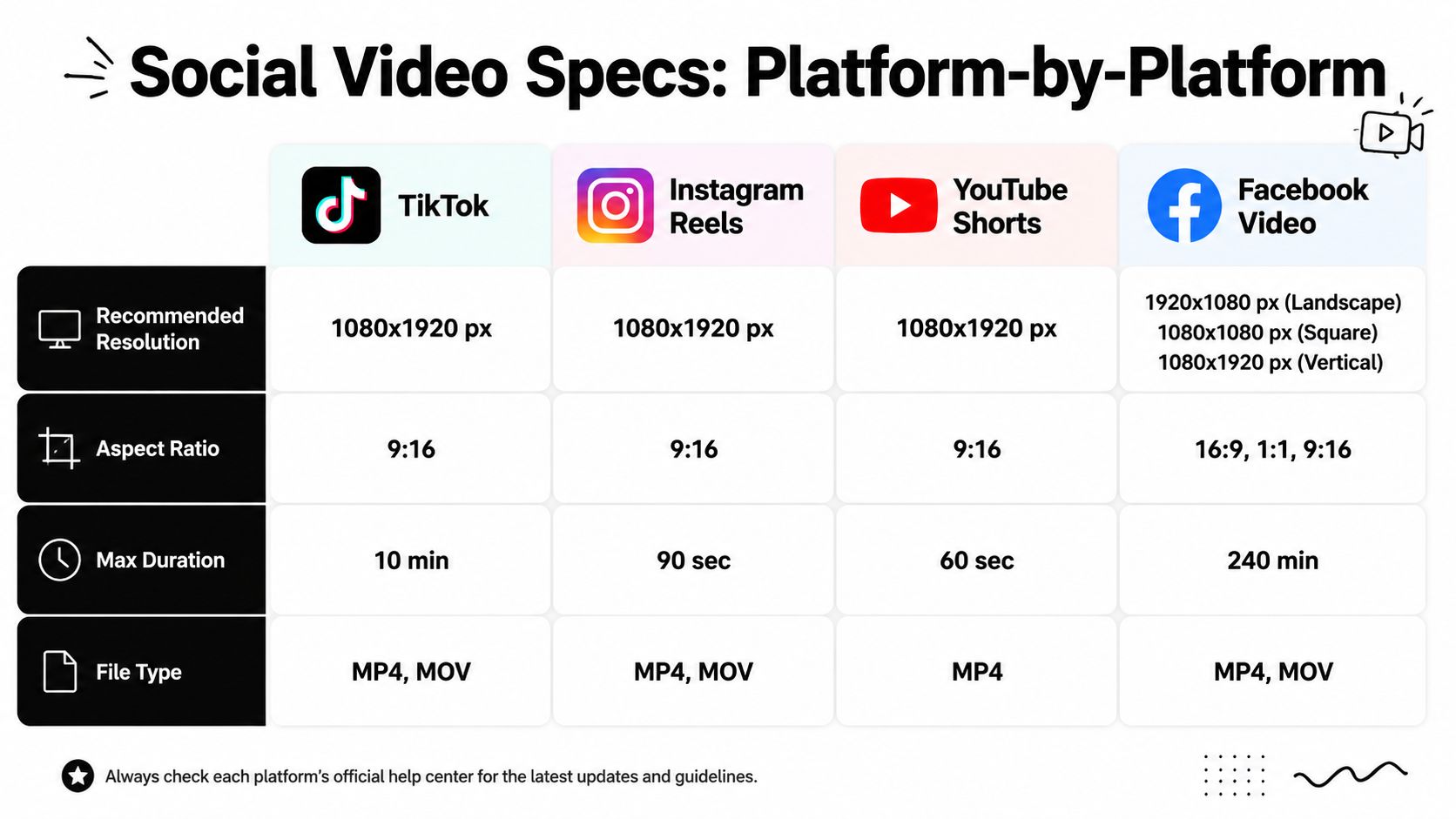
| Platform | Recommended setup | Why it matters |
|---|---|---|
| TikTok | 1080x1920 px, 9:16, MP4 or MOV, up to 10 min | Full-screen vertical is native to the feed |
| Instagram Reels | 1080x1920 px, 9:16, MP4 or MOV, up to 90 sec | Reels reward clean mobile viewing and quick pacing |
| YouTube Shorts | 1080x1920 px, 9:16, MP4, up to 60 sec | Shorts need instant clarity and tight framing |
| Facebook Video | 1920x1080 landscape, 1080x1080 square, or 1080x1920 vertical, MP4 or MOV, up to 240 min | Facebook supports more feed contexts and viewing styles |
If you're publishing Reels regularly, this reference on Instagram Reels dimensions is helpful because small framing errors can place text under interface elements or crop key visuals.
What these specs mean in practice
Most beginners memorize dimensions without understanding the logic. Here's the logic.
- 9:16 wins on phones because it fills the screen and removes distractions
- Brief videos work better in feed environments because people decide quickly whether to keep watching
- Higher motion clarity helps compression survive upload so fast edits, camera movement, and text transitions stay cleaner
That doesn't mean every video must feel frantic. It means every frame has to earn its place.
Common mistakes that hurt performance
A few production choices lower quality before the algorithm even has a chance to test the post:
- Tiny text placement that becomes unreadable on smaller screens
- Wide-shot framing that makes faces, products, or demonstrations hard to parse
- Letterboxing or pillarboxing that wastes screen space
- Overcomplicated visuals that look fine on desktop but collapse on mobile
Use the feed as your editing environment. If a frame isn't clear on a phone at arm's length, it isn't finished.
The faceless-video advantage here
Faceless creators often outperform camera-first teams on technical consistency because their workflows are built around fixed outputs. Template-based production naturally standardizes aspect ratio, caption position, pacing, and safe zones. That's one reason automated systems scale well. They remove the small formatting mistakes that can weaken every post.
Storytelling Techniques for High Engagement
Most social media video underperforms for one reason. It asks for attention before it earns understanding.
People in a feed don't give you much time. They need to know what the video is about almost immediately, why they should care, and what they'll get by staying. Existing guidance often stops at "keep it short," but the sharper idea is information density per second. The video has to communicate the premise, visual hook, and payoff early enough to work even without sound (silent-viewing and information-density guidance).
Build around Hook, Story, Offer
A simple framework helps.
Hook is the first instant of relevance. That might be a direct problem statement, a surprising visual, or a claim that creates tension.
Story is the explanation, example, or sequence that develops the point. In short-form content, this is usually compressed into a few beats instead of a full narrative arc.
Offer is the next action or takeaway. It could be a lesson, a product benefit, a perspective shift, or a call to comment, click, or follow.
A weak opening says, "Hi guys, today I'm going to talk about email automation."
A stronger opening says, "Most email automations fail before the first message sends. Here's where the setup breaks."
Design for silent viewing
A lot of viewers watch with sound off, especially in public or while multitasking. That's why text isn't decoration. It's structure.
Use on-screen text to do one of three jobs:
- Clarify the premise so the viewer can orient instantly
- Guide pacing by breaking the message into clean visual beats
- Deliver payoff by reinforcing the key result or insight
Don't dump a paragraph on screen. Give the eye one idea at a time.
If the viewer can't understand the clip on mute, the script isn't finished.
Why faceless storytelling works
Many creators assume they need to be on camera to build trust. Sometimes that's true. Often it isn't.
Faceless video works when the content itself carries the value. Think narrated explainers, software walkthroughs, animated text stories, list-based educational clips, or product visuals with voiceover. In these formats, the viewer isn't looking for personality first. They're looking for clarity.
A practical example looks like this:
- Open with a claim in large text.
- Pair it with a relevant stock shot, screen recording, or animated visual.
- Add voiceover for tone and continuity.
- Use kinetic captions to keep the eye moving.
- End with one takeaway or action.
This style is especially useful for educators, niche publishers, local businesses, and agencies managing multiple brands. It removes filming friction while keeping output consistent.
Camera angle still matters, even without a face
If you do film original footage, match the angle to the job of the clip. Eye-level framing often feels more trustworthy. Close-ups improve product clarity. POV can increase immersion. Overhead shots help tutorials. The most cinematic choice isn't always the best one. In feed environments, clarity often beats drama.
Modern Creation Workflows From Manual to Automated
The question isn't whether to make social media video. It's how to build a workflow your team can sustain.
Teams often fall into one of three models. The right one depends on what you're optimizing for: control, speed, or scale.
Manual production
This is the traditional route. You script, film on a phone or camera, transfer footage, edit in software like Adobe Premiere Pro, Final Cut Pro, or CapCut, then export and publish.
Manual production gives you the most creative control. It's ideal when performance depends on a recognizable face, product handling, or custom cinematography. It also creates the most operational drag. One missed filming day can break your publishing rhythm.
Manual workflows often involve more hidden work than new marketers expect:
- Pre-production such as scripting, shot lists, props, and location setup
- Production including lighting, audio, multiple takes, and file management
- Post-production with editing, captions, thumbnails, revisions, exports, and scheduling
Templated creation
The middle ground is template-first production. Tools like Canva and CapCut let teams reuse layouts, transitions, brand kits, lower thirds, and caption styles. This cuts editing time without removing humans from the process.
For many small businesses, this is the first big efficiency leap. Instead of reinventing every video, you standardize the parts that shouldn't change. The intro style stays familiar. Captions stay readable. Brand colors stay consistent.
Music selection also gets easier when you work from a repeatable system. If you need legal-safe options, this 2026 free background music guide is a useful reference for sourcing tracks without adding licensing confusion to your workflow.
Automated faceless production
Automation changes the job from "edit every clip by hand" to "design the system that produces clips consistently."
In an automated workflow, the creator supplies the topic, prompt, or template. The system handles some combination of script drafting, visuals, voiceover, subtitles, formatting, and publishing. At this stage, faceless content becomes a serious operating model rather than a side tactic.
A platform like ClipCreator.ai, for example, can generate short faceless videos for TikTok, YouTube, and Instagram using prompts or templates, then pair scripts with visuals, voiceovers, subtitles, and publishing steps. That's useful for teams producing recurring educational clips, story-based content, or brand explainers without booking talent for every post.
The strategic value isn't novelty. It's repeatability.
Automated video creation works best when the format is stable, the message is clear, and the brand needs consistent output more than custom cinematography.
A quick product walkthrough helps make that concrete:

How to choose the right workflow
Use this decision lens:
| Priority | Best-fit workflow |
|---|---|
| Maximum creative control | Manual |
| Balanced speed and brand consistency | Templated |
| High output and operational scale | Automated |
A founder-led personal brand may stay manual because audience connection depends on the person. A local service business may choose templates for weekly offers and testimonials. An educational channel, publisher, or agency may lean automated because the goal is to publish frequently across topics and accounts.
What matters is matching the workflow to the business model. The wrong setup isn't just inefficient. It usually leads to inconsistency, and inconsistency is where most social strategies collapse.
Smart Repurposing and Publishing Strategies
Publishing the same file everywhere isn't repurposing. It's copying. Good social media video strategy adapts one idea into multiple native executions.
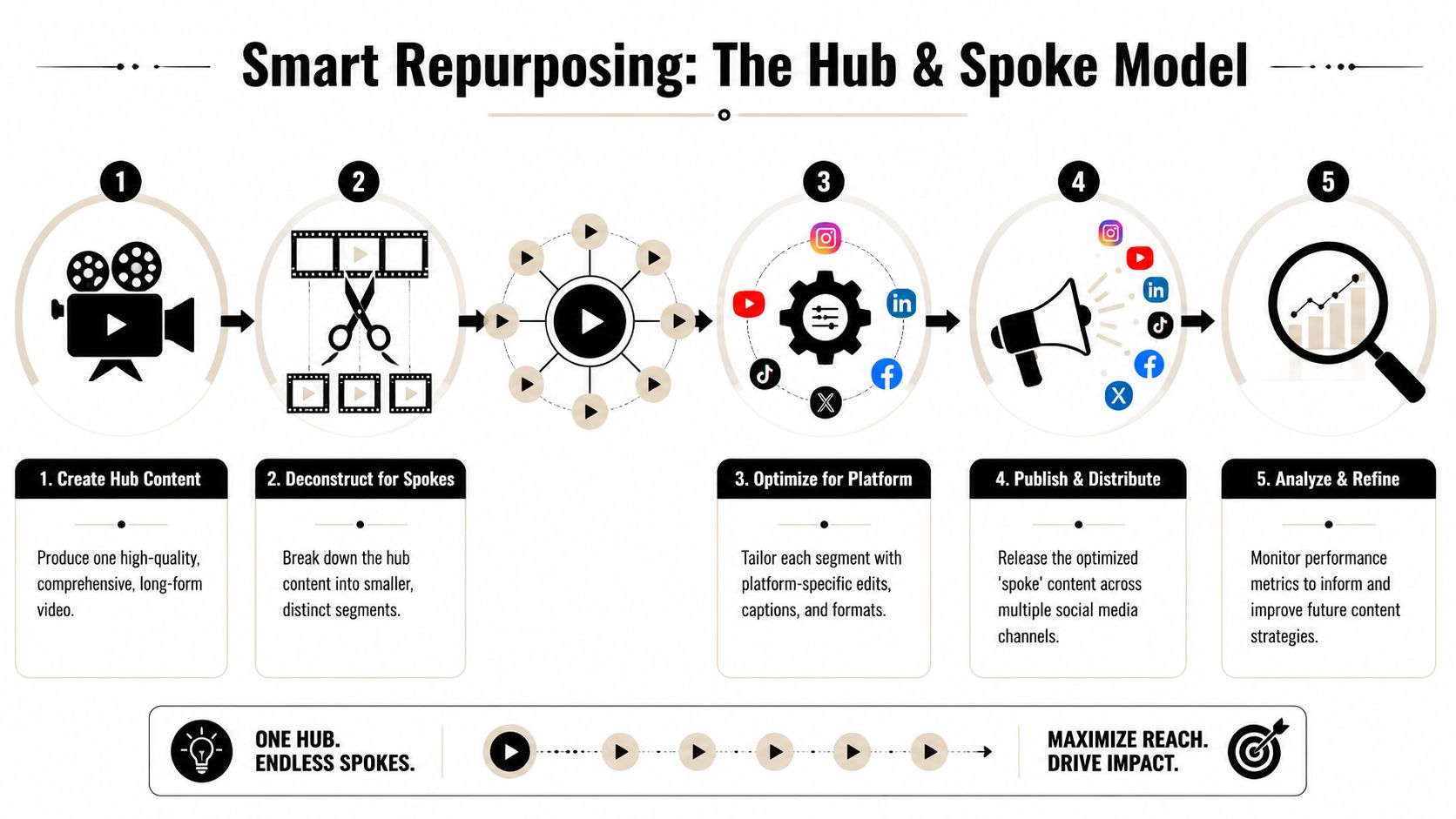
The simplest model is hub and spoke. You start with one central asset, then break it into smaller platform-specific pieces.
Start with the hub
Your hub content is the fullest expression of the idea. That could be:
- A webinar recording with multiple teachable moments
- A podcast interview with several quotable answers
- A product demo that answers different buyer questions
- A script pack for a faceless video series on one topic
The hub doesn't have to be public first. It just has to contain enough substance to spin into several smaller posts.
Build the spokes
Now adapt by platform behavior, not just by file size.
A single teaching point can become:
- A TikTok clip with a hard hook and faster pacing
- An Instagram Reel with stronger caption styling and trend-aware audio choices
- A YouTube Short with a clearer search-friendly title angle
- A carousel post built from the same script if the lesson works better as swipeable text
- A Story sequence that asks the audience a question related to the clip
New marketers often get tripped up. They think repurposing means trimming. Often it means reframing.
A simple publishing rhythm
You don't need a chaotic calendar. You need a reliable one.
Try this operational pattern:
- Choose one core topic based on product questions, customer objections, or recurring themes.
- Create one strong source asset in manual, templated, or automated form.
- Pull out multiple angles from that asset, each with its own opening line.
- Customize the packaging for each platform before scheduling.
- Review results weekly and promote the formats that hold attention best.
Repurposing isn't about squeezing more posts out of one idea. It's about matching one idea to different viewing contexts.
Consistency matters here because audiences rarely see every post. A systemized schedule helps you stay visible without reinventing your content strategy each morning.
Measuring Video Performance That Matters
Many focus initially on views. Views matter, but they're incomplete. A video can get attention and still fail to educate, persuade, or drive action.
A better approach is segmented analysis. Performance should be broken down by platform, audience demographic, and content format, rather than lumped into one dashboard, because comparison across video, static, and carousel content helps isolate which creative variables influence reach, CTR, and conversion (segmented social analytics guidance).
What to look at instead of raw views
Use metrics as diagnostic clues.
- Retention signals show whether the opening matched the promise
- Watch time patterns reveal where pacing drops or confusion starts
- Clicks and conversions tell you whether the content moved beyond entertainment
- Comments and saves can indicate relevance, clarity, or future intent
A short, faceless explainer may not earn the same visible reaction pattern as a personality-led rant. That doesn't make it weaker. It may be doing a different job.
Compare like with like
Don't compare everything against one global average inside your own account. Compare:
- Short-form versus short-form
- Tutorials versus opinion clips
- Faceless explainers versus on-camera videos
- Platform-native versions of the same idea
That kind of analysis helps you answer practical questions. Did the hook work better as a question or a statement? Did close-up product footage beat talking-head delivery? Did a caption-heavy version improve comprehension?
The goal isn't perfect attribution. It's better decisions.
What a new marketing hire should learn fast
Treat analytics as a creative feedback loop, not a report card. When a video underperforms, ask what part failed: the opening, the clarity, the pacing, the packaging, or the platform fit. When a video works, document the structure so you can repeat it intentionally.
That habit is what turns social media video from random output into a growth system.
If you want a simpler way to produce faceless short-form content at a steady pace, ClipCreator.ai is built for that workflow. It can help teams generate scripts, visuals, voiceovers, subtitles, and publishing-ready videos for TikTok, YouTube, and Instagram, which is useful when consistency matters more than filming every clip from scratch.

Create your first video in under 2 minutes
Pick a niche, and ClipCreator.ai generates and auto-posts faceless videos to your channels every day.
Join ClipCreator.ai

