Reels generated 2.25 times the reach of single-image posts in Buffer's analysis of more than 4 million Instagram posts published from January 2022 through October 2024. That's a reason to make short video, not a promise that any clip will find an audience. Reach gets someone into the room. Your opening, delivery, and ending determine whether they stay and pass it along.
Treat every short Instagram video as one production system: a file that displays correctly, an opening that makes a clear promise, and a payoff worth sending or saving. Judge the result by completion and shares and saves relative to reach, not by views or likes alone.
Instagram Short Video Specs at a Glance
The technical values below follow Slice Media's social video specifications, with the duration milestone attributed separately.
Instagram short video specs for 2026
| Specification | Recommended value | Why it matters |
|---|---|---|
| Aspect ratio | 9:16 | Fills the vertical phone screen without black bars |
| Resolution | 1080 x 1920 px | Matches the standard vertical master |
| Maximum width | 1920 px | Upper limit listed for uploads |
| File container | MP4 or MOV | Accepted upload formats |
| Video codec | H.264 or HEVC, progressive | Supports compatible playback |
| Audio codec | AAC | Standard mobile audio delivery |
| Frame rate | 23 to 60 fps, about 30 fps by default | Balances motion and file size |
| Video bitrate | Up to roughly 25 Mbps | Avoids unnecessarily heavy exports |
| Maximum length | Up to 3 minutes, a limit reached in January 2025, according to MarketerCoffee's Reels history | Length should earn retention, not fill time |
Compose vertically from the start. A square or portrait-feed export doesn't use the same canvas as a full-screen Reel. Depending on the viewing surface and crop settings, you can end up with unused space or missing content.
Keep faces, demonstrations, and essential words away from the edges. The Instagram Reels dimensions guide is useful when preparing a reusable editing canvas rather than correcting each clip individually.
Build a delivery preset
Save an export preset in CapCut, Adobe Premiere Pro, or DaVinci Resolve, then inspect the exported file rather than trusting the preset name. The maximum duration is a ceiling, not an editorial target. I'd start with the shortest cut that delivers a complete answer.
Teams adapting creative for paid placements can also use AdCrunch's spec guide for multi-account media buyers to separate organic production decisions from placement-specific delivery checks.
Before uploading:
- Confirm the canvas: Check the exported dimensions, not just the project settings.
- Confirm the file: Inspect the container and codecs in the export summary.
- Check a phone: Play the actual file and look for cropped subjects, unreadable words, and unexpected borders.
How to Shoot and Edit a Short Instagram Video
Start with an answer worth watching, not a folder of footage you hope to turn into a story. For a product demonstration, show the task the product solves. For a faceless lesson, choose visuals that explain the narration rather than merely decorating it.
Use this production flow to organize the work before opening your editor.
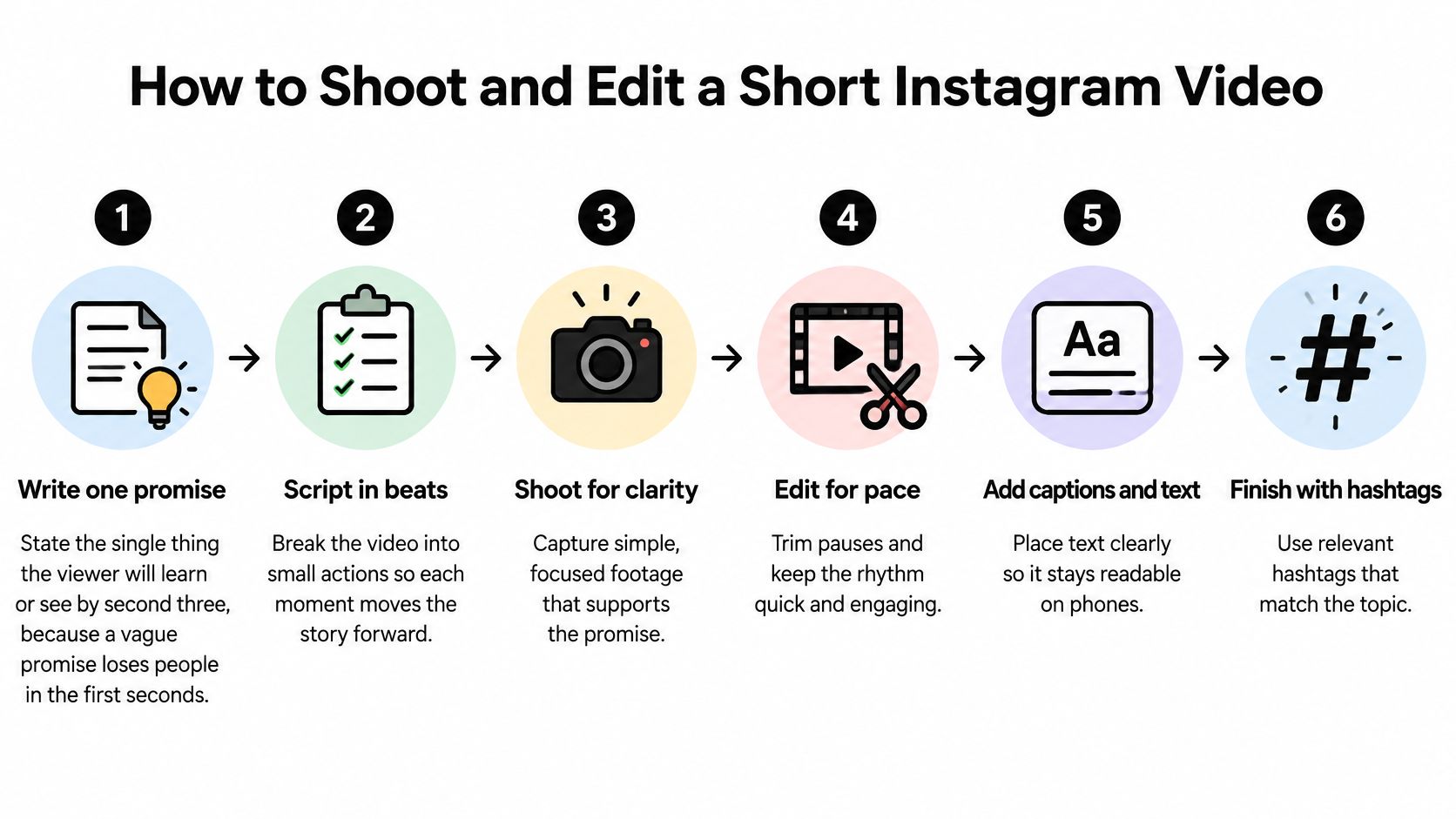
Build the cut around one promise
- Write one promise. Finish this sentence before recording: the viewer will leave knowing how to do this specific thing. A general topic such as better product photography isn't a promise; showing how to remove a distracting background is.
- Script in beats. Give each sentence a job: introduce the problem, show the action, explain the result, or resolve the question. If consecutive lines make the same point, keep the stronger one instead of covering the repetition with extra footage.
- Frame for the final canvas. Leave room for subtitles while recording, and keep the important action visible without requiring a wide crop. The common mistake is shooting a beautiful horizontal demonstration whose hands, tools, or product labels disappear in the vertical version.
- Make the opening concrete. Start with a visible change, a useful question, or the finished result that you'll explain. Skip the logo animation and avoid a mysterious cold open that asks strangers to keep watching without telling them why.
For a hypothetical shop selling reusable bottles, the opening could show a leaking lid beside a correctly seated seal. That establishes a practical problem immediately, without a spoken introduction to the company. AdCrafty's Reels tips for ecommerce brands can help when translating this approach into product-led creative.
Finish for mobile viewing
- Edit for progression. Trim dead air, repeated gestures, and shots that continue after the viewer understands them. Add a close-up, diagram, or alternate angle when it clarifies the next idea, not because a timer says the screen needs another cut.
- Mix speech first. Set the voiceover at a comfortable listening level, then bring music underneath it. A track that sounds subtle through headphones can still mask consonants on a phone speaker, so don't approve the mix on headphones alone.
- Complete the words, then export. Finalize subtitles, on-screen labels, the post caption, and relevant hashtags before checking the finished file. Export a clean master without another platform's watermark, then watch carefully to confirm that the argument survives without narration.
Editing rule: Remove anything the viewer must sit through before receiving the value you promised.
When using a walkthrough alongside your own edit, pause at each production decision and apply it to your footage rather than copying its pacing automatically.

Writing Captions, On-Screen Text and Hashtags
Place the words before polishing their style. Keep essential text inside the central safe area, clear of the action buttons on the right and the caption interface near the bottom. A title that looks balanced in an empty editing canvas can become unreadable once Instagram adds its controls.
Subtitles should appear with the spoken phrase, not trail behind it. Correct automatic transcription manually, especially product names, technical terms, and words whose meaning changes with punctuation.
Make each text element do a different job
Use on-screen labels to identify what viewers should notice and subtitles to carry the spoken explanation. Don't place a large headline, a detailed diagram, and dense subtitles over the same action. If everything competes for attention, simplify the frame before shrinking the type.
Break subtitle lines at natural phrases. Keep a modifier with the word it describes, and avoid leaving a short stranded word on its own line. Check readability at normal phone size rather than enlarging the editor preview.
Prepare the text alongside the footage so you can judge both together.
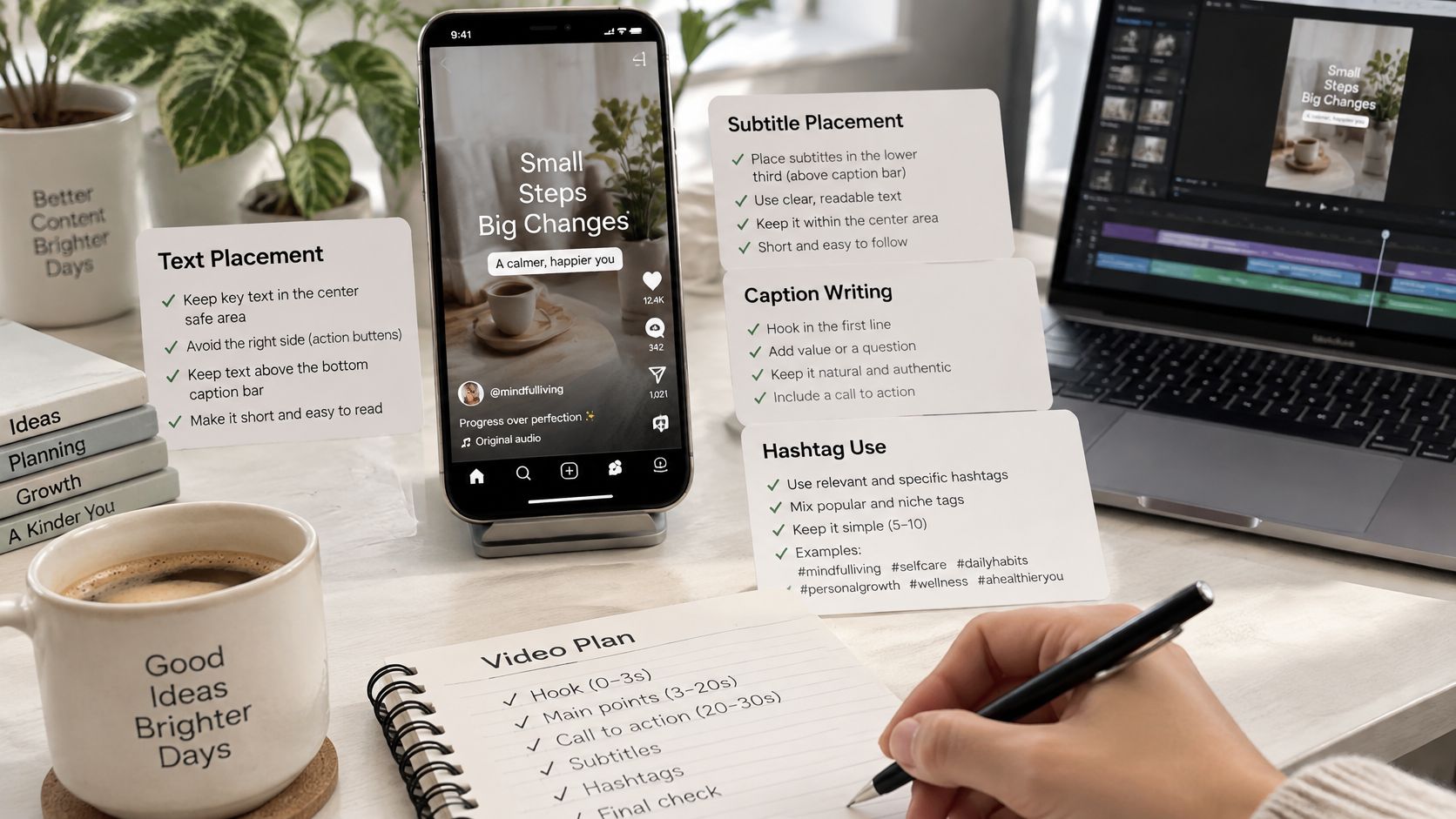
Package the lesson clearly
- Post caption: Put the payoff or the question being answered in the opening line. Use the remaining space for qualifications, a useful summary, or context that would slow the video.
- Hashtags: Choose a small set of specific topic tags rather than a long stack of broad discovery terms. Treat them as labels, not a substitute for a clear subject.
- Cover frame: Select an image and title that explain the clip without requiring it to play. Preview the grid crop before approving it.
Say an educator makes a micro-lesson about the difference between revenue and profit. Put those terms beside a simple worked example, repeat the distinction in the caption's opening line, and choose a cover that names the comparison.
The viewer should understand the lesson's subject with sound off. They shouldn't need to read a miniature essay while also following the demonstration.
Formats That Get Sent and Saved
A viewer considering a private share has a recipient in mind. A viewer saving a video has a future task in mind. Design for one of those decisions, rather than ending every clip with a general request for engagement.
SocialPilot's Reels algorithm coverage identifies watch time, sends per reach, and likes per reach as important signals, while describing Reels as a discovery surface for reaching non-followers. Saves add a separate editorial question: did you make something useful enough to reopen?
Give the viewer a reason to keep it
A checklist works when the steps are usable without your explanation. A recording checklist might show lens cleaning, framing, microphone placement, and a playback check. Leave the final summary readable so the saved video remains practical.
A niche warning helps someone prevent a recognizable mistake. Show the symptom, explain the cause, and demonstrate the correction. An export warning is more useful when viewers can see the damaged crop beside the corrected version.
A teaching moment gives someone language they can repeat. Name the term, show an example, then end with a concise explanation that a viewer could pass to a colleague.
A specific story earns its ending through a resolved situation. For example, follow an educator turning a confusing diagram into a clear lesson, then reveal the change that made it understandable. Don't replace the resolution with a vague motivational line.
Browse Instagram Reels examples for structural ideas, then adapt the reason someone would forward the clip, not just its visual style.
A useful ending tells the viewer who else needs the information or when they'll need it again.
Write the handoff before recording
Identify the audience in the opening and the recipient in the ending. A crop tutorial could close by asking viewers to send it to the teammate who prepares their exports. A checklist can invite them to save it for their next recording session.
If music competes with that final instruction, remove the music. The handoff matters more than maintaining a trend.
Metrics That Show a Short Video Is Working
A high view count can hide a weak video. It tells you that playback happened, not whether the right people understood the message or acted on it.
Instagram's ranking explanation describes predictions including whether someone will watch a Reel to completion, reshare it, like it, or visit its audio page. That's a behavioral system, not a simple formula based on follower count.
Keep a compact performance scorecard
| Metric | What it helps diagnose |
|---|---|
| Average watch time | How much viewing the clip earns |
| Completion rate, where available | Whether viewers reach the payoff |
| Shares per reach | How often reached viewers pass it along |
| Likes per reach | Positive response relative to distribution |
| Saves per reach | Usefulness relative to the audience reached |
| Profile visits | Interest in the creator beyond the clip |
Use the metric labels available in your account. If Instagram exposes aggregate shares rather than a separate sends measure, record shares and don't relabel them as private messages.
Calculate each per-reach measure using the corresponding action count divided by accounts reached. Keep total saves too, but use saves per reach when comparing clips with different distribution.
Test creative decisions, not folklore
Work in small batches on a cadence you can sustain. Change one variable: the opening line, the duration, or the final takeaway. Keep the topic and production approach similar enough that you can make a useful comparison.
Don't choose a winner solely because its completion rate increased after a drastic shortening. You may have removed the explanation that made the clip worth saving. Likewise, a shared joke may reach widely without generating interest in your educational or commercial offer.
The Instagram Reels algorithm guide can help you separate ranking signals from production decisions. Your working test is whether completion improves alongside sharing, while saves and profile activity remain relevant to your objective.
Measurement caution: A stronger result on one post is a reason to repeat the test, not proof that you've found an algorithm shortcut.
There's no universal completion percentage in Instagram's cited guidance that guarantees distribution. Compare against your own recent, similar posts, and allow the same observation window before judging each result.
Fixing Common Short Video Problems
Read the symptom before rebuilding the video. A slow opening, an unclear takeaway, and a damaged export require different fixes. Reshooting everything makes it harder to learn which change helped.
Use this table to identify the smallest useful intervention.
Short video symptoms, causes and fixes
| Symptom | Likely cause | Fix |
|---|---|---|
| Black bars or cropped subject | Wrong aspect ratio | Re-export using the vertical master preset |
| Captions hidden by buttons | Text outside the safe area | Move on-screen text into the central area |
| Blurry picture | Low-quality export or upscaled source | Export from the original footage at an appropriate bitrate |
| Dialogue hard to hear on phone | Music masks speech | Lower music under the voiceover and recheck on a phone |
| Upload fails | Unsupported container or codec | Re-export using the compatible MP4 preset |
| Many views, few saves or shares | Weak or irrelevant payoff | End on a takeaway worth sending to a specific person |
| Viewers leave in the opening | Slow or vague promise | Lead with the useful result or a meaningful visual change |
Try the cheapest creative fix first
For an opening problem, replace the introductory line and first shot in the next test. Keep the explanation intact so you can see whether the new entrance helps viewers reach it.
For weak sharing, inspect the substance before adding a stronger request. Asking people to save an incomplete checklist won't make it useful. Supply the missing instruction, make the summary readable, or narrow the audience.
An audio problem needs a mix adjustment, not a faster script. Listen through the phone's speaker at an ordinary volume, and check whether every word remains intelligible during the loudest part of the music.
Re-export when the file is at fault
Return to the original footage rather than repeatedly exporting an already compressed download. Check the timeline canvas, source scaling, text placement, and delivery preset before creating the replacement.
A higher bitrate can't restore detail that was never captured. If the original image is soft, replace that shot or simplify its role rather than enlarging it further.
Don't interpret weak engagement as a creative verdict while the file has visible or audible faults. Once playback is clean, change a single creative variable so the next comparison stays useful.
Publish a Test Video This Week
Choose a question people already ask you. A repeated customer question, a confusing lesson term, or a common setup mistake gives you a defined audience and a concrete answer. Don't start with a broad theme such as business growth or better learning.
Draft a compact explanation with the promise in its first sentence. Identify the visual that proves the answer and the final takeaway someone could send to a colleague.
Use a simple production checklist
- Prepare the assets: Capture or generate vertical visuals with space for the words and interface.
- Finish the explanation: Add timed subtitles, check technical terms, and remove redundant narration.
- Package the post: Write a payoff-led caption, relevant hashtags, and an understandable cover.
- Inspect the export: Use your saved delivery preset and check the actual downloaded file.
- Approve on a phone: Watch, then listen through the speaker. Fix anything that changes the meaning.
If assembly is the bottleneck, we offer an optional starting point with ClipCreator.ai: create your first video in under two minutes from a pre-made story type or custom prompt, with automatically added subtitles. Download the generated video, complete the same phone check, and upload it to Instagram manually.
Run one three-video test
Publish your first video and two related variations on a steady cadence. For this initial test, change only the opening. Keep the main explanation and ending comparable so you're not trying to interpret several edits at once.
Record the same scorecard for each post after an equal observation window. Look for an opening that gets more viewers through the explanation without weakening the reasons to share or save it.
Keep the better version, then test the ending in your next batch. That's a manageable production habit: make a clear promise, deliver it cleanly, and improve one decision using the response you receive.
Visit ClipCreator.ai to turn a story prompt into a faceless video with story-aligned visuals, narration, and subtitles. Use it to prepare your first test file, then review it on your phone and publish it to Instagram with a clear promise and a sendable ending.

Create your first video in under 2 minutes
Pick a niche, and ClipCreator.ai generates and auto-posts faceless videos to your channels every day.
Join ClipCreator.ai