
It's 8:47 p.m. You've read the same three books all week, your child wants a story about a nervous moon or a rabbit who loves trains, and you're too tired to invent one from scratch. A bedtime story AI tool can turn that request into a fresh tale in moments, but the useful question isn't whether it can produce words. The useful question is what it produces, how safely it produces it, and where a human still needs to guide the result.
For creators, the same system can turn one story idea into narration, illustrations, captions, and a faceless short video. That makes bedtime story AI relevant to families, educators, publishers, and social-video teams. It also creates responsibilities around child safety, privacy, quality, and the role of human connection in a bedtime routine.
What Bedtime Story AI Actually Is
Bedtime story AI is more than a chatbot that writes a paragraph about a dragon. It's a connected set of generative tools that can create a narrative, narrate it aloud, illustrate its scenes, and assemble those pieces into an audio or video experience.
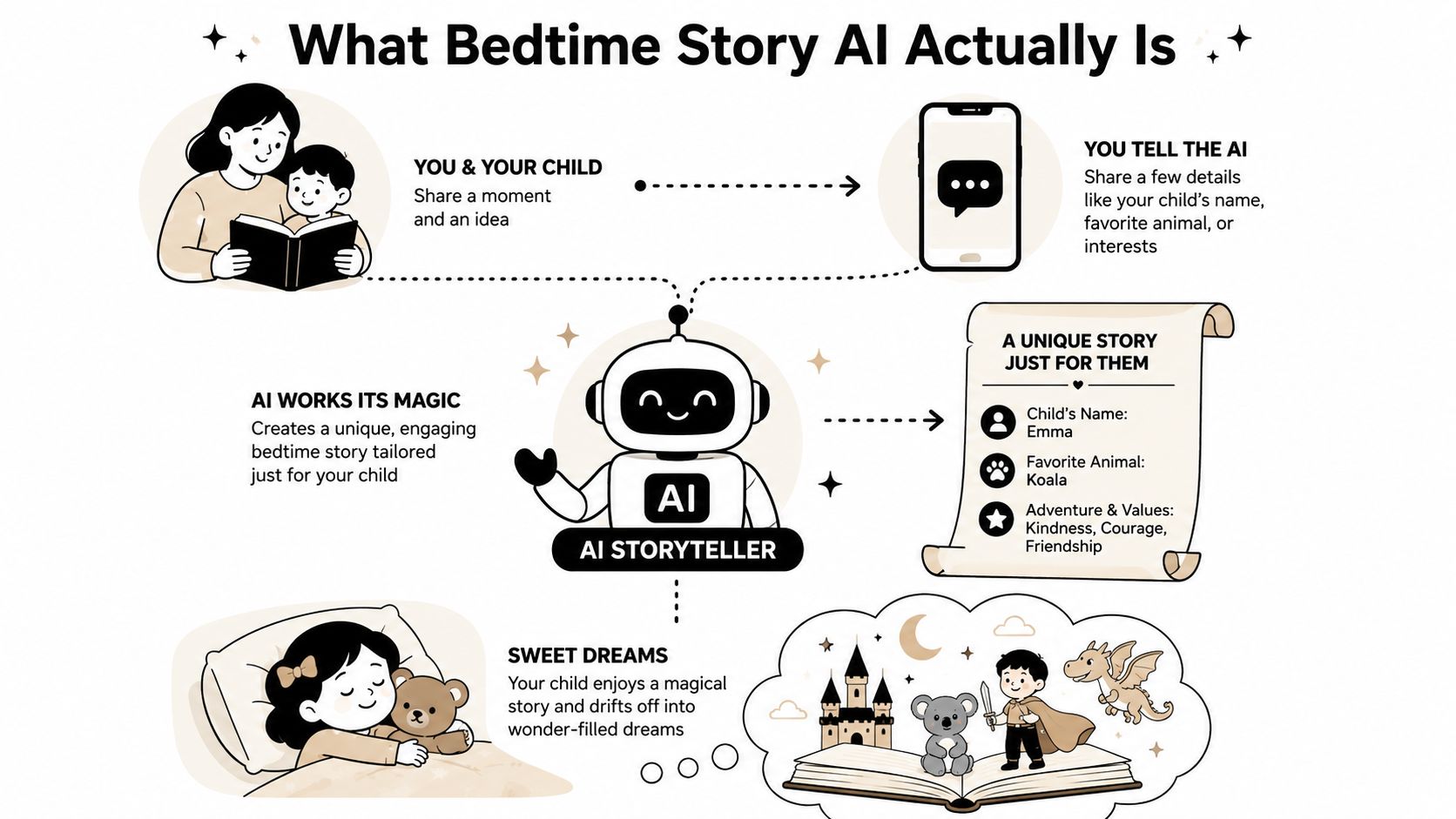
A parent might enter a request such as, “Write a gentle story for a young child about a cautious fox visiting a quiet lighthouse. Keep the language simple, avoid danger, and end with sleep.” The language model turns that brief into a story. A text-to-speech system can then read it in a calm voice. An image generator may create a lighthouse, fox, and moon for each scene, while a video editor combines the assets.
The output can sit anywhere on a spectrum:
- Text only, for a parent to read and adapt.
- Audio story, with synthetic narration and optional sound design.
- Illustrated storybook, with generated pictures and on-screen text.
- Faceless short video, using voiceover, captions, gentle motion, and story-aligned visuals.
What separates a purpose-built bedtime story AI setup from a general assistant is the control layer around the writing. A well-designed tool should accept an age range, story length, emotional intensity, vocabulary level, character details, and prohibited topics. It should also check the generated draft instead of assuming that a friendly prompt guarantees a suitable result.
That distinction matters because children's stories need more than grammatical sentences. Characters should remain recognizable, the emotional arc should stay calm, and the ending should resolve rather than escalate. Creators interested in how storytelling formats are evolving can also browse the Xholic AI storytelling collection for broader creative references.
The first practical step is to identify the output you need. A tired parent may want a short script to read together. A creator may need a repeatable production asset that can become a narrated social video. The same underlying model can support both, but the safety checks, editing process, and publishing decisions shouldn't be identical.
How the Technology and Pipeline Work
A bedtime story AI product usually works as a pipeline. Each layer has a different job, and a failure in one layer can affect everything that follows.
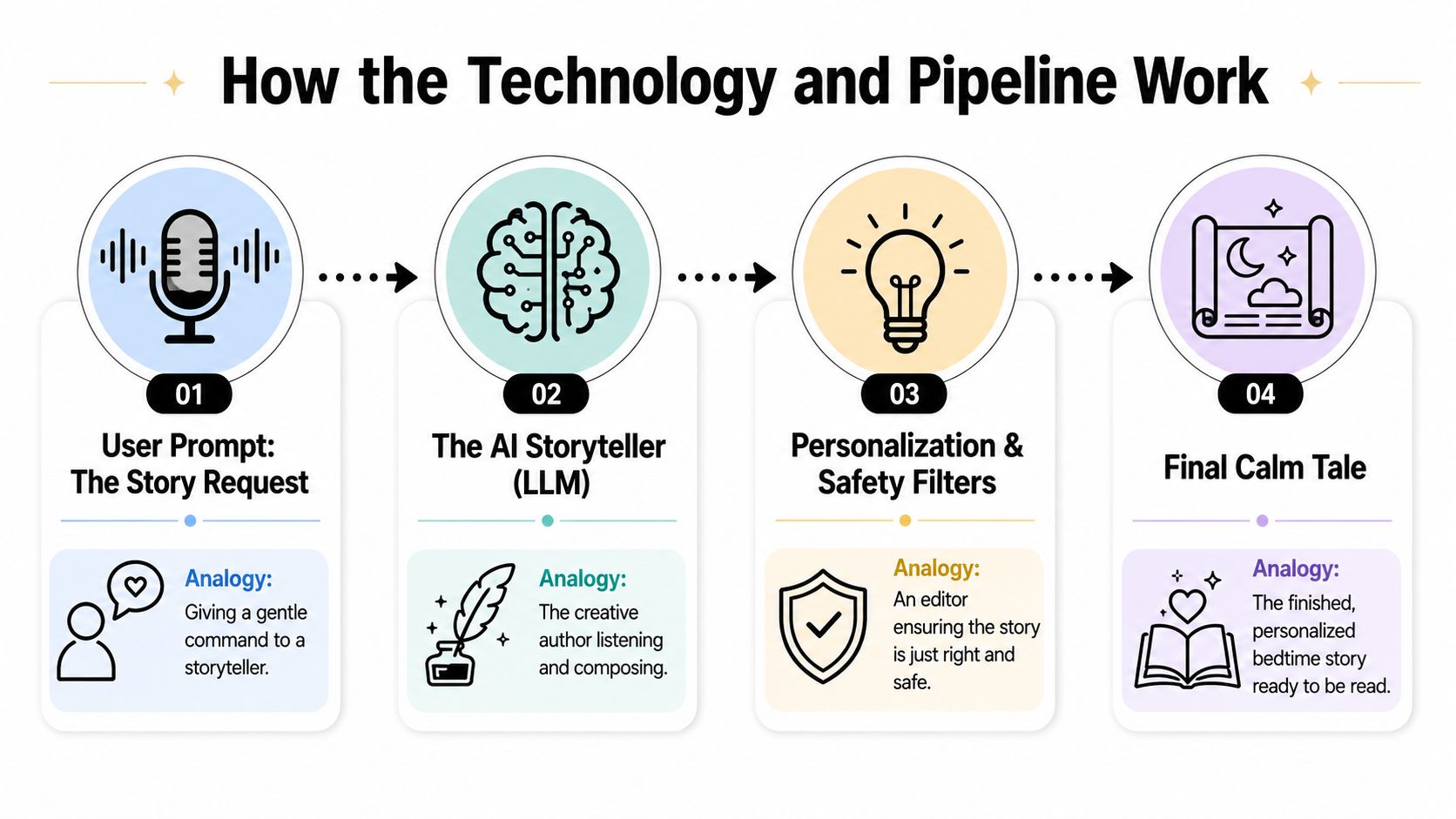
1. The language model drafts the story
The large language model acts like a screenwriter working from a brief. It receives details such as the child's approximate reading level, the setting, the characters, the desired mood, and the ending. Rather than asking for “a good story,” an orchestration layer can request a structured result with a title, scene list, narration, image prompts, and caption text.
That structure helps downstream tools. If the model produces one long block of prose, a creator still has to decide where scenes begin and end. If it returns clearly separated scenes, the image and video stages can use those boundaries.
2. Safety systems inspect the request and draft
Safety shouldn't be treated as one final button. Stronger architectures use restricted inputs, pre-generation filtering, model moderation, post-generation screening, and parent review controls. The Amazon Science PG-STORY dataset and evaluation work describes sentence-level and discourse-level safety annotations, which is useful because a story can be harmless sentence by sentence yet troubling in its overall progression.
A filter might flag violence, frightening imagery, unsafe instructions, sexual content, or a character placed in an unsuitable situation. The system can refuse the request, revise it, or send it to a guardian for review.
3. Text-to-speech creates the voice
Text-to-speech is the voice actor. It converts the approved script into narration, with choices for pace, warmth, pronunciation, pauses, and character distinction. A technically accurate voice can still sound wrong for sleep if it reads too quickly or adds dramatic emphasis at every sentence.
This stage also introduces practical constraints. Long scripts can increase processing time, and a voice may pronounce invented names inconsistently. Splitting the script into scene-sized segments makes it easier to correct one line without regenerating the entire production.
4. Images and video turn the story into a format
An image generator can create a visual for each scene, but consistency requires deliberate prompts. The fox should keep the same colors, clothing, proportions, and expression across the lighthouse, beach, and bedroom scenes. Without those controls, the character may subtly change from image to image.
The final assembly stage works like a video editor building a reel from prepared assets. An orchestration tool passes the script to the voice model, sends scene descriptions to the image model, synchronizes narration with visuals, adds captions and music, and exports the finished file. Token limits, model latency, failed image calls, and timing mismatches all need handling. Automation reduces manual work, but it doesn't remove the need for quality control.
Benefits and Honest Limitations
Bedtime story AI solves a real creative problem: families and creators often need variety faster than a person can write from a blank page. A parent can request a story that reflects a child's interest or a current transition, while a creator can develop a connected series without repeating the same plot.
The category also has a growing commercial context. One market projection places AI-generated children's books at $0.12 billion in 2025 and $0.82 billion by 2033, with a projected 27.60% CAGR over that forecast period, as reported by HTF Market Intelligence's AI-generated children's book market report. A separate estimate places AI-generated interactive storybooks at $3.2 billion in 2025 and $18.7 billion by 2034, with a projected 21.8% CAGR, covering an adjacent category rather than bedtime stories alone. These projections help explain the interest, but they don't prove that every AI bedtime product delivers a better experience.
| Dimension | Strength | Limitation |
|---|---|---|
| Variety | Produces new settings, characters, and themes on demand | Fresh wording can still feel formulaic |
| Personalization | Can incorporate approved interests and familiar details | Personal details create privacy and consent questions |
| Accessibility | Supports narrated, illustrated, and multilingual formats | Voice quality and translation may need review |
| Creator workflow | Speeds up script, visual, narration, and caption preparation | Automated output still needs editing |
| Emotional experience | Can support a calming structure | It may not match the warmth and responsiveness of a parent |
| Consistency | Templates can standardize tone and format | Names, voices, facts, and character details can drift |
Evidence is still developing. A 2024 pediatric sleep study compared AI-generated and expert-written psychotherapeutic bedtime stories across 80 questionnaires from four reviewers. Reviewers correctly categorized 85% of all stories. They identified 95% of AI stories as AI-generated, while expert stories were correctly categorized 75% of the time. The researchers also found that AI-constructed stories were weaker in sleep-related cognitions, emotions, and daytime consequences, which suggests that early systems could be distinguished by both style and clinically relevant content. See the study record for the pediatric sleep research.
Human presence remains part of the product. A generated story can provide material for a bedtime ritual, but it can't replace a caregiver's attention, timing, questions, and reassurance.
Independent research on AI-generated digital storybooks also points to playful engagement, particularly when children hear or read stories in a home language, while raising concerns about narrative complexity, image-text alignment, and narration quality. The practical conclusion is balanced: use AI as a supplement for storytelling, not as an automatic substitute for shared reading or a caregiver's judgment.
Writing Prompts That Produce Safe, Calming Stories
A vague prompt gives the model too much room to choose the mood, pacing, conflict, and ending. A useful bedtime prompt behaves more like a production brief. It defines the boundaries before the model starts improvising.
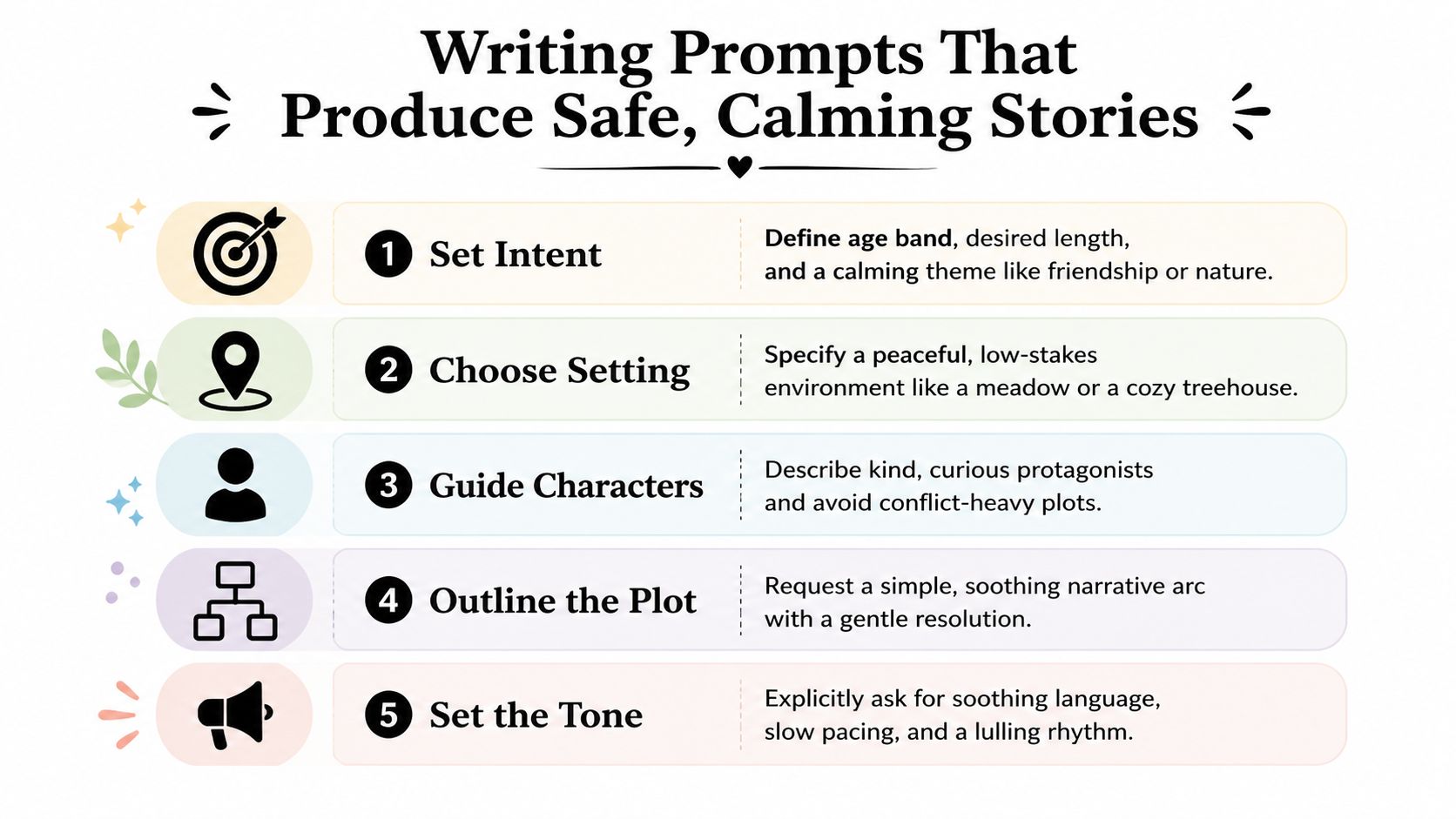
Build the brief from five controls
- Set the intent. Specify the age band, approximate length, purpose, and central theme. “A calming story about preparing for school” gives the model a clearer destination than “write something nice.”
- Choose the setting. Use low-stakes places such as a meadow, a quiet garden, a cozy treehouse, or a softly lit bedroom. A setting can create tension without requiring danger.
- Guide the characters. Name the recurring characters and describe their roles. Say whether the protagonist is curious, careful, playful, or tired. Avoid entering sensitive personal details that the story doesn't need.
- Outline the plot. Ask for a simple beginning, a small problem, a reassuring solution, and a quiet ending. This prevents the model from introducing a new crisis in the final paragraph.
- Set the tone. Include cues such as “slow-paced,” “gentle repetition,” “predictable arc,” “warm sensory language,” and “no jump scares.” Tone instructions should be explicit, not implied.
Compare these two requests:
Weak prompt:“Write a bedtime story about Mia and a rabbit.”
Stronger prompt:“Write a gentle bedtime story for an early reader about Mia and a small rabbit in a quiet garden. Use simple vocabulary, a slow pace, short paragraphs, and a predictable arc. Include one small problem, no danger or frightening sounds, and resolve the problem through cooperation. End with both characters feeling safe and sleepy. Don't invent medical, family, or location details. After writing, list any sentence a guardian should review.”
The second prompt gives the model a role, audience, setting, emotional limit, plot shape, and review instruction. It also reduces unnecessary data collection. For more guidance on turning creative requests into structured generation briefs, use this AI video prompt guide.
Review before sharing
A parent or editor should read the entire output, not just the title. Check that names are spelled correctly, the story doesn't introduce fear near the end, the illustrations match the narration, and the voice pronounces personal names appropriately.
Use a simple safety routine:
- Minimize names: Use a first name only when the story needs it, and avoid addresses, school names, routines, or identifying traits.
- Test refusal behavior: Try an unsafe request in a controlled environment and confirm that the system refuses or redirects it.
- Keep a review record: Save approved prompts and outputs so recurring problems can be found and fixed.
- Preview every asset: Review text, audio, images, captions, and music separately.
- Set a fallback: Keep a human-written story or offline recording available if the service fails.
Turning a Bedtime Story Into a Faceless Short Video
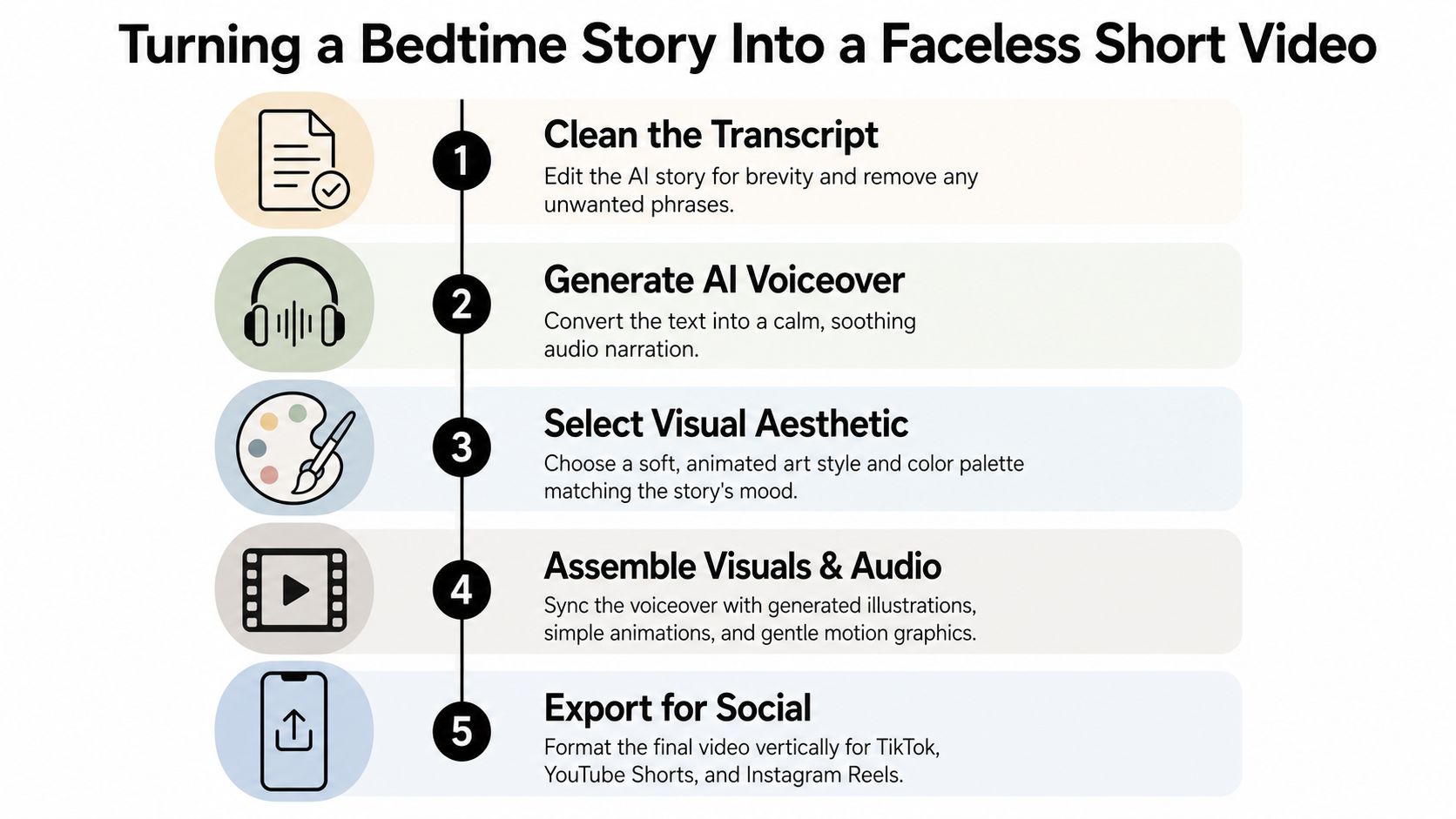
A finished bedtime story can become a short-form video without showing a child, parent, or presenter. The key is to treat the story as a sequence of visual beats rather than one uninterrupted block of narration.
Start with a production-ready script
First, remove repetition, unnecessary exposition, and any detail that doesn't survive a short runtime. Then divide the story into six to ten scenes, with each scene carrying one visual idea. A simple sequence might be:
- A quiet moonlit garden.
- A rabbit noticing a tiny light.
- The rabbit following a path.
- A gentle pause beside a pond.
- A friend arriving with a lantern.
- Both characters settling beneath the stars.
For a short video, scene timing needs to feel deliberate. A creator can begin by testing 2.5 to 3 seconds per scene, then adjust according to narration speed and visual complexity. That timing is a production starting point, not a guaranteed engagement formula.
Generate each illustration with the same character description, art direction, color palette, and visual reference. Repeat the important identifiers in every prompt. “A small cream-colored rabbit with a blue scarf, soft watercolor texture, muted blue and lavender palette, quiet evening lighting” gives the image system more continuity than asking for “the rabbit” each time.
Assemble for silent and spoken viewing
Choose a calm voice with clean pauses, then place captions where platform controls won't cover them. Keep text large enough to read on a phone and limit each caption to the spoken idea currently shown on screen. Gentle ambient music should sit underneath the narration rather than compete with it.
A tool such as ClipCreator.ai can combine an AI-written script with story-aligned images, voiceover, subtitles, and vertical export for short-form platforms. Creators who need more structured starting points can browse Prompt Builder's prompt libraries for reusable prompt patterns, then adapt them to child-safe storytelling.
Here's a practical transformation prompt:
“Convert the approved bedtime story into a vertical faceless short video. Preserve the plot and calm ending. Divide it into eight scenes. For each scene, provide narration, a concise caption, a visual description, and a transition. Use a consistent watercolor style, no faces of real people, no frightening imagery, slow movement, and a gentle opening line in the first three seconds.”
A hook can still be quiet. “The rabbit found a light that only appeared when the garden was ready for sleep” creates curiosity without using shock or fear. For production details specific to this format, see the bedtime story video workflow.

Use Cases for Creators, Educators, and Brands
The same generation pipeline can serve different audiences, but each audience needs a different definition of quality. A short-form creator may prioritize a recognizable series format. A librarian may care more about language accessibility and discussion prompts. A children's brand needs character consistency and clear rights management.
| Audience | Primary Format | Cadence | Example Hook |
|---|---|---|---|
| Short-form creators | Narrated faceless story videos | A repeatable series schedule | “Tonight, the sleepy fox hears a sound beneath the snow.” |
| Educators and librarians | Listening stories with vocabulary support | Organized by theme or learning goal | “Three new words appear in this gentle garden story.” |
| Children's brands | Illustrated character stories and seasonal episodes | Campaign-based releases | “When the lantern festival begins, every little creature gets a job.” |
| Agencies | White-label audio and video experiences | Built around client requirements | “A new calming story for your family app arrives tonight.” |
For short-form creators
A creator can build a channel around recurring characters, such as a cautious fox, a patient cloud, or a small boat that travels through quiet places. Consistent titles, colors, narration style, and opening structure help viewers recognize the series. The creator should still review every script and image because an automated story can introduce a visual contradiction or an unsettling phrase.
For educators and libraries
Educators can use generated stories as listening-station material, discussion starters, or language-learning supports. A story about sharing can include a short vocabulary frame, while a home-language version can make participation easier for multilingual learners. The adult should verify cultural details, pronunciation, and reading difficulty before using the material with children.
For children's brands
A brand can create seasonal stories around original characters, but the production brief should lock character traits, visual references, approved vocabulary, and prohibited themes. Rights questions matter at every stage. The team needs to know whether it has permission to use a voice, image style, music track, character design, or licensed property in the intended market.
For agencies and app teams
Agencies can connect a bedtime story AI pipeline to a parenting app, podcast network, or education service. A white-label system may need approval queues, audit logs, brand rules, data deletion controls, and a manual fallback. The agency should also disclose AI involvement in a way that's clear to clients and audiences, particularly when content is made for children.
Monetization can come through platform advertising, sponsorships, paid story collections, subscriptions, licensing, or client production. The commercial model shouldn't determine the safety standard. A story made for a free social channel still deserves the same careful review as one embedded in a paid family product.
Choosing the Right Bedtime Story AI Setup
Choose the workflow according to the job, not the novelty of the technology. A parent who wants an occasional narrated story has different needs from a creator publishing a recurring video series or an agency managing several branded channels.
Path one, a turnkey family app
A consumer app is the simplest starting point when you want an audio or illustrated story without assembling individual services. Look for age controls, parent preview, minimal data collection, clear deletion options, and a way to correct or reject an unsuitable result. If the app doesn't explain how it handles a child's name or personal preferences, treat that as an unresolved product question.
Path two, a creator-grade stack
A creator can combine a language model for scripts, a text-to-speech service for narration, an image generator for scenes, and a video editor for assembly. This path gives you more control over voice, visual identity, captions, and publishing, but it also makes you responsible for checking every handoff. A dedicated AI bedtime story generator workflow can help creators start from a defined story format before moving into video production.
Path three, a custom agency build
A custom system makes sense when an agency or platform needs brand controls, approval stages, private integrations, voice management, or a specialized safety policy. It requires more engineering and governance. Teams should plan for model changes, service outages, data retention, incident handling, and human escalation before launch.
Use this readiness checklist before committing:
- Safety controls: Confirm input restrictions, draft screening, output moderation, and guardian review.
- Human approval: Assign a named person to approve scripts, voices, images, and final videos.
- Data policy: Check what personal details are stored, for how long, and how deletion works.
- Rights review: Verify the commercial status of generated voices, images, music, and branded characters.
- Consistency testing: Re-run stories with recurring names and characters to find drift.
- Fallback planning: Keep approved scripts and production templates available if an API or app becomes unavailable.
For a busy parent, start with a tool that produces the smallest useful output, preferably a reviewed text or audio story. For a solo creator, test one repeatable faceless format with a fictional character before building a large content library. That approach lets you evaluate safety, tone, consistency, and audience fit without locking your entire workflow to a system you haven't tested.
ClipCreator.ai helps turn bedtime story prompts into faceless short videos with AI-written scripts, story-matched visuals, voiceovers, and subtitles for social platforms. Visit ClipCreator.ai to test a small bedtime-story workflow, review the finished assets yourself, and decide whether its automated production approach fits your publishing routine.

Create your first video in under 2 minutes
Pick a niche, and ClipCreator.ai generates and auto-posts faceless videos to your channels every day.
Join ClipCreator.ai