
You've got a content calendar full of ideas, but one short video still eats the better part of a working session. You write the script, search for visuals, record or synthesize narration, fix the pacing, add captions, check the brand styling, export the file, then repeat the process for every platform. By the time the video is ready, the next idea is already waiting.
An AI video clip generator can compress much of that production chain, but generation alone isn't the test. A usable system must preserve your visual identity, keep narration and subtitles aligned, support review, and publish consistently across TikTok, YouTube, and Instagram. The difference between an impressive demo and a dependable content operation appears after the first few videos, when revisions, scheduling, and quality control start consuming the time you hoped to save.
Why Short-Form Creators Are Turning to AI Video Clip Generators
A faceless creator producing scary stories might begin with a headline, a rough outline, and a folder of reusable assets. Several hours later, the finished clip may still need a better opening, more suitable imagery, tighter captions, and a final check for continuity. That process works for an occasional upload, but it becomes a bottleneck when the channel depends on a steady stream of short-form content.
An AI video clip generator changes the starting point. Instead of opening a blank editing timeline, the creator can choose a format or provide a prompt, then let software draft the narrative, match visuals to each scene, generate a voiceover, and assemble captions. The human still decides whether the story is worth publishing and whether the result sounds like the channel, but the repetitive assembly work moves into a reusable workflow. The broader category is also expanding quickly. Grand View Research data cited by Adwave's 2026 AI video generation overview places the purpose-built AI video generator market at USD 788.5 million in 2025 and USD 946.4 million in 2026, with a projection of USD 3.44 billion by 2033 and a 20.3% CAGR from 2026 to 2033.
Producer's rule: Use AI to remove repeatable production tasks, not to remove editorial judgment.
The workflow shift
Traditional short-form production often has separate handoffs for scripting, asset selection, narration, editing, captions, exporting, and publishing. A generator combines some or all of those stages, depending on the product. Tools built around prompt-to-video creation may supply a complete first draft, while editing platforms such as Descript or VEED focus more heavily on transforming footage you already have.
That distinction matters. A raw text-to-video model may produce striking shots but leave you responsible for story structure, timing, subtitles, and platform formatting. A workflow-oriented tool may create less cinematic footage while getting a publishable narrative assembled faster. For creators who want a repeatable faceless format, the second option is often more useful.
Solo creators benefit because they can test ideas without building every asset manually. Small businesses can turn recurring topics into branded explainers. Agencies can create a controlled production lane for multiple clients, provided each client has separate style rules, approval steps, and asset libraries. This broader guide to AI content creation for social media is useful when deciding which parts of your current process should be automated first.
Why volume changes the decision
A one-off video can hide weak automation. You can manually replace an odd image, correct a subtitle, and adjust a voiceover when the project is an experiment. A recurring content operation exposes every failure because the same correction appears again and again.
That's why the category appeals to people producing faceless stories, micro-lessons, product explainers, and repurposed clips. They aren't only looking for a machine that can make one video. They need a system that can preserve a format, apply consistent choices, and move approved files toward publication without forcing the creator to rebuild the process each time.
How an AI Video Clip Generator Actually Works
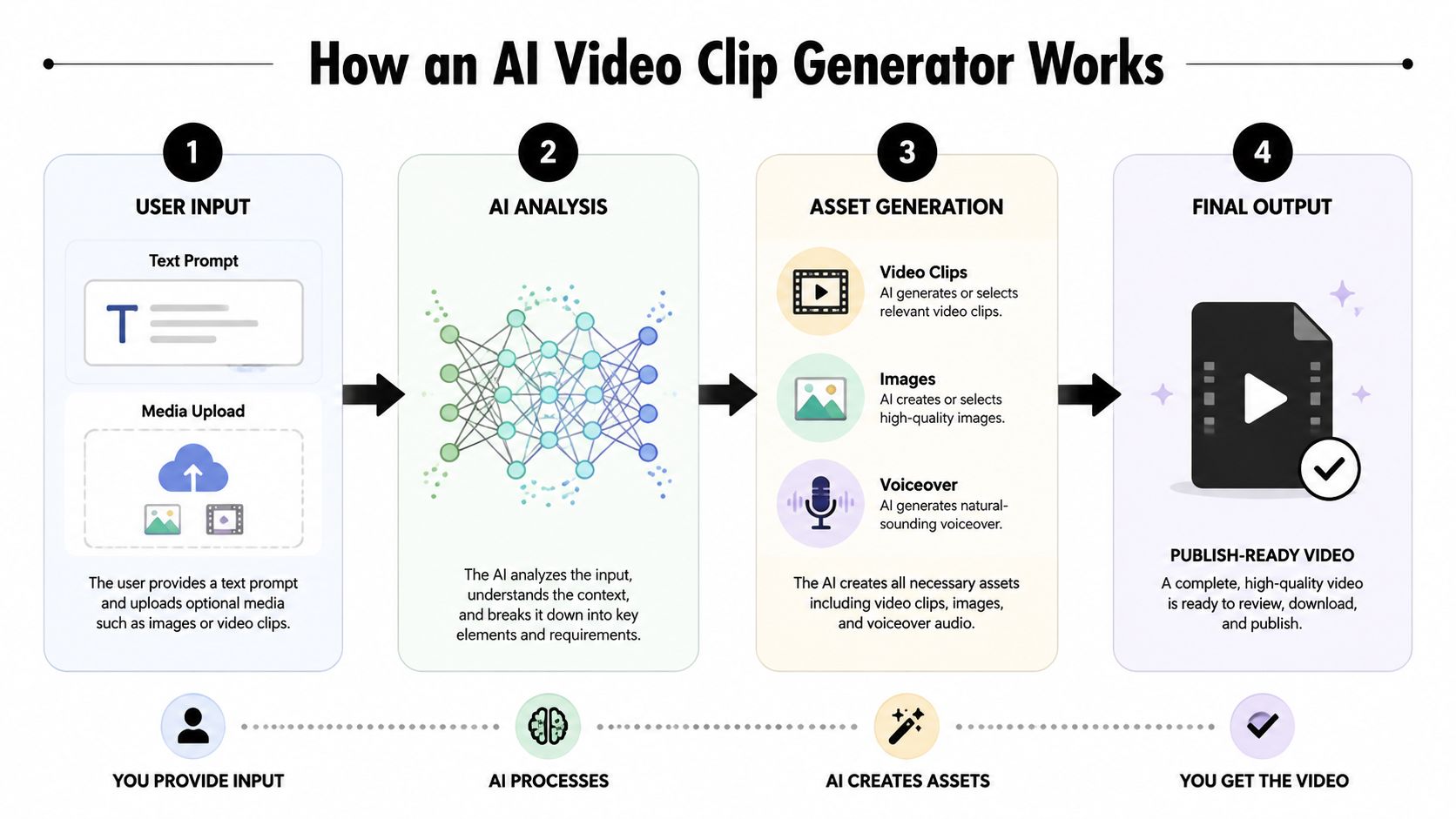
The easiest way to understand the technology is to follow one project from prompt to export. Take a 60-second scary story video. The finished clip needs more than a collection of attractive images. The opening must create tension, the narration must match the written story, each visual must support the scene, and subtitles must appear while the words are spoken.
Start with the creative input
You might enter a prompt such as “Write a tense faceless short about a night guard who hears footsteps in an empty building.” Some platforms begin with that instruction, while others start from a template with predefined pacing, scene structure, typography, and narration settings. A strong prompt identifies the subject, emotional direction, audience, format, and ending rather than just naming a topic.
The system then interprets the request and creates a script or scene plan. A practical guide to AI video prompts can help. Prompt structure affects the draft's voice, level of detail, and visual direction, but it won't eliminate the need to review factual claims, tone, or story logic.
Turn the script into scenes
A production-focused generator breaks the narrative into visual beats. The line about the guard entering a corridor may receive one image, while the sound of footsteps may trigger a darker, tighter visual. Story alignment is more important than filling every second with unrelated stock footage. When the images ignore the narration, the clip feels assembled rather than authored.
This is also where consistency problems begin. A character's clothing, setting, lighting, or physical appearance can change between scenes unless the tool uses references, persistent style instructions, or a controlled template. The comparison of designer-made and AI content offers useful context for deciding where automation is appropriate and where deliberate design direction still matters.
Generate voice and captions
The voice layer converts the approved script into narration. Useful controls include pacing, pronunciation, emotional delivery, pauses, and voice selection. A lifelike voice can still sound wrong if the script contains awkward sentences or if the timing leaves no breathing room between ideas.
Subtitles are generated from the narration or script and then timed to the audio. Review them for names, punctuation, emphasis, and line breaks. Caption accuracy has a direct effect on comprehension, especially when viewers watch without sound. A generator that produces attractive visuals but requires extensive manual caption repair hasn't automated the full workflow.
Assemble and prepare the file
The final stage combines scenes, narration, music, captions, transitions, and output settings. Before export, check the first seconds, the final call to action, text placement, safe areas, and whether the visual rhythm supports the story. The result may be a complete video, or it may be a rough draft that still needs editing in another application.
That distinction should appear clearly in any product evaluation. Ask whether the tool generates an isolated clip, a sequence of scenes, or a finished short-form package. The more stages it handles, the more important versioning, approvals, and replacement controls become.
Key Features That Separate Production Tools from Demos
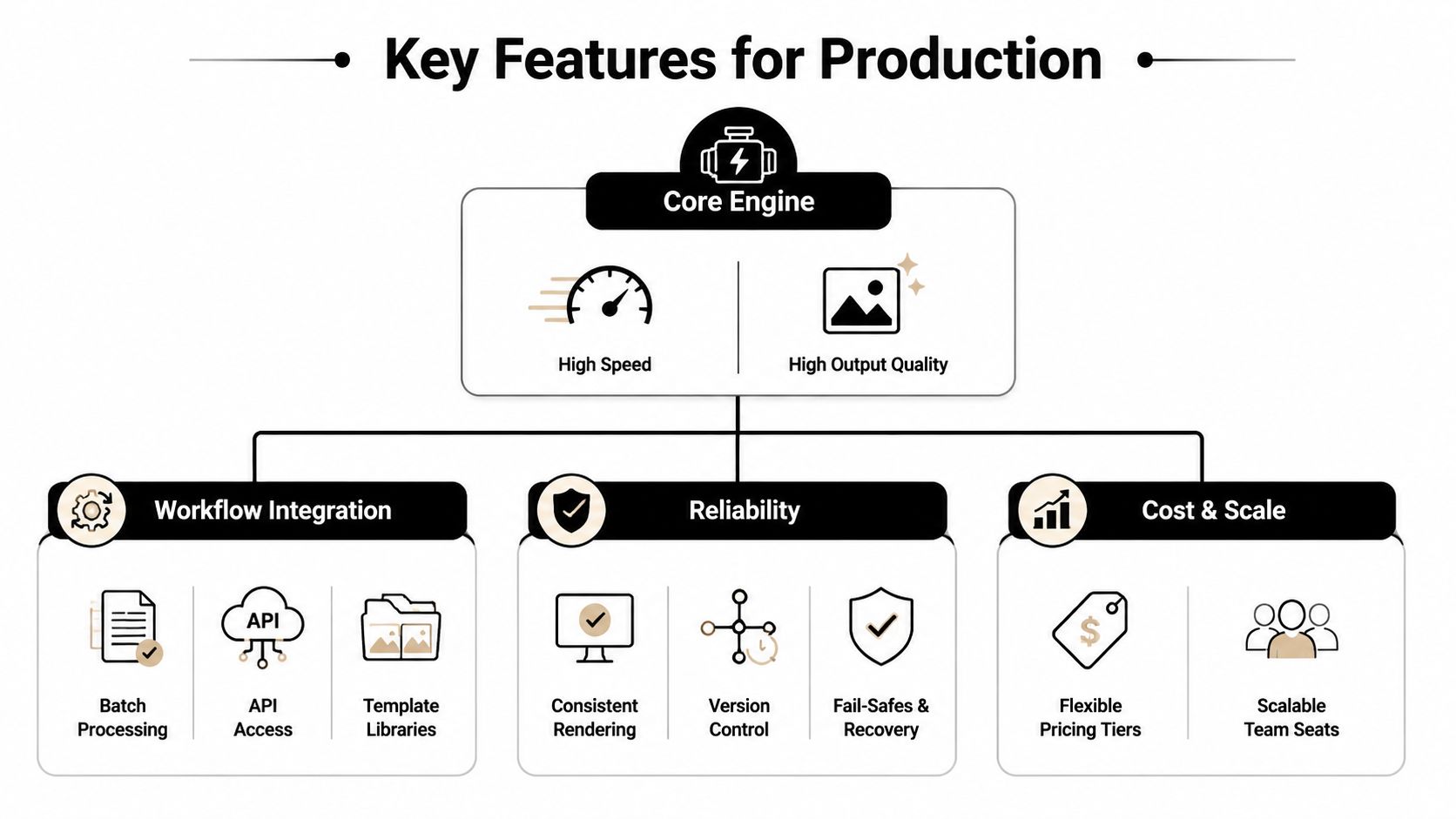
A demo proves that a model can produce something. Production software proves that a team can use it repeatedly without losing control. The most important features sit at the intersection of quality, speed, consistency, and workflow integration.
Look beyond sharpness
Video quality includes more than resolution. Researchers increasingly evaluate generated video with video-specific measures such as FVD, FID, and IS, alongside standard datasets including FaceForensics, SkyTimelapse, UCF101, and Taichi-HD, as described in this diffusion-transformer video generation research. Those evaluations matter because temporal coherence determines whether subjects remain stable and motion flows naturally from frame to frame.
For practical short-form production, inspect faces, hands, text, repeated objects, and camera movement. Flicker, identity shifts, and sudden changes in perspective create revision work even when individual frames look attractive. A tool that supports reference images, reusable styles, and scene-level controls can be more valuable than one that merely advertises impressive still frames.
Treat latency as an operating cost
Generation speed affects the entire publishing system. If every revision takes too long, batch production becomes difficult and scheduling windows become harder to meet. A mobile-oriented diffusion-transformer model reported 151.3 FPS on an iPhone 16 Pro Max per denoising step and 83.09 on server-side evaluation, while outperforming larger models such as CogVideoX-2B and LTX-Video on the VBench total score, according to the model's published research.
That result doesn't mean every SaaS product will deliver the same performance. It does show why latency per denoising step deserves attention. Ask how long a typical draft takes, how quickly a single scene can be regenerated, and whether failed jobs can be retried without rebuilding the project.
Production features that earn their keep
- Voice control: Reusable voice settings, pronunciation handling, and natural pauses matter more than a large voice catalogue.
- Subtitle accuracy: Captions should be editable, timed to speech, and easy to restyle across a batch.
- Templates and prompts: Templates accelerate proven formats, while custom prompts prevent the channel from becoming visually repetitive.
- Brand controls: Store fonts, colors, logos, tone rules, image references, and recurring calls to action in one place.
- Workflow integration: Batch creation, exports, scheduling, account connections, and approval states determine whether the tool fits a real content calendar.
- Failure recovery: A production tool should make it easy to identify failed renders, replace one asset, and preserve the rest of the edit.
A glossy interface can hide weak controls. Test the boring operations, because those are the actions you'll repeat after the novelty disappears.
Real-World Use Cases for Creators and Businesses
Different teams need different forms of automation. A faceless storyteller cares about narrative rhythm and visual continuity, while an educator may care more about readable captions and precise terminology. Choosing the same feature set for every use case usually creates unnecessary work.

Faceless creators
Story channels often start with a repeatable premise, such as a strange encounter, bedtime tale, or unexplained event. Templates help maintain the opening structure and visual rhythm, while custom prompts keep individual episodes from sounding identical. The generator should let the creator replace a weak scene without changing the entire narrative.
The main risk is sameness. If every clip uses the same voice cadence, caption animation, and image treatment, viewers may recognize the template before they understand the story. A useful system supports controlled variation inside a stable brand frame.
Small businesses
A local service business may need product explainers, customer education, announcements, and simple answers to recurring questions. It benefits from a brand kit, approved language, a consistent voice, and a review step before anything reaches a public account. Automation saves time only when the business can prevent unsupported claims, outdated offers, or off-brand phrasing from entering the publishing queue.
Educators and e-learning channels
Educators can use an AI video clip generator to turn a concept into a short narrative lesson, vocabulary explanation, or recap. Here, subtitle timing and terminology review matter more than flashy transitions. A human should verify the script, pronunciation, diagrams, and any instructional claim before publication.
A broader AI YouTube content workflow can help teams think about how scripting, production, metadata, and publishing fit together rather than treating video generation as an isolated step.
Agencies and marketers
Agencies need separation between clients, reusable approvals, and predictable output. One client may want understated typography and restrained narration, while another expects energetic motion and frequent calls to action. The generator must preserve those differences across batches, not apply one global style to every account.
Scheduling becomes especially valuable here. Once a client approves a batch, the agency can prepare platform-specific versions and queue publication while keeping a human checkpoint for sensitive topics, paid campaigns, and regulated claims.
The workflow often looks like this:
- Select the format: Define the recurring video type and audience.
- Apply the brand rules: Load approved visual, voice, and language settings.
- Generate a batch: Produce drafts around a focused group of topics.
- Review exceptions: Correct factual, visual, pronunciation, and caption issues.
- Schedule outputs: Send approved versions to the appropriate platform calendar.

The Hidden Bottleneck Is Workflow Not Generation Quality
Better pixels won't fix a broken content operation. A video can look polished and still fail because the voice doesn't match earlier posts, the logo shifts position, captions cover the platform interface, or nobody knows which version received approval.
Survey data reflects this operational gap. Organizations report that only 39% of video-generation deployments are in production, compared with 44% for image generation, according to Artificial Analysis's 2025 survey summary. The difference suggests that moving from experimentation to dependable video operations creates challenges beyond model quality.
Consistency needs rules
Brand consistency isn't just a color palette. It includes sentence length, emotional range, vocabulary, visual motifs, voice selection, caption behavior, pacing, and the way a video asks viewers to act. If those rules live in one producer's memory, automation will drift as soon as more people create content.
Create a short brand specification before generating at scale. Include approved words, prohibited claims, visual references, voice instructions, caption styling, opening patterns, and review requirements. Then test the generator with several prompts that should produce the same recognizable identity without producing identical videos.
Reviewability decides whether automation is safe
Full automation sounds attractive until a flawed script reaches a client account. Build review into the workflow rather than treating it as an admission of failure. A reviewer should be able to inspect the script, listen to the voiceover, correct subtitles, replace a scene, and approve the final export without starting over.
Adobe's 2025 creator survey found that 86% of creators use generative AI, with 55% using it for editing or upscaling and 52% using it to generate new assets, as reported in the same Artificial Analysis summary. Those use patterns point toward augmentation, not universal hands-off publishing. Creators often trust AI to accelerate individual tasks before they trust it with an entire public-facing pipeline.
Scheduling is part of production
A finished file sitting on a hard drive isn't a publishing system. Check whether the tool supports platform connections, scheduling, captions, descriptions, export variants, timezone handling, and a visible queue. Also confirm what happens when a render fails or a platform rejects a post.
The useful question isn't “Can this tool make a video?” It's “Can my team move an approved idea from prompt to scheduled publication while preserving the same brand rules at every step?”
How to Choose the Right AI Video Clip Generator
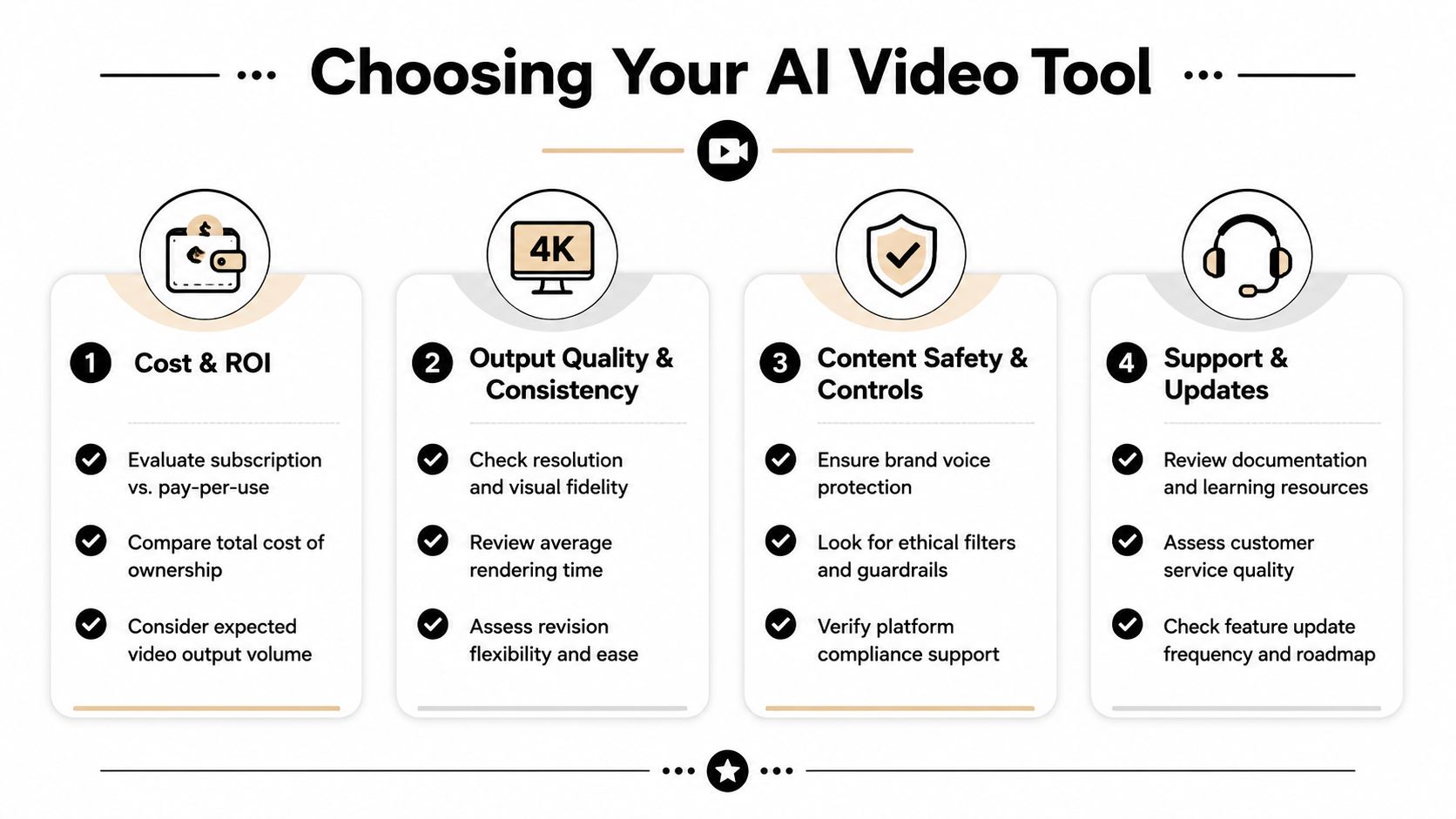
Start with the workflow, not the feature page. Write down the format you publish, the inputs you already have, the parts that consume the most time, the corrections reviewers make, and the platforms that receive the final files. Then compare tools against those constraints.
Evaluate the economics honestly
The subscription price is only one part of the cost. Include review time, failed generations, revisions, asset replacement, account management, and the effort required to publish each version. Adoption barriers remain substantial, including high expense at 38%, unreliable output quality at 34%, and uncertainty about how models are trained at 28%, according to the survey data reported by Biz Chosun.
Ask these questions before committing:
- Cost model: Is billing based on seats, renders, minutes, credits, or platform usage?
- Revision burden: Can you regenerate one scene, voiceover, or caption layer without rebuilding the project?
- Rights and provenance: Who owns the output, and what records or disclosures accompany generated assets?
- Brand control: Can you save voice, style, typography, image, and language instructions?
- Publishing path: Does the platform support scheduling and multi-platform posting, or will someone download and upload manually?
- Support: Can your team find documentation and get help when a production job fails?
Match the tool to the operating model
A cinematic text-to-video model may suit concept work, while a template-driven suite may be more practical for recurring social formats. An editor such as Descript is useful when the source material is recorded footage, and a repurposing tool may be better when the raw input is a long interview or webinar.
ClipCreator.ai is one option for creators and teams that want faceless short-form production from templates or custom prompts. Its workflow combines AI-written scripts, story-aligned images, lifelike voiceovers, accurate subtitles, HD output up to 90 seconds, scheduling, and multi-platform auto-posting for TikTok, YouTube, and Instagram. Users retain ownership of produced videos, can cancel anytime, and the service offers a first-two-videos refund promise through Stripe. Its approach is described in more detail in this overview of AI video creation tools.
For supporting visual assets outside the video workflow, an AI headshot studio for professionals may serve a different need, such as creating consistent profile or team imagery. Don't confuse that type of asset generation with a publishing system. Each solves a separate part of the content operation.
Run a controlled trial
Pick one format and create enough drafts to expose recurring failures. Review the same elements every time, including hook clarity, brand voice, visual continuity, narration, subtitles, export quality, and scheduling behavior. Track qualitative observations and actual time spent, rather than assuming that a fast first draft equals a fast finished video.
A tool earns a place in your stack when it reduces the total path to approved publication. If it generates attractive clips but creates more revision and uploading work, it's an asset generator, not an automation system.
Your Next Steps to Automate Short-Form Video
Start with one repeatable format, not an entire content strategy. Choose a topic that doesn't require complex claims, define the voice and visual rules, and decide what a reviewer must approve before publication.
Then run a small batch through your chosen AI video clip generator. Inspect the script, image continuity, voiceover, subtitles, export, and scheduling process. Keep a record of where you still intervene, because those interventions reveal whether the tool is saving production time or moving the work into a different interface.
Finally, compare the finished workflow with your manual process. Look at the time required to reach an approved, scheduled post, not the time required to generate a draft. If the results remain consistent and the correction list stays manageable, expand the format gradually. If the same failures repeat, improve the prompt and brand rules before increasing volume.
The strongest system isn't the one that makes a single astonishing clip. It's the one that lets a creator produce recognizable, reviewable videos on schedule without rebuilding the process every morning.
ClipCreator.ai turns prompts and proven story templates into faceless short-form videos with scripts, story-aligned images, lifelike voiceovers, subtitles, scheduling, and multi-platform publishing. Visit ClipCreator.ai to test a repeatable workflow for TikTok, YouTube, or Instagram and see whether it reduces the work between an idea and a scheduled post.

Create your first video in under 2 minutes
Pick a niche, and ClipCreator.ai generates and auto-posts faceless videos to your channels every day.
Join ClipCreator.ai

