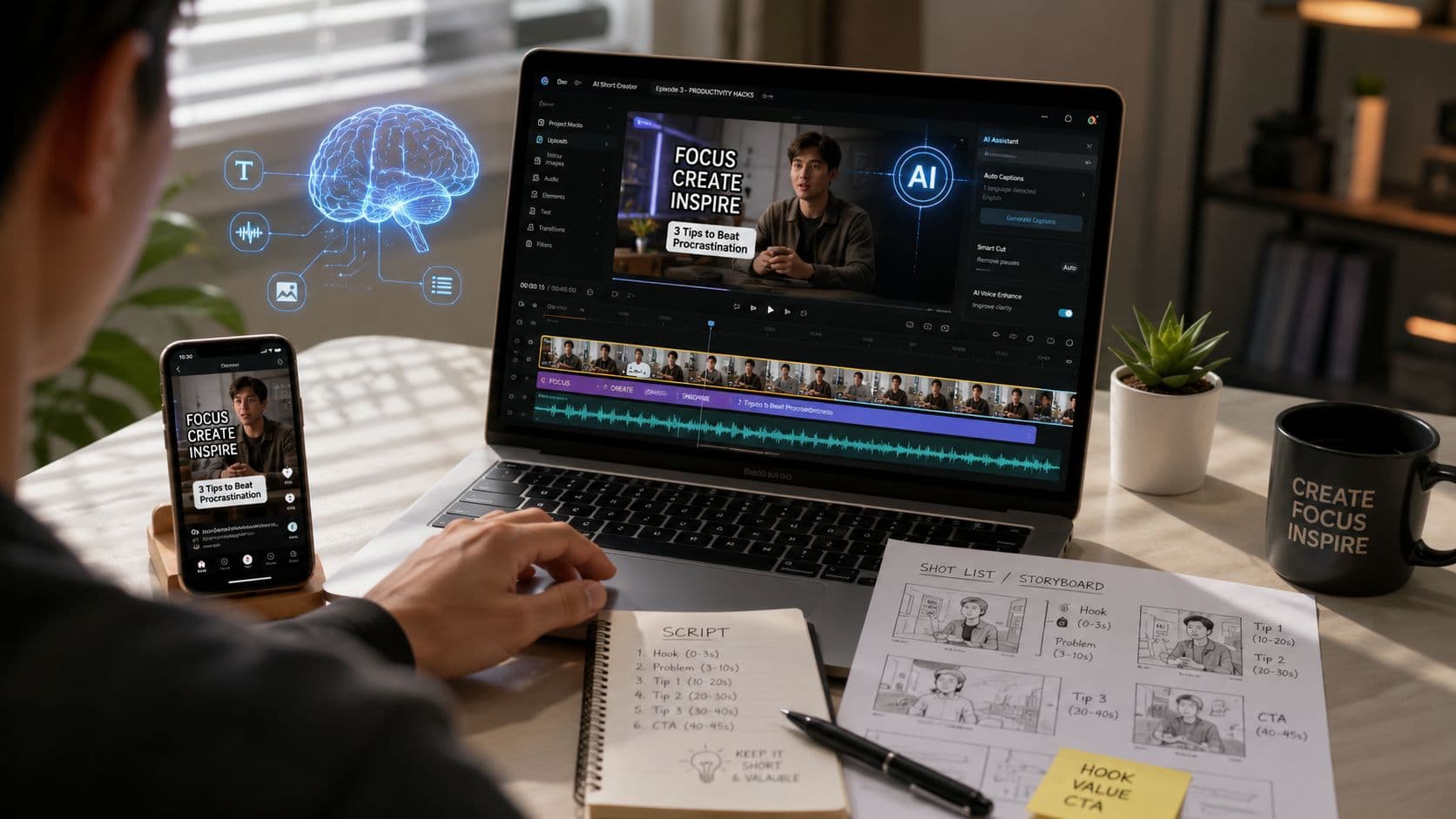
96% of people have watched an explainer video to learn about a product or service, and 85% say a video convinced them to buy, according to Wyzowl's 2026 explainer-video benchmark. That changes the question for creators and marketing teams. AI explainer videos aren't an experimental format looking for an audience. They're an accelerated production layer for a format people already use to understand, evaluate, and act.
The catch is that “type a prompt, receive a finished explainer” still describes a demo more accurately than a dependable production system. Current video models can generate attractive motion, but they remain unreliable with readable text, continuity, technical interfaces, and coherent sequences longer than a short shot. The producer's job in 2026 isn't to remove human judgment. It's to place that judgment where AI is weakest, then use automation everywhere else.
What AI Explainer Videos Are
An AI explainer video teaches one product, feature, process, or idea while generative AI handles at least one major production layer. It may assist with the script, visuals, voiceover, subtitles, or edit. The format predates generative AI. AI compresses parts of the established explainer workflow, shortening the path from rough concept to publishable draft.
A useful explainer usually runs between 15 and 90 seconds, depending on the platform, subject, and context required. A feature announcement can fit into a few clear beats. A product walkthrough may need the full runtime, with the explanation divided into scenes instead of forced into one continuous generation.
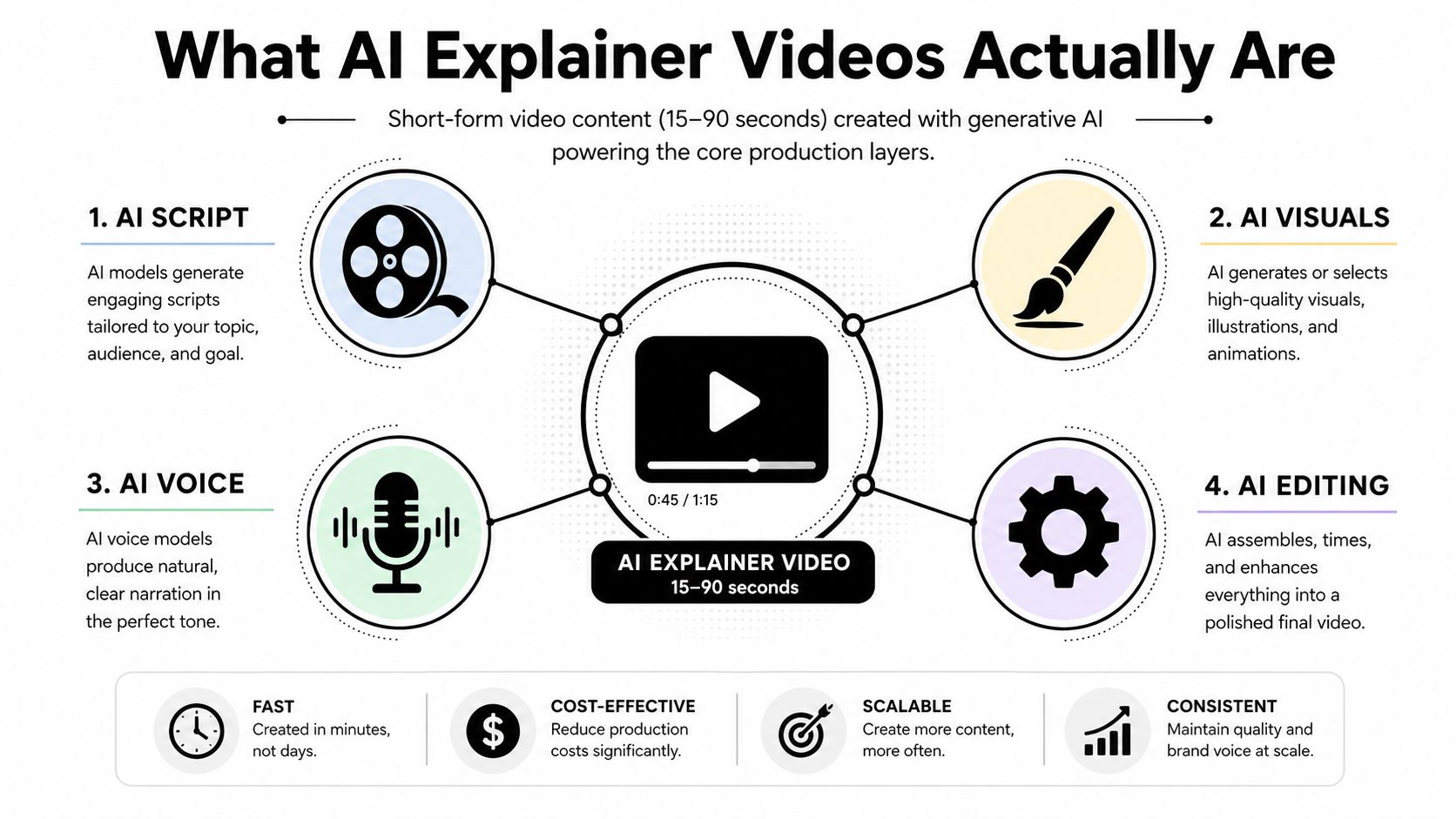
The Wyzowl benchmark describes established audience behavior: 96% have watched an explainer video, and 85% say a video convinced them to buy or take action. Explainer content therefore fits education, onboarding, product marketing, and conversion. AI adds production speed to a communication format audiences already understand.
Three common shapes
Most short-form AI explainers use one of three practical structures:
- Narrated B-roll: Voiceover carries the argument while stock footage, generated clips, screenshots, and animated overlays illustrate each beat.
- Kinetic typography: Large words, icons, diagrams, and motion graphics keep the explanation readable with sound off.
- Screen-recorded walkthrough: A product interface or workflow remains central, while narration and captions guide the viewer through each action.
A layered pipeline makes the production logic easier to manage. The script contains beats, each beat maps to a shot, and each shot can combine generated footage, a screen recording, a still image, subtitles, and an audio cue. This structure also exposes the current quality ceiling of AI video models. They can produce a convincing shot, but continuity, readable interface text, and technical accuracy often break when one generation is expected to carry an entire 80 to 90 second explanation.
A coherent longer explainer comes from assembling shorter, controlled pieces. Lock the script and visual purpose for every beat, generate or capture the assets separately, then use editing to maintain pacing and continuity. The producer decides whether each asset proves the point. For a broader guide to using AI-generated video content in a repeatable publishing system, the same distinction applies: AI can create an asset, while editorial judgment turns those assets into an explanation.
Why Short-Form Explainer Video Wins on Attention
Short explainers work because they force prioritization. A viewer shouldn't need to remember a long chain of context before understanding the payoff. The strongest versions introduce the problem quickly, demonstrate the useful idea, and finish with one clear action.
Independent 2026 video-statistics coverage reports 56% engagement for educational videos under one minute and 54% for tutorials under one minute. The same dataset says 63% of consumers prefer learning about a product through short-form video, compared with text articles, infographics, and sales calls. These figures support a practical production choice, not a promise that every short video will perform well.
Another benchmark reports that videos under 90 seconds can reach 50% completion rates on social platforms and generate 2.5 times more engagement than long-form educational videos. A separate benchmark places retention above 70% for videos under 60 seconds, declining to roughly 50% at two minutes and below 35% at five minutes. Taken together, the evidence points toward a front-loaded edit, with the essential explanation delivered early.
Platform attention profiles
The platform figures aren't interchangeable. A benchmark based on platform-native short video reports median engagement of 5.2% on TikTok, 2.3% on Instagram Reels, and 0.9% on Facebook short video (platform engagement research). The lesson is less about declaring one platform universally superior and more about respecting native behavior.
| Platform | Optimal Length | Hook Window | Avg Completion Rate |
|---|---|---|---|
| TikTok | Under one minute often suits concise explainers | Open with the problem immediately | Retention is strongest when the core idea arrives early |
| Instagram Reels | Short vertical edits with prominent text | Start with a visual or textual interruption | Completion depends on clean pacing and readable overlays |
| YouTube Shorts | Short, self-contained lessons or demonstrations | Avoid a slow setup | Longer explainers need a strong middle beat |
These rows intentionally describe production guidance rather than unsupported universal thresholds. The verified benchmarks establish that concise educational video performs strongly and that retention drops as runtime expands. They don't establish one fixed ideal length or hook window for every account.
AI helps here through iteration. A producer can write several opening lines, render alternate visual treatments, and test different closing prompts without rebuilding every asset from scratch. That advantage disappears if the team publishes the first automated draft without checking whether the hook answers a viewer's question.
Production rule: Use the first minute to explain the idea. Use the final beat to tell the viewer what to do next.
Who Uses AI Explainer Videos and How
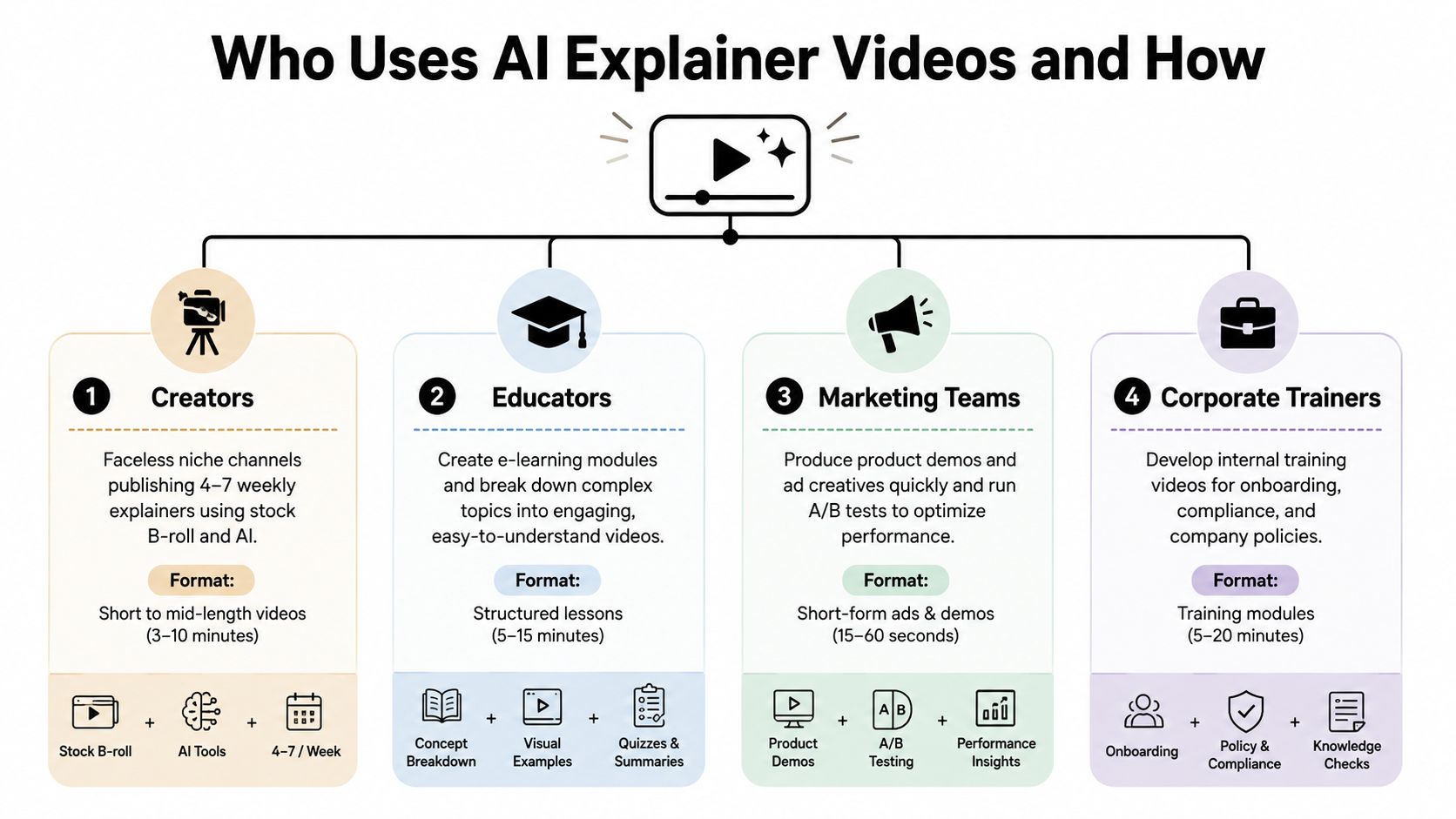
The same technology produces very different work depending on who owns the audience and the risk of being wrong. A creator needs repeatable concepts. A brand needs accurate product language. An educator needs comprehension. An agency needs a workflow that survives client review.
Creators need repeatable visual grammar
A faceless creator covering finance, productivity, or software can build a recognizable series around narrated B-roll, generated illustrations, subtitles, and recurring visual motifs. The value isn't just speed. A consistent opening style, caption treatment, and scene rhythm helps viewers understand what kind of content they're receiving before the explanation begins.
The creator should keep each video narrow. “How budgeting works” is broad. “Why a budget fails when it ignores irregular expenses” gives the script a problem, a visual metaphor, and a specific conclusion.
Brands should show the product, not approximate it
Product teams get the most credibility from screen-recorded explainers. Use AI to outline the narration, generate supporting transitions, and create subtitle drafts, but show the interface where a label, button, or workflow matters. A generated imitation of a dashboard may look polished while teaching the wrong interaction.
A useful brand format combines an animated problem statement, a real screen capture, and one closing action. The structure keeps the video accessible without asking a synthetic visual to carry factual product detail.
Educators can use analogy as a bridge
An educator might turn a difficult concept into a visual analogy, then cut to a classroom recording, diagram, or worked example. AI can propose several analogies and draft a concise voiceover, but the teacher should verify that the metaphor doesn't introduce a misconception.
The best educational explainer doesn't replace the lesson. It creates an entry point, refreshes a concept, or gives learners a compact review they can replay.
Agencies need handoffs, not magic
Agencies can package explainers around a fixed workflow: client brief, approved script, scene map, asset generation, review, export, and delivery. That makes revision scope visible and prevents the team from treating every client request as an open-ended regeneration exercise.
The right format follows the viewer's decision, not the tool's feature list.
Creators may optimize for repeatable series output. Brands may prioritize interface accuracy. Educators may prioritize clarity over visual novelty. Agencies need all three concerns translated into artifacts that another person can inspect.
The Trust and Quality Ceiling Most Guides Skip
The current quality ceiling appears exactly where explainers demand precision. AI video models can produce attractive scenes, but readable on-screen text remains unreliable, especially when the frame contains product names, chart labels, interface controls, or dense instructional copy. Letters can distort, characters can change, and a visually impressive scene can become unusable the moment a viewer needs to read it.
Continuity is another fault line. Generated clips often behave like isolated shots rather than connected scenes, so a person's face, clothing, object position, or lighting may shift between generations. If the edit depends on a recurring synthetic presenter or a prop that must remain consistent, the audience can notice the break before the narration has finished its sentence.
Independent reporting on current AI-generated video quality notes that the technology is useful for many social and advertising applications but still struggles with fine motion, readable text, and clips longer than about 10 seconds. That limitation clashes with the structure of a coherent 80 to 90-second explainer, which usually needs multiple connected beats rather than one disconnected visual.
Design around the weak points
The workaround is not to demand that one model solve every layer. Build the video so accuracy-sensitive information comes from controlled assets.
- Keep generated on-screen text minimal.
- Add labels in the editor or motion-graphics software instead of asking the model to render them.
- Use real screen recordings for interfaces and workflows.
- Anchor synthetic motion to stock footage, diagrams, or static product imagery.
- Treat each AI clip as a shot with a job, not as a complete scene sequence.
Voice introduces a separate trust issue. Technical terms can receive awkward pronunciation, while avatar lip sync can drift enough to feel artificial within seconds. Review names, acronyms, product terminology, and transitions manually. If the video's credibility depends on whether viewers trust what they're seeing, transparency and provenance matter alongside polish. A practical overview of the detection and authenticity conversation is available in this AI Video Detector Humantext.pro guide.
The Production Workflow Behind a Strong AI Explainer
A dependable AI explainer is an orchestration problem. Give each layer a defined output, review it before the next handoff, and generate short shots in batches. One prompt rarely produces a coherent final timeline because current models handle individual moments better than connected explanations.
1. Script
Start with a 60 to 80-second hook-first script. Give the opening one job, identify the problem, and move through one idea per roughly 8 seconds. An LLM can check clarity, repetition, technical vocabulary, and word count. Subject-matter review still decides whether the claims are accurate.
The handoff artifact is an approved script with marked beats. Each beat should answer, “What must the viewer understand here?” If the answer contains several ideas, split the beat before generating visuals. That separation gives the edit a clear spine.
2. Visuals
Build a scene list before opening a video generator. Map every beat to a source: AI clip, stock footage, product screenshot, screen recording, diagram, or motion-graphics overlay. Render AI footage in short batches, around 8 to 10 seconds, then select the shots that illustrate or reinforce the spoken beat.
The scene list makes the quality ceiling manageable. A static frame can carry a precise concept when a generated sequence would introduce continuity errors. It also prevents the timeline from filling with visually polished but contextually empty clips.
3. Voiceover
Choose between a human recording and an AI voice. ElevenLabs can support voice cloning workflows, while Descript and Adobe Podcast can help clean or reshape recorded audio. Whichever route you choose, listen for pronunciation drift in technical terms and adjust timing only after the narration sounds natural.
A useful production reference for deciding where AI belongs in a broader content operation is XBurst's AI content strategy. The principle applies here, too. Automate repeatable preparation, while keeping human review at points where meaning or trust can change.
4. Assembly and subtitles
Cut the timeline in CapCut or Premiere. Add burned-in captions using CapCut, Captions, or Veed, then present important terms as brief text pops rather than filling the frame with paragraphs. Captions should match the spoken words, while the visual hierarchy signals which phrase deserves attention.
A script-to-video workflow can organize the handoff from approved narration to visual assembly. Keep the script-to-video production layer subordinate to the editorial plan. The script determines the beat, and the visual layer supplies evidence, emphasis, or context for that beat.
5. Publish and test
Export platform-native versions, including 9:16 for TikTok, 1:1 for feed placements, and 16:9 for YouTube. Upload native captions where the platform supports them, then test the opening three seconds with alternate hooks when the workflow allows it.
For a solo producer, one person may own every stage. For a team, each stage needs a named owner and a clear handoff. That structure protects consistency as output increases.

Best Practices, Metrics, and Common Pitfalls
The useful comparison isn't “AI versus human.” It's naive automation versus AI-assisted production. A one-click draft may be fast, but it often leaves the producer with generic visuals, weak transitions, inaccurate captions, and no clear reason for the viewer to continue.
The verified benchmarks support concise pacing, but the brief doesn't provide validated KPI thresholds for hook retention, completion targets, saves, audio loudness, or posting windows. Treat those as variables to measure for your own audience, not universal promises.
| Metric | Naive AI | AI-Assisted |
|---|---|---|
| Hook | Generic opening or delayed context | Several hook options reviewed before export |
| Script | One-pass narration with mixed ideas | Beat-level script checked for clarity |
| Visuals | One generator used for every shot | AI clips mixed with footage, screenshots, and overlays |
| Captions | Automatic text accepted without review | Captions checked against the voiceover |
| Editing | Default pacing and transitions | Cuts shaped around meaning and viewer attention |
| Iteration | Regeneration without a hypothesis | One variable changed and measured at a time |
Pre-publish checks
- Hook clarity: The first sentence presents a problem, answer, or compelling tension.
- Beat alignment: Every major spoken point has a matching visual idea.
- Caption accuracy: Product names, numbers, and technical terms are correct.
- Frame readability: Text remains legible on a small vertical screen.
- Audio balance: Voice remains clear against music and effects.
- Native export: Aspect ratio and caption treatment fit the destination.
- Trust review: Synthetic footage doesn't imply evidence the brand can't support.
Avoid relying on one generator for every asset. Don't publish unedited text-heavy frames, skip script review, or repurpose a horizontal composition into a cramped vertical crop. A disciplined review of video marketing best practices can help teams turn those checks into a repeatable operating habit.
Review performance after publication, but change one meaningful variable at a time. If viewers leave during the explanation, inspect the beat and visual match. If they finish but don't act, inspect the final instruction. Metrics become useful when they lead to a specific edit decision.
Putting It All Together and What Comes Next
A strong AI explainer follows a simple sequence: define the audience, write the beats, generate layered visuals, record or synthesize the voice, burn in accurate subtitles, then publish and test. The model can accelerate individual tasks, but the producer still controls the argument, evidence, pacing, and final meaning.
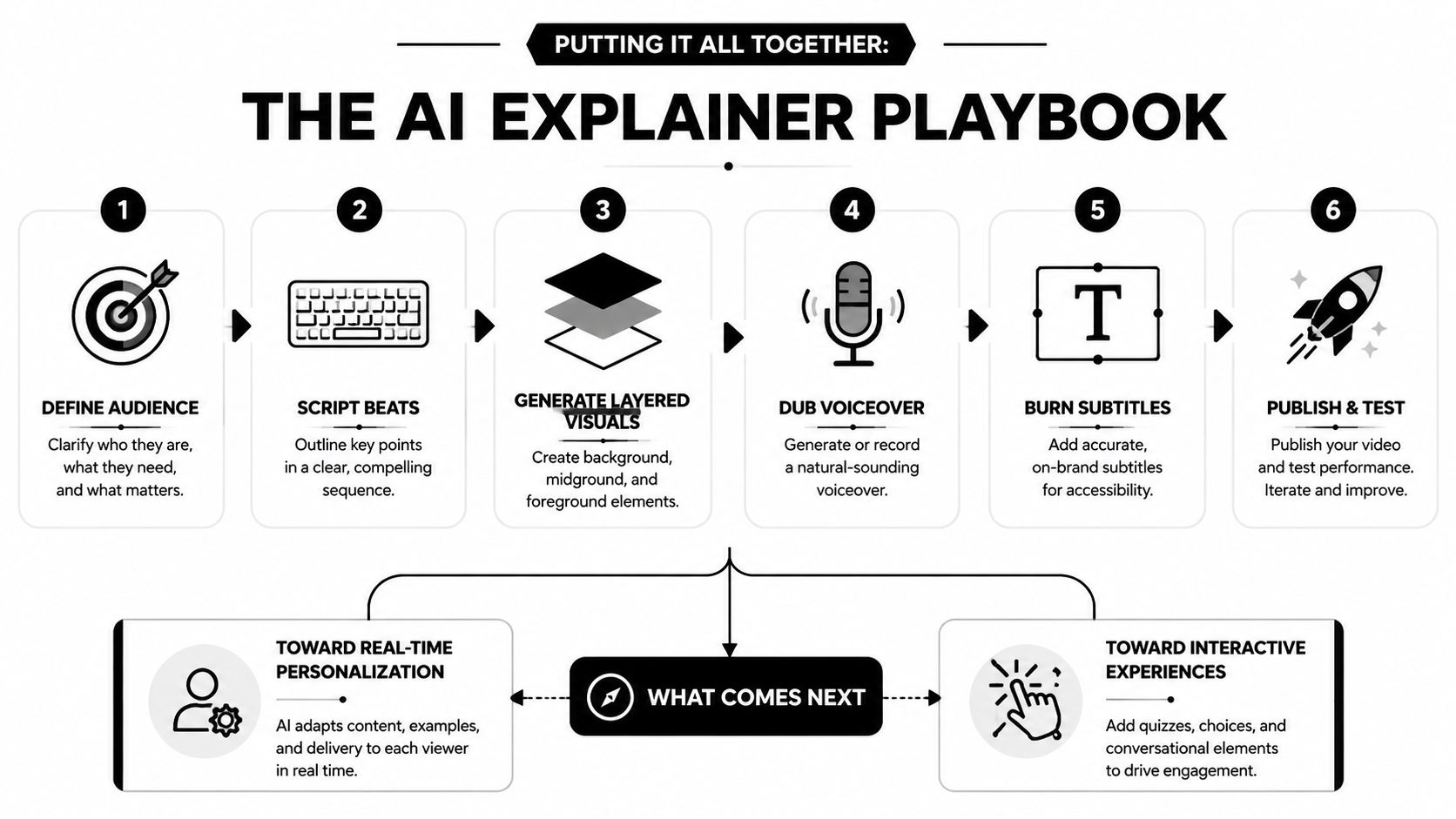
Creators can turn one clear topic into a faceless series. Brands can adapt a reviewed script into product, FAQ, and onboarding cuts. Educators can convert lesson hooks into compact concept refreshers. Agencies can productize the workflow around defined briefs, approvals, and delivery formats.
The next shift will likely move from raw generation toward curation, prompt engineering, continuity control, and editorial judgment. Better models may produce longer coherent shots, while real-time personalization and on-device rendering could expand how audiences receive explainers. The immediate advantage still belongs to producers who know when not to generate.
Start by choosing one audience, one problem, and one short explanation. Build the scene map before rendering, replace inaccurate generations instead of defending them, and measure what viewers do after watching.
ClipCreator.ai turns a custom prompt or template into a faceless short video workflow with AI-written narratives, aligned visuals, voiceovers, subtitles, and publishing support. Visit ClipCreator.ai to test a repeatable explainer process for TikTok, YouTube, or Instagram, then use the resulting draft as a controlled starting point for your own editorial review.

Create your first video in under 2 minutes
Pick a niche, and ClipCreator.ai generates and auto-posts faceless videos to your channels every day.
Join ClipCreator.ai

