
You're probably here because you've burned too many late nights on the same pointless task. You finish the script, cut the talking head, and then lose momentum inside a stock library. You type “busy office,” “person typing laptop,” “city at night,” and get the same polished, overused footage everyone else already has.
That part of the workflow used to feel normal. It doesn't anymore.
A good AI B-roll generator changes the job. Instead of hunting for clips that almost fit, you describe the shot you need and generate it on demand. That's a real shift for short-form creators, faceless channels, educators, and brands that need volume without turning every edit into a scavenger hunt. It's also where a lot of surface-level tutorials stop too early.
The hard part isn't just generating footage. The hard part is generating footage that improves retention, fits your edit, survives post-production, and doesn't create platform risk later. That's where the true value lies.
The End of Endless Stock Footage Searches
A common short-form edit stalls at the exact same moment. The hook is written. The A-roll is trimmed. Captions are in. Then the editor opens a stock site and starts scrolling through clips that feel technically fine and creatively dead.
The problem isn't just time. It's mismatch. Stock libraries are built around broad categories, while short-form video usually needs a very specific visual beat. You don't need “a person walking in a hallway.” You need a tense, low-light hallway shot that lands right when the narrator says something unsettling. You don't need “coffee shop footage.” You need a handheld shot that feels busy, warm, and slightly imperfect because polished stock kills the mood.
That's why AI B-roll has moved from novelty to utility. It gives creators a way to generate supporting visuals around the edit instead of forcing the edit to bend around whatever stock happens to exist.
Where old workflows break
Traditional stock search tends to fail in four places:
- Specificity: You know the emotional tone you need, but the library only gives broad categories.
- Consistency: One clip looks cinematic, the next looks like a corporate ad.
- Speed: Searching, previewing, downloading, testing, and replacing clips drags out the simplest project.
- Originality: If the footage is easy to find, other creators are already using it.
Practical rule: If you spend more time searching than deciding, the workflow is broken.
An AI B-roll generator fixes that by changing the editor's role. You stop acting like a media librarian and start acting like a visual director. That shift matters most in short-form, where every inserted shot needs to earn its place fast.
The bigger opportunity is easy to miss. AI B-roll isn't only about saving time. It's about control. You can build cutaways for ideas that are abstract, niche, brand-specific, or impossible to shoot on demand. That's useful on its own. It becomes much more useful when you pair it with better prompts, stronger quality control, and a realistic approach to copyright and platform filters.
What Is an AI B-Roll Generator and How Does It Work
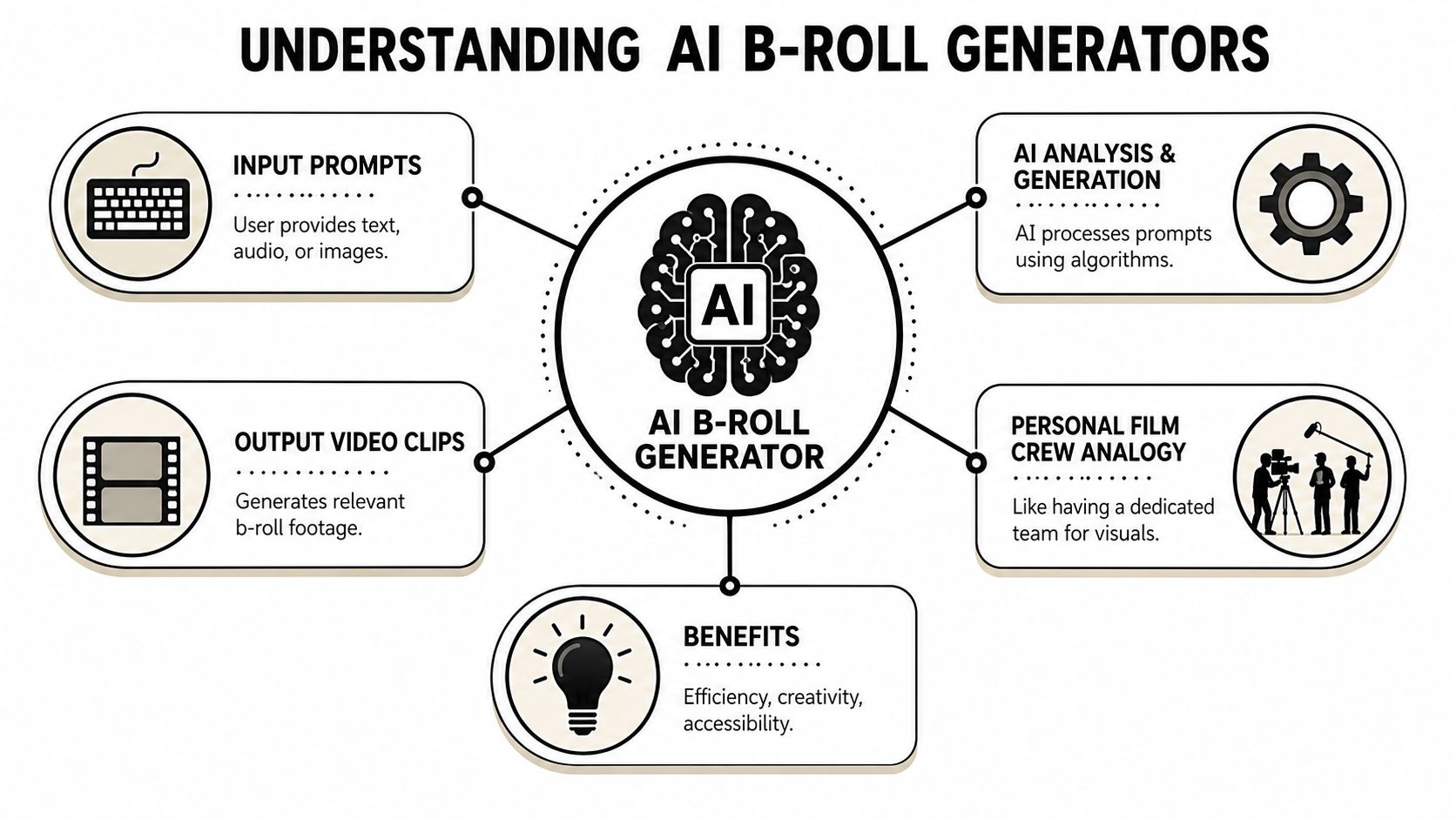
An AI B-roll generator is a tool that creates short supporting video clips from prompts instead of pulling them from a fixed stock library. In practice, that means you can describe a shot in plain language and get a custom clip back that's built for your edit.
The simplest way to think about it is this. It's like having a personal film crew on standby. You tell that crew what the subject is doing, where the scene happens, how the camera should move, and what the light should feel like. The tool handles the generation.
The basic workflow
Most tools follow the same pattern:
- You provide an input, usually text, sometimes image or audio context.
- The model interprets the request and generates motion, composition, texture, and lighting.
- You review several outputs and pick the clip that best supports the line, beat, or transition in your timeline.
What makes this different from stock is flexibility. Stock footage can only give you what someone already shot. Generative video can create something closer to what the edit needs. That doesn't mean it replaces all stock or all filming. It means you now have a third option that's often faster and better suited.
Why this category matters now
This isn't a fringe corner of the creator economy. The AI B-roll generation market analysis from Market Intelo says the global market reached 1.8 billion in 2025** and is projected to grow to **14.7 billion by 2034, with a 31.4% CAGR. That kind of growth tells you creators and businesses aren't treating AI B-roll like a toy. They're building workflows around it.
If you're comparing tools more broadly, a useful primer is this overview of GPT Uncensored AI video tools, especially if you want context on how B-roll generation fits inside the larger AI video stack.
A stock library gives you choices. An AI B-roll generator gives you direction.
What it does well and what it doesn't
It works best when you need:
- Short support shots that explain, transition, or reinforce a point
- Abstract visuals for concepts that don't have obvious real-world footage
- Brand-specific mood that generic stock can't deliver
It struggles when you expect:
- Perfect continuity with human-shot footage straight out of the model
- Long narrative scenes with complex realism
- Zero post-production after generation
That trade-off is worth it for most short-form creators. The speed and flexibility are real. So are the limitations. The creators getting strong results are the ones who treat AI B-roll as a production tool, not a one-click replacement for craft.
Mastering the Art of AI B-Roll Prompts
Weak AI clips are often obtained for one reason. Their prompts describe a topic, not a shot.
That sounds minor, but it changes everything. “Entrepreneur working late” is a topic. “Founder rubbing tired eyes at a cluttered desk, dim office, laptop glow, slow push-in, cool blue light” is a shot. The second one gives the model enough structure to make visual choices that feel intentional.
The bigger mistake is thinking prompting is only about image quality. For short-form creators, prompting is also about viewer retention. An Influencer AI Agents analysis on AI B-roll generation tools notes that B-roll placed in the first three seconds has a meaningful impact on retention, while tool documentation still doesn't connect specific prompt styles to engagement metrics. That gap matters. If your opening visual is generic, your edit feels generic before the audience even hears the full point.
The prompt skeleton that holds up in real edits
A reliable structure is:
Subject + action, location + detail, camera move, light
This format works because it tells the model four things an editor cares about. Who or what is on screen. What's happening. How the shot should move. How it should feel.
Examples:
- Subject + action: barista wiping counter, trader checking phone, rain hitting window
- Location + detail: cramped apartment kitchen, neon alley with wet pavement, quiet suburban office
- Camera move: slow pan right, handheld drift, locked close-up, overhead tilt
- Light: harsh fluorescent light, golden hour backlight, moody low-key shadows
Why vague prompts fail
Vague prompts create clips that are visually acceptable and editorially useless. They often have the same problems:
- No hierarchy: The model doesn't know what the focal point is.
- No motion plan: The camera movement feels random or flat.
- No mood: Lighting defaults to something generic.
- No editorial role: The clip doesn't clearly support a line or transition.
If the prompt doesn't tell the model why the clip belongs in the timeline, the output usually feels disposable.
Prompting for better B-roll before and after
| Vague Prompt (Before) | Specific Prompt (After) | Expected Improvement |
|---|---|---|
| office worker | exhausted office worker slumped over keyboard, small desk, messy paperwork, slow push-in, cold fluorescent light | Better emotional clarity and a stronger match for burnout, stress, or overwork narration |
| city at night | empty downtown street at night, wet pavement reflecting neon signs, slow pan right, light fog, moody blue and magenta glow | More atmosphere and stronger hook value for suspense, tech, or urban storytelling |
| coffee shop | close-up of espresso pouring into ceramic cup, cozy cafe counter, handheld micro-movement, warm morning light | More tactile detail and better use for pacing, lifestyle, or calm transition shots |
| person using phone | young professional checking phone while waiting at train platform, commuters blurred in background, medium shot, subtle dolly left, cool overcast light | More context and better narrative relevance for modern work, news, or communication topics |
| AI concept | abstract neural network particles flowing through dark digital space, smooth cinematic drift, soft glow, futuristic calm lighting | More useful visual metaphor for explainers and faceless educational videos |
A retention-first way to think about prompts
Prompt for the moment the clip appears, not just the scene itself.
If the B-roll lands in the opening hook, use motion and contrast. If it appears at a likely drop-off point, use a shot that resets attention through a change in angle, energy, or texture. If it supports an explanatory line, prioritize clarity over style.
Three practical habits help:
- Write prompts from the script, not from broad themes. Pull exact nouns, verbs, and emotional cues from the spoken line.
- Use camera language on purpose. Slow pans feel different from handheld drift. That difference changes how polished or urgent the moment feels.
- Generate variants around one idea. Change only one variable at a time, like light or movement, so you can tell what improved the result.
Creators who get the most out of AI B-roll aren't necessarily better writers. They're better shot callers. They know the clip's job before they ask the model to make it.
A New Workflow for Short-Form Video Creation
The fastest AI B-roll workflow doesn't start in the generator. It starts in the script.
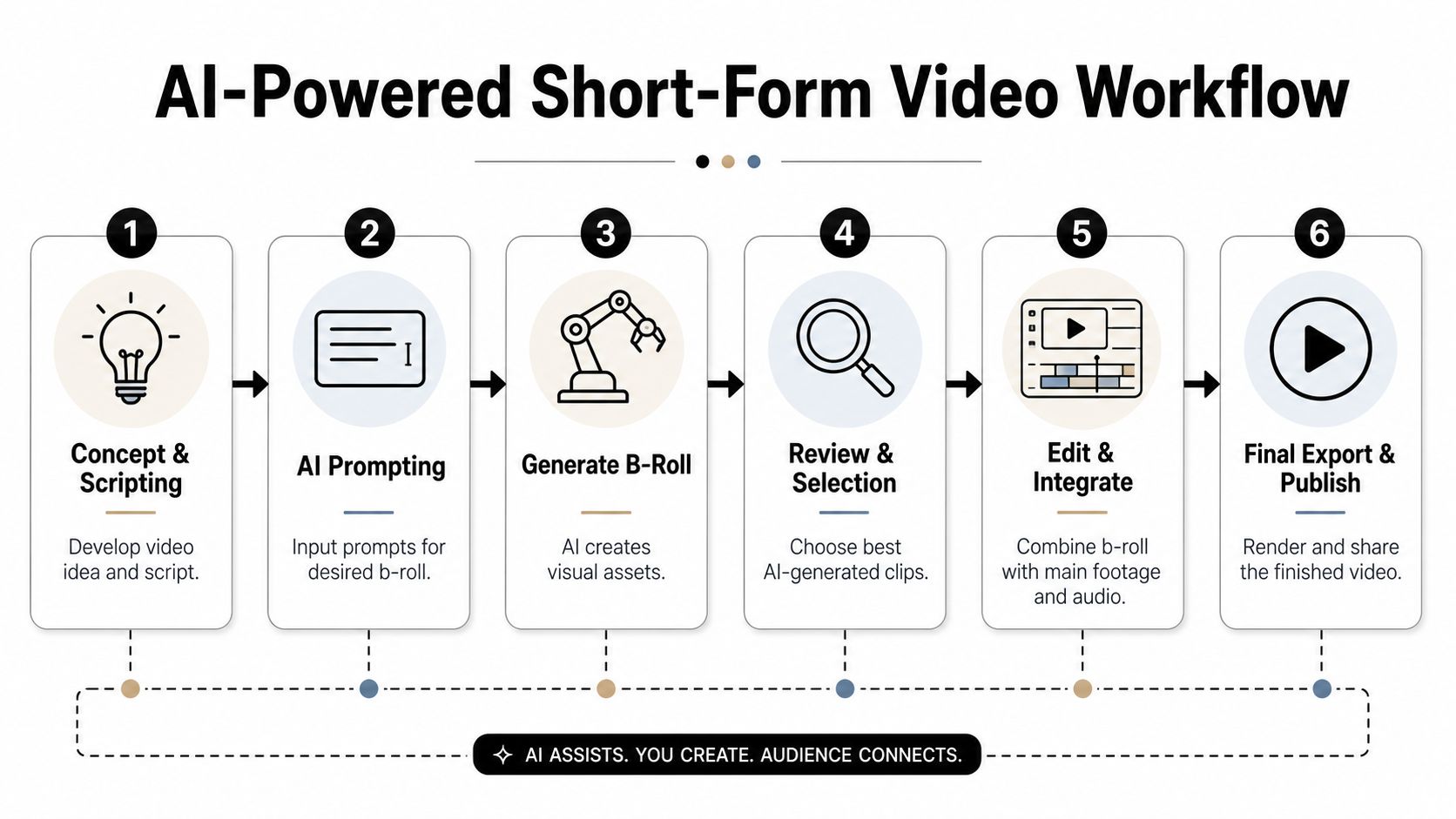
If you wait until the timeline feels empty, you'll still waste time. The better move is to identify visual beats while you're scripting or rough-cutting. Mark the hook, the explanation points, the transitions, and the moments where the pace drops. Those are your B-roll slots.
A practical production sequence looks like this:
The working sequence
- Script with visual intentFlag lines that need reinforcement, contrast, or a pattern interrupt.
- Extract shot prompts in batchesTurn those flagged moments into prompt-ready shot lines.
- Queue generations togetherDon't generate one clip, review it, then start over. Batch the whole set.
- Review with the edit openPick clips based on timeline fit, not standalone beauty.
- Trim hardMost AI B-roll works better when it gets in, does its job, and gets out.
A current generation example comes from Oakgen's guide to AI B-roll for content creators, which notes that industry-standard tools using Seedance 2.0 can queue 12+ shots at once, render a 10-second clip for about $0.60 in 1 to 3 minutes, and reduce production time by up to 80% compared with traditional stock sourcing.
That changes how you work day to day. You're no longer searching clip by clip. You're planning a shot set, letting the model process it, and returning to the timeline with options.
For creators building ad-style shorts or product-led social content, the ShortGenius AI video ad maker is worth a look if you want another reference point for how AI tools are streamlining fast-turn short-form production.
Here's a practical walkthrough of the broader idea in action:

What changes in your role
The editor becomes more like a director and less like a search operator.
You define the shot list, set the visual intent, reject weak generations, and shape the final rhythm. That's a better use of creative time. It also produces a more coherent video, because the supporting footage is built around your script rather than borrowed from a library built for everybody.
Batch generation works best when the prompts share a visual language. If every prompt asks for a different world, the final edit feels stitched together.
Quality Control and Post-Production Essentials
You save hours generating B-roll, then lose the gain in the edit if you treat those clips as finished footage.
That's the trap.
AI B-roll often looks convincing on first review because you're judging a single shot. In the actual sequence, small mismatches show up fast. Contrast sits a little high, motion cadence feels slightly synthetic, and the cut lands half a beat too late for the spoken line. Viewer retention drops on details like that. People may not identify the problem, but they feel it.
Color matching decides whether the clip belongs
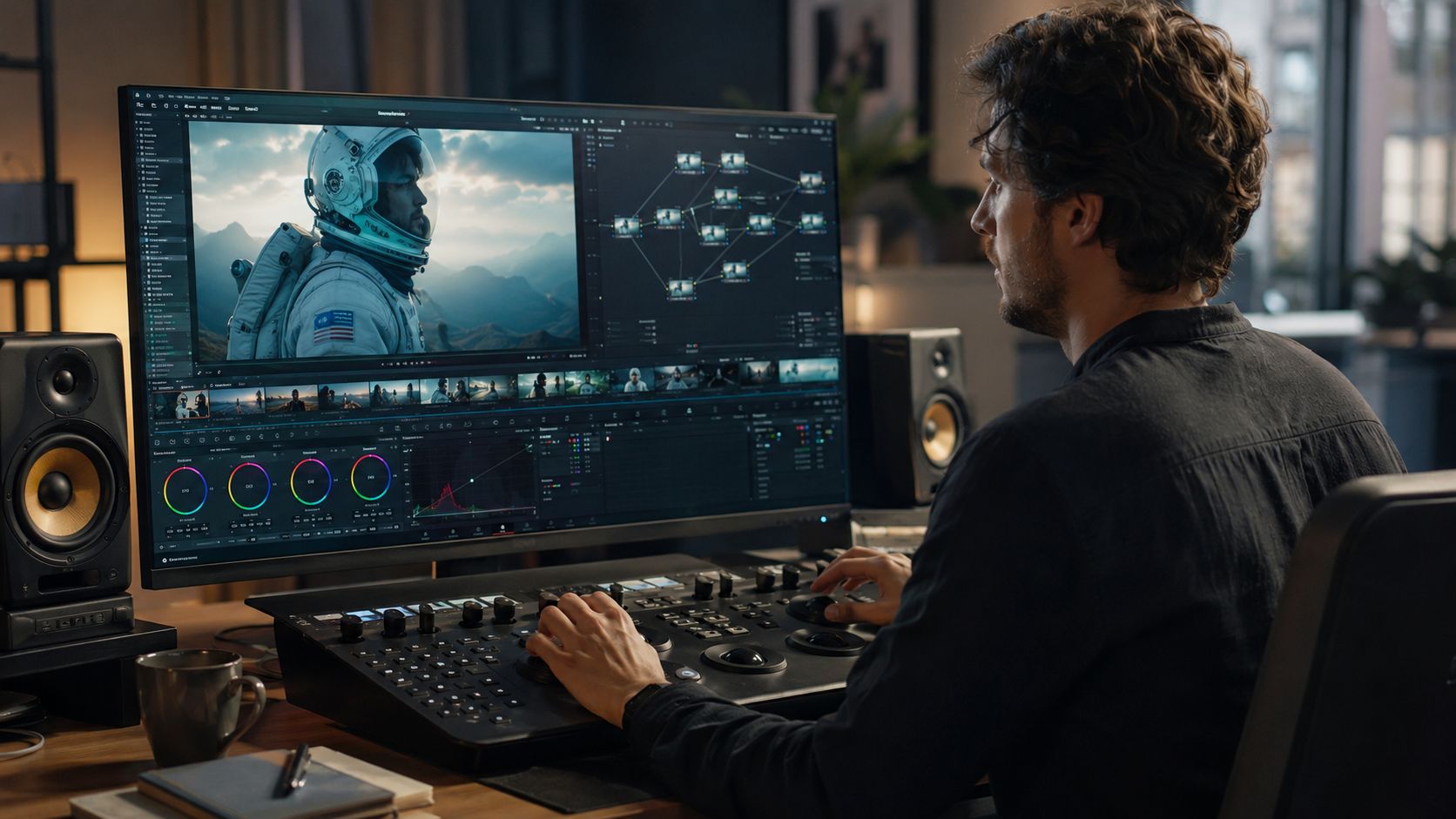
AI footage rarely arrives ready to sit beside your A-roll. A previous source cited earlier noted that color matching is one of the most common cleanup steps, especially around mid-tones and ambient audio levels. That matches what I see in practice. The clip is often close, but “close” still reads as separate footage.
Start with the transition point, not the clip by itself. Check the outgoing A-roll frame, the first AI frame, and the return cut. Mid-tones usually need attention first. After that, check white balance, shadow density, and highlight rolloff. Product shots, desk setups, and indoor talking-head content are especially sensitive because viewers subconsciously know what those scenes should look like.
A short checklist helps:
- Match mid-tones before chasing stylized looks.
- Check temperature on the cut, not full-screen in isolation.
- Lower saturation if the generated clip feels too “clean” beside real footage.
- Review at normal playback speed. Problems that feel minor on pause often stand out in motion.
Audio and timing carry more weight than creators expect
If a generated clip includes usable ambience, keep it under control. Background texture can help a scene feel grounded, but it should never compete with the line that clip is supporting. Poor ducking and sloppy transitions are one of the fastest ways to make an AI-assisted edit feel cheap.
This matters even more if your workflow includes synthetic narration. Cleaner narration gives you less room to hide rough edits, so your pacing has to be tighter. If voice quality is part of your process, this guide to best text to speech software for creators pairs well with a stricter post-production workflow.
One rule works almost every time. Cut AI B-roll shorter than your first instinct.
Most generated shots start to reveal themselves if they stay on screen too long. Use them to reinforce a phrase, reset attention, or visualize a claim, then move on. That editing choice ties directly back to prompt engineering for retention. Prompts should request a clear subject, one dominant action, and a strong focal change in the first second or two. If the shot needs four seconds to become interesting, it will underperform in shorts.
Review for anomalies before you review for beauty
Pretty footage can still fail QC.
Watch every candidate clip once with sound off and once at 200% zoom. Look for warped hands, unstable edges, object flicker, inconsistent reflections, text-like artifacts, and background elements that change shape between frames. These are the defects viewers catch instantly, and they are also the kind of defects that can trigger trust problems in commercial content, finance content, health content, or anything presenting itself as factual.
My standard reject rules are simple:
- Cut any shot with visible anatomy errors or object warping.
- Reject clips with fake-looking camera physics.
- Remove shots that distract from the spoken point, even if they look impressive alone.
- Avoid clips that look too synthetic for the claim being made. That choice protects retention and reduces compliance headaches later.
Editors who get the best results from AI do more selection than repair. They generate broadly, reject aggressively, and polish only the shots that are right for the timeline. That is where the time savings hold up.
The Hidden Risks Legal and Platform Compliance
A lot of AI B-roll tutorials act like “royalty-free” solves everything. It doesn't.
The legal and platform side is murkier than the average creator wants to admit. A tool can say the output is original, but that still doesn't answer the questions that matter most in practice. Who owns the resulting clip under the tool's terms. Whether a platform treats that clip as meaningful original content. Whether your final video looks distinctive enough to avoid being classified as repetitive or low-effort.
The demonetization problem is real
A LlamaGen discussion of free AI B-roll generator risks cites emerging data showing that 42% of faceless channels reported reduced ad revenue or demonetization in 2025 because of “repetitive or low-effort” AI content flags.
That number should change how you use these tools. The risk isn't just copyright in the abstract. The risk is packaging. If your videos look formulaic, recycle the same visual rhythms, or rely on obviously synthetic filler, the platform may treat them as low value even if the clips themselves are technically usable.
What triggers trouble
The patterns that tend to create risk are usually editorial, not just technical:
- Repetitive visual motifs: Same shot types, same pacing, same animation feel across every upload
- Prompt laziness: Generic commands that lead to generic footage
- Thin transformation: Little evidence of human editing, commentary, structure, or narrative intent
- Sloppy metadata: Titles, descriptions, and tags that don't reflect a clear original concept
If you're also layering music under your shorts, rights clarity matters there too. This guide to background music licensing is worth reviewing because audio rights can complicate compliance just as fast as visuals.
Practical ways to lower your risk
No public checklist guarantees monetization safety, but a few habits reduce exposure:
- Build prompts around narrative specificity
The more specific the visual is to your actual script, the less your content feels mass-produced. - Mix AI B-roll with other original elementsVoice, scripting, pacing, sequencing, captions, and editorial framing should all show human intention.
- Avoid visual copy-paste across uploadsEven a good prompt can become a bad pattern when it gets reused too often.
- Read the tool's ownership and usage terms directlyDon't rely on marketing language alone.
Platforms don't judge your workflow. They judge the finished video and the pattern of your channel output.
That's the right mindset. AI B-roll can absolutely help you scale. It can also make your channel look automated in the worst possible way if you use it as filler instead of directed storytelling.
Choosing and Integrating an AI B-Roll Solution
Picking an AI B-roll generator isn't only about output quality. It's about whether the tool fits the way you publish.
The market is moving fast, and the business case is already strong. In a YouTube discussion citing Gartner's projection on synthetic and AI-enhanced video, Gartner predicts that by 2026, 90% of online video content will be synthetic or AI-enhanced. The same source notes that AI B-roll tools can cut the B-roll stage from 90 minutes to under 15 minutes, an 80% reduction in labor, while reducing overall production costs by up to 90%.
Those numbers explain why this is no longer a side experiment for creators who publish consistently.
The checklist that matters
When evaluating a tool, check these points before you commit:
- Generation speed: If rendering drags, your “faster” workflow won't feel faster.
- Prompt control: You need enough control to direct mood, motion, and style, not just broad topics.
- Ownership terms: Read what the platform says about output rights and commercial usage.
- Workflow fit: The best tool is the one that reduces handoffs between scripting, generating, editing, and publishing.
- Consistency controls: Look for tools that help you maintain a recognizable visual language across a series.
For a broader look at how creators compare automation tools around content production and distribution, XBurst's AI social media tool rankings offer useful context.
Integration matters more than features on a landing page
Some tools generate attractive clips and still slow you down because the assets don't fit neatly into your publishing stack. Others may produce slightly less dramatic output but save you far more time because they connect better to the rest of your process.
That's especially important if you're producing faceless shorts at volume. In that case, the winning setup is usually the one that compresses the full path from concept to published video. If that's your priority, it also helps to look at workflow-focused systems built around short-form automation, including resources on AI shorts maker workflows.
The right AI B-roll generator should make your edits faster, your visuals less generic, and your channel more resilient. If it only gives you interesting clips, that's not enough.
If you want an easier way to turn ideas into finished faceless videos without stitching together separate tools, ClipCreator.ai is built for that workflow. It helps creators generate short-form videos with scripts, visuals, voiceovers, subtitles, scheduling, and auto-publishing in one place, so you can spend less time managing the process and more time refining the creative.

Create your first video in under 2 minutes
Pick a niche, and ClipCreator.ai generates and auto-posts faceless videos to your channels every day.
Join ClipCreator.ai

