A solid training video for customer service is your secret weapon for building a support team that's consistent, scalable, and genuinely effective. These videos create a single source of truth, making sure every single agent gets the same top-tier training on everything from mastering your product to navigating tricky customer conversations.
Why Video Training Is No Longer Optional for Customer Service
Let's be honest: dense training manuals and text-heavy emails are gathering dust. Modern customer service pros learn best with dynamic, visual content that gets straight to the point. A smart video training program isn't just a perk anymore; it's a core requirement for building an efficient and effective customer support operation. It delivers a repeatable, consistent experience that has a real impact on your bottom line.
The Dual Role of Training Videos
A good video library does double duty, serving both your newest hires and your seasoned veterans. For new folks, a series of short, focused videos gets them up to speed on company policies, software, and communication standards way faster than any manual could.
For your experienced agents, video is the perfect tool for continuous learning. You can quickly push out updates on new product features, changes in return policies, or best practices for handling the latest customer trends. It keeps everyone working from the same playbook.
A well-crafted training video program closes knowledge gaps, eliminates inconsistencies, and empowers every agent to deliver exceptional service, regardless of their tenure.
The numbers don't lie. Training videos have become a huge part of modern customer service strategy, with 23% of businesses now prioritizing them as a core tool. We're all realizing that structured, accessible training directly improves customer satisfaction and helps bring down those pesky support ticket volumes. You can dig deeper into these trends in Wyzowl's latest research.
Key Benefits of Using Videos in Customer Service Training
Shifting to a video-first training model isn't just about keeping up with trends; it brings real, measurable advantages that move the needle on your most important metrics.
| Benefit | Impact on Business |
|---|---|
| Improved Consistency | Every agent gets the same message and instructions, wiping out "it depends on who you get" service lottery for customers. |
| Increased Engagement | Combining sight and sound is far more engaging than reading text, leading to better focus and knowledge retention. |
| Enhanced Scalability | Onboard a growing or remote team without the logistical nightmare of scheduling in-person sessions across time zones. |
| Better First-Contact Resolution | Confident, well-informed agents solve problems on the first try, which is a direct driver of higher CSAT scores. |
Ultimately, a strong library of customer service training videos is an investment in your brand's reputation and your team's sanity. By making training more accessible and effective, you empower your agents to do their best work, which is a win for everyone.
Pinpointing Your Training Goals and Audience Needs
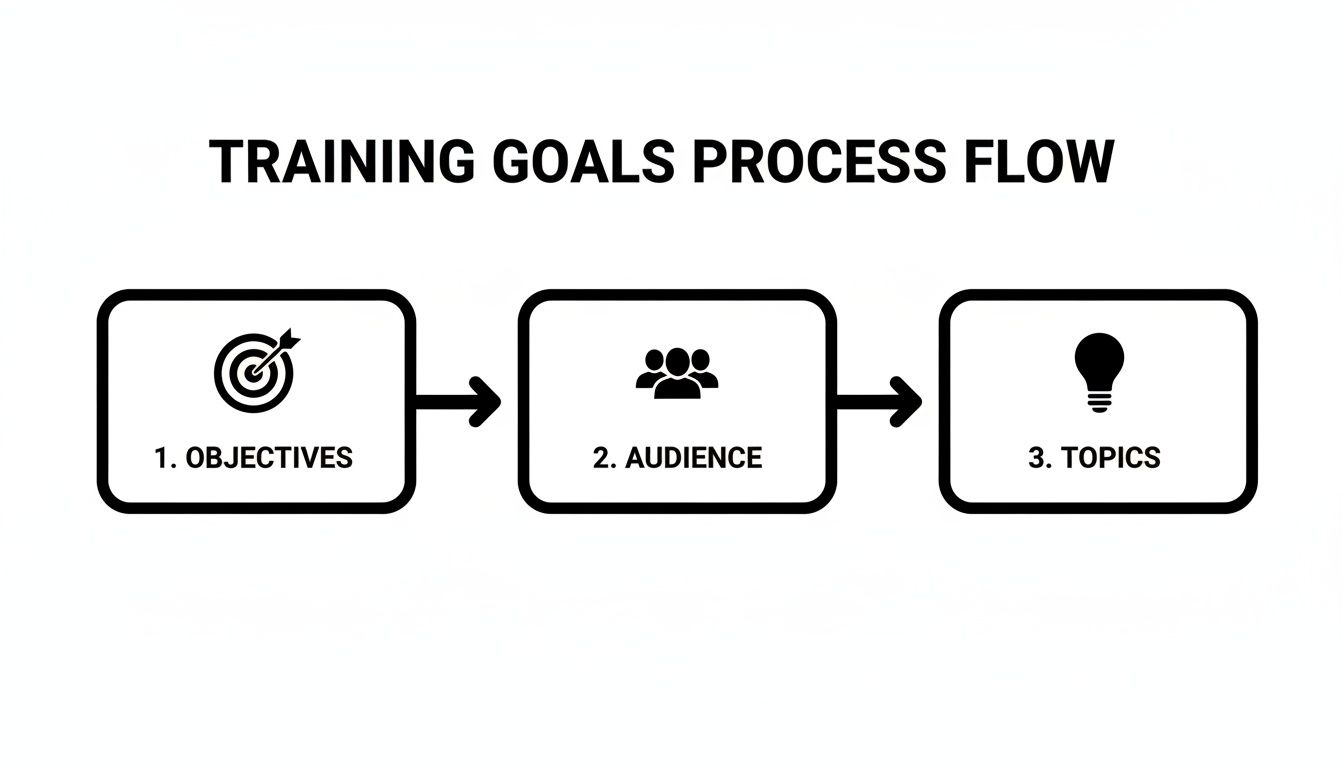
Before you even think about hitting record, the most crucial work happens. A truly effective training video for customer service isn't built on fancy graphics or a charismatic narrator; it's built on a rock-solid foundation of clear goals and a genuine understanding of who's watching. Skip this step, and you’re just creating content that won't actually improve performance.
It all starts with defining your learning objectives with surgical precision. Forget vague goals like "improve communication skills." Instead, get specific. What, exactly, should a team member be able to do after watching your video that they couldn't do before? This action-first mindset is what turns fuzzy ideas into measurable results.
Defining Actionable Learning Objectives
Think of a good learning objective as a promise to your viewer. It’s a guarantee that by the end of the video, they’ll walk away with a new, practical skill they can use immediately.
For instance, "Learn about handling angry customers" is a weak, passive goal. A much stronger, actionable one is, "Successfully apply the A-C-E de-escalation technique (Acknowledge, Clarify, Empathize) to calm a frustrated customer." See the difference? One is about knowing, the other is about doing.
Let's break it down with a few more real-world examples:
- For Software Training: "Correctly process a multi-item refund in our new POS system in under 90 seconds."
- For Soft Skills: "Identify and use three approved phrases for expressing empathy during a support call."
- For Policy Updates: "Accurately explain the new warranty policy to a customer inquiring about a product replacement."
Getting this granular forces your video to be laser-focused on solving a real problem. You're not just throwing information out there; you're building specific skills that directly tie to key metrics like handle time and CSAT scores.
A great training video doesn't just teach what to know—it shows what to do. Focus every second of your content on driving a specific, observable behavior change.
Tailoring Content to Your Audience
Knowing what you need to teach is only half the battle. Just as important is knowing who you're teaching. A video that’s a perfect primer for a new hire will feel painfully basic—even condescending—to a ten-year veteran. You have to segment your audience to create content that respects their experience and targets their specific needs.
Think about these two common groups:
- New Hires: They need the essentials, the "101" stuff. Your videos for them should cover core processes, need-to-know company culture points, and foundational software skills. You have to assume they're starting from scratch with your internal systems.
- Seasoned Agents: This group craves upskilling content. They've mastered the basics, so give them videos on advanced troubleshooting techniques, nuanced policy updates, or strategies for handling those rare, high-stakes customer scenarios.
A great way to generate relevant video ideas is to look at your support ticket data. If you see a sudden spike in questions about a specific feature, that's your cue. A short, targeted video explaining exactly how to handle that issue can provide immediate value. This just-in-time approach ensures every piece of content you produce is solving a current, pressing need. For more ideas on how to organize your production process, you might be interested in our guide on creating a training video from start to finish.
2. Scripting and Storyboarding for Better Engagement
Once you know what you need to teach and who you're teaching, you can start mapping out the actual video. This is where the magic happens. A truly effective training video for customer service comes down to a punchy, human-sounding script and a solid visual plan—your storyboard. This is how you turn learning goals into a story that actually resonates.
Write a Script That Sounds Human
Let's be honest: nobody wants to listen to a script that sounds like it was vetted by the legal department. Your agents are people, and they learn best when the information feels natural and easy to digest. So, write like you talk.
Use simple language, keep your sentences short, and maintain a friendly, encouraging tone. This approach makes the content feel less like a lecture and more like a helpful tip from a seasoned pro.
Embrace the Power of Micro-Lessons
Think small. Really small. The most successful training videos I've seen are built on the concept of micro-lessons. In fact, one study found that viewers are 30% more likely to finish a video if it's under 60 seconds.
Instead of creating a 10-minute saga on "Handling Returns," break it down. Create a series of super-short, focused videos:
- "How to Process a Refund in 3 Steps" (60 seconds)
- "Explaining Store Credit vs. Cash Back" (45 seconds)
- "What to Do with a Damaged Return" (60 seconds)
This respects your team's limited time and dramatically boosts how much they remember. It also turns your video library into a searchable, just-in-time resource for when they're on the floor and need an answer, fast.
This simple process flow is the foundation for everything that follows. It ensures every script you write and every storyboard you create is tied directly back to a specific learning goal.
Build a Simple Storyboard
You don't need to be a Pixar artist to create a storyboard. For faceless training videos, it's just a simple blueprint that aligns your visuals, on-screen text, and voiceover. Think of it as your roadmap to make sure every single visual element supports what's being said.
A basic two-column table in a Google Doc or Word file is all you need.
| Visuals (What the viewer sees) | Audio/Text (What the viewer hears/reads) |
|---|---|
| Scene 1: Animated icon of an unhappy customer. On-screen text: "Handling a Refund Request" | VO: "When a customer asks for a refund, the first step is always to listen and show empathy." |
| Scene 2: Screen recording of the POS system. Cursor highlights the "Refund" button. | VO: "Navigate to the customer's order and select the 'Refund' option." |
| Scene 3: A checklist graphic appears on screen with "Acknowledge," "Process," and "Confirm" checked off. | VO: "Remember our three key steps: Acknowledge the issue, process the return, and confirm the refund with the customer." |
This forces you to think visually from the start. It helps you decide if a quick graphic, a text overlay, or a screen recording would be the clearest way to explain a point, ensuring your visuals and audio are perfectly in sync.
A storyboard is your best defense against creating a boring video. It visualizes the flow and pacing before you invest time in production, ensuring the final product is dynamic and clear.
Taking the time to script and storyboard is the difference between a video that gets assigned and one that actually gets watched, remembered, and applied on the job. This planning stage is non-negotiable.
Bringing It All Together with Modern AI Video Tools
Here’s some good news: you don't need a film crew or a five-figure budget to create a polished training video for customer service. Not anymore. AI-powered tools have completely changed the game, making it possible for anyone to produce genuinely effective and engaging content on a tight timeline and budget.
This approach is especially perfect if you're building a library of "faceless" videos. These rely on sharp visuals and crystal-clear audio instead of on-screen presenters, which is often a more scalable and easier-to-update model.
What we're talking about is an automated workflow that takes your finished script and does the heavy lifting for you. It's simply a smarter, faster way to work. A project that used to take weeks of coordination can now be knocked out in an afternoon.
Let's dig into how these tools actually bring your storyboard to life.
Let AI Handle the Visuals
First up, turning your script into a visual story. The old way involved painstakingly searching for stock footage or designing graphics from the ground up. Now, script-to-video tools can automatically generate relevant images, animations, and on-screen text that match your script's narrative.
For example, if a line in your script is "walk the customer through the refund process," the system can instantly create a clean, animated graphic of a credit card transaction or a simple screen recording showing the key steps. This keeps your visuals laser-focused on the learning objective, cutting out any fluff that might distract your team.
Find the Perfect AI Voice
A clear, professional voiceover is non-negotiable for a good training video. But hiring voice actors is expensive and adds a lot of time to your production schedule. This is where modern text-to-speech (TTS) technology shines. Today’s AI voices are incredibly human-like and can be dialed in to match your brand’s tone, whether you’re going for warm and friendly or more formal and direct.
The right AI voiceover can elevate your training content from a simple slideshow to a professional educational tool. It provides consistency across all your videos and can be easily updated whenever a script changes.
You can usually pick from a huge library of accents and speaking styles, ensuring the narration actually connects with your team. This flexibility is also a massive win for global teams, making it almost trivial to produce your training videos in different languages.
Add Subtitles in a Snap
Accessibility isn't just a nice-to-have; it's a must. Subtitles make your training inclusive for team members who are deaf or hard of hearing, not to mention everyone who just prefers watching videos on mute (which is a lot of people). Manually transcribing and timing subtitles is a mind-numbing task, but AI does it for you.
Modern video platforms generate perfectly synced captions straight from your script and audio. It’s a huge time-saver, but more importantly, it boosts comprehension and helps everyone retain the information better.
If you’re looking for new ways to turn your scripts into compelling videos, it’s worth exploring modern solutions for script-to-video AI content creation. Adopting an AI-driven workflow makes creating a steady stream of high-quality training content a sustainable reality. For a deeper dive, check out our complete guide to training video production.
Getting Your Training Content Out There and Seeing if It Worked

Creating a great video is a huge step, but it’s really only half the battle. A brilliant training video for customer service doesn't do much good if it never gets in front of your team, or if you have no idea whether it’s actually making a difference. This final piece of the puzzle is all about smart distribution and real-world measurement.
Now that your video is edited and ready to go, a few last-minute tweaks can really boost its impact. I always recommend adding simple text overlays to highlight the most important points. You could also add a clear call-to-action at the end, like "Review the new policy document now." Little things like this keep people engaged and tell them exactly what to do next.
How to Get Your Videos to Your Team
Your distribution strategy should fit right into your team's existing daily routine. The last thing you want is to make them hunt down training materials.
- For Core Training: Your company's Learning Management System (LMS) is the perfect spot for those foundational training videos. It's built for this stuff, letting you track who has completed what and create organized learning paths.
- For Quick Updates: Got a short, time-sensitive update? Maybe a quick tip for handling a new software bug? Push it out directly through a team chat app like Slack or Microsoft Teams. It's fast and immediate.
- For Just-in-Time Support: A searchable internal knowledge base, like Confluence or Notion, is ideal for hosting a library of micro-lessons. This way, agents can pull up a quick video answer right when they need it—while they’re on a call with a customer.
And don't forget about accessibility. Adding accurate, well-timed subtitles is non-negotiable for any modern training program. It ensures everyone on your team can access the content and makes it easier for people to understand, especially if they're in a noisy office. Our guide on how to add closed captioning to a video walks you through how to do it right.
The best distribution channel is the one your team already uses every day. When you embed learning into their existing workflow, it stops feeling like a chore and just becomes a natural part of the job.
Measuring What Actually Matters
The true measure of a training video's success isn't how many people viewed it—it's whether it changed behavior for the better. To really prove the value of your work, you have to connect your training to tangible business results.
Look past the simple completion rates. It’s nice to know who watched the video, but the real question is: did it work? A great starting point is to collect qualitative feedback. Send out a quick survey asking agents how confident they feel using the new skill they just learned about.
Then, it's time to dig into your support metrics. Pull the data from before you rolled out the training and compare it to the data from after.
- First Contact Resolution (FCR): Did you see FCR rates improve for the specific problem covered in the video?
- Average Handle Time (AHT): Are agents solving these kinds of tickets more efficiently now?
- Customer Satisfaction (CSAT): Have CSAT scores gone up for interactions related to the training topic?
When you get this right, the financial impact can be huge. Studies show that AI-assisted agents who get proper training resolve issues 47% faster and achieve 25% higher first-contact resolution rates. In fact, AI-powered customer service systems can deliver an impressive $3.50 for every $1 invested, and solid video training is a key part of that equation. By connecting your training efforts to hard numbers like these, you can clearly show everyone in the organization just how valuable this work really is. You can read more about the ROI of customer service automation on Salesmate.io.
Common Questions About Customer Service Training Videos
When you start making training videos, a few practical questions always pop up. Getting those sorted out early can be the difference between a project that never gets off the ground and one that really makes an impact. Let's dig into some of the most common ones I hear from teams.
Getting these details ironed out from the start helps you create content that's not just effective, but actually sustainable to produce over the long haul.
What’s the Ideal Length for a Customer Service Training Video?
The honest answer? It depends on the topic and where you're posting the video. But if there’s one golden rule to follow, it’s micro-learning. People simply learn and remember things better when they’re delivered in short, focused chunks.
If your video teaches a single, specific skill—like how to properly log a support ticket—keep it tight. Aim for 60 to 90 seconds. That's the sweet spot for a quick-reference guide you can drop into a Slack channel or team chat when someone needs a fast answer.
For something more involved, like a complete walkthrough of a new software feature, you can stretch it to 3-5 minutes. But even then, I'd strongly suggest breaking that bigger topic into a playlist of shorter, bite-sized videos. This makes the information way easier to digest. It also means your agents can quickly find and re-watch the exact part they need without having to scrub through one long recording.
The best training videos I’ve ever seen answer one question or teach one skill. They get in, get it done, and get out. Brevity isn't just a style choice; it's a critical part of effective learning.
How Can I Actually Measure the ROI of My Training Videos?
Measuring the return on your training videos isn’t fuzzy—it’s about connecting what you’ve created to real business results. You'll want to look at both the hard numbers and the feedback from your team.
First, let's talk data. Before you release a new training video, get a baseline measurement of your key performance indicators (KPIs). After the video has been circulating for a few weeks, measure those same KPIs again.
- First Contact Resolution (FCR): Are you seeing a higher resolution rate for the specific issue your video covers?
- Average Handle Time (AHT): Are agents closing out these types of tickets more quickly?
- CSAT Scores: Are customer satisfaction scores improving for interactions related to the training topic?
- Ticket Escalations: Are fewer of these tickets getting escalated to senior staff?
Then, you need to get qualitative feedback. This can be as simple as sending out a quick survey. Ask your team to rate their confidence level on the topic before and after watching the video. This directly shows the video's impact on their skills and day-to-day work.
Do I Need to Hire Professional Actors or Get People on Camera?
Definitely not. In fact, "faceless" videos are not only becoming the norm but are often far more practical and scalable for training. You can forget about the hassle of booking studios or coordinating with on-screen talent, which slashes your production costs and timelines.
A high-quality, AI-generated voiceover paired with a clean screen recording, simple animated graphics, and clear on-screen text can look incredibly polished. This approach lets you produce content way faster. And the best part? It makes updates a total breeze. When a process inevitably changes, you just tweak the script, regenerate the video, and you're done. No expensive reshoots required. For the fast-moving world of customer service, that kind of agility is everything.
Ready to create engaging, faceless training videos without all the usual headaches? ClipCreator.ai automates the entire workflow, from script to final video, so you can build a powerful training library in a fraction of the time. Create your first video today at ClipCreator.ai.

Create your first video in under 2 minutes
Pick a niche, and ClipCreator.ai generates and auto-posts faceless videos to your channels every day.
Join ClipCreator.ai