
You open CapCut on Monday morning and find three short-form posts due today, no finished scripts, and a brand deal waiting by Friday. The first hour disappears into choosing a topic. The next goes into rewriting an opening that still feels flat. By the time you start editing, you're already producing under deadline pressure.
That workflow makes every post feel like an emergency. Batch content creation replaces that daily scramble with a production line: ideation, scripting, visual generation, voiceover, editing, adaptation, quality assurance, and scheduling happen in focused sessions. The result isn't more output. It's a repeatable system that lets you publish consistently without making every morning a race against the clock.
The system also creates two problems if you build it carelessly. Reusing the same hook and edit across every platform creates same-video fatigue, while skipped reviews let subtitle, timing, and export errors multiply across an entire batch. The sections below treat batching as an end-to-end short-form workflow, not a Sunday planning ritual.
What Batch Content Creation Actually Solves for Short-Form Creators
The Monday creator in that opening scenario doesn't have an idea problem. They have a context-switching problem. They move from research to scripting, scripting to image selection, image selection to editing, and editing back to client communication before any single task reaches a clean finish.
Content batching groups related work into one focused session. A creator might develop a set of concepts first, write the scripts together, generate visuals in a separate pass, then assemble, review, and schedule the finished videos. This workflow turns daily posting into planned production cycles, so each session has a clear output instead of an open-ended list of unfinished tasks.
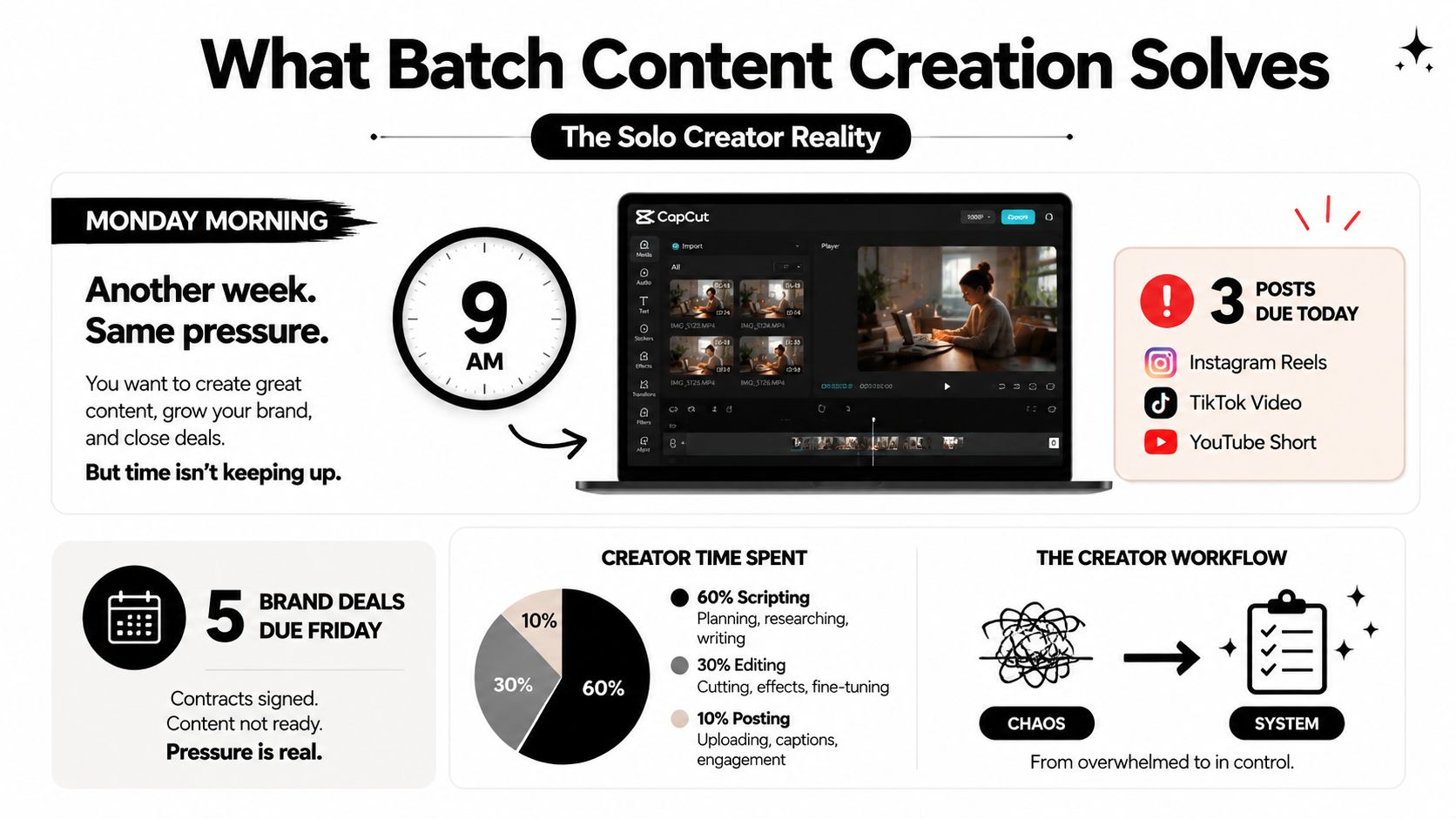
A 2026 guide to content batching describes creators producing 20 to 30 posts in 2 to 4 hours, compared with 30 to 60 hours per month for daily posting workflows. The same guide says this can imply a reduction of roughly 25 to 56 hours per month, with savings reaching 90% in some cases. Treat those figures as workflow illustrations, not a promise. Your actual result depends on your format, revision process, research burden, and how much of the pipeline you automate.
Where the reclaimed time goes
The useful benefit isn't having empty hours. It's deciding where those hours should go.
- Creative development: Build stronger story angles, hooks, and visual directions before production begins.
- Testing: Prepare several distinct openings or endings instead of betting the entire week on one idea.
- Commercial work: Make room for brand briefs, client revisions, and audience replies.
- Quality control: Review the finished content before it reaches the public.
Batching became more formalized as short-form publishing scaled across TikTok, Instagram, and YouTube. Those channels reward creators who maintain a dependable cadence, but consistency becomes expensive when every video starts from a blank project file. A production line lowers that repeated setup cost.
Practical rule: Batch the work that benefits from momentum, but keep judgment, platform tailoring, and final approval close to publication.
The system fails when creators confuse repetition with efficiency. A batch of identical videos may be fast to export, yet it can look generic to viewers and awkward on platforms with different audience behavior. It also fails when one unnoticed subtitle or framing error gets copied into every version. Good batching removes avoidable work while preserving deliberate creative decisions.
Planning a Content Calendar That Batches Without Repetition
A useful calendar doesn't just answer “what posts on which day?” It separates content themes, formats, platforms, and variations before production begins. Start with three to five theme buckets that fit your niche. For a faceless scary-stories channel, those buckets might be urban legends, unexplained recordings, historical mysteries, listener submissions, and practical folklore.
Give each bucket a job. Urban legends can carry curiosity-led narratives, while listener submissions can create a stronger community angle. The distinction matters because a calendar full of the same story structure will feel repetitive even when the subjects change.
Build the calendar around variations
Use one planning grid for TikTok, YouTube Shorts, and Instagram Reels, but don't assume one row equals one identical upload. Record the core idea once, then specify the version needed for each platform.
A reusable script record should include:
- Core premise: The event, question, or conflict.
- Hook family: A warning, unanswered question, surprising detail, or direct claim.
- Narrative shape: Setup, escalation, reveal, and closing prompt.
- Visual direction: Locations, characters, atmosphere, and recurring visual rules.
- Platform version: Hook, caption, text density, and call to action.
- Novelty rule: A condition that prevents the next video from repeating the same opening or visual rhythm.
For a deeper planning framework, use this content calendar planning guide as a reference, then adapt the structure to your own production capacity.
Here's a practical snapshot for a faceless story channel:
| Day | Theme Bucket | Platform | Format |
|---|---|---|---|
| Monday | Urban legends | TikTok | First-person narrated story |
| Tuesday | Historical mysteries | YouTube Shorts | Search-led explainer |
| Wednesday | Listener submissions | Instagram Reels | Confession-style narration |
| Thursday | Unexplained recordings | TikTok | Evidence-led suspense |
| Friday | Urban legends | YouTube Shorts | Reveal-focused story |
| Saturday | Folklore | Instagram Reels | Save-friendly myth breakdown |
| Sunday | Historical mysteries | TikTok | Fast timeline narrative |
This grid gives the batch a clear shape, but it doesn't lock you into identical publishing language. For a weekly cadence, count the actual deliverables by platform and variation. If one concept becomes three native versions, your script session must account for three opening treatments, three caption approaches, and any required changes to on-screen text.
Use templates as guardrails, not cages
Create a prompt template with fixed brand rules and flexible story fields. Fixed rules might specify a restrained narrator, short sentences, a visual mood, and a final question. Flexible fields should include the location, central mystery, source material, and reveal.
Keep a version log beside the calendar. Mark the hook type, first visual, narrator pace, ending style, and platform used for every post. When the next batch begins, filter out combinations you've recently used. That simple record prevents a common failure: generating twenty videos that technically cover different topics but all begin with the same sentence and use the same sequence of images.
The Four-Stage AI Pipeline for Bulk Script to Video
AI-assisted batch production works best when you treat it as four connected stages, not a single “generate video” button. A 2025 study on generative-AI short-form video production identifies this sequence: concept and prompt planning, visual asset generation, voice and audio generation, and integrated editing. You can read the four-stage AI production research for the underlying workflow.
Stage one, concept and prompt planning
Start with a batch brief that defines the channel's identity once. For example:
Create a tense, faceless urban-legend story set in a quiet coastal town. Use a restrained narrator, concrete sensory details, escalating uncertainty, and a final reveal that remains plausible. Avoid graphic violence, unsupported factual claims, and repeated hook patterns. End with a question suited to the platform version.
Then add the episode-specific input:
- Premise: a lighthouse keeper records a second foghorn after the lighthouse is shut down.
- Audience promise: a compact mystery with a grounded explanation and one unresolved detail.
- Visual anchors: wet stone steps, rotating light, empty shoreline, old logbook.
- Variation instruction: open with a sound cue rather than a warning or question.
The prompt should control both story logic and variation. If you ask for “another scary story,” the model may preserve the same rhythm. If you define the forbidden hook types and required visual change, the batch has a better chance of staying varied.
Stage two, visual asset generation
Generate visuals from the script's actual beats. Don't choose atmospheric images first and force the story to fit them later. A visual prompt for the lighthouse episode might request a rain-darkened lantern room, an abandoned logbook with a specific page open, and a distant beam crossing fog. Each asset should support a line of narration or a transition.
Story alignment matters more than visual novelty. If the narrator mentions a locked door while the screen shows an open hallway, viewers may not identify the exact error, but the story will feel less credible.
Stage three, voice and audio generation
Select the voice before final timing. A slow, dramatic voice can stretch a script beyond the intended runtime, while a clipped delivery can flatten suspense. Generate the narration, review pronunciation of names and locations, then choose background audio that supports the pacing without competing with speech.
ClipCreator.ai is one option for this pipeline. It combines AI-written narratives with story-aligned images, voiceovers, subtitles, and HD short-form output up to 90 seconds, so the operator can spend more time selecting concepts and reviewing drafts. The same handoff can also be built manually with a writing model, an image generator, a voice tool, and an editor. The trade-off is control versus assembly time.
Stage four, integrated editing
Editing should synchronize the narration, visuals, subtitles, transitions, and sound mix. Review the first generated draft for structural problems before producing every variation. If the hook is weak or the reveal arrives too late, revise the template rather than correcting each export individually.
For the time budget, reserve one afternoon for a week's asset production rather than treating the estimate as guaranteed throughput. The script-to-video workflow shows the kind of handoff that can reduce manual assembly, but your selection and review time still determines whether the batch is publishable.
Adapting One Batch Across TikTok, YouTube Shorts, and Instagram Reels
Cross-posting saves time only when you reuse the core story, not every presentation decision. A report discussed by MarketingTechNews in its coverage of Metricool's short-form analysis examined nearly six million short-form videos and highlights how fragmented performance can be across platforms. That makes identical publishing a weak default.
Take one 60-second urban-legend video about a phone call received from an abandoned apartment. The plot can stay intact, but the opening and packaging should change.
| Platform | Hook treatment | Supporting text | Closing action |
|---|---|---|---|
| TikTok | “The apartment had no electricity, but its phone rang every night.” | Short, suspenseful overlays that change with the reveal | Ask viewers whether they'd answer |
| YouTube Shorts | “The abandoned apartment phone call explained” | Clear keywords and concise context | Invite viewers to watch another mystery |
| Instagram Reels | “Would you answer a call from a disconnected apartment?” | More readable text with a save-friendly summary | Encourage saving or sharing with a friend |
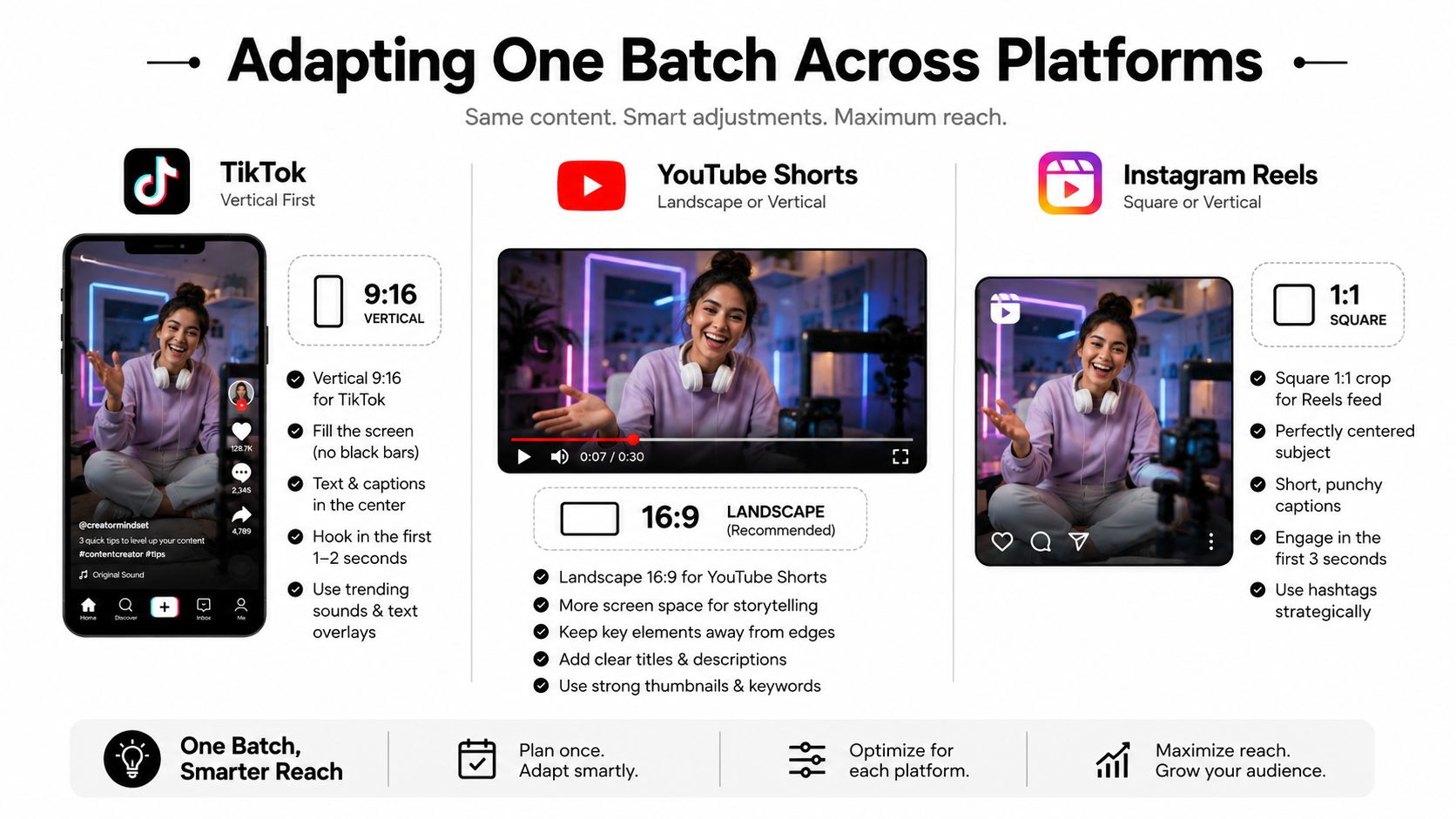
TikTok can support a sharper curiosity gap. YouTube Shorts benefits from a title and opening that make the subject legible. Instagram Reels needs packaging that works for viewers who may discover the video through a profile grid, recommendation, or share.
Run the adaptation checklist before export
- Rewrite the first sentence: Remove platform-specific phrasing that feels copied.
- Adjust the caption: Match the platform's reading behavior and discovery context.
- Check text placement: Keep subtitles and overlays clear of interface controls.
- Change the first visual when useful: A close-up may suit one feed, while a location establishing shot may better frame another.
- Review the CTA: Ask for the action that makes sense on that platform, not the same request everywhere.
Creators often batch the source capture and then build variants from reusable modules. Short-form advertising guidance from ShortGenius recommends this modular approach and warns that resize, caption, and export mistakes create avoidable waste. For additional inspiration on short-form visual treatments, browse the AIMVG Reels category, then adapt the idea to your own channel rather than copying its surface style.
QA Gates That Catch Errors Before Publishing
Once the production line is running, quality control becomes the bottleneck. Generating another draft is easy. Finding that every draft has a mistimed subtitle, a clipped caption, or a visual that contradicts the narration is expensive.
The first QA gate should happen at the script and audio stage, before you spend time polishing the edit. Read the script aloud, verify names and claims, and listen for unnatural pauses. Then inspect the assembled video with sound on and off. A viewer may miss a voiceover error when captions are present, but they won't miss subtitles that cover the subject or reveal the ending too early.
Use a separate approval gate for each of these checks:
- Subtitle accuracy: Correct spelling, punctuation, line breaks, and synchronization.
- Voiceover timing: Confirm that the audio matches the visual beat and doesn't rush the conclusion.
- Visual coherence: Make sure locations, objects, colors, and character details remain consistent with the narrative.
- Brand voice: Remove phrasing that sounds generic, exaggerated, or unlike the channel.
- Platform compliance: Review framing, caption placement, length rules, and export settings.
- Final preview: Watch the complete draft without skipping.
The source image URL above must be exact, but its content context also points to the practical rule: check spelling and sync, verify audio-visual alignment, confirm visual consistency, review platform requirements, and watch the full draft.
Add a human gate to AI output
A 2025 global survey reported that over 80% of creators use AI in their workflows, while nearly 40% use it from start to finish, as covered by Sprout Social's analysis of AI and content batching. That adoption makes review more important, not less. An automated workflow can repeat a mistake at scale.
The reviewer should ask four blunt questions:
- Does this idea feel original within the channel's recent uploads?
- Are factual statements supported or clearly framed as fiction?
- Does the narration sound like the intended brand?
- Does any sentence or visual have a soulless, template-generated feel?
Speed multiplies whatever you fail to catch. Put approval gates between generation and publication.
Save the QA result with the batch record. If several videos fail for the same reason, fix the prompt, template, or export preset before the next production run.
Scheduling, Auto-Posting, and Tracking What the Batch Actually Did
Scheduling is the point where a finished batch becomes a publishing system. Assign each approved video a platform, theme bucket, version label, and intended publishing window. Keep the source file, caption, thumbnail frame, and final export together so a scheduled post doesn't become a scavenger hunt later.
Platform-level account connections can reduce manual publishing steps, especially when a workflow supports TikTok or YouTube account authorization and sends approved content live without repeated edits. Still, automation doesn't remove responsibility. Check the preview, confirm the destination account, and verify that the caption and version match the intended platform.
A lightweight tracking sheet is enough to close the loop. Record the post date, platform, theme, hook family, video version, and outcome notes. Review each network using the metrics it exposes, such as views, watch behavior, completion, shares, saves, comments, and follows. Avoid judging the whole batch by one visible number. A post with fewer views may reveal a stronger retention pattern or a more useful topic for the next cycle.
Turn performance into production decisions
Tagging creates traceability. If an urban-legend batch underperforms, you should be able to distinguish a weak subject from a weak hook, poor visual fit, or unsuitable platform packaging. Without those labels, the next planning session becomes guesswork.
Use the findings to update three things:
- Topic allocation: Make more room for theme buckets that produce meaningful audience response.
- Version rules: Retire hook structures that repeatedly feel stale and test new openings.
- Production prompts: Add instructions for pacing, visual changes, or CTA style based on observed behavior.
Scheduling tools can sit alongside broader productivity systems. A curated guide to best time management apps can help you compare task planning and calendar options, while video scheduling software for short-form workflows focuses more directly on preparing content for publication.
Batch one should produce information, not just uploads. Batch two uses that information to change the calendar. By batch three, the system should help you make deliberate creative bets instead of repeating whatever was easiest to generate.
Your First Batch Week Plan and Time Budget
Run your first batch as a controlled test. Don't build a huge content library before you know where your workflow breaks. Choose a small set of themes, prepare the prompts, and keep the version rules visible while you produce.
A practical first-week schedule looks like this:
- Planning, 90 minutes: Choose theme buckets, map platform versions, write prompt templates, and assign hook variations.
- AI production and exports, 3 to 4 hours: Run concept planning, visual generation, voiceover assembly, integrated editing, and initial file organization.
- Adaptation and QA, 1 hour: Rewrite hooks and captions, check platform fit, review subtitles, listen to audio, and watch every final draft.
- Scheduling and auto-posting, 30 minutes: Connect the correct accounts, assign publishing windows, upload captions, and confirm previews.
That gives you a defined operating block rather than an all-day production spiral. If the workflow takes longer, identify the exact stage causing the delay. More automation won't fix a calendar that generates repetitive ideas, and more templates won't fix a weak approval process.
Avoid the common first-batch mistakes:
- Skipping versioning: Distinct topics still look repetitive when every hook and visual sequence matches.
- Publishing identical clips everywhere: Reuse the core asset, but adapt the packaging and pacing.
- Treating QA as optional: One error can spread through multiple exports.
- Generating before planning: A large folder of unrelated drafts isn't a content strategy.
- Tracking without labels: Unsorted results won't tell you what to change.
The purpose of batch content creation isn't to post more for its own sake. It's to publish consistently enough that the algorithm and your audience can recognize the channel, while each video still earns attention on its own terms.
ClipCreator.ai can turn custom prompts or story templates into faceless short-form videos with scripts, story-aligned visuals, voiceovers, subtitles, scheduling, and multi-platform auto-posting. If you want to test an end-to-end batch workflow instead of assembling every stage manually, visit ClipCreator.ai and build your first production cycle.

Create your first video in under 2 minutes
Pick a niche, and ClipCreator.ai generates and auto-posts faceless videos to your channels every day.
Join ClipCreator.ai