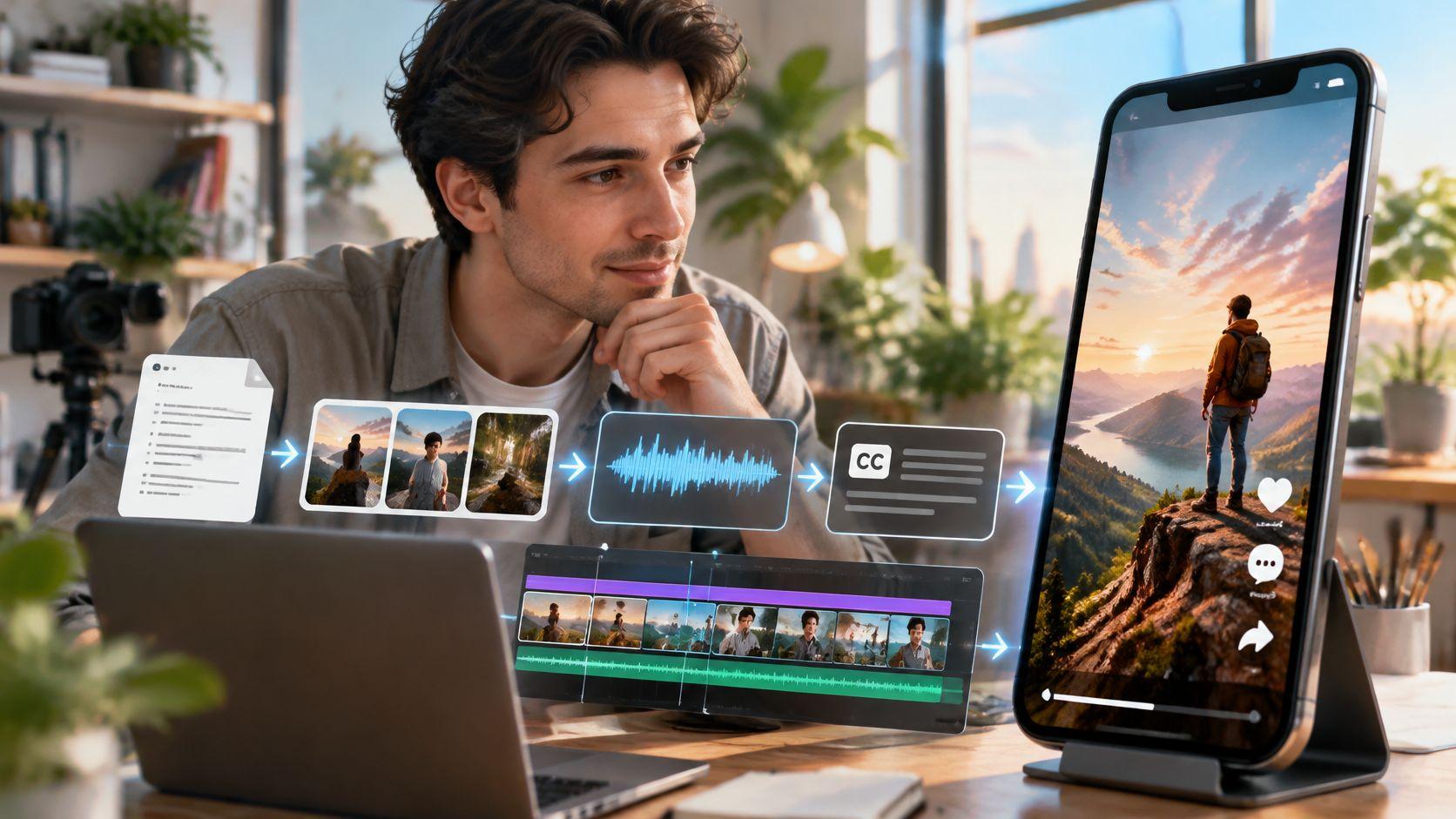
You've got a script open in one tab, a blank upload screen in another, and a suspicion that the tool you're paying for makes better demo reels than it makes your videos. The sample clips on the sales page have perfect faces, crisp captions and a narrator who sounds like a nature documentary. Your first render gave you a woman with a third hand emerging from her sleeve and a subtitle that renamed your product "Clips Creator dot A I".
That gap between the demo and your script is the honest story of AI short-form video in 2026. The models are good now, but they're good at parts, not at the whole job. The way to judge one is to walk the pipeline the way a production crew would, name what each stage does, and then put your own 60 seconds of script through it before you commit a month of posting to a tool.
What an AI Short-Form Video Generator Actually Makes
An AI short form video generator is software that turns a prompt, a template or a script into a finished vertical clip, usually between 30 and 90 seconds, shaped for TikTok, YouTube Shorts or Instagram Reels. A more useful definition is this: it's a small production studio compressed into one login, with a writer, an illustrator, a narrator, a subtitle operator and an editor all sitting behind the same text box.
The parts stay the same even when the interface doesn't. Every tool in this category hands you the same six layers, which means you can compare products on identical components instead of on how modern the dashboard looks.
| Component | What the Tool Generates | What to Verify |
|---|---|---|
| Script | Narrative or lesson text written from a prompt or template | Hook lands in the first 3 seconds and reading time fits the length |
| Visuals | Story-aligned images or animated scenes | The same character and setting appear in every scene |
| Voiceover | Synthetic narration in a chosen voice and language | Names, technical terms and pacing sound right |
| Subtitles | Time-synced captions added automatically | Words are accurate, timing matches speech and text is readable on a phone |
| Format and length | Vertical 9:16 frame, typically up to 90 seconds | Key content sits clear of platform buttons and length fits the plan |
| Publishing | Downloadable file or direct posting to connected accounts | Schedule control and a manual download option are available |
The six layers split into two kinds of work. Script, visuals and voiceover are generated, so a model decides what they contain and the result varies between runs. Subtitles, format and publishing are assembled, so they follow rules you can predict, check and fix.
Where the rework lands: visuals, almost every time. A bad script line takes a minute to rewrite. A scene where your narrator's jacket changes colour between shots means regenerating everything downstream of it.
Captions run a close second, for a duller reason. A name the voice model mispronounces gets transcribed exactly as mispronounced, so the same error appears twice in one clip and then repeats in every repost.
The layer people forget to check is the hook, because no tool warns you about it. If the opening beat is a logo and a slow zoom, nothing later in the clip recovers the viewers who scrolled. Format knowledge beats prompt skill here, which is why sellers of unglamorous products study opening patterns so closely. A mattress retailer hooking mattress shoppers on video is solving the same first-two-seconds problem as a horror-story channel, just with a different payoff. By the end of that table you should be able to name all six layers and predict which two will cost you a re-render.
Core Features to Check in Any Generator
Vendors demo with their own script, their own topic and their best voice. That's a showroom test, and it tells you almost nothing about your Tuesday afternoon. The evaluation that predicts your experience takes about an hour: sign up, paste your own script, and score eight checks as pass or fail.
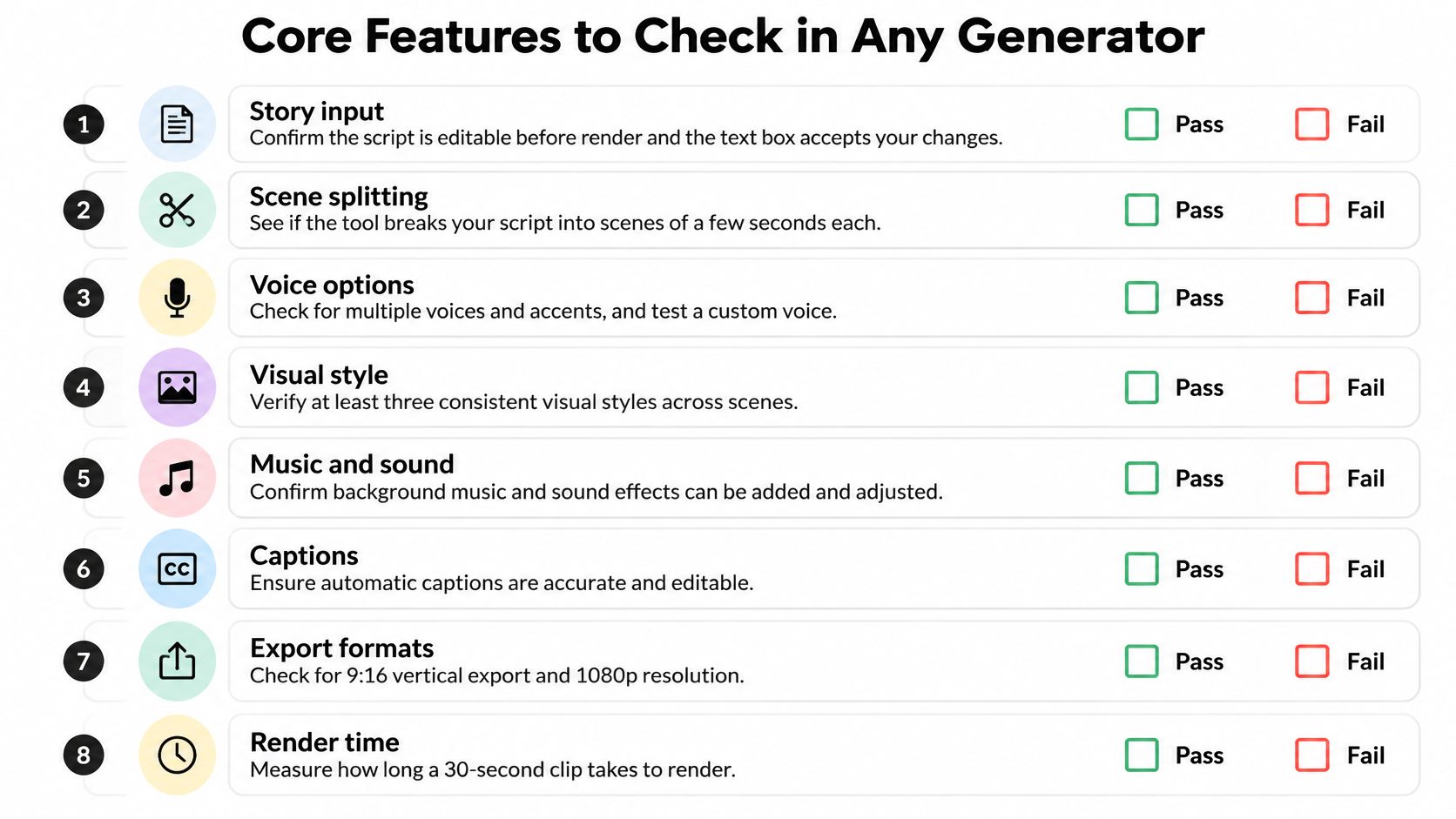
Start with story input. You need to edit the text before anything renders, and you need a prompt box that isn't secretly locked to one viral template. If a tool only lets you swap a topic word into a fixed story skeleton, you're renting a format, not a generator.
The two failures that end the evaluation early
Scene continuity is the first. Ask for a reference image, a character lock or a fixed seed, then check that the same person, outfit and location survive from scene one to scene six. Without that mechanism, a strong motion setting will slowly redesign your cast.
The second is caption control. Open the caption editor and try to correct a name, a technical term and a line break. Burned-in captions you can't touch mean every future typo is permanent, and there's no separate caption file to repurpose.
Voice range, length, export quality, publishing and rights are the rest of the scorecard. Test the voice on a deliberately awkward sentence containing two product names and a number. Set 30, 60 and 90 second versions in a true 9:16 frame, note whether HD needs a paid plan, and confirm the file downloads as well as posts. Then read the licence on commercial use and ownership.
| Feature | Pass signal | Fail signal |
|---|---|---|
| Story input | Script editable before render and a custom prompt is allowed | Locked to a viral template only |
| Scene continuity | Reference image, character lock or fixed seed | Identity or setting changes between scenes |
| Voice range | Several voices and languages with speed and pause control | One voice and no pause control |
| Caption control | Names, terms and line breaks editable and clear of the subject | Burned-in captions you cannot correct |
| Length and format | 30, 60 and 90 seconds in a true 9:16 frame | Fixed length or a non-vertical frame |
| Export quality | HD file and watermark rules stated on the paid plan | Watermark on the paid plan or unclear resolution |
| Publishing | Manual download plus optional scheduling | Posting only with no file download |
| Rights | You own the output for commercial use | License unclear or personal use only |
A tool that fails the first two rows is a toy, however polished the sample reel. If your audience arrives from long streams rather than scripts, the trade-offs shift, and this guide to AI clip tools for streamers covers the moment-to-clip version of the same evaluation.
How the Generation Pipeline Turns a Prompt into a Clip
Take a 60-second script about the 1883 Krakatoa eruption. You paste it in, pick a documentary voice, press generate, and a vertical file appears a minute or two later. Between those two moments, five distinct models did five distinct jobs, each handing its output to the next like a relay team.

- Script to beats. A language model rewrites your text and slices it into scenes of a few seconds each. A vague line becomes a vague picture.
- Beats to pictures. Each scene becomes a story-aligned image or a short animated clip, prompted with the scene text and any style or character reference you supplied.
- Script to voice. A speech model reads the lines in the chosen voice and language, with pacing set by punctuation and any pause controls.
- Voice to captions. Timing is read from the generated audio, not from your written script, so a mispronunciation propagates into the subtitles.
- Pieces to a file. Images, narration, music and transitions are cut together into the vertical frame at the length you selected.
A generator is a pipeline of several models, not one model making a movie.
That structure isn't specific to one product. The field assembled it stage by stage, from text-to-image work in 2016 and direct text-to-video in 2018, through video diffusion in 2022, to OpenAI's February 2024 Sora announcement, which showed minute-scale prompt-generated scenes with more coherent motion. A 2025 bibliometric review counted 145 AI-video-generation publications in 2024, describing that year as a pronounced publication peak (ACM Digital Library).
Where a handoff fails quietly
Errors travel forward, and the finished file hides them. Four handoffs are worth inspecting on your own script. Scene text that drifts away from your prompt. A character or background that changes after the image step. A name or technical term the voice says incorrectly. Captions that don't match the spoken line, or that sit on top of the subject's face.
This clip shows a single text-to-video model handling one scene, which is the second handoff in isolation.

The last handoff is editing work, and it's where a lot of the craft now lives. Anyone assembling generated scenes into a sequence benefits from a working knowledge of smarter AI post-production workflows, because trimming, versioning and review passes are what turn five near-misses into one coherent minute.
Benefits and Limits of AI-Generated Short Videos
The demand case is settled. In 2024, 83% of surveyed video marketers used short-form video, according to HubSpot's 2024 Video Marketing Report, and 89% of consumers said they wanted to see more videos from brands, per HubSpot's consumer trends research. Creators have moved the same way: in 2025, 91% of creators used AI tools in their content-creation process, according to Epidemic Sound's Future of the Creator Economy Report.
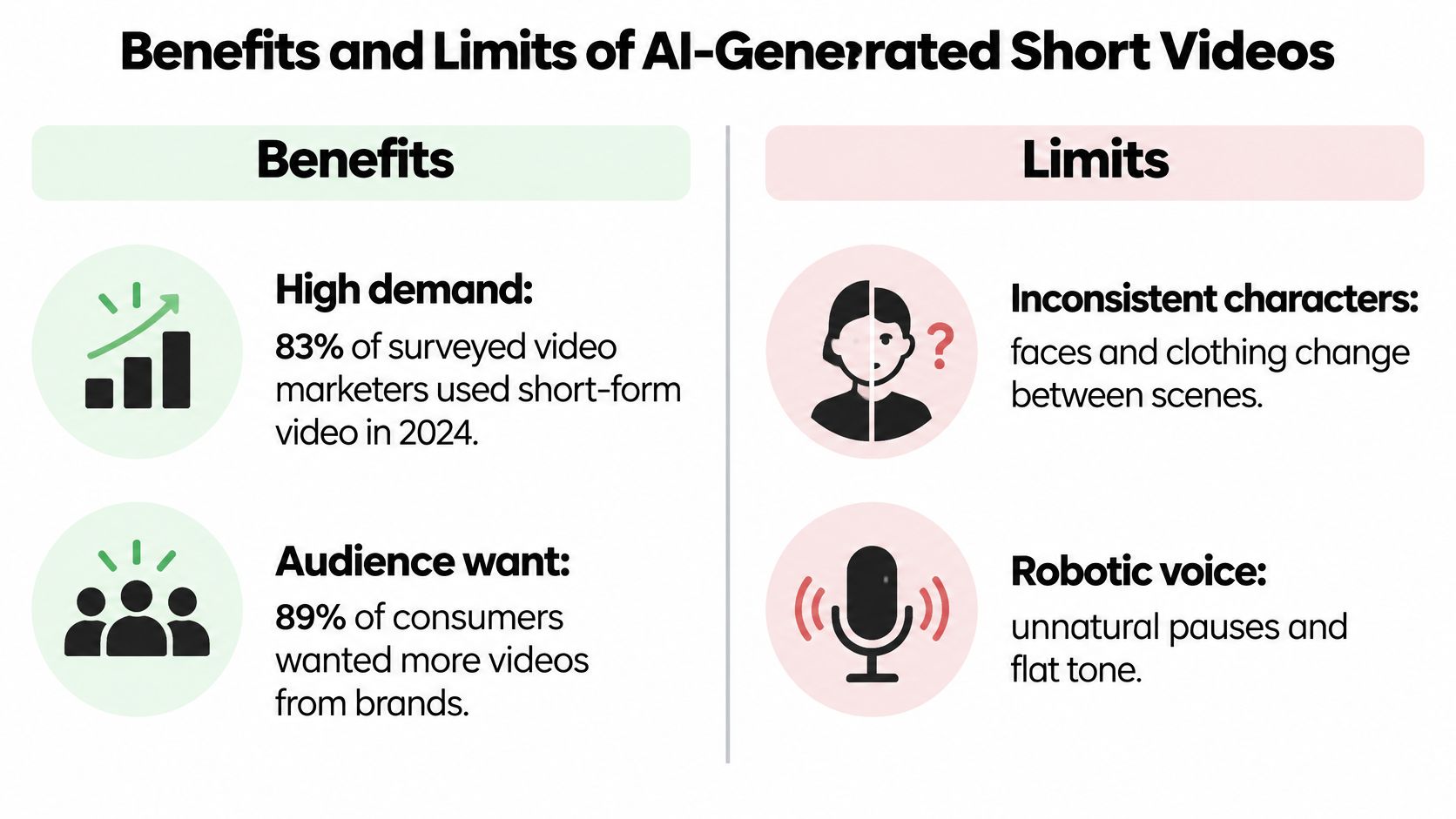
Against that volume, the benefits are practical rather than magical. A clip lands in minutes, a week of posts stops depending on one editor's calendar, and a second or third language costs a render rather than a studio day. Each of those is a production bottleneck removed, not a creativity upgrade.
The limit that matters most is temporal consistency, and it isn't visible in a single frame. The AIGCBench evaluation framework measures 11 metrics across four dimensions and estimates consistency by computing CLIP similarity between adjacent frames, where higher similarity indicates fewer abrupt changes in identity, background or style. Motion and consistency pull against each other: push motion harder and a coat changes colour mid-scene.
Say you make a 75-second history explainer. The hook works, the music is right, and then scene four hands the narrator a different face. Words drawn inside an image come out as smeared shapes. The voice says "Herodotus" in a way no caption editor will fix. And a template reused every day for a month looks like what it is.
| Side | What happens | What to do |
|---|---|---|
| Speed | A finished clip can be produced in minutes | Spend the saved time on the hook and a fact check |
| Cadence | A week of posts stays steady | Still change premise and visuals between posts |
| Language tests | Several voices or languages can be tried at low cost | Localize the script rather than only translating it |
| Temporal consistency | Face, coat or background shifts when motion is strong | Use a reference image and reject failed scenes |
| Text inside images | Words drawn in the picture are often garbled | Put wording in captions, not in the image |
| Narration | Names and technical terms are mispronounced | Add a pronunciation list to the script |
| Sameness | One template across many videos looks mass-produced | Change hook, arc, visuals and voice |
Segment-level generation with a continuity check beats one unconstrained pass at the whole narrative. Build in a reference image, a glossary of pronunciations, and a hard rule that failed scenes get regenerated rather than explained away in the comments.
Captions Languages and Accessibility for Short Clips
Caption quality is part of the product, not a setting buried under the export button. Four jobs get skipped by the usual auto-subtitle toggle, and each one has a check you can run in about two minutes on a phone.
- Names and technical terms. Keep a short glossary of product names, people and course vocabulary, then correct every auto caption against it. A wrong proper noun doesn't stay in one video, it repeats in every repost and every localized version.
- Translated versus localized scripts. A literal translation works for stable facts. Hooks, jokes, idioms and examples need rewriting for the region, because the joke that lands in Manchester lands flat in Manila. Where your audience is mixed, keep a shared lingua franca version and one localized cut.
- Layout against the interface. Place captions clear of faces, product shots and the like and comment buttons, then watch the whole thing on a phone with the sound off. Text hiding the subject costs you the visual you paid to generate.
- Voice and access decisions. Decide early whether one voiceover gets adapted per region or the lines get translated one by one, and find out whether the tool gives you a caption file or only burned-in text. Sign-language access remains a human production step, so plan for it rather than assuming a generator covers it.
Practical rule: if a caption error survives the glossary check, treat the whole batch as failed. One bad name multiplied across twenty uploads is a brand problem, not a typo.
A video can sound excellent in isolation and still fail here. If the narration is clear but the subtitle sits over the only visual proof in the frame, the viewer learns nothing. Run the glossary and the muted-phone check on both your 30-second and 60-second cuts before you schedule a multilingual batch, and use a repeatable captioning workflow for short videos so the pass criteria don't change between batches.
Who Uses AI Short-Form Videos and What They Need
Five groups drive most of the demand, and they don't want the same thing. The cadence they need and the risk they carry decide which features matter more than output polish.
| User Group | Typical Output | Posting Rhythm | Main Risk |
|---|---|---|---|
| Faceless creators | Story, mystery or bedtime narratives built on template hooks | Daily or several times a week | Repetitive videos read as mass-produced |
| Small businesses | Product explainers and offer announcements | Two to three times a week | Off-brand visuals and unverified claims |
| Educators | Micro-lessons of 45 to 90 seconds | One to three per week per course | Factual errors and unclear narration |
| Agencies | Campaigns for several client accounts | Set by each client's calendar | Scaling output without per-client brand review |
| Storytellers | Themed serialized episodes | Fixed weekly series | Character continuity between episodes |
The common thread is distribution, not ambition. Short vertical clips have become a major format on YouTube, Instagram and TikTok at once, and a 2025 review of platform data reported that YouTube Shorts surpassed 200 billion daily views in 2025, up from roughly 70 billion daily views reported in March 2024, though part of that rise reflects YouTube counting a view when a Short starts playing (Springer review of AI video generation). The same summary notes more than 2 billion logged-in monthly Shorts users on YouTube and over 1 billion monthly users worldwide on TikTok.
Read that as an operating condition rather than a headline. For a faceless channel, one excellent video a month is invisible next to twenty adequate ones, so cadence is the product. For an educator or a small business, the risk profile flips: a misstated fact or an invented product claim is far more expensive than a slow posting week, because trust is the asset being spent.
Find your row in that table and write down two things: the output format your audience expects and the posting rhythm you can sustain. Those two numbers, not the sales page, become the baseline for the test below.
How to Test a Generator on Your Own Script
Set the test up properly and it takes one focused hour. Improvising it across a week tells you nothing you can compare.
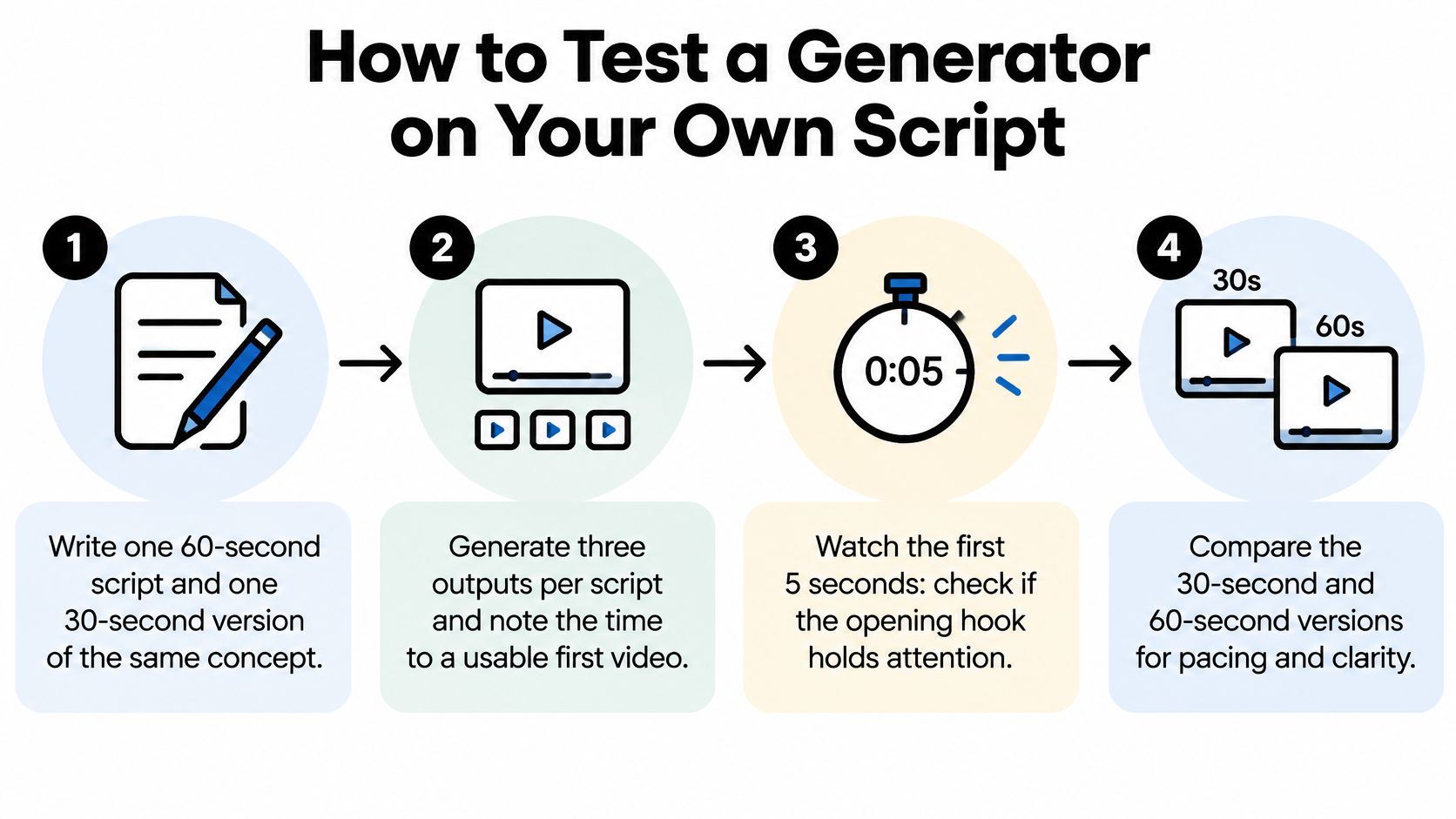
- Write two scripts. One 60-second script and a 30-second version of the same concept, so length is the only variable.
- Generate three outputs per script. Note the time from paste to a usable first video, and keep every version.
- Watch the first three seconds with sound off. The premise has to be legible from the visuals and subtitles alone.
- Check scene continuity. The same character, setting and props must persist across the whole clip. One identity change fails the run.
- Read every subtitle line against the audio. Log each name or technical term that comes out wrong.
- Listen for mispronunciation and pacing. Fix them in the script rather than working around them in the edit.
- Publish both lengths and compare completion after seven days. Same hook, different duration, one platform.
The evidence behind steps three and seven is blunt. In a dataset of 9.2 million TikTok recommendations from 347 users, researchers found that 55% of recommended videos were not watched to the end, with most skips landing before the halfway point, and a separate study found that metadata, especially video duration, was the strongest predictor of completion, while videos under 100 seconds reached a broader but more variable audience (ACM study on short-video engagement).
Two extra checks belong in the list. After the subtitle read-through, mark every name and term against your glossary, and fail the run if the same error survives all three outputs. Then look at the muted phone frame and confirm the caption text clears the subject and the platform buttons.
Pass rule: a tool passes when it clears the hook, continuity and caption checks on three runs in a row. Two out of three is a coin flip you'll be paying for monthly.
If you need a second language, generate a localized script rather than a word-for-word translation, and compare completion only once that version exists. Prompt structure drives most of these outcomes, so it's worth tightening your approach to AI video prompts before you blame the model for a vague result.
Confirm a Two-Week Pilot Before You Scale
A clean export is not a green light. It's one data point on one day. Before you raise volume, run about ten videos across two weeks on a single account and one format, whether that's a 60-second explainer or a bedtime story.
Change the premise, the narrative arc, the visual treatment and the voice across those ten. Same template with a new title is how a channel starts looking automated even when every script was written fresh. Write one line of creative direction for each video before generation, which gives you a dated record that a human chose the idea.
YouTube's updated policy treats repetitive, template-based, mass-produced content as ineligible for monetization, and a disclosure label alone doesn't necessarily protect reach or eligibility (ClipSpeed's breakdown of AI video monetization). Higher upload volume increases that exposure when the clips are near-identical. Keep realistic synthetic-media disclosure separate from ordinary production help, because not every assisted edit carries the same obligation.
Review the batch on day 14 for repeated hooks, matching pacing and lookalike imagery. Score hook, continuity, caption and variation on one sheet, then make a single go or no-go call. Before you commit, check what a batch costs per usable video, using this guide to AI video generator pricing against your own numbers rather than a headline plan. On our side, a first video renders in under 2 minutes, every video downloads as a file you can post to any network, and you own what you make for personal or commercial use.
If you'd rather spend your hour on the script than on assembling scenes, ClipCreator.ai runs the whole pipeline for you: AI-written narratives from a proven template or your own prompt, story-aligned images, a chosen synthetic voice, automatic subtitles and HD output up to 90 seconds, then scheduled publishing to TikTok and YouTube once you connect an account. Run the three-run test above on one of your own scripts and judge the output, not our demo. Start at ClipCreator.ai and see what your first two videos look like.

Create your first video in under 2 minutes
Pick a niche, and ClipCreator.ai generates and auto-posts faceless videos to your channels every day.
Join ClipCreator.ai