You've probably been handed a simple request that turns out not to be simple at all: “Can you send us the training as a SCORM file?”
If you work in education, training, marketing, or content production, that question can stop a project cold. You may already have videos, slides, quizzes, or a polished lesson. But a SCORM file sounds like a special kind of media file, and that's where the confusion starts.
It isn't a video format. It isn't a PDF. It isn't even really “the course” in the conventional sense.
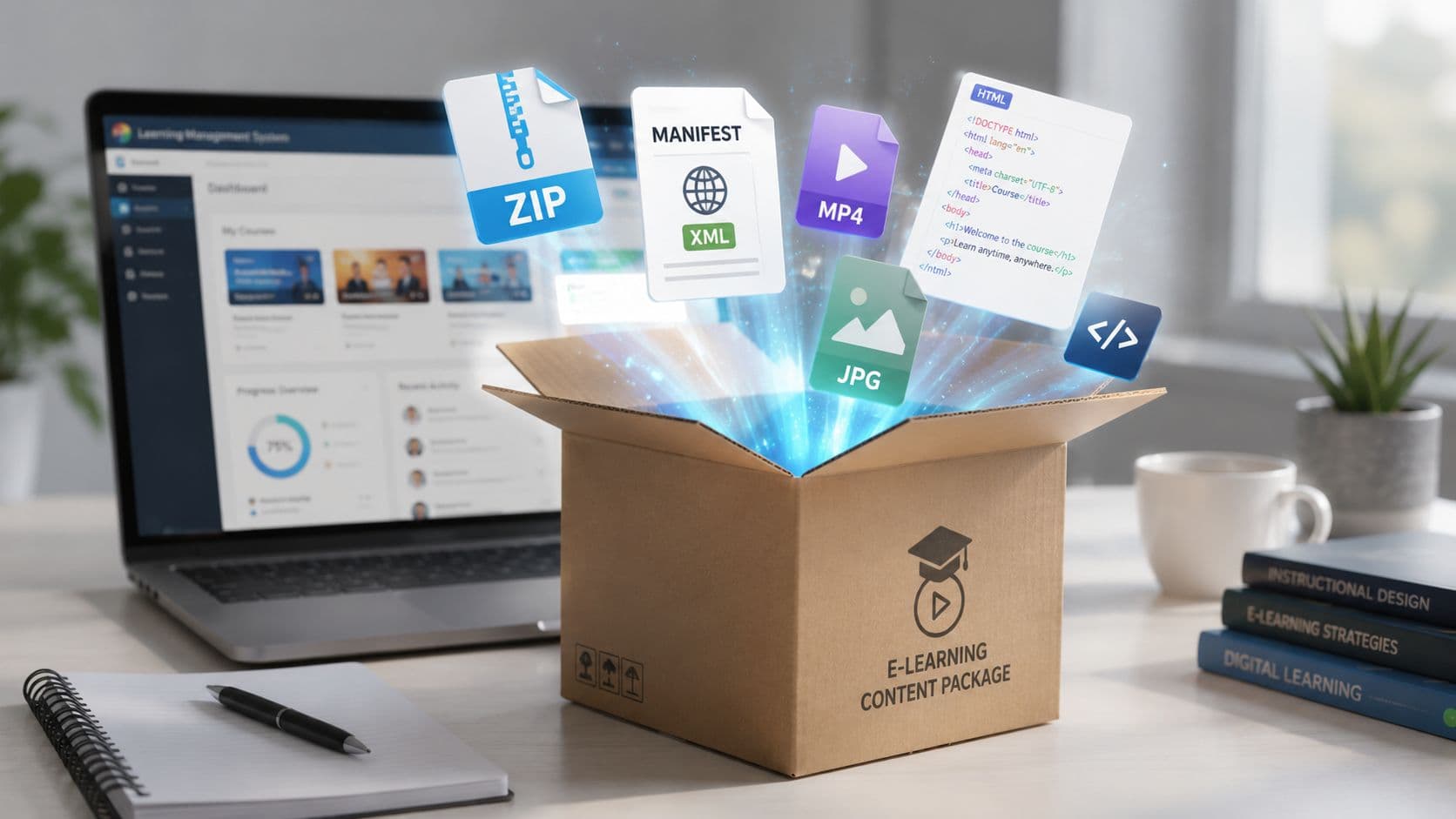
A better way to think about what is a scorm file is this: it's a standardized package for delivering training into a Learning Management System, or LMS, while also letting that LMS track what the learner did. If you're building training videos and want a simpler production workflow before packaging them for formal delivery, this guide on how to create training videos helps at the content stage.
Your Guide to Understanding SCORM Files
A project manager asks for “the SCORM file” two days before launch. The course itself is already built. The videos are approved, the quiz works, and the slides look finished. Then the actual question appears: what exactly are they asking for?
SCORM stands for Shareable Content Object Reference Model. It was developed through the U.S. Department of Defense's Advanced Distributed Learning initiative to help online courses work across different learning systems, as described in LearnBrite's SCORM file format overview. The practical goal was simple. Build training once, then package it in a way an LMS can reliably launch and track.
That history explains why SCORM still appears in so many statements of work. It solved a very specific business problem: portability.
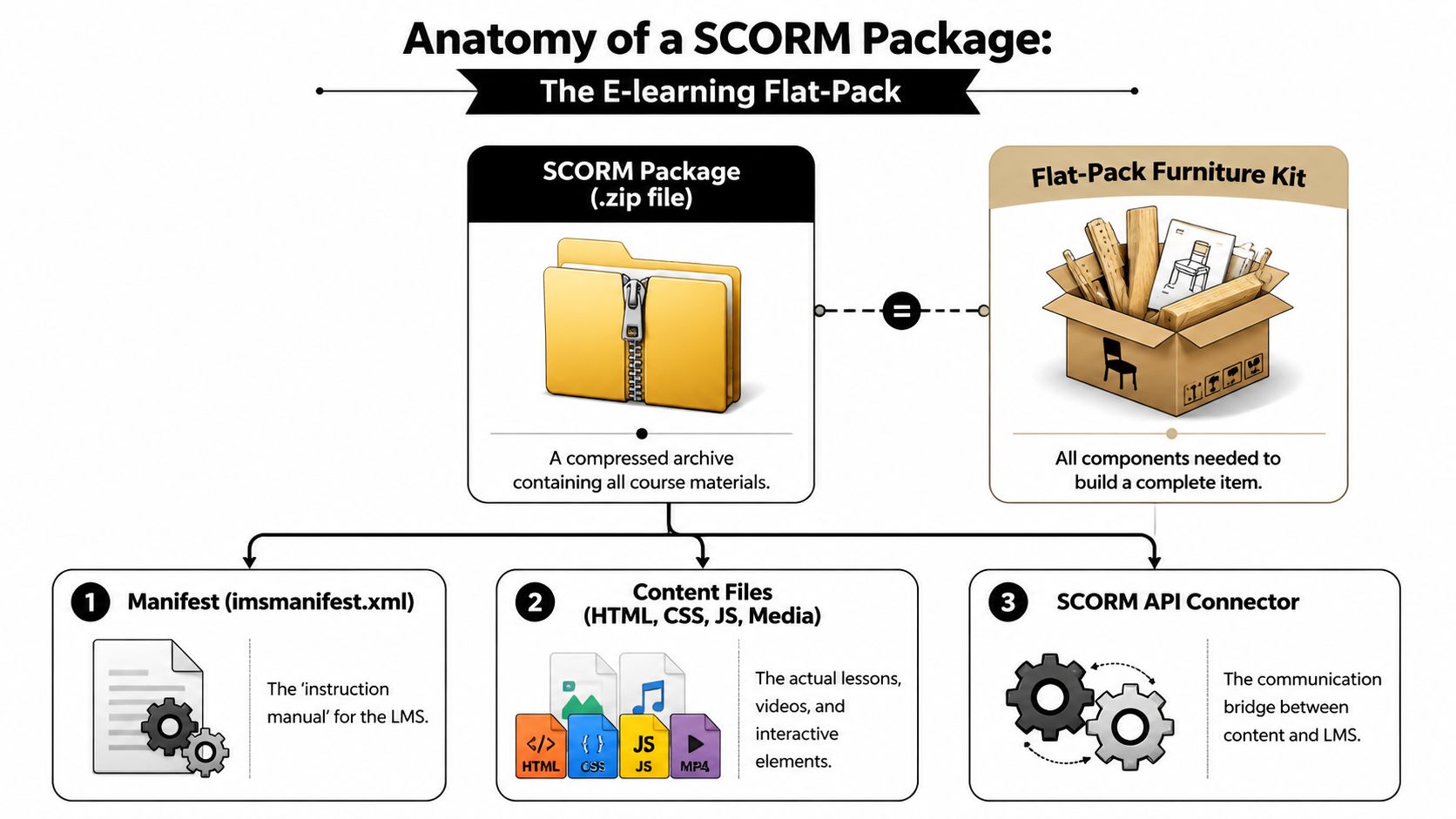
The easiest way to understand it is with a flat-pack furniture comparison. SCORM works like a flat-pack furniture kit for e-learning. Your actual training content is the set of parts inside the box. The SCORM standard is the agreed set of labels and instructions that helps the LMS identify the parts, assemble the learner experience, and record what happened during use.
That point matters because the word “file” causes a lot of confusion. A SCORM file is usually not one standalone lesson in the way an MP4 or PDF is one standalone asset. It is a packaged course archive that an LMS knows how to open, launch, and monitor.
For a project manager, that changes the conversation. You are not only asking whether the training looks right. You are also asking whether it will upload cleanly, start in the LMS, mark completion correctly, and pass back a score if there is an assessment.
A short working definition helps:
- It packages course materials: pages, media, quizzes, scripts, and supporting files are bundled together.
- It gives the LMS instructions: the package includes information about what to launch and how the course is organized.
- It reports learner activity: the course can send details such as completion, score, and time spent back to the LMS.
If your training only needs to deliver a quick message, SCORM can be more than the job requires. A short explainer video or lightweight lesson may be easier to produce and easier to distribute, especially for micro-learning. If you are starting from the content side, this guide on how to create training videos for workplace learning is a useful first step before you decide whether formal LMS tracking is necessary.
That is the practical lens to keep in mind throughout this guide. SCORM is valuable when you need structured delivery and reporting. It is less useful when you need people to watch, read, or learn something quickly without formal tracking.
Anatomy of a SCORM Package
To demystify SCORM, it helps to stay with one concrete comparison: a flat-pack furniture kit. What arrives is not a finished chair or desk. It is a box of parts arranged in a standard way so the person opening it knows what is inside, what goes first, and how the pieces fit together.
The box itself
A SCORM package is usually a ZIP archive that contains the course and the files that describe it. As explained in iSpring's Spanish guide to SCORM, that bundle typically includes web-style assets such as HTML pages, media, stylesheets, scripts, and a manifest file named imsmanifest.xml.
If you open the ZIP, what you see often looks closer to a small website than to a video or document.
In the flat-pack analogy, these are the panels, screws, fittings, and labeled bags.
The instruction manual
The file that matters most is the manifest, usually imsmanifest.xml.
For a project manager, the easiest way to read that is this: the manifest is the instruction booklet the LMS follows when it opens the package. It tells the system what parts are included, how the lessons are organized, which file should launch first, and where each resource sits inside the archive.
Without that file, the LMS may have every asset it needs and still fail to open the course correctly. The content is there. The directions are not.
A practical way to explain the manifest to stakeholders is simple. It is not the lesson itself. It is the map.
Why portability works
SCORM travels reasonably well between LMS platforms because compliant systems are trained to look for the same kind of map and the same package structure. If the receiving LMS supports the same SCORM version, it can usually identify the launch file and course organization without anyone rebuilding the content from scratch.
That is the value of standardization. One package, many compatible systems.
Here is the flat-pack version:
| Package part | Flat-pack analogy | What it does |
|---|---|---|
| ZIP package | Cardboard box | Keeps all course files together |
imsmanifest.xml | Instruction booklet | Tells the LMS what to launch and how the course is structured |
| HTML, media, scripts | Panels, screws, fittings | Delivers the actual learner experience |
What SCORM does not solve
This is a common point of confusion. SCORM helps with packaging, launch rules, and reporting. It does not make weak content better, fix accessibility problems, or guarantee a good mobile experience.
A well-designed course can be packaged as SCORM. A frustrating course can also be packaged as SCORM.
That matters when teams are deciding how formal the training really needs to be. If the goal is a quick product update, a short policy reminder, or a piece of micro-learning, SCORM may be more structure than the job requires. A simple video or lightweight lesson can be easier to produce and easier to distribute when tracking is not the main requirement.
How SCORM Content Communicates With an LMS
Packaging is only half the story. The other half is why teams ask for SCORM in the first place: tracking.
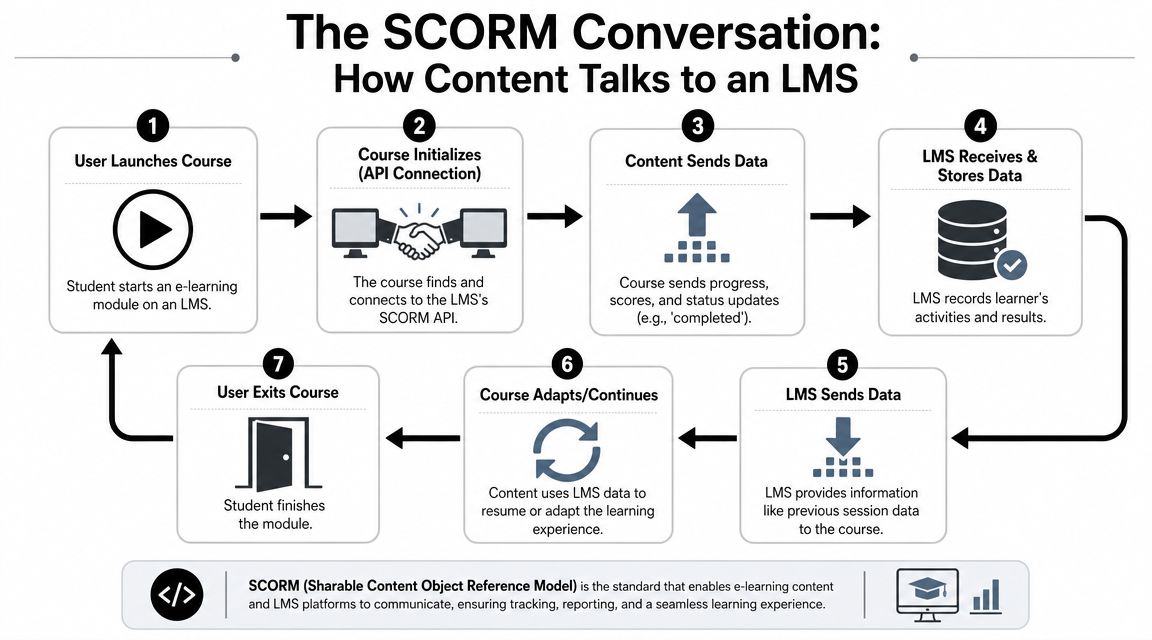
Once the learner launches the course, the course content and the LMS start a structured conversation. SCORM defines the rules for that conversation, so the content can report what happened and the LMS can store it.
A visual makes this easier to picture:
The conversation in plain English
From a systems perspective, SCORM's value isn't just packaging. It's runtime data exchange. The content communicates with the LMS to record learner interactions such as completion, time spent, and quiz scores, which is why it's widely used for traceable training delivery, as described in Easygenerator's SCORM tracking overview.
In flat-pack terms, packaging got the furniture into the room. Runtime communication is the checklist that reports whether the chair was assembled, how far the builder got, and whether the final inspection passed.
A SCORM course typically sends messages like these during use:
- The learner started the course
- The learner reached a certain point
- The learner spent time in this session
- The learner completed the lesson
- The learner earned a score
The LMS stores those results instead of treating the course like a static webpage.
Here's a quick explainer video if you want a visual walkthrough of the idea:

Why that matters in real projects
If you're delivering compliance training, onboarding, certification, or any course with a pass/fail outcome, this reporting layer is the reason SCORM exists in the workflow.
A manager usually doesn't ask for SCORM because they love standards. They ask for it because they need the LMS to answer practical questions:
| Question | Why SCORM helps |
|---|---|
| Did the learner finish? | The course can report completion status |
| How long did they spend? | The course can send time data |
| Did they pass the quiz? | The LMS can store scores |
| Can records be reviewed later? | The LMS persists results |
If a course can't send status and score back to the LMS, you lose the main operational advantage of SCORM.
What people often assume incorrectly
A common misunderstanding is that uploading a ZIP file into an LMS automatically creates robust reporting. It doesn't. The course has to be built to communicate correctly during runtime.
That's why two SCORM packages can behave very differently in the same LMS. Both may launch, but only one may reliably save progress or completion.
This is also why SCORM remains useful for formal training but can feel heavy for simple content delivery. If all you need is “watch this short lesson,” a full reporting protocol may be more infrastructure than the project needs.
Comparing SCORM 1.2 and SCORM 2004
When someone asks for SCORM, the next question should be: which version?
The two major SCORM versions most commonly used are SCORM 1.2 and SCORM 2004, according to Academy of Mine's anatomy of a SCORM course. For most project managers, it helps to think of them as two editions of the same flat-pack standard. Both aim to fit the same category of furniture. One is older and simpler. The other adds more detailed instructions and more complex assembly rules.
SCORM 1.2 vs SCORM 2004 at a glance
| Feature | SCORM 1.2 | SCORM 2004 |
|---|---|---|
| General position in the market | Older and commonly supported | Newer and more capable in some LMS setups |
| Reporting model | Simpler tracking model | More detailed tracking model |
| Completion and success status | Treated more simply | Can separate completion from success |
| Sequencing and navigation | More limited | Includes sequencing capabilities |
| Implementation complexity | Usually easier to support | Often more complex to configure and test |
When teams choose SCORM 1.2
SCORM 1.2 is often the safer choice when compatibility matters most. If your LMS is older, or your client just says “send a SCORM file” without technical detail, this is often the version they mean.
That doesn't make it better. It makes it dependable in many environments.
Choose it when:
- Your LMS support is unclear: Older systems often handle 1.2 more predictably
- You need basic completion reporting: Completion, score, and launch behavior may be enough
- You want fewer moving parts: Simpler specifications can mean fewer surprises during deployment
When SCORM 2004 makes more sense
SCORM 2004 is more useful when the learning flow itself matters. It can better distinguish whether someone merely finished a course versus passed it, and it supports sequencing logic.
That can matter in structured programs where learners must complete content in a specific order.
A useful rule of thumb is this: if your team cares mainly about broad LMS compatibility, SCORM 1.2 is often the safer export. If your LMS supports it and your course logic is more complex, SCORM 2004 may be worth it.
The practical project manager question
Don't start with “Which version is newer?” Start with “What does the LMS support?”
If the LMS administrator names a version, use that. If they don't know, test both in a staging environment before rollout. Version choice is less about ideology and more about what the receiving platform handles cleanly.
How to Create and Test a SCORM Package
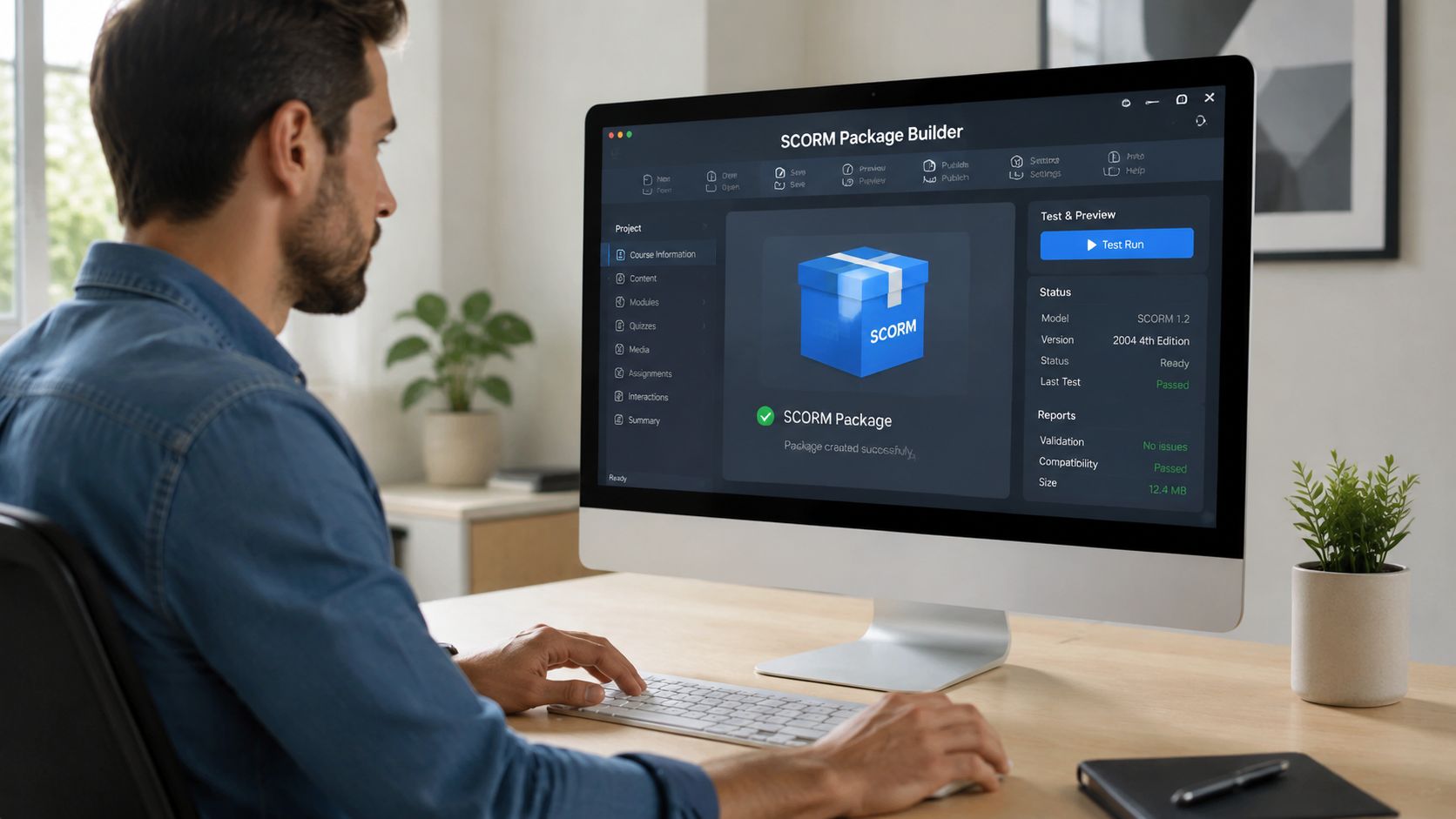
Teams typically don't hand-code SCORM packages. They create the learning content in an authoring tool, then export it as SCORM.
That matters because it changes the project from a development problem into a workflow problem. You usually aren't assembling XML files manually. You're building screens, quizzes, narration, and interactions, then letting the authoring tool generate the package structure.
Typical creation workflow
Common tools for this include Articulate Storyline, Adobe Captivate, and iSpring Suite. If your content starts as short educational videos, video training software options can help earlier in the process before final LMS packaging.
The workflow usually looks like this:
- Build the course contentAdd lessons, screens, media, and checks for understanding.
- Set completion rulesDecide what counts as finished. That might be viewing a set number of slides, passing a quiz, or both.
- Export to a SCORM versionThe authoring tool creates the ZIP package and the required manifest structure.
- Upload to a test environmentVerify that the course launches and reports correctly.
- Deploy to the production LMS
After testing, upload the package to the production platform.
Why testing matters more than people think
A SCORM package can be technically valid and still fail in your specific LMS. That's why experienced developers test in two places: a neutral SCORM test environment and the target LMS itself.
The neutral environment tells you whether the package is built correctly. The target LMS tells you whether that LMS handles the package the way you expect.
Useful checks include:
- Launch behavior: Does the course open at the right entry point?
- Completion reporting: Does the LMS show completed when the learner meets the rule?
- Score reporting: If there's a quiz, does the score store correctly?
- Resume behavior: If the learner exits midway, can they continue where they left off?
Build once. Test twice. A package that launches isn't automatically a package that reports correctly.
A note on content-first tools
Not every project begins inside a classic authoring tool. Some teams create the media first, then wrap it for LMS delivery later. ClipCreator.ai is one example of a tool used to generate short-form educational video content, and its SCORM export can package that content for LMS use when needed.
That approach can work well when the primary challenge is producing content efficiently, not designing a heavily interactive course from scratch.
The Future of E-Learning SCORM vs xAPI
A training manager has 20 short product updates to publish by Friday. The sales team just needs to watch them on phones and move on. Packaging every clip as SCORM would be like boxing each screwdriver tip in a full flat-pack furniture kit, complete with instructions, labels, and parts lists, even though the learner only needs one small tool.
That is the fundamental future question around SCORM. Not whether SCORM is old or new enough, but whether the packaging fits the job.
SCORM still earns its place when training has to live inside an LMS and report a clear result. It was built for packaged courses, standard launch behavior, and dependable records such as completion, score, and time spent. As noted in SCORM.com's one-minute SCORM overview, its strength is interoperability across LMSs. Its limits show up when you want to track finer-grained actions, learning that happens outside the LMS, or activity across mobile and offline contexts.
Where SCORM still fits well
The flat-pack furniture analogy helps here. SCORM works well when you need the full kit: the box, the parts list, the assembly steps, and a way to confirm the finished item was built correctly.
Use SCORM when the project calls for:
- Formal LMS delivery: Training that must be assigned, launched, and tracked inside a learning platform
- Clear reporting rules: Completion, pass/fail, score, and time records that administrators can review
- Portable course packages: Content that may need to move from one SCORM-compatible LMS to another
- Structured assessment: Onboarding, compliance, certification, or audit-related training
In those cases, SCORM is practical because everyone agrees on the basic shape of the package and the signals it sends back.
Where SCORM can feel like overkill
Now switch scenarios. You are publishing short refreshers, software tips, policy reminders, or micro-lessons that people access when needed. The content may live in a knowledge base, intranet, sales enablement hub, or mobile workflow.
Here, SCORM can add extra assembly where none is needed. You may not need the manifest, runtime messages, and LMS completion rules just to deliver a two-minute lesson. The learner wants the content. The business may only need view access, not course-style tracking.
A simple comparison makes the choice clearer:
| Need | Better fit |
|---|---|
| Required LMS course with completion tracking | SCORM |
| Activity tracking across systems, apps, and devices | xAPI |
| Short educational clips or quick-reference lessons | Simple video or web delivery |
SCORM and xAPI solve different tracking problems
SCORM asks a narrow question: what happened inside this packaged course while it was running in the LMS?
xAPI asks a wider one: what learning actions happened across tools, devices, and contexts?
That difference affects project planning. With SCORM, you are usually building a course package and agreeing on completion rules. With xAPI, you are often designing a tracking strategy across multiple systems. The project becomes a workflow problem, not just a course development problem.
For many teams, xAPI is useful when learning no longer lives in one place. A salesperson watches a video, completes a product simulation, attends a live session, and reads a job aid in a separate app. SCORM was not designed to stitch all of that together. xAPI was.
Choosing the right wrapper
For many organizations, the sensible decision depends on the content type.
If the training is formal, assigned, and audited, SCORM is still a strong choice. If the content is short, frequent, and meant to support people in the flow of work, SCORM may be more packaging than the project needs. In that case, microlearning platform options are often a better starting point than an LMS-first workflow.
The practical question is simple: do you need LMS packaging and course-style reporting for this specific content?
If yes, SCORM remains useful. If no, lighter delivery methods often make more sense.
If you are creating short educational content and only need SCORM packaging for selected projects, ClipCreator.ai can help you produce faceless training videos and micro-lessons, then package that content for LMS delivery when needed.

Create your first video in under 2 minutes
Pick a niche, and ClipCreator.ai generates and auto-posts faceless videos to your channels every day.
Join ClipCreator.ai