You already have more video ideas than you think.
They're sitting in old blog posts, FAQ pages, product pages, lesson notes, help docs, landing pages, and long articles that took real effort to write. The problem isn't a lack of source material. It's that turning those assets into short-form video often feels like starting from zero every time.
That's where the idea to convert a link into a video becomes useful. Not because one-click automation is magical, but because it gives you a faster starting point. Instead of brainstorming from a blank page, you begin with a URL that already contains structure, claims, examples, and a built-in angle. The best workflows treat the link as raw material, not the finished script.
Turn Your Existing Content Into a Video Goldmine
A common bottleneck looks like this. A business has strong written content, but its social channels are inconsistent. A creator has useful tutorials on a site or newsletter, but no repeatable way to turn them into TikTok clips or YouTube Shorts. An agency has client pages full of material, but every video still requires manual scripting, asset gathering, editing, and captioning.
That gap matters because video isn't a side format anymore. Landing pages with embedded video convert at 86% higher rates than text-only pages, and short-form video under 60 seconds generates 2.5x more engagement per impression than other content types, according to Digital Applied's 2026 video marketing data points. If you're sitting on useful written content and not translating it into video, you're leaving reach and conversion potential locked inside static pages.
The practical shift is simple. Stop asking, “What video should I make today?” Start asking, “Which existing page already contains a strong video premise?”
What usually converts well
Some links are naturally video-ready:
- How-to posts: They already have steps, outcomes, and a clear audience problem.
- List articles: These map cleanly into short scenes and quick cuts.
- Product pages: Good for benefit-led clips, feature explainers, and objections.
- FAQ pages: Strong source material for myth-busting or answer-style Shorts.
Others need more reshaping. Dense whitepapers, legal pages, and broad homepages often produce vague videos unless you narrow the message before generation.
Practical rule: A page with one clear promise usually becomes a stronger short-form video than a page trying to explain everything.
If you're exploring ways to automate repurposing across channels, quso.ai's take on Repurpose.io alternatives is worth reading because it frames the broader workflow problem, not just the upload step. And if your source material starts as documents rather than webpages, this guide on turning PDFs into videos is useful for thinking about extraction before editing.
Opportunity isn't “paste link, publish instantly.” It's extracting more value from content you've already paid for with time, expertise, or both.
The Anatomy of a Great Link-to-Video Workflow
Good link-to-video systems work like a content refinery. The URL is the crude input. The finished short is the refined output. Everything in between determines whether you get something watchable or just an animated summary.
According to Wyzowl's 2026 video marketing statistics, 91% of businesses now use video as a marketing tool. That makes efficiency the primary challenge. Teams don't just need video. They need a repeatable way to produce it from assets they already own.
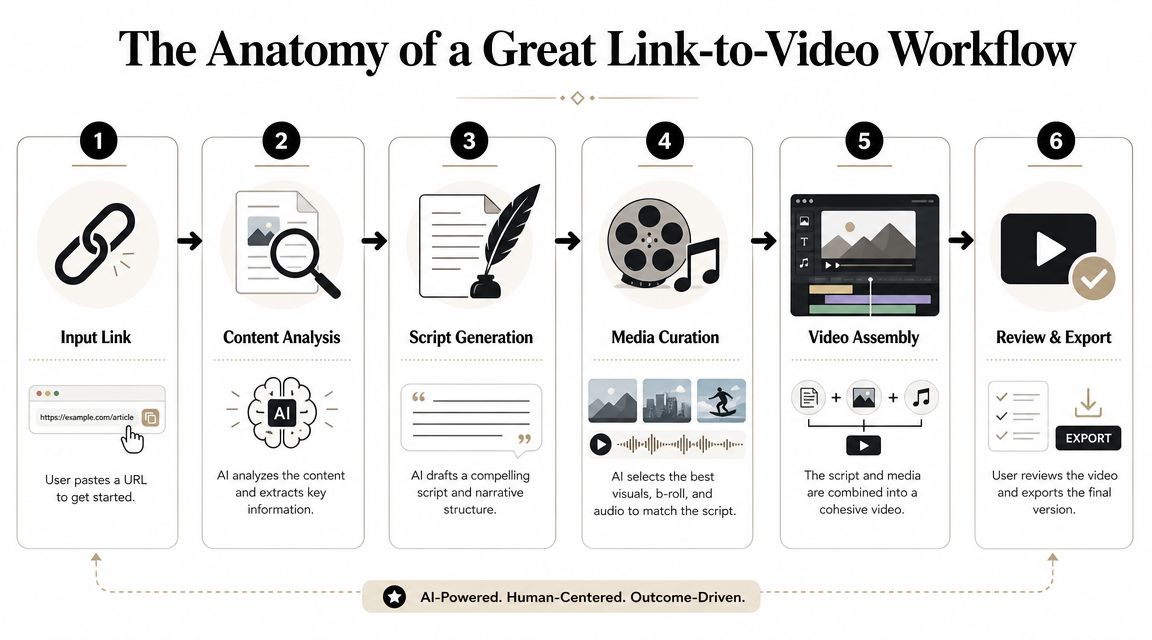
Stage one through three
The first half of the workflow is all about extracting and shaping meaning.
- Input linkYou paste a public URL. That could be a blog post, product page, article, transcript page, or resource page.
- Content analysisThe system parses the page. It identifies headings, paragraphs, claims, and sometimes images or embedded media. This stage often breaks when the source page is cluttered, heavily interactive, or badly structured.
- Script generation
The extracted text gets turned into spoken language. At this point, many outputs start sounding robotic. Web copy is written to be scanned. Video narration has to be heard and followed in real time.
Stage four through six
Once the message is usable, the system builds the viewing experience.
Visual pairing
The tool either selects stock visuals, repurposes page images, or generates scene concepts. Strong outputs match the visual to the sentence's job. Weak outputs just decorate the script with vaguely related footage.
Video assembly
Voiceover, timing, transitions, subtitles, and formatting come together here. This is also where aspect ratio and pacing get decided. A vertical short needs very different framing from a horizontal explainer.
Review and export
This is the stage people skip most often. They assume the AI draft is final, then wonder why retention drops. Review is where you trim setup, tighten hooks, replace weak visuals, and remove lines that sound like webpage copy instead of video.
If the first five seconds sound like an introduction to an article, the script still isn't ready.
A reliable mental model is this: extraction gives you information, but refinement gives you a video. When people say a tool can't convert a link into a video well, they're often describing a weak script-refinement stage, not a failure to scrape text.
From URL to Viral-Ready Video A Practical Guide
The fastest way to waste time is to convert the wrong link. The fastest way to get useful output is to choose a page with a narrow message, then direct the tool like an editor.
Pick the right source page first
Not all URLs carry the same narrative potential.
A list-style blog post often converts cleanly because it already contains sequence. “Five mistakes,” “three tips,” and “how to” formats naturally become scene one, scene two, scene three. A product page can also work well, but only if you choose one angle. “Who this is for,” “what problem it solves,” or “why this feature matters” are each separate shorts.
Pages that usually need extra work include:
- Homepage links: Too broad. They describe the whole business, not one idea.
- Research-heavy articles: Good source material, but the script needs aggressive simplification.
- Feature comparison pages: Useful if you isolate a buyer question instead of summarizing the full table.
- Long transcripts: Rich information, but they need a strong editorial cut.
Guide the extraction instead of accepting it
One of the biggest mistakes is assuming the tool knows what matters. It doesn't. It sees text. You see the angle.
Before generating, decide:
- The core claim: What's the one sentence the viewer should remember?
- The audience: Beginner, buyer, student, creator, operator?
- The action: Should they rethink something, click, comment, or save?
That one decision changes everything. The same product page can become a benefit-led TikTok, a pain-point YouTube Short, or an educational Reel depending on the prompt and edit choices.
A useful tactic is to pull supporting material from nearby assets before generation. For example, if your source page is thin, borrow language from testimonials, your FAQ, or a transcript summary. This is similar to how creators work with YouTube transcript extraction workflows when a direct page summary doesn't carry enough story on its own.
Rewrite for spoken rhythm
The AI draft usually tells the truth of the page, but not the rhythm of a good short.
A webpage sentence often sounds like this: “Our platform helps teams streamline content operations with automation and flexible publishing controls.” A usable voiceover sounds more like: “Still posting manually? This automates the content pipeline so your team can publish faster without juggling five tools.”
That difference is everything.
According to Opus's URL-to-video overview, a key challenge is platform fit and originality. Many tools can create a video from a link, but the result often feels like a generic repackaged webpage. In practice, the best results come when you guide the AI with a structure or prompt that forces a native format instead of a page summary.
Editorial shortcut: Keep the point. Change the phrasing. Viewers should feel like they're hearing a creator, not listening to a website read aloud.
Shape the visuals around story beats
After the script is tight, review every scene for visual purpose.
Good pairings do one of three things:
- Clarify the point
- Increase contrast
- Reset attention
If a line explains a problem, show the friction. If it introduces a result, show the before-and-after idea visually. If the script gets abstract, add on-screen text that makes the takeaway obvious even with the sound off.
When you need a reference for pacing and scene density, a short walkthrough helps more than another feature page. This example is useful:

The strongest videos made from links don't feel automated. They feel edited.
Your Toolkit Automated vs Manual Approaches
There are two workable ways to convert a link into a video. The first is a mostly automated workflow inside one platform. The second is a manual stack where you split the job across separate tools.
Neither is universally better. The better choice depends on whether you value speed, control, or repeatability most.
The automated route
An all-in-one workflow handles script generation, scene creation, voiceover, subtitles, formatting, and often scheduling. This is the right model when consistency matters more than handcrafted editing on every single asset.
It works especially well for:
- Teams publishing frequently: Repetition matters more than perfection.
- Faceless channels: The format is already template-driven.
- Agencies with recurring deliverables: Standardization keeps output predictable.
The trade-off is creative granularity. You usually won't get frame-level control over every scene, and some outputs can feel templated unless you put real effort into the prompt, structure, and review pass.
The manual stack
A manual stack usually looks something like this: ChatGPT for script drafting, Canva for visual assembly, CapCut for timing and captions, plus a separate voiceover tool if needed. This route gives you far more control over phrasing, scene order, media selection, and timing.
That control costs time. Every video becomes a small production job.
Here's the simplest comparison:
| Feature | ClipCreator.ai (Automated) | Manual Stack (ChatGPT + Canva + CapCut) |
|---|---|---|
| Speed from link to draft | Fast, with most steps handled in one workflow | Slower, with multiple handoffs |
| Creative control | Moderate, guided by templates and edits | High, with detailed scene-by-scene decisions |
| Best for | Consistent publishing and scalable output | Custom storytelling and brand-specific polish |
| Learning curve | Lower for non-editors | Higher because each tool has its own workflow |
| Review needs | Focused on refining AI output | Focused on building and refining from scratch |
| Operational overhead | Lower | Higher |
If you're comparing broader strategy tools around content quality and optimization, this roundup of AI content optimization tools is a useful companion because it highlights where generation ends and editorial systems begin. The same distinction matters here.
How to choose without overthinking it
Use the automated path when your real problem is publishing volume. Use the manual stack when your real problem is precision.
A good rule is to test your process on the same source page both ways. Build one version in an all-in-one workflow and one with your manual stack. Then compare where time went: script fixing, visual search, editing, or subtitle cleanup. That usually reveals the bottleneck faster than feature lists do.
If your starting point is text rather than a URL, a guide to using an AI video maker from text helps frame the same decision from the other direction.
Best Practices for Engaging Short-Form Videos
A generated short isn't finished when it exports. It's finished when it holds attention.
Most weak link-to-video content fails for the same reason. The source material may be useful, but the final edit still behaves like a page summary instead of a native short for TikTok, Reels, or YouTube Shorts.
What to tighten before publishing
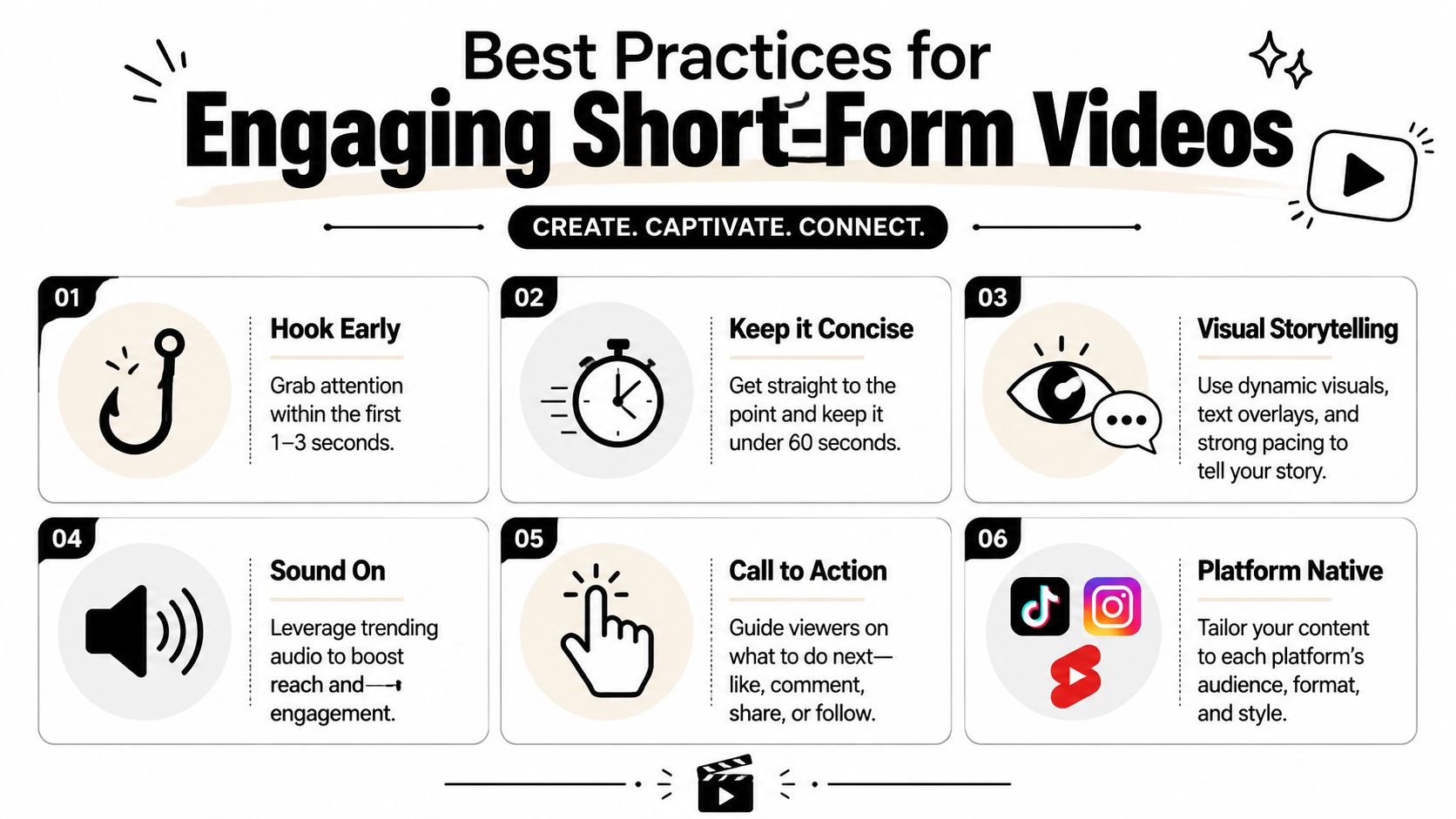
Use this checklist before you post:
- Hook early: Don't open with brand context or scene setting. Start with tension, a mistake, a surprising claim, or a direct payoff.
- Trim setup: If the first line only exists to introduce the topic, cut it.
- Keep captions readable: Short lines, clear contrast, and timing that matches natural speech matter more than decorative styling.
- Switch visuals with purpose: Every scene change should either add information or refresh attention.
- Make the takeaway visible: Important points should appear as text, not only in the voiceover.
- End with a next step: Ask for a save, a follow, a click, or the next video in the series.
Make it feel native to the platform
A TikTok that sounds like a webinar snippet will struggle. A YouTube Short built like an Instagram ad will also feel off. Platform fit isn't just aspect ratio. It's cadence, phrasing, and visual density.
Native short-form video sounds like a person talking to one viewer, not like a brand reciting page copy.
Audio matters too, but only if it supports the format. Trend-chasing sound choices can help in some cases, but they won't rescue a weak structure. Prioritize the script, subtitle timing, and opening seconds first.
Originality still matters
Automation saves time, but speed can flatten your voice if you let every video follow the same generic pattern. Keep a small set of narrative templates you trust. For example: problem to fix, myth versus reality, before versus after, quick explainer, or answer to one common objection.
That gives the AI a container. The source page supplies the facts. Your template supplies the storytelling.
Frequently Asked Questions About Converting Links to Videos
Which links usually work best
Public pages with clear structure work best. Blog posts, product pages, resource articles, and FAQ pages are usually easier to process than pages built around scripts, pop-ups, or dynamic components.
Paywalled, private, or authenticated pages are less predictable. If the tool can't access the content cleanly, the output will usually be incomplete or generic.
Can I legally turn any webpage into a video
No. You need to think about ownership before you generate anything.
According to Synthesia's URL-to-video guidance, business users need clear answers on rights, privacy, and source reliability. That includes whether the source URL contains copyrighted material, how private or paywalled pages are handled, and whether factual accuracy is preserved during extraction.
A safe rule is simple:
- Use pages you own
- Use assets you have permission to repurpose
- Review factual claims before publishing
- Don't assume a public page is free to repackage commercially
Why do some outputs feel generic
Because extraction isn't the same as editorial judgment. A tool can pull text from a page, but it can't always identify the strongest angle for a short. Generic videos usually come from broad links, weak prompts, or unedited scripts that preserve webpage wording.
If the draft sounds flat, narrow the angle and regenerate. If it still sounds flat, rewrite the opening and first transition manually.
How much should I review before posting
More than the average person does.
Check the script against the original page, especially when the source contains nuanced claims, updated information, or product details. Review visuals for accidental mismatch. Read subtitles line by line. If the workflow includes auto-posting, treat approval as a brand-safety step, not a formality.
What length works best
Short-form works best when each video carries one idea. If the source page contains five good ideas, that's usually five videos, not one crowded summary. The moment you start compressing too much context into one short, retention usually drops because the pacing turns into a rush of points without a narrative spine.
If you want a faster way to turn articles, prompts, and existing content into faceless short-form videos without stitching together a manual stack, ClipCreator.ai is built for that workflow. It helps creators, educators, and brands generate story-aligned visuals, voiceovers, subtitles, and ready-to-publish videos for TikTok, YouTube, and Instagram with far less production drag.

Create your first video in under 2 minutes
Pick a niche, and ClipCreator.ai generates and auto-posts faceless videos to your channels every day.
Join ClipCreator.ai