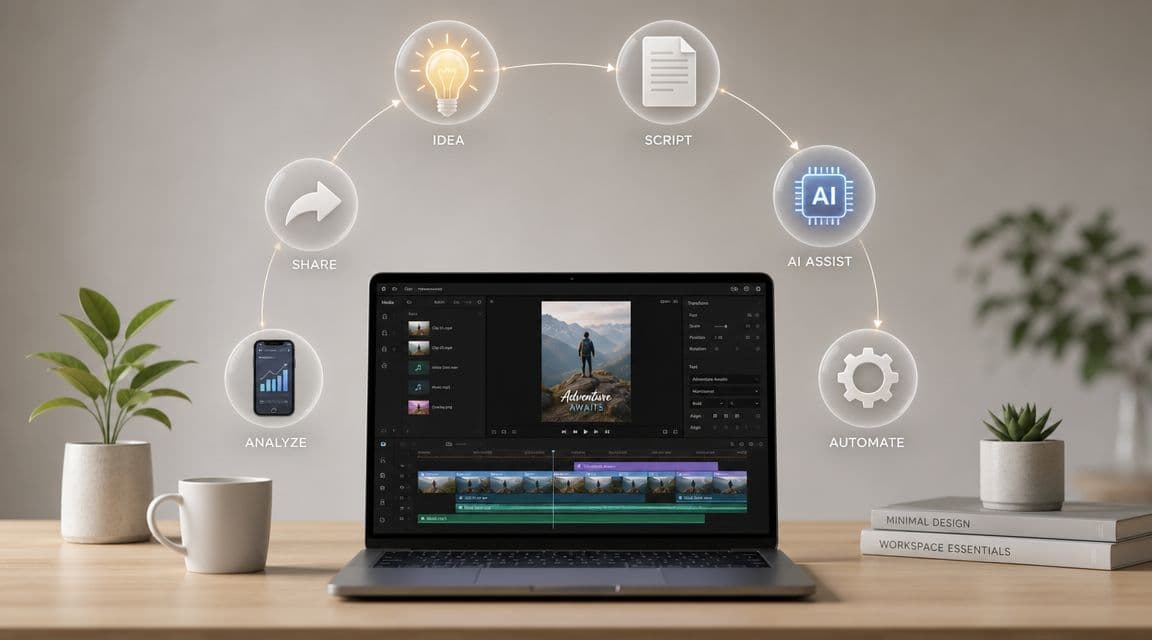
You probably already know the feeling. A video idea lands at the wrong time, you save it in a notes app, then the work starts stacking up. Script, footage, voiceover, captions, timing, export, upload. By the time you could publish, the idea feels stale and the process feels heavier than the opportunity.
That's where most content creation and marketing systems break. Not because the ideas are weak, but because the workflow depends on too many manual steps. When every post requires fresh creative energy and production labor, consistency slips first. Reach and results usually slip right after it.
The market has moved on from casual posting. 90% of organizations reported having a content marketing strategy, which tells you that publishing is no longer treated as an occasional tactic. It's a structured operating function tied to visibility, authority, and ongoing audience attention, according to ProperExpression's content marketing statistics roundup.
Why a Faceless Video Workflow Is Your New Superpower
Faceless video works because it removes the slowest parts of traditional video production. You don't need to be on camera. You don't need a perfect filming setup. You don't need to coordinate wardrobe, lighting, or reshoots just to publish one short-form idea.
That changes the economics of output.
For creators, agencies, educators, and brand teams, a faceless workflow turns content from a high-friction creative event into a repeatable production process. That matters because short-form channels reward consistency. If you only publish when motivation strikes, you'll spend more time rebuilding momentum than compounding results.
Why consistency beats bursts
A lot of people still approach video as a campaign asset. They make one polished post, wait, then start over from scratch. That model works for occasional launches, but it breaks for TikTok, YouTube Shorts, and Instagram Reels.
A stronger model looks more like a system:
- Idea capture becomes structured instead of random
- Scripts follow repeatable formats instead of blank-page improvisation
- Visual assembly is standardized instead of handcrafted every time
- Publishing runs on a schedule instead of memory and spare time
Practical rule: If publishing depends on your mood, it isn't a system yet.
Faceless video also creates distance between your personal energy and your content output. That's useful if you run multiple brands, manage client work, or don't want your face to be the product.
What the workflow solves
A good automated workflow solves three common problems at once:
- Production dragThe manual sequence is what usually kills momentum. Once you reduce the number of decisions per video, ideas stop dying in draft form.
- Brand inconsistencyWhen every script, voice, caption style, and posting routine changes from one upload to the next, the audience gets a fragmented experience.
- Scaling limitsYou can hand-make a few videos each week. Scaling that volume without a system usually means lower quality, missed posts, or burnout.
If you're building around short-form video, the smartest move is to design a workflow first and let creativity operate inside it. That's what makes faceless publishing powerful. It gives you a way to keep showing up without rebuilding the machine every day.
If you're still figuring out the channel structure itself, this walkthrough on how to make a faceless YouTube channel is a useful starting point because it forces you to think in formats, not one-off uploads.
Ideation and Scripting for Viral Potential
Most content ideation fails for a simple reason. People brainstorm topics when they should be designing messages for a specific awareness stage.
A viewer who doesn't yet recognize the problem needs a different hook than someone comparing solutions. That sounds obvious, but most short-form creators still push the same script style to everyone.
Many content guides miss how messaging should change for unaware, problem-aware, solution-aware, product-aware, and most-aware audiences. Different claims and benefit-led messages are needed at each stage to be effective, as explained in this five awareness levels framework.

Start with awareness, not topics
Before writing a script, answer one question. What does the viewer already believe?
That one answer changes the hook, the pacing, and the proof you need.
Here's a straightforward approach:
- Unaware viewers need interruption and curiosity. They're not looking for you.
- Problem-aware viewers respond to pain, friction, and recognition.
- Solution-aware viewers want contrasts, trade-offs, and clearer options.
- Product-aware viewers need trust signals, fit, and differentiation.
- Most-aware viewers usually need a final reason to act now.
This is why “good content” often underperforms. It may be well made, but the message is mismatched to the audience's level of intent.
Use repeatable formats with flexible hooks
You don't need endless originality. You need reliable structures.
In practice, viral-friendly faceless videos usually come from a small set of format families. Historical reveals, cautionary stories, myth-busting, ranked lists, quick explainers, and transformation narratives all give you a built-in arc. The variable is the angle.
Here's a workable scripting process:
- Pick one format familyExample: scary story, hidden fact, business mistake, niche myth.
- Match it to awareness levelA myth-busting angle works well for problem-aware viewers. A comparison angle fits solution-aware viewers better.
- Write the first line for tension, not summaryDon't open by explaining the topic. Open with conflict, surprise, or consequence.
- Build one promise into the middleGive the viewer a reason to keep watching. A reveal, a twist, a lesson, or a payoff.
- End with one next step
Not every video needs a hard sell. Sometimes the next step is another related video.
The strongest scripts don't try to say everything. They create one clean chain of attention from hook to payoff.
If you want extra perspective on format planning across channels, this guide to digital content creation is useful because it looks at audience engagement through the lens of content design rather than just posting frequency.
Turn prompts into scripts faster
The practical advantage of AI in scripting isn't that it replaces judgment. It removes blank-page friction.
A useful workflow is to start with a structured prompt that includes the audience stage, format family, tone, and desired ending. Then edit for specificity. That's faster than trying to invent every line from scratch and usually produces stronger first drafts because the constraints are clear.
For creators building faceless content at volume, the better play is to maintain a script bank of hooks, transitions, and closing patterns. Then feed those into a repeatable generator or template-based process. This is the same logic behind how to make a script, where the goal isn't just writing faster. It's writing with a format that already fits the channel.
Automating Your Video Production Workflow
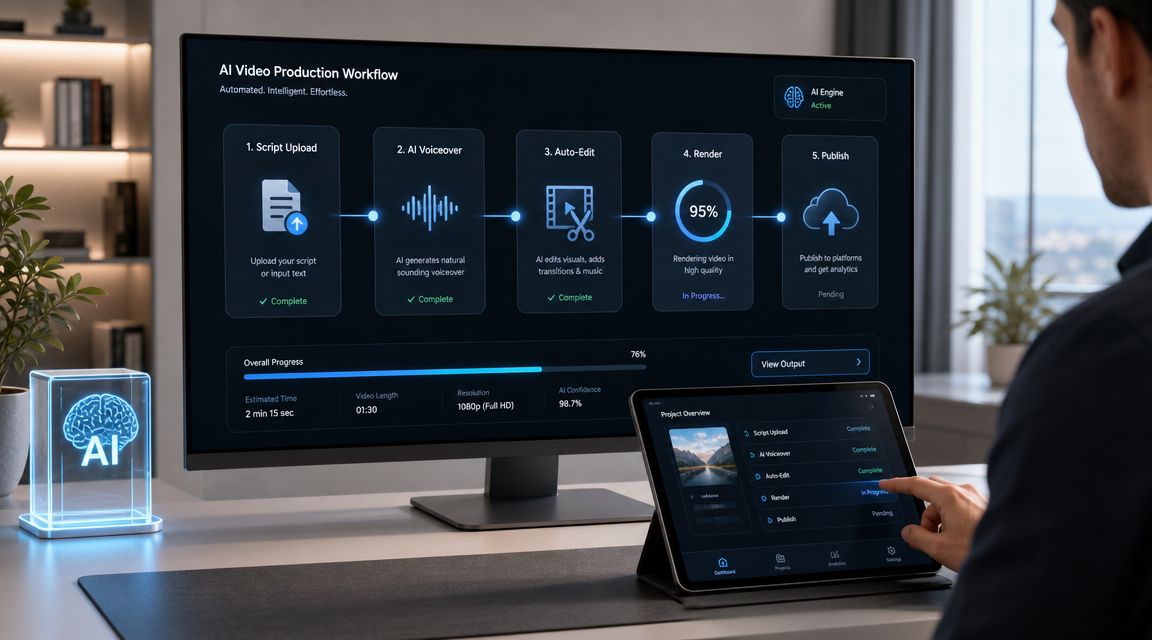
Once the script is approved, the old production model becomes a bottleneck. You still need visuals, narration, subtitles, formatting, and export. If each of those steps lives in a different tool, short-form output turns into project management.
That's why AI has moved from novelty to daily workflow. 85% of marketers report using AI tools for content creation, and 81% of professionals identified artificial intelligence as the leading trend in content creation and promotion for 2025, according to BYYD's Statista-based review of content marketing trends.
What should be automated
Not every step deserves the same level of human attention. That's the main trade-off experienced teams learn early.
You should stay hands-on where judgment matters most, such as positioning, claims, tone, and final approval. You should automate the parts that are repetitive, mechanical, or easy to standardize.
That usually means:
- Script-to-scene matching for visual pacing
- Voice generation when a human recording adds delay without adding strategy
- Subtitle timing and styling for speed and consistency
- Rendering and formatting for vertical platforms
- Scheduling and posting so publication doesn't depend on someone being online
A practical faceless pipeline
A reliable faceless pipeline usually follows this order.
Lock the script first
Don't start by editing visuals. Start by confirming that the script has one message, one audience stage, and one clear ending. If the wording is weak, no amount of motion, music, or subtitle styling will save the video.
Teams often waste time polishing production before validating the idea.
Build scenes around narrative beats
Each short-form script has a few natural beat changes. Hook. Development. Payoff. CTA or loop. Visual selection should support those transitions, not compete with them.
For faceless content, that often means using generated imagery, stock-style motion, text overlays, or lightweight animated sequences. The point isn't realism. The point is clarity and pace.
Add voice and subtitles together
Narration and subtitles should be treated as one layer of comprehension. If the pacing is off, viewers feel it immediately.
A lot of manual workflows force creators to record first, edit later, then subtitle as a separate cleanup task. That's slow and usually leads to timing issues. An integrated workflow is cleaner because the spoken rhythm and text timing can stay aligned from the start.
One example is automated content creation workflows, where a script can be turned into a faceless vertical video with generated visuals, AI voiceover, subtitles, and scheduled posting inside one system. That kind of setup doesn't remove the need for editorial review, but it does remove a lot of production drag.
Why this matters for publishing cadence
Automation isn't valuable just because it's faster. It protects consistency.
When content teams skip a post, they usually blame creativity. In practice, the actual problem is often that the production chain is too fragile. One missing asset, one delayed recording, one formatting issue, and the publish date slips.
Workflow test: If one person gets sick and your content calendar collapses, your process is too manual.
Here's what an automated workflow gives you in operational terms:
- Fewer handoffs between tools and people
- More predictable output across days and channels
- Easier batch production because the format is stable
- Faster iteration when a topic hits and you want follow-ups immediately
A short demonstration makes the difference easier to see in motion:

What not to automate blindly
There are still failure points.
- Weak source material produces polished but forgettable videos
- Generic prompts create scripts that sound interchangeable
- Overlong narration kills retention
- No review step lets factual mistakes and off-brand phrasing slip through
The right model is hybrid. Use automation for assembly and throughput. Keep humans responsible for message quality, approvals, and performance decisions.
That's how faceless video becomes a marketing function instead of a content treadmill.
Optimizing and Scheduling for Each Platform
Cross-posting the exact same file everywhere is easy. It's also one of the fastest ways to get average results on every platform.
TikTok, YouTube Shorts, and Instagram Reels may all support vertical video, but they don't reward the same behavior in the same way. Viewers arrive with different expectations. The interface shapes how they watch. Even the role of captions, on-screen text, and comment prompts changes from app to app.
Short-form video platform optimization at a glance
| Feature | TikTok | YouTube Shorts | Instagram Reels |
|---|---|---|---|
| Hook style | Fast disruption, curiosity, native-feeling opening | Clear value or intrigue immediately | Polished opening with a strong visual cue |
| Pacing | Quick cuts and conversational movement | Tight structure with a clear payoff | Slightly smoother pacing, still brief |
| Caption style | Bold on-screen text works well | Clear subtitles help with retention and comprehension | Clean captions that don't clutter the frame |
| Audio approach | Trend-aware sound can help when it fits the concept | Voice clarity matters more than trend chasing | Audio should feel branded or aesthetically consistent |
| Comment prompt | Questions and hot takes often spark replies | Prompts that extend the topic can pull viewers deeper into your channel | Community-oriented prompts fit well |
| Thumbnail mindset | Feed-first, less reliance on static cover | Channel context matters more over time | Cover selection influences profile presentation |
| Republishing approach | Native adaptation helps | Topic continuity across Shorts helps | Visual polish and format consistency matter |
What changes by platform
TikTok tends to reward speed of attention. If the first seconds feel slow, polished in the wrong way, or too obviously repurposed, viewers move on. That means your opening frame and your first line matter more than your overall message quality if they never stay long enough to hear it.
YouTube Shorts is a little more forgiving when the topic is strong and the payoff is clear. Search behavior, channel context, and series-style content can help here. A short that answers one precise question or delivers one satisfying reveal often travels better than a vague trend imitation.
Instagram Reels sits in a different cultural space. Viewers often expect a cleaner visual identity and stronger alignment with the broader account. A Reel that performs on TikTok as rough and reactive may need tighter styling and clearer branding to fit Instagram.
Don't optimize for “vertical video” as a category. Optimize for the viewer behavior inside each app.
Scheduling is a production tool, not just a calendar feature
Creators often think about scheduling as convenience. It's more important than that. Scheduling protects your publishing rhythm from interruptions, context switching, and last-minute friction.
A good scheduler helps in three ways:
- Batching workYou can create several videos in one sitting, then release them over time.
- Reducing operational mistakesYou're less likely to miss titles, captions, or posting windows when the process is pre-set.
- Separating creation from distributionThat matters because making content and publishing content require different mental modes.
For teams running multiple accounts, auto-posting also prevents the common trap of producing enough content but failing to distribute it consistently.
Inclusivity is part of optimization
A lot of platform advice focuses on hooks, trends, and timing. It ignores a simpler growth lever. More people can engage when your content is easier to consume.
The Content Marketing Institute recommends accessible descriptions, alt text, and transcripts as ways to widen reach and resonance in content workflows, as outlined in its guide to mastering the content creation process.
For short-form video, that translates into practical choices:
- Use readable subtitles instead of tiny decorative text
- Avoid overstuffed screens where captions, stickers, and visuals compete
- Write descriptions clearly so context isn't lost
- Plan for sound-off viewing because many people watch that way first
Those changes don't make content less engaging. They make it easier to understand quickly, which is usually the bigger challenge anyway.
Repurposing Content for Maximum Strategic Reach
The biggest waste in content creation and marketing isn't bad content. It's underused content.
A strong short-form video already contains the hard part. It has a hook, a point of view, a sequence, and a payoff. If you publish it once and move on, you're treating a durable asset like a disposable post.
Organizations with a documented content marketing strategy generate 3x more leads per dollar spent than those without, according to Digital Applied's content marketing statistics roundup. Repurposing fits that logic because it turns one approved idea into multiple useful formats without restarting the creative process.
Think in assets, not posts
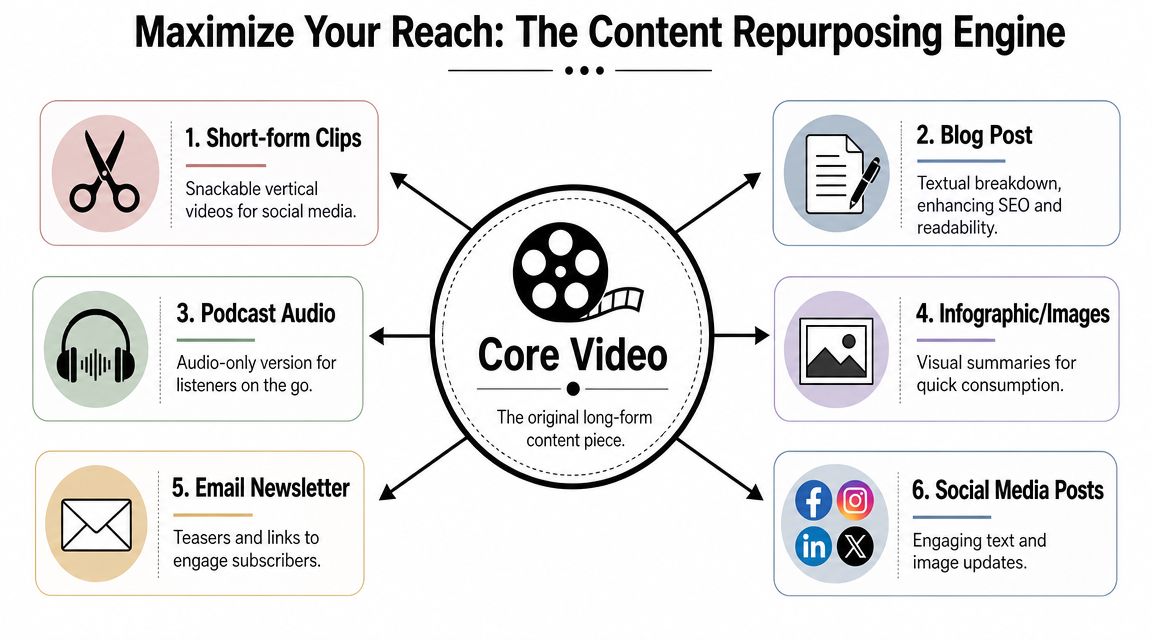
A faceless video can be broken into reusable components:
- The hook becomes a social caption or email subject line
- The script becomes a short blog post, thread, or carousel draft
- The visual sequence becomes still graphics or quote cards
- The narration can become audio-only content
- The core claim can anchor a follow-up series
That shift matters because it changes how you brief and store your content. Instead of asking, “What should we post today?” you ask, “What can we extract from the idea we already validated?”
A practical repurposing chain
Here's a simple example.
You publish a faceless short video explaining a common business mistake. From that one video, you can create:
- A text post with the hook and one contrarian takeaway
- A short blog article expanding the argument with context
- A carousel using the same narrative beats in swipe form
- An email intro that links to the video or related offer
- A compilation segment for a longer YouTube upload
- A new short that answers the top comment or objection
Repurposing works best when the original idea is specific. Vague videos create vague spin-offs.
This is also where strategy beats volume. Publishing more from the same strong concept usually outperforms inventing unrelated content every day. Repetition, when it's adapted by format and audience context, builds recognition instead of fatigue.
What doesn't count as repurposing
A lot of creators say they repurpose when they really just duplicate.
That usually looks like this:
- Uploading the same file everywhere with no caption changes
- Cropping a long video into random clips with no narrative rewrite
- Reposting old content without a new angle, audience, or frame
Real repurposing preserves the core idea while changing the packaging. That's what makes the asset travel farther without feeling lazy or recycled.
Measuring and Scaling Your Video Content Engine
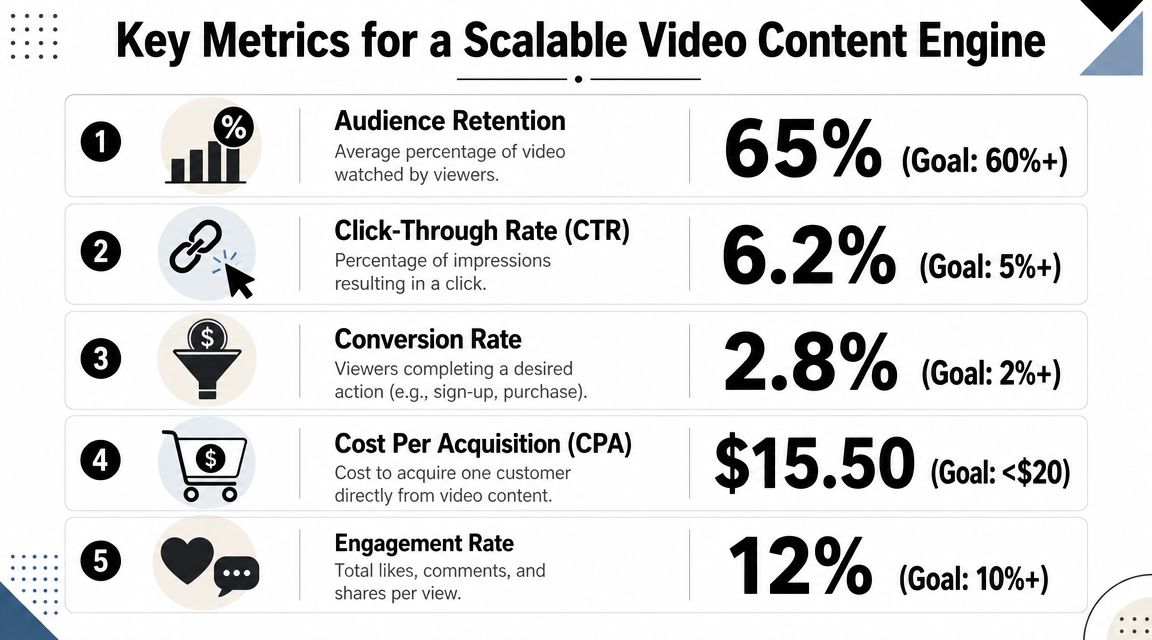
If you want to scale video, you need a feedback loop that tells you why something worked. Views alone won't do that.
A measurable workflow starts with clear business goals, assigned ownership, and KPIs that match the outcome you care about. Coursera's framework for content strategy recommends a repeatable production process and measurement tied to business results rather than vanity traffic, which is why this content strategy guide from Coursera is worth reading closely.
The metrics that actually help you improve
For short-form video, the most useful signals usually come from behavior, not applause.
Focus on:
- Retention patternsWhere do viewers drop? If they leave before the setup ends, the hook is weak or too slow.
- Average watch timeThis tells you whether the pacing and information density are holding attention.
- Completion behaviorFinishing a video often signals that the promise was kept.
- Clicks and downstream actionsThese matter more when the goal is leads, demos, sign-ups, or sales.
- Repeat winners by formatIf one format keeps producing strong retention, build a series instead of chasing novelty.
How to read the signal correctly
Don't treat every weak result as a topic failure. Often the issue is structural.
A few examples:
| Pattern | What it usually means | What to change |
|---|---|---|
| Early drop-off | Hook didn't earn attention | Rewrite first line and first visual |
| Mid-video decline | Pacing slowed or value got muddy | Tighten transitions and remove setup |
| Strong retention, weak clicks | Content engages but doesn't bridge to action | Improve CTA relevance |
| High views, low completion | Topic was attractive, execution was loose | Shorten and sharpen the script |
This is the difference between guessing and operating. Once you can identify where attention breaks, your next batch improves faster.
Strong analytics don't just tell you what happened. They tell you what to produce next.
Scaling without losing quality
Scale doesn't mean posting more at any cost. It means increasing output while preserving the parts that make the content effective.
A workable scaling model looks like this:
- Standardize winning formats so the team isn't inventing from scratch
- Batch production by theme to reduce context switching
- Keep review checkpoints for accuracy and brand voice
- Use analytics to cut losers quickly instead of defending weak ideas
If you want another useful perspective on reuse and workflow design, these content strategies for creators are worth scanning because they frame repurposing as a system decision, not just a distribution tactic.
The biggest improvement I've seen in automated video operations is simple. Teams grow faster when they stop treating each post like an isolated creative event. The moment content creation and marketing become one measured engine, decisions get clearer. You know which hooks deserve another run, which formats need rewriting, and which assets should be repurposed instead of abandoned.
If you want a simpler way to run that engine, ClipCreator.ai helps automate faceless short-form video production and publishing for TikTok, YouTube, and Instagram. It's a practical fit when you already know consistency matters and you want a workflow that turns scripts into scheduled videos without stitching together separate tools by hand.

Create your first video in under 2 minutes
Pick a niche, and ClipCreator.ai generates and auto-posts faceless videos to your channels every day.
Join ClipCreator.ai