
You open YouTube to see what's trending on youtube, and within minutes the tab count gets ridiculous. A trending feed. A search results page. Three competitor channels. Notes in a doc. Half a script. No finished video.
That loop burns creators out because trend research feels productive while publishing feels risky. Many creators stay stuck in research mode, then arrive late to the topic anyway.
The fix is not chasing harder. It is building a repeatable system that finds trends early, filters them fast, and turns them into faceless short videos without dragging you into manual production every day.
The End of the Endless Content Treadmill
A lot of creators think the main problem is idea scarcity. It usually is not. The fundamental problem is execution friction.
You spot a topic, hesitate, overthink the angle, spend too long scripting, then the trend cools off before the video goes live. That is the content treadmill in practice. You are moving constantly, but not getting far.

Short-form made this more intense. YouTube Shorts reached 200 billion daily views by July 2025, and more than 500 hours of video are uploaded every minute, which makes consistent posting a visibility problem as much as a creative one, according to Exploding Topics on YouTube trends.
That changes how smart creators work.
Trends are not the business
A trend is just raw material. The business is your system for turning that raw material into publishable content quickly.
The creators who handle trends well usually do three things:
- They stop relying on inspiration: They use a shortlist of repeatable formats.
- They reduce decisions: The hook, pacing, visuals, and ending follow a structure.
- They publish while the topic is still warm: They do not wait for a perfect script.
This matters even more for faceless channels. You are not asking an audience to show up for your personality first. You are asking them to stop scrolling because the concept is timely and the packaging is sharp.
What works and what fails
Here is the trade-off often overlooked:
| Approach | What happens |
|---|---|
| Chasing broad trends manually | You spend too long producing and arrive late |
| Posting whatever appears on the homepage | You compete with everyone else using the same idea |
| Building repeatable faceless formats | You can react faster and keep quality stable |
Practical takeaway: Treat trend content like an operations problem, not a motivation problem.
I have seen creators waste days trying to predict the next massive topic when a better move is simpler. Find a rising angle inside a trend category, match it to a format you can produce quickly, and post consistently enough for the platform to get clean signals about your channel.
That is the shift. Stop asking, “What is trending right now?” Start asking, “What trend format can I publish on repeatedly this week without rebuilding my process from scratch?”
How to Find Trends Before They Peak
Most advice starts and ends with the public Trending page. That is late-stage information. Useful for awareness, not great for opportunity.
The stronger workflow starts inside your own YouTube data.
Use YouTube Studio before outside tools
The most overlooked place to find what's trending on youtube is Analytics > Trends inside YouTube Studio. Google says the Trends tab can surface “Content Gaps for Shorts”, which highlights terms where audience interest is high and supply is low, and channels targeting those gaps can see up to a 4x view velocity within the first 7 days in Google's YouTube trends guidance.
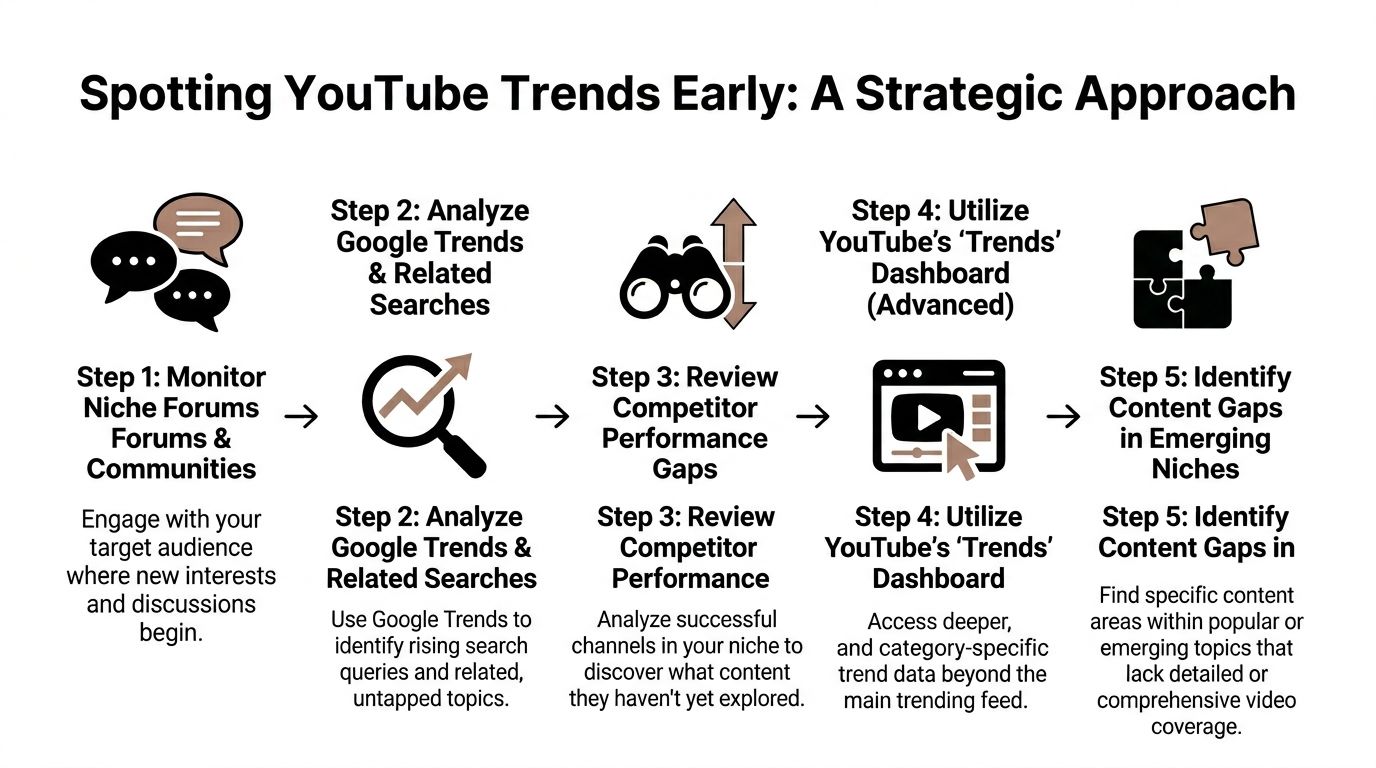
Use it like an operator, not like a browser:
- Open your niche first.
Do not scan everything. Enter a topic area close to your channel so the data stays useful. - Check Top Searches.
This tells you what your audience is actively looking for, not what the internet is talking about in general. - Look for Shorts content gaps.
These are often better than obvious trends because they still carry demand without the same pile-on effect. - Save terms you can reuse.
A trend list is not enough. Build a working list of phrases and subtopics you can test across multiple short formats.
Tip: Audience-specific demand beats broad hype. A smaller topic with a cleaner fit often performs better than a giant trend with no channel alignment.
Cross-check before you commit
Internal YouTube data tells you what your audience wants. External tools help you confirm whether the interest is spreading.
I like to cross-reference three sources:
- Google Trends for rising query behavior
- Exploding Topics for early topic movement
- Niche communities like Reddit, Discord, or creator comment sections for wording people use
This keeps you from making a common mistake: choosing a term that looks interesting in one tool but has weak real-world traction.
If you want a practical companion workflow, this guide on how to find trending topics is useful for turning raw ideas into a shortlist you can publish from.
A quick rule helps here. If a term shows up in YouTube Studio, appears to be rising elsewhere, and already sparks audience questions or repeat comments, it is usually worth testing.
Do not ignore format trends
Topic trends matter, but format trends often arrive earlier.
A few examples of format-level signals:
- Narrated lists
- Animated explainers
- Story-driven shorts
- Myth-busting clips
- POV fact videos
These are valuable because you can drop multiple trend topics into the same shell. That speeds production and keeps your channel visually consistent.
Later in the process, this is what makes faceless automation possible. You are not reinventing the wheel for each upload. You are slotting new trend inputs into a proven structure.
A helpful breakdown of trend discovery in action is below.

Validating Trend Potential to Avoid Wasted Effort
Finding a trend candidate is easy. Deciding whether it deserves production time is where most channels fail.
A topic can be popular and still be a bad idea for your channel. It might be saturated, too broad, too personality-driven, or impossible to package cleanly in a faceless short.

Use a decision filter, not hype
A good validation pass answers four questions:
| Question | What you are checking |
|---|---|
| Is demand accelerating? | Interest is moving, not flat |
| Is competition still manageable? | You can enter without fighting giant incumbents immediately |
| Is there a faceless angle? | The concept works with narration, text, visuals, or animation |
| Can you repeat it? | One video can become a series if it lands |
One video can become a series if it lands. API-based research tools then provide assistance. The practical benchmark from niche research is to prioritize keywords with search volume growth over 300% week-over-week and a competition score below 40/100, which can surface low-competition niches within trending categories, with RPMs ranging from 4–9 in OutlierKit's breakdown of untapped YouTube niches.
That does not mean every term meeting those thresholds is good. It means those terms deserve inspection.
Broad trend versus usable angle
Here is the distinction creators often miss:
- Bad trend pick: “travel”
- Better trend pick: hidden places locals avoid sharing
- Bad trend pick: “fashion”
- Better trend pick: micro-subculture style explainers
- Bad trend pick: “AI”
- Better trend pick: one narrow AI workflow with a clear outcome
The broad version is crowded and vague. The narrower version gives you a hook, an audience, and a repeatable series format.
Key takeaway: A trend becomes usable when you can describe the audience, the promise, and the video angle in one sentence.
Watch for three red flags
A trend usually is not worth the effort if one of these is true:
- It relies on face-driven charisma
If the appeal mostly comes from reaction shots, celebrity identity, or creator personality, a faceless format may feel weak. - The search phrase is hot but the packaging is muddy
If you cannot imagine a clean title and hook quickly, the topic may be interesting but not practical. - Every visible result looks the same
If the niche is already flooded with near-identical shorts, you need a sub-angle, not a copy.
For ongoing evaluation after publishing, I like using a simple performance review loop. This article on how to track content performance is a solid reference for deciding whether a test topic deserves a second and third video.
Validation is really a time-protection step. It stops you from spending half a day producing a video on a trend that was only attractive because everyone else was already talking about it.
From Trend Idea to Automated Video Script
Once a topic survives validation, the next job is not “write a great script.” It is “write a script that survives scrolling.”
That is a different skill.
Faceless shorts need clarity fast. If the first lines are soft, the video dies before the main point arrives. A strong short script is built around compression, not completeness.
The short script structure that holds attention
For most faceless trend videos, a 60 to 90 second structure works best when it follows a simple sequence:
- Hook
Open with tension, surprise, or a clear promise. - Setup
Give just enough context so the viewer understands why this matters now. - Payoff
Deliver the reveal, explanation, list, or story turn. - Close
End with either a satisfying final line or a prompt that earns comments.
Here is the practical difference between weak and usable.
Weak hook:
“Today we are talking about a trend happening on YouTube right now.”
Usable hook:
“This search term is rising fast, but most creators are attacking it the wrong way.”
The second version creates a gap in the viewer’s knowledge. That is what buys you the next few seconds.
Build prompts like a producer
If you use AI to draft scripts, the prompt quality matters more than the tool itself. Generic prompts create generic videos.
A better prompt includes:
- Topic: the validated trend or sub-niche
- Audience: who the video is for
- Tone: eerie, educational, direct, playful, calm
- Structure: hook, three beats, close
- Constraints: short sentences, no filler, visual-friendly narration
If you are comparing platforms before settling on your script workflow, Toolradar has a useful roundup of best AI writing tools that can help you choose the right drafting assistant for your style.
Example prompt formats
A few practical prompt shapes work well for faceless channels.
For a historical fact short
“Write a 75-second faceless YouTube Short script about a surprising historical event. Use a curiosity-driven hook, one twist in the middle, and a final line that sounds memorable without being dramatic.”
For a bedtime story format
“Write a 90-second eerie bedtime tale for adults. Keep the language simple, visual, and atmospheric. End with a final sentence that invites viewers to imagine what happened next.”
For an educational micro-lesson
“Write a concise script explaining one overlooked concept in plain English. Start with a common misconception, correct it, and close with one practical takeaway.”
For a more detailed walkthrough of script mechanics, this guide on how to write a video script is worth keeping open while you build your templates.
Tip: The best faceless scripts read like spoken captions. If a line sounds smart but not speakable, rewrite it.
The target is not literary quality. It is retention. The viewer should understand the story instantly, visualize it easily, and feel that the ending delivered what the opening promised.
Automating Your Content Engine with ClipCreator.ai
Manual production is where most trend strategies break down.
Research is manageable. Validation is manageable. Scripting is manageable. Then the backlog hits. Voiceover, visuals, subtitles, formatting, exports, uploads, scheduling. That is where channels lose momentum.
The practical answer is automation, especially for faceless short-form.
Why automation matters now
YouTube is crowded at a level that makes manual inconsistency expensive. In 2025, over 500 hours of video were uploaded every minute, which equals 720,000 hours daily, and the library exceeded 800 million videos, according to Teleprompter's 2025 YouTube statistics.
That scale changes the standard. Publishing once inspiration strikes is not enough. Channels need a process that turns approved ideas into finished videos on schedule.
What an automated workflow should do
A useful faceless workflow should cover the whole chain:
| Stage | Manual approach | Automated approach |
|---|---|---|
| Script draft | Write from scratch each time | Start from a repeatable prompt or template |
| Voiceover | Record or edit audio manually | Generate narration automatically |
| Visuals | Search, crop, and sequence assets | Build story-aligned visuals around the script |
| Subtitles | Add captions after export | Generate them during production |
| Publishing | Upload by hand | Schedule and auto-post |
Here, ClipCreator.ai fits well for busy creators, educators, and agencies. Instead of treating each short like a standalone project, it lets you operate from a production system.
A practical set-and-schedule routine
The strongest use case is not random automation. It is validated automation.
A simple operating rhythm looks like this:
- Pick a proven format
Start with a format that already works for faceless content, such as scary stories, bedtime tales, explainers, or list-driven narrative clips. - Feed in a trend-specific prompt
The trend provides the angle. The format provides the structure. - Generate the full asset stack
Script, voiceover, images, and subtitles need to come out aligned so you are not fixing mismatches manually. - Schedule in batches
Instead of making one video and hoping it works, prepare several around adjacent trend angles and let them roll out consistently. - Post across platforms
If a concept works on YouTube Shorts, it often deserves testing on TikTok and Instagram as well.
That batch mentality matters. It protects you from overreacting to one upload and keeps the channel active while you review what the audience responds to.
What works better than trend-chasing by hand
I prefer an engine with fixed ingredients:
- one niche bucket
- one repeatable video format
- one trend research routine
- one scheduling cadence
That is how you stay fast without becoming sloppy.
What does not work is rebuilding your process around every new topic. That creates hidden delays. You think you are being flexible, but you are really adding friction.
Practical takeaway: Speed comes from fewer decisions, not from rushing.
ClipCreator.ai is useful because it is built for this exact pressure. You can start from proven viral templates or custom prompts, generate faceless HD videos up to 90 seconds, add lifelike voiceovers and subtitles, then schedule and auto-post without turning each upload into a separate production job.
For channels trying to stay visible in fast-moving categories, that matters more than perfection. The advantage is not that automation replaces judgment. The advantage is that it preserves judgment for the parts that matter: picking trends, choosing angles, and improving prompts.
Answering Your Top Questions About YouTube Trends
Should I build a channel only around trends
No. Build around a repeatable topic territory and use trends as accelerants.
A channel built only on random trend hopping usually feels incoherent. A channel built on one clear niche can absorb trends without losing identity. That is a better long-term play for faceless content.
How do I keep automated videos from sounding generic
Prompting style matters more than people think. Searches for “how to use AI for faceless storytelling” are spiking in 2026, but many tutorials skip the brand voice issue. The stronger approach is to create prompts that specify tone, vocabulary, and narrative style, as noted in PackaPop's piece on trending YouTube niches.
A weak prompt asks for a script on a topic.
A strong prompt asks for a script in your channel’s voice.
Keep a small brand voice sheet with rules like:
- Sentence style: short or layered
- Vocabulary: plainspoken or dramatic
- Narrator personality: calm, skeptical, eerie, upbeat
- Closing style: question, twist, takeaway, or cliffhanger
How do I monetize trend content without chasing junk traffic
Pick underserved angles inside commercially useful niches. Trend traffic is fine. Unfocused traffic is not.
A practical example is choosing specific problem-solving subtopics over giant entertainment-only terms. If viewers arrive with intent, monetization options become easier to build around later.
Do I need promotion if I am already posting Shorts consistently
Yes. Good Shorts can travel on-platform, but distribution still benefits from active promotion, better packaging, and cross-platform reuse. If you want a broader playbook beyond YouTube itself, this guide on how to promote a YouTube channel gives solid ideas for extending reach without relying on luck.
What is the biggest mistake with what's trending on youtube
Creators confuse visibility with fit.
Just because a topic is visible does not mean it belongs on your channel. The better test is simple. Can you explain why your audience would care, and can you turn it into a series if the first video works? If the answer is no, skip it.
If you want to turn trend research into an actual publishing system, ClipCreator.ai makes that process much easier. You can go from a validated topic to a finished faceless short with AI-written scripts, voiceovers, visuals, subtitles, scheduling, and auto-posting built into one workflow. For busy creators and teams, it is a practical way to stay consistent without living inside the editing timeline.

Create your first video in under 2 minutes
Pick a niche, and ClipCreator.ai generates and auto-posts faceless videos to your channels every day.
Join ClipCreator.ai

