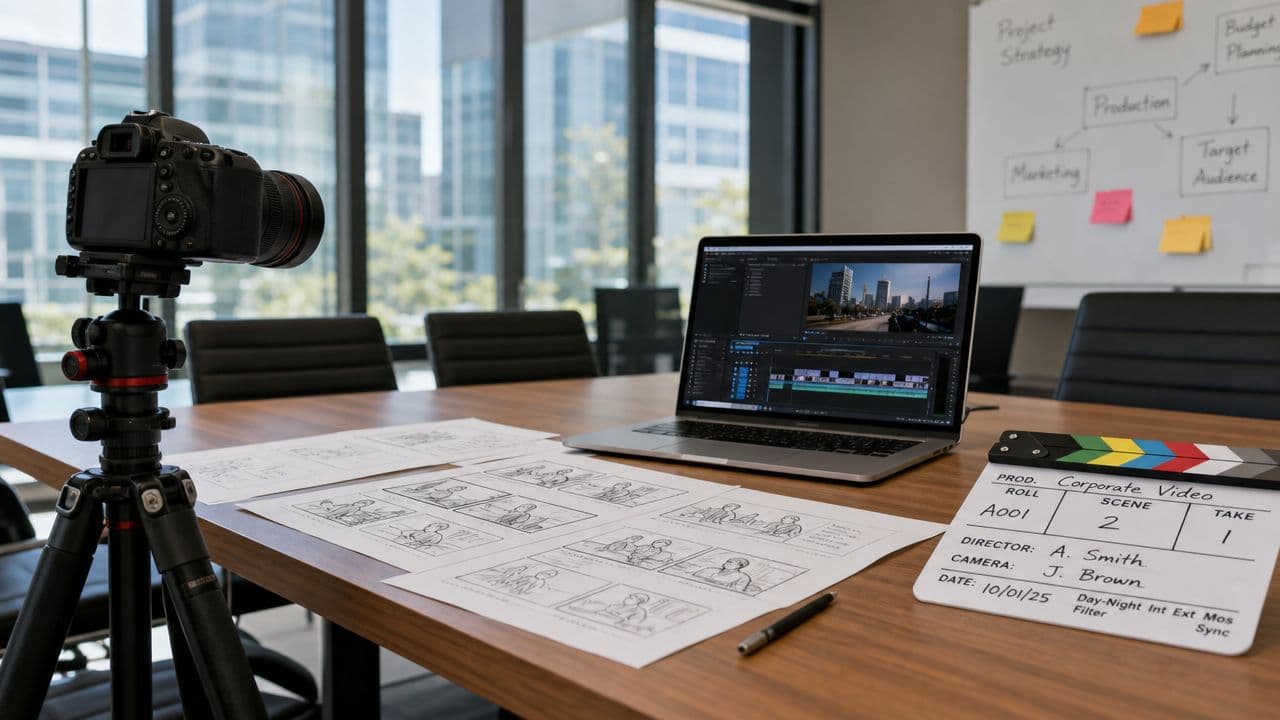
You've been told to “make a video for the company.”
That request usually lands without enough context. Is this for sales, recruiting, product education, investor updates, onboarding, or social media? Is the audience cold prospects or current employees? Does leadership want a polished brand film, or do they just want something useful that ships fast?
That's where most first major video projects go sideways. Teams jump to cameras, scripts, and editing software before they've decided what the video is supposed to do. The result is often expensive, slow, and hard to reuse.
Good corporate video production starts in a less glamorous place. It starts with business intent, audience clarity, and realistic distribution plans. Once those are locked, the creative choices get easier. So do the budget conversations.
Why Corporate Video Is More Than Just a Marketing Task
A marketing manager often gets handed video as if it's a single deliverable. In practice, it behaves more like an operating asset. The same company might need one video to help sales explain a product, another to train new hires, and another to align employees around a leadership message.
That broader role is one reason the category keeps expanding. The global Corporate Video Production Services market was estimated at $7.73 billion in 2025** and is projected to reach **$8.29 billion in 2026, with forecasts of $12.73 billion by 2032, reflecting a 7.37% CAGR according to 360iResearch's corporate video production services analysis. That isn't niche spending. It reflects how firmly video now sits inside everyday business communication.
It solves business problems that email and slides often can't
When a team says it needs “a video,” the actual need is usually one of these:
- Sales clarity: A buyer doesn't understand what the product does.
- Training consistency: Different managers explain the same process in different ways.
- Executive alignment: Leadership wants one message delivered the same way across the company.
- Brand trust: Prospects need to see how the company presents itself, not just read copy on a page.
A strong video can compress explanation. It can show process, tone, product context, and human presence in a way static documents rarely match.
Practical rule: If the message needs to be delivered repeatedly, video usually deserves a seat at the table.
Internal use is where many teams undervalue it. A training video that explains the same workflow every time can remove confusion and reduce the burden on managers. If your first major project is operational rather than promotional, treat that as a strategic win, not a compromise. This is why many teams begin with employee training videos that standardize onboarding and process communication.
The real shift is organizational, not just creative
The biggest mistake I see is treating corporate video production like an isolated campaign asset. That leads to one polished piece with no plan for follow-up, adaptation, or reuse.
A better approach is to ask three questions early:
- Who needs this most right now
- What action should happen after watching
- Where will people see it
Those questions move the conversation away from vanity and toward utility. Once that happens, video stops being “content” and starts functioning like infrastructure for communication.
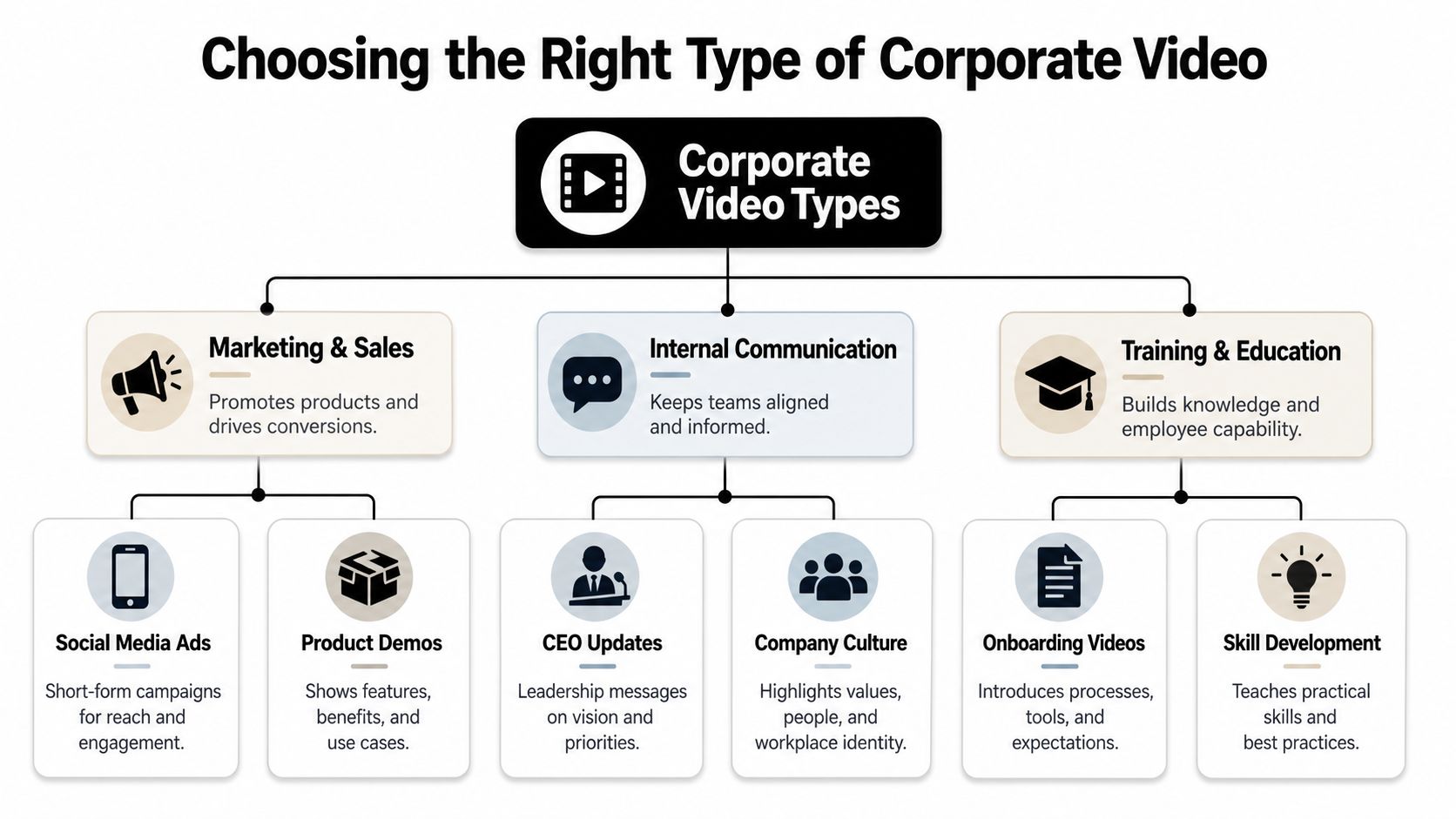
Choosing the Right Type of Corporate Video
A corporate video can be a product demo, a CEO update, a recruiting reel, a training module, or a short paid social asset. If you choose the wrong format for the job, the project can look polished and still fail.
Start with the business goal, not the style
Many first-time buyers of video ask for a “brand video” because it sounds safe. That's fine if the goal is broad awareness or repositioning. It's a bad fit if sales needs a clear product walkthrough or HR needs onboarding support.
Use this simpler decision model:
- Need attention and emotional positioning: Brand film or social ad
- Need explanation: Product demo or explainer
- Need alignment inside the company: Internal communications video
- Need repeatable teaching: Training or onboarding video
If your team is still fuzzy on what an explainer should look like, reviewing a few explainer video examples across formats and use cases helps sharpen the brief before production starts.
Corporate video types at a glance
| Video Type | Primary Goal | Typical Audience | Common Length |
|---|---|---|---|
| Brand film | Build trust and emotional connection | Prospects, investors, recruits | Short to medium |
| Product demo | Show how the offering works | Buyers, sales prospects, users | Short to medium |
| Social media ad | Capture attention quickly | Cold audiences on social platforms | Very short |
| Training video | Teach repeatable tasks or policies | Employees, new hires | Short to medium, often in modules |
| Internal communication video | Align teams around updates or decisions | Employees, departments, leadership audiences | Short |
| Company culture or recruiting video | Show team, values, and work environment | Candidates, recruits, partners | Short to medium |
What each format does well, and where it fails
Brand films work when your company needs a stronger market story. They don't work well when viewers need practical detail. If the sales team keeps answering the same product questions, a cinematic brand piece won't fix that.
Product demos are strong when the buyer's main barrier is understanding. They need focus. The best ones show the job the product does, not every feature in the interface.
Training videos work when consistency matters more than charisma. Keep them modular. Teams can update one lesson without remaking everything.
Internal communications videos are useful when tone matters as much as information. A leadership message delivered on camera can reduce ambiguity in a way a long internal memo often doesn't.
Pick the format that fits the decision you want the viewer to make. Not the format your stakeholders happen to like watching.
Most companies don't need one perfect video. They need the right first video, built for a clear job.
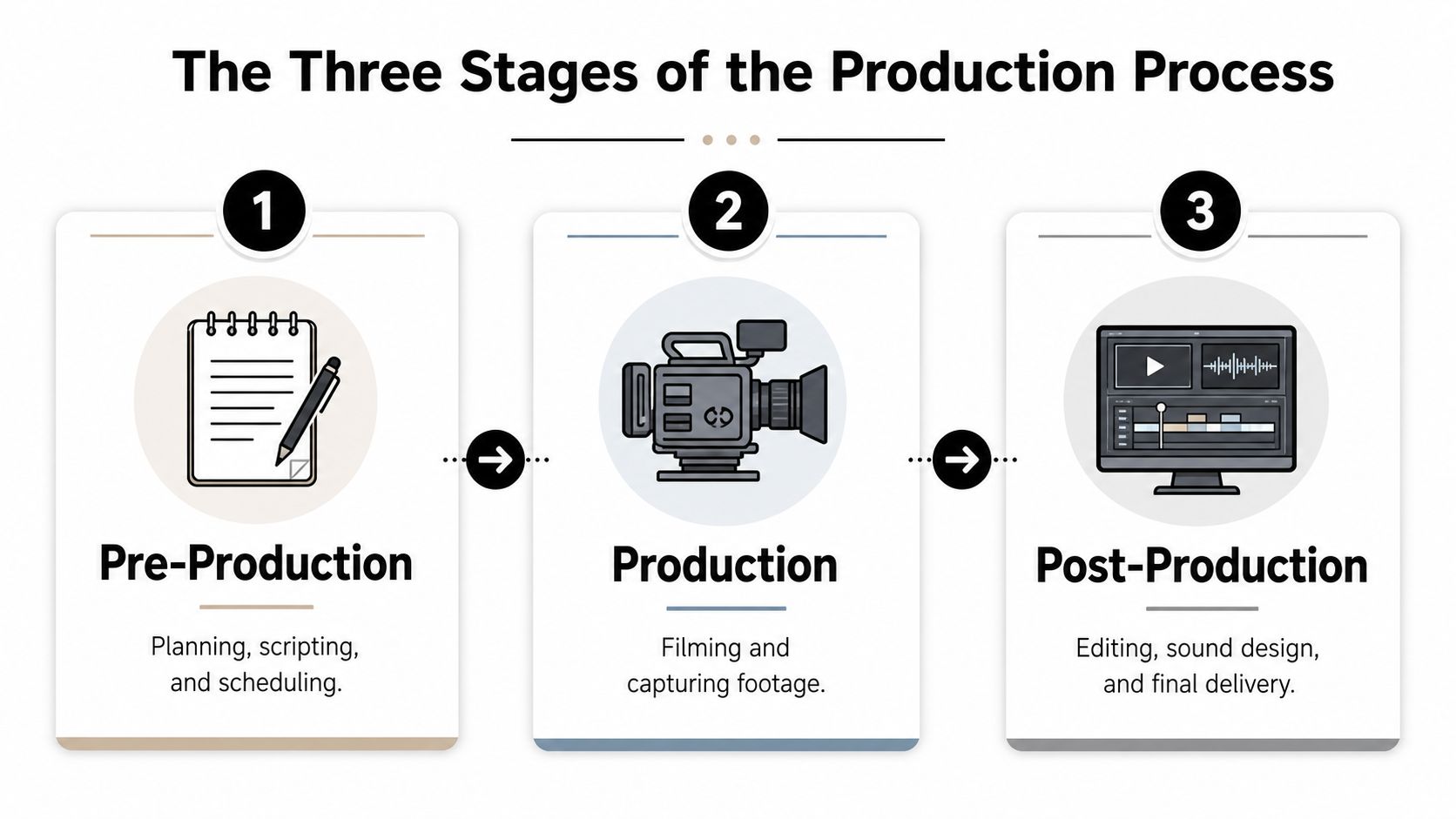
The Three Stages of the Production Process
Corporate video production looks complicated from the outside because people tend to focus on the shoot. The shoot matters, but it's only one phase. The project really lives or dies in planning and finishing.
Consider the process of building a house. You need a blueprint before construction, and the finishing work determines whether the final result feels complete.
Pre-production is where the budget gets protected
Pre-production is the planning layer, where teams define audience, message, script, shot list, interview questions, schedule, locations, approvals, and delivery requirements.
When this phase is rushed, problems multiply later. A missing approval creates reshoots. A vague script creates bloated edits. A weak brief leaves stakeholders debating taste instead of evaluating whether the piece supports the goal.
Typical pre-production items include:
- Creative brief: audience, purpose, call to action, success criteria
- Script or outline: spoken lines, visuals, structure
- Logistics plan: crew, locations, timing, interview availability
- Approval path: who signs off, and at what stage
If you're coordinating multiple stakeholders for the first time, a documented video production workflow that maps approvals and handoffs can prevent a lot of avoidable churn.
Production captures options, not just footage
Production is the filming stage. Cameras roll, interviews happen, B-roll gets captured, and the crew executes the plan.
Often, teams overspend because they confuse visible activity with value. A large set, extra camera, or longer shoot day only helps if it improves the final deliverable. More gear doesn't automatically mean a better corporate video.
What usually matters most on set:
- A confident producer or point person who keeps the day moving
- Clean audio because weak sound makes even good visuals feel amateur
- Enough coverage to give the editor flexibility later
- Tight interview direction so people sound natural, not scripted
A useful reality check comes from small business teams trying to boost revenue with video marketing. The pattern is familiar. The videos that help most are usually the ones with clear messaging and practical distribution, not the ones with the most elaborate shoot.
Post-production is where strategy becomes visible
Post-production includes editing, graphics, color work, sound cleanup, music, captions, versions, and final exports. This stage shapes pacing and clarity. It also decides whether the asset can be repurposed well.
A rough cut shouldn't answer “Do we like it?” first. It should answer “Does this do the job we hired it to do?”
That's the standard to keep. If a video is meant to explain a product, the edit should remove distractions and shorten the path to understanding. If it's for internal alignment, the message should feel direct and credible, not overproduced.
How to Budget for Corporate Video Production
A marketing manager gets three quotes for the same project and sees a spread that makes no sense at first glance. One vendor prices a simple interview-led video like a brand campaign. Another comes in low, then charges extra for captions, cutdowns, and revision rounds. The budget problem usually starts there. Teams compare totals before they compare scope.
The useful budgeting question is simple: what result does this video need to produce, and how long will that asset stay useful? A homepage brand film, a quarterly hiring video, and a library of short product clips should not be funded the same way. One may justify a larger upfront spend. Another should be built for speed, frequent updates, and easy versioning.
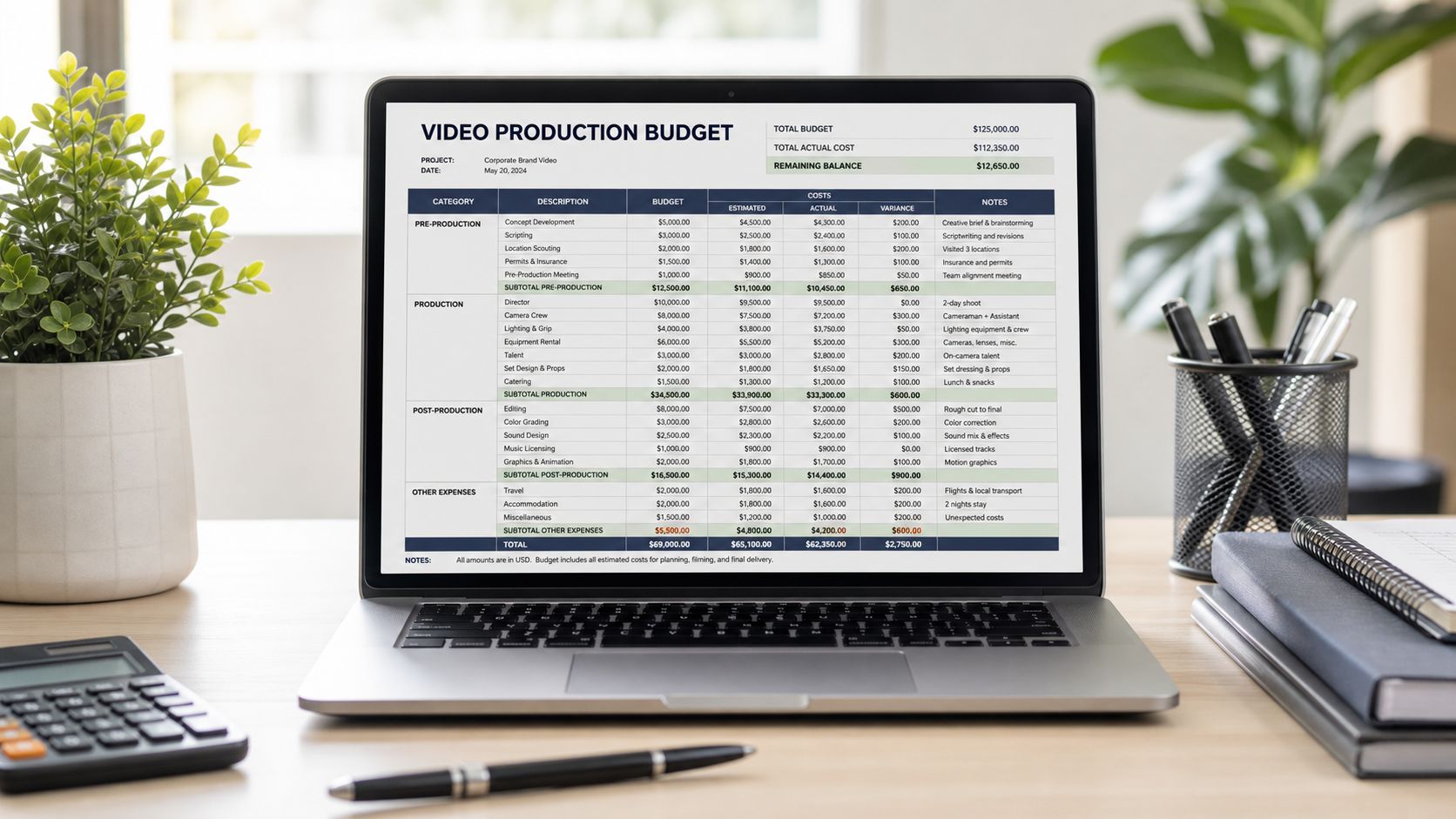
What actually pushes costs up
Equipment matters, but it is rarely the line item that breaks the budget. Time does. Complexity does. Approval layers do.
The biggest cost drivers tend to be:
- Crew size: A larger crew can make a demanding shoot run faster, but it also raises day rates and coordination needs.
- Locations and logistics: Multiple sites, travel, permits, and room changes create setup time that clients often underestimate.
- Talent and scheduling: Executives, customers, and subject-matter experts are expensive in a different way. Delays around their availability can stretch the schedule.
- Creative ambition: Custom scripts, motion graphics, animation, wardrobe, makeup, and art direction improve the final piece when the strategy supports them.
- Post-production scope: Subtitles, platform-specific exports, cutdowns, translations, and approval rounds add labor after the shoot is over.
I usually tell teams to watch for hidden complexity, not just visible production value. A straightforward one-day interview shoot can cost less than a "small" project that needs five stakeholders, legal review, three filming locations, and twelve final deliverables.
Match spend to asset lifespan and distribution plan
Budgeting gets easier when you separate flagship assets from high-volume content.
A flagship corporate video often earns a larger budget because it supports sales, recruiting, events, and investor conversations over a longer period. Short-form content works differently. It may need lower production polish, but it often delivers more opportunities to test messages, formats, and audience segments. That trade-off matters now more than it did a few years ago. Companies still need polished cornerstone videos, but they also need a content system that can produce useful clips at a pace the market expects.
Here is a practical way to frame the budget:
| Budget approach | Best fit | What to expect |
|---|---|---|
| Lean in-house or hybrid | Internal updates, training, social cutdowns, simple explainers | Faster production, lower polish, stronger need for tight planning and clear messaging |
| Mid-range professional | Product demos, testimonials, recruiting videos, website content | Good balance of quality, efficiency, and reuse across channels |
| Premium flagship production | Brand films, launch campaigns, executive communications, major event openers | More pre-production, more approvals, stronger visuals, and a longer shelf life if the message is stable |
The hybrid model is often the smartest buy. Use an outside team for strategy, scripting, core filming, and the edit template. Then use internal staff or lighter freelance support to turn that footage into short-form clips, regional versions, and campaign variations. That approach closes the gap between traditional corporate video production and the current pressure to publish more often without rebuilding the budget every quarter.
Ask vendors questions that expose the real scope
A quote is only useful if you know what is inside it.
Ask questions like:
- How many revision rounds are included?
- Are captions, aspect-ratio versions, and short cutdowns included or billed later?
- Who writes the script and manages approvals?
- What happens if an interview subject cancels or the shoot moves?
- Will we receive organized project files or raw footage for reuse?
- Can this production feed a short-form content pipeline, or are we paying for one finished piece only?
That last question matters more than many teams realize. If a vendor delivers one polished video plus twenty usable clips, the price may be better than a cheaper quote that leaves you with a single asset and no flexibility.
Good budgeting is not about squeezing the lowest number out of production. It is about spending where the message has a long life, keeping faster-moving content lighter, and building footage you can reuse across formats, including the AI-assisted and short-form workflows many teams now use to improve ROI.
Setting Goals and Measuring Video ROI
A corporate video doesn't earn its keep because people say it looks great. It earns its keep when it changes behavior. That might mean a prospect books a demo, a buyer understands the offer faster, or an employee completes a process correctly.
Set the outcome before the script
Before anyone writes a line, decide what success looks like. Not in abstract language. In operational terms.
For example:
- Brand awareness video: Are you trying to create recall, reposition the company, or support a launch?
- Product demo: Should viewers request a meeting, start a trial, or understand one feature better?
- Training video: Do you want fewer repeated questions, more consistent execution, or faster onboarding?
- Internal leadership video: Is the goal trust, clarity, or speed of organizational alignment?
These choices shape the script. They also shape the edit. A video designed to trigger action needs a different structure than one designed to reassure or educate.
Views rarely tell the full story
A lot of teams still default to view count because it's visible and easy to report. That's not enough. A high-view asset can still be strategically weak if it reaches the wrong audience or fails to move them.
A better way to think about performance is by matching the metric to the task:
| Video purpose | More useful measurement lens |
|---|---|
| Brand storytelling | Attention quality, watch-through patterns, branded response |
| Product education | Click behavior, follow-up interest, sales team feedback |
| Training | Completion patterns, repeated use, reduction in confusion |
| Internal communication | Reach inside the organization, comprehension, consistency of message |
If you can't say what action the viewer should take, you can't measure ROI in a useful way.
Distribution changes the outcome
Strong production often gets wasted when many teams invest in one polished master edit, then force it onto every platform.
That approach misses how people watch. As noted in Moonb's discussion of platform-specific corporate video distribution, many corporate video strategies ignore the distribution gap on short-form platforms, where 80% of viewers watch without sound and expect immediate hooks. That creates what the source describes as an algorithmic cost for repurposed content that wasn't built for the platform.
So ROI isn't only about making the video. It's about packaging it correctly for where it will live. A strong strategy usually includes different intros, tighter edits, captions, and platform-specific framing instead of one universal export.
Essential Best Practices and Legal Considerations
A corporate video can fail after the shoot is over.
The usual problem is not creative taste. It is execution. A strong concept loses value fast when the team discovers the music license is unclear, the customer testimonial was never released in writing, or the edit does not crop cleanly for vertical placements. For a marketing manager running a first major production, these are the issues that separate a usable asset library from an expensive one-off.
Build for distribution before production starts
Production choices should reflect where the footage will live. Think Branded Media's corporate video brief checklist recommends planning for 4K capture and multiple aspect ratios during the brief, and notes that silent viewing is common on many platforms.
That has practical consequences on set. Frame with safe space for vertical and square crops. Write lower thirds and on-screen text that still make sense on a phone. Treat captions as part of the script, not a post-production patch. Even if a polished horizontal master is the primary deliverable, the footage should still support the shorter cutdowns that often produce more day-to-day engagement.
This is one of the clearest shifts in corporate video production. Traditional teams often optimize for the boardroom premiere or the website hero section. Modern teams need footage that can be repackaged into paid social, sales enablement clips, recruitment edits, and short-form variants without another full shoot.
Legal review should happen before the camera rolls
Legal problems are cheaper to prevent than to fix.
Someone on the client side should own the approval trail and store the documents in one place. At minimum, that means confirming music licenses, talent releases, location permissions, trademark usage, and any required review of product claims or regulated language. Employee participation also deserves care. A casual internal ask can create tension later if someone appears in a campaign asset they did not expect to be used publicly.
This matters even more when one shoot is expected to feed many formats. The wider the distribution plan, the more likely a small rights issue turns into a reuse problem six months later.
Technical discipline beats expensive gear
Good corporate video usually looks organized, not extravagant. Clean audio, stable exposure, consistent white balance, readable graphics, and exports that match the destination platform do more for credibility than renting a higher-end camera package.
Use an external microphone. Monitor audio live. Leave framing room for alternate crops. Confirm brand elements before editing starts. Export versions based on channel needs, not one master file for every use case. Those habits save revision rounds and protect budget.
Teams trying to connect polished brand production with scalable performance content should also plan derivative assets from the first edit. A testimonial shoot might yield a flagship case study, six paid social cutdowns, and several silent short-form clips. Tools such as Koast's AI for enhanced video ads reflect where the market is heading: fewer isolated hero videos, more systems for turning approved footage into repeatable ROI across formats.
The practical standard is simple. If the footage is legally clear, technically clean, and structured for reuse, it will keep working long after the launch week.
Scaling Production with AI and Short-Form Video
Traditional corporate video production still has a place. If you need a flagship brand film, an executive message with real presence, or footage from an actual facility, a conventional shoot may be the right call.
The problem is scale. Most marketing teams don't just need one hero asset anymore. They need a steady stream of usable content in multiple formats, for multiple channels, without turning every update into a mini film production.
Short-form has changed what “professional” means
A lot of older production advice still assumes polish is the main goal. On short-form platforms, fit often matters more than polish. Content needs to open quickly, communicate clearly without relying on sound, and match the pacing of the feed.
That shift is visible in current platform behavior. Emerging trends in 2026 show that faceless, AI-narrated short-form videos under 90 seconds are outperforming traditional talking-head corporate films in engagement by 3.2x on TikTok, according to Studio Global's discussion of business video trends.
That doesn't mean every business should stop filming humans. It means teams should stop assuming that expensive human labor is the only path to credibility.
Where AI actually helps
Used well, AI doesn't replace strategy. It removes repetitive production drag.
The practical gains are usually in:
- Script drafting: Faster first drafts for recurring content
- Voiceover generation: Useful when you need consistency across many versions
- Auto-captioning: Critical for silent-viewing platforms
- Clip extraction: Easier repurposing from long-form source material
- Synthetic B-roll or image generation: Helpful when a concept needs visual support without a new shoot
A broader look at Koast's AI for enhanced video ads is useful here because it reflects the same operational shift many teams are making. They're not abandoning craft. They're using AI to make iteration, testing, and versioning possible at a pace manual production can't sustain.
Here's what that workflow looks like in practice:

The smart model for many teams now is hybrid. Keep traditional production for assets where real presence matters. Use AI and short-form systems for recurring education, social distribution, and high-volume content output. That's where modern ROI starts to look very different from the old one-video mindset.
If you need a practical way to produce and publish faceless short-form video consistently, ClipCreator.ai is built for that workflow. It helps businesses, creators, and marketers generate scripts, visuals, voiceovers, subtitles, and scheduled posts for TikTok, YouTube, and Instagram without turning every video into a manual production project.

Create your first video in under 2 minutes
Pick a niche, and ClipCreator.ai generates and auto-posts faceless videos to your channels every day.
Join ClipCreator.ai